Celebrating TXTImpact's 20 Years of Business Texting Excellence. Be part of our journey. Start your free trial today!

Building Automation & BMS

SMS Alerting for Your Building Automation System

Alarms that Reach a Phone, not just Inbox.

Don't let critical alarms get lost in an inbox. TXTImpact turns email and API notifications from your BAS, BMS, or SCADA system into instant SMS alerts delivered directly to your team's phones.

Who's behind this

Two Decades in Business Messaging, Trusted by Over 30,000 Businesses

For over 20 years, TXTImpact has powered business messaging for more than 30,000 organizations. Beyond its messaging platform, TXTImpact helps businesses build custom integrations and provides ongoing support long after implementation. Building automation and BMS alerting is just one of the many ways organizations use its reliable messaging infrastructure.

30,000+

Businesses served

20+ yrs

In the messaging industry

Custom

Integrations built around your workflow

Concierge

Support, not a ticket queue

Two doors in

However Your System Talks, We Can Listen

There's no single "BAS protocol" for getting an alert out to a phone, so TXTImpact meets your system at whichever door it already has open: a scripting layer that can make a web request, or an outgoing email account it's had configured for years.

If your system can call an API
HTTP SMS API

Point a middleware script, IoT platform, or custom driver at our API the moment an alarm tag trips, and the text goes out before the operator has finished reading the log line.

  • Built for real-time, event-driven triggers, not batch jobs

  • Plugs into SCADA middleware, IoT gateways, and in-house apps alike

  • Delivery and read status come back to your system programmatically

If your system can only send email
Email-to-text Bridge

Older BMS and SCADA installs are usually stuck with email as the only outbound channel. Point that same email at a TXTImpact address and it arrives on a phone as a text — nothing to install, nothing to reprogram.

  • Purpose-built for aging Niagara AX, N1, and first-generation BMS deployments

  • Reuses the outgoing email account already sitting in your station

  • Drops into existing alarm classes and routing rules unchanged

Beyond SMS

One Alert, Whichever Channel Your Team Actually Reads

SMS is the most universal channel for a critical alert, but it isn't the only one TXTImpact supports. The same trigger — an API call or an outgoing alarm email can just as easily land as an MMS with an attached image, a rich RCS message, or a WhatsApp message, so a team that already lives in a different app doesn't have to change habits to see the alert.

Email-to-MMS
Send the picture, not just the alarm

Attach a camera snapshot, floor plan, or diagnostic screenshot to the alert itself — useful when "door forced" or "water detected" is a lot clearer with an image attached than a text line alone.

Email-to-RCS
Richer formatting, real read receipts

Deliver a formatted, richer message than plain SMS, with delivery and read confirmation — so a dispatcher can verify an alert was actually seen, not just sent.

Email-to-WhatsApp
Meet contractors where they already are

Route alerts to WhatsApp for on-call staff, contractors, or international facilities teams who run their day through WhatsApp rather than SMS.

Same trigger, same setup on your BAS side, all you choose which Messaging channel the message lands in, and different recipient groups can be routed to different channels from the same alarm.

Why this matters right now

The Free Carrier Email-to-Text Gateway Your Alarm System May Still Be Using Is Going Away

For years, plenty of BMS and BAS installs sent alarm texts the cheap way: pointing an outgoing email at a free carrier address like @vtext.com or @txt.att.net. That workaround is disappearing carrier by carrier, and if your alarm routing still depends on it, alerts may already be failing silently.

Shut down · June 17, 2025
AT&T

[email protected]

AT&T formally discontinued its email-to-text and text-to-email gateway. Messages sent to an @txt.att.net address no longer go through at all.

Non-functional since Dec. 2024
T-Mobile

[email protected]

T-Mobile never announced an official end date. The @tmomail.net gateway simply became unreliable through late 2024 and stopped resolving by December.

Phasing out · full shutdown Mar. 31, 2027
Verizon

[email protected]

Verizon has stopped onboarding new users and confirms the service is being wound down. Delivery is already inconsistent well ahead of the final cutoff date.

Why carriers killed it:

Free email-to-SMS gateways had no sender verification, which made them an easy channel for spam and "smishing" attacks. As carriers tightened spam filtering and moved toward 10DLC-registered business messaging, legitimate alerts started failing right alongside the abuse — often with no bounce message or error, so the monitoring tool shows "sent" while nobody's phone rings.

If a BAS or BMS alarm class is still addressed to one of these free email to text gateways, that's not a future risk — it's a live gap in your alerting. TXTImpact's email-to-text bridge is a drop-in replacement: same workflow, same outgoing email account, but delivered over a properly registered, carrier-compliant SMS route instead of a domain that a carrier can (and will) shut off without notice.

Under the hood

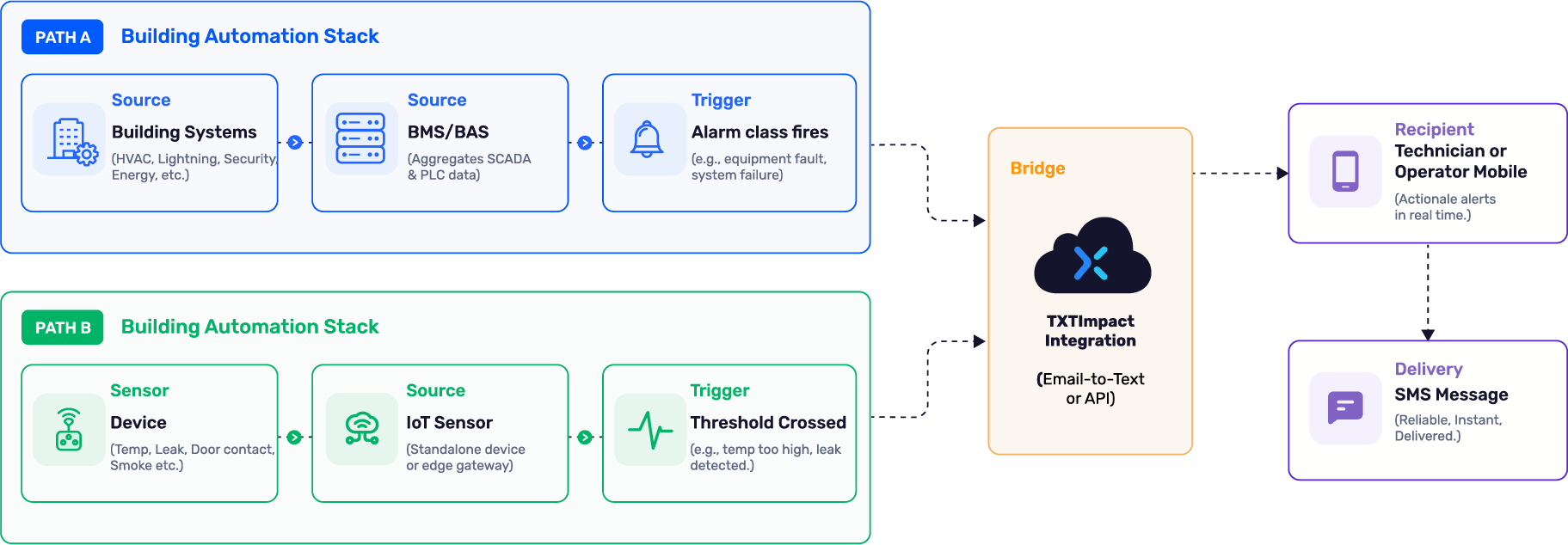
Two Ways An Alarm Reaches TXTImpact

Your BMS aggregates data from controllers, PLCs, and SCADA in an industrial setting, and raises the alarm itself — that's the path most buildings use. A standalone IoT sensor can also skip the BMS entirely and report straight to the bridge. Both end up in the same place.

Two ways an alarm reaches TXTImpact.png

Notice what's missing from either path: TXTImpact never sits inside the control loop. It picks up after the alarm decision has already been made, whether that decision came from your BMS or from a sensor reporting directly — which is exactly why it doesn't need SCADA-level access to do its job.

The Alarms Teams Actually Can't Afford To Miss

HVAC-01

HVAC system failure notifications

FIRE-02

Fire and safety alarm dispatch

SEC-03

Security breach alerts

ELEV-04

Elevator malfunction notifications

PWR-05

Power outage and generator-fail alerts

ENV-06

Data center environmental alerts

Pick one, or run both

Choosing Between API And Email-to-text

1. HTTP API integration

Best for: Modern BAS deployments with middleware, custom drivers, or IoT platforms.

  • Fastest and most scalable integration

  • Direct SMS delivery via the TXTImpact API

  • Supports delivery status and response data

  • Requires a developer for API integration and custom coding

  • Can be Expensive since a dedicated resource required to handle the integration part.

2. Email-to-text integration

Best for: BAS platforms that already send email alerts or organizations looking for a no-code solution.

  • No custom development required

  • Just Replace the recipient's email with [email protected]But first Configure the Email-to-SMS service in TXTImpact before use.

  • Works with existing email alarm notifications

  • No technical Expertise required and Easy to Implement.

By platform

Where To Click Inside The Platform You Already Run

The concept is identical everywhere — find the alarm or notification configuration settings, add a recipient, route the right alarms to it. 

Tridium
Niagara 4 / Niagara AX

API or Email-to-Text

Johnson Controls
Metasys

API or Email-to-Text

Honeywell
Alerton Compass

API or Email-to-Text

Distech Controls
Distech Controls

API or Email-to-Text

Not seeing your platform? If it can make an HTTP call or send an outgoing email — and almost everything built in the last twenty years can — the same two methods apply. Tell the integration team what you're running and we'll map it out with you.

Why texting still wins

Email Waits For An Inbox Check. SMS Doesn't.

No dashboard

Nobody has to be logged into the BAS to see it

No app

Lands on any mobile number, smartphone or flip phone

Escalation-ready

Chains into on-call rotations when the first text goes unanswered

Off the LAN

Reaches the recipient over cellular, not the building's Wi-Fi

An email alert is only as good as the next inbox check. A text shows up on the lock screen. That gap in urgency is why SMS has become the default channel for anything a facilities team would classify as life-safety or business-continuity critical.

Who this is for

Built For The Buildings Where A Missed Alarm Is Expensive

Smart buildings

Hospitals

Manufacturing plants

Universities

Data centers

Government facilities

Facility management firms

System integrators

Honest comparison

Four Ways To Close The Alarm-To-Phone Gap

There isn't one right answer here — it depends on whether your building has reliable internet and how many sites you're rolling this out across. Here's how the options actually stack up.

MethodSpeedSetup effortInternet dependencyBest for
TXTImpact SMS APIHighLow — cloud API, no hardware to rack-mountRequires outbound internet from the BAS/middleware to the APIReal-time, programmable alerts from modern BAS/SCADA
TXTImpact Email-to-TextMedium-HighLow — reuses existing outgoing email accountRequires the BAS's existing outgoing email connectionLegacy BMS/SCADA systems with email alarm output already configured
Native email alerts onlyLowLowFull — both sending and reading depend on internet/inbox accessNon-critical, informational updates
On-premise hardware SMS gatewayHighMedium-High — physical device, SIM, install, and maintenanceNone once installed — sends over its own cellular connectionFully offline or air-gapped sites where no cloud dependency is acceptable
Free carrier gateway (vtext.com, etc.)Low — failing silentlyNone — already built, if it still existsFully dependent on a carrier that is actively shutting it downNothing still in production — being retired across AT&T, Verizon, and T-Mobile

To be direct about the tradeoff: a hardware SMS gateway with its own SIM card keeps working even if a building loses power and internet at once, and that's a real reason some fully air-gapped or disaster-recovery sites choose one. TXTImpact gives up that last sliver of offline independence in exchange for something most portfolios value more — no device to procure, ship, mount, or maintain, and a rollout across ten buildings that takes an afternoon instead of ten site visits.

Setup

From First Alarm To First Text, In Five Steps

1. Sign Up with TXTImpact 

Start your free TXTImpact trial, complete your 10DLC registration in minutes using the AI Wizard, and enable the Email-to-Text service. If you prefer API integration, Contact our team can help you with the setup, documentation, and implementation.

4. Configure alert triggers

Map the alarm classes, severities, or event categories you want to monitor to the notification path you just configured. This ensures only the right events—such as critical equipment failures, high-priority alarms, or system faults—are automatically converted into text alerts and delivered to the appropriate recipients.

2. Define recipients or groups

Set up on-call individuals, shift teams, or escalation groups so the right person gets texted first and also enable inbox forwarding rule.

5. Enable and test

Trigger a manual or forced alarm and confirm SMS delivery before relying on it for production alerts.

3. Connect your BMS, SCADA, or IoT system

Locate your existing email alarm notification settings and replace the recipient's email address with [email protected]. Every email alarm is then automatically converted into an SMS and delivered to the recipient's mobile phone.

See, How it Works? 👉 Email to Text Tutorial Video

Check out our step-by-step guide to setting up the Email-to-Text service in TXTImpact.

The Next Alarm shouldn't Wait for Someone to Check Email

Wire up  email-to-text bridge  or API today — whichever matches what your platform already supports — and the next real alarm goes straight to a phone.

FAQ

Frequently Asked Questions

How do SCADA systems send SMS alerts?

Most SCADA platforms send SMS alerts in one of two ways: by using an Email-to-SMS bridge, which is the simplest and most convenient option, or by calling an HTTP SMS API directly from a scripting engine or middleware layer when an alarm or event is triggered.

Can I send SMS alerts from a BMS system?

Yes. Platforms like Niagara Tridium, Metasys, and Desigo can trigger SMS through a driver that calls an SMS API, or by pointing an existing email notification at an email-to-text address — no new hardware required.

What is email-to-text for building automation?

It's the most easy method where your BAS or BMS sends a normal alarm email to a special address tied to a recipient's phone number, and a gateway converts that email into an SMS. It only requires an outgoing email account that's already configured.

Is an SMS API better than email alerts?

Both Email-to-SMS and SMS APIs are more effective than relying on email alerts alone because they deliver notifications directly to a mobile device. For most BAS and BMS deployments, Email-to-SMS is the easiest and fastest option it requires little to no development and works with existing email alarm notifications. If your system supports custom integrations and you need advanced automation or two-way workflows, an SMS API may be the better choice.

Can legacy systems send SMS notifications?

Yes. Legacy BAS and SCADA systems that only support outgoing email can use an email-to-text gateway to convert those emails into SMS messages — which means older Niagara AX or first-generation BMS installs can add SMS alerting without a system upgrade.

Does TXTImpact support anything besides SMS for BAS alerts?

Yes. Just as TXTImpact can convert email alarm notifications into SMS, it can also convert them into MMS, RCS, or WhatsApp messages. Depending on the messaging channel you choose, the same email notification is automatically converted into that format and delivered to the recipient—without requiring any changes to your BAS or BMS alarm configuration.

Can I still use vtext.com or txt.att.net to send BAS alarms

as SMS?

Not reliably. AT&T shut its email-to-text gateway down entirely on June 17, 2025. T-Mobile's gateway has been non-functional since December 2024. Verizon is winding its gateway down ahead of a full shutdown on March 31, 2027, with delivery already inconsistent in the meantime. Any alarm class still pointed at one of these free addresses should move to a dedicated, carrier-compliant email-to-text service.

Cookie Settings

By using this website you agree to our privacy policies

Cookie Settings

We use cookies to improve user experience. Choose what cookie categories you allow us to use. You can read more about our Cookie Policy by clicking on Cookie Policy below.

These cookies enable strictly necessary cookies for security, language support and verification of identity. These cookies can’t be disabled.

These cookies collect data to remember choices users make to improve and give a better user experience. Disabling can cause some parts of the site to not work properly.

These cookies help us to understand how visitors interact with our website, help us measure and analyze traffic to improve our service.

These cookies help us to better deliver marketing content and customized ads.