How to Send Tridium Niagara Text Alerts (Email-to-SMS and REST API Integration Guide)
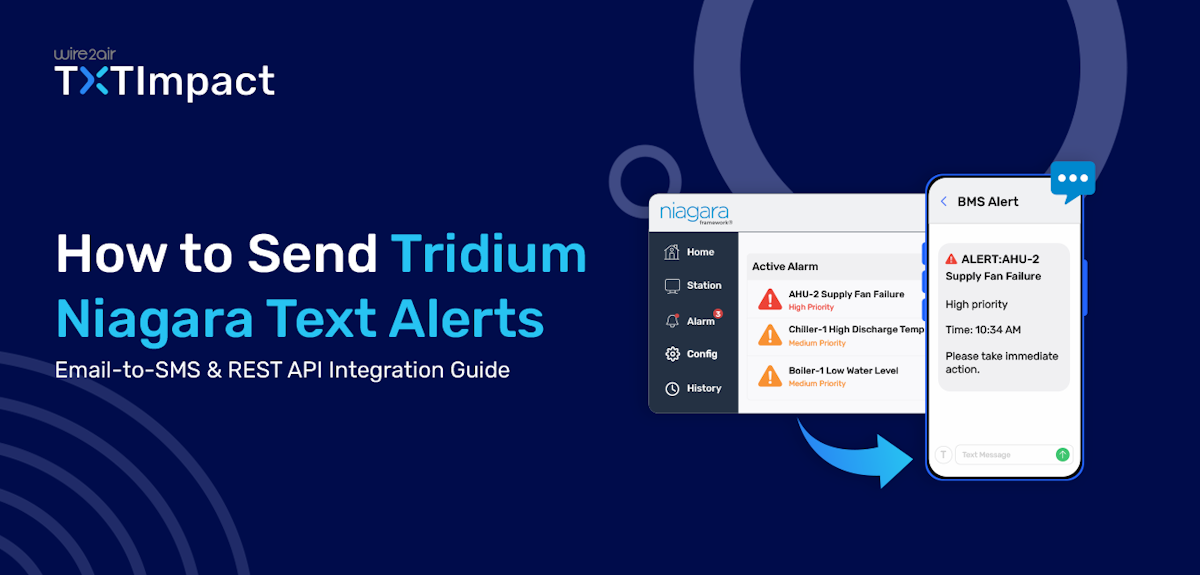
Every second counts in building automation environments, especially when critical equipment fails, safety system alarms trigger, or environmental conditions drift out of range.
Tridium Niagara, or the Niagara Framework, is universal software that serves as the front-end engine of a Building Management System (BMS), connects various smart devices, normalizes operational data, and standardizes control management across smart buildings, data centers, and industrial IoT systems.
While Tridium Niagara provides robust alarm management capabilities, relying solely on email notifications can lead to missed or delayed alerts, especially for on-call technicians who are away from their desks.
SMS offers a faster, more reliable way to send alerts and ensure important notifications are seen and acted upon immediately. Fortunately, you can configure Tridium Niagara to send text alerts using either Email-to-SMS gateways or REST API integrations.
This guide takes you through both methods, their benefits and limitations, configuration steps, and the right method for your business. Let’s go!
Key Takeaways:
|
What are Tridium Niagara Text Alerts?
Tridium Niagara text alerts are SMS notifications triggered by alarms, events, or system conditions within the Niagara Framework.
The Niagara Framework is widely used to integrate and manage building automation systems (BAS), including HVAC equipment, lighting controls, energy management systems, refrigeration units, security systems, and industrial devices.
When the platform detects a fault in one of the systems, such as an equipment failure, a threshold violation, or another predefined event, it automatically generates an alarm to inform the appropriate authorities.
Now, the platform can either trigger an email or an SMS to notify the authorities about the event. However, it’s recommended to send alerts via SMS rather than email; let’s learn why.
Why Send Niagara Alerts as SMS Instead of Email?
In building automation environments, delayed responses to critical events can result in equipment damage, energy waste, compliance issues, and costly downtime.
While email has long been a standard method for delivering system alerts, it is not always the most effective channel for time-sensitive notifications.
Hence, by integrating Niagara with an SMS service via Email-to-SMS gateways or REST APIs, alarms can be converted into text messages and sent instantly to the appropriate personnel, enabling maintenance teams to assess and respond to issues much faster than with email-only notifications.
Here’s why you must use SMS notifications to send Niagara critical alerts to the authorities:
- Faster delivery: SMS messages are typically delivered within seconds, helping teams respond to critical alarms immediately.
- Quicker response times: Technicians and facility managers can receive alerts on their phones, even when away from their desks.
- Higher visibility: Text messages are more likely to be seen and read quickly than emails buried in crowded inboxes.
- Reduced risk of missed alerts: Important notifications stand out better in text messages than in busy email inboxes.
- Ideal for Remote teams: Field technicians and distributed teams can stay informed with SMS alerts wherever they are.
- Supports business continuity: Faster awareness of equipment failures and system issues helps minimize downtime and operational disruptions.
- Complements email notifications: Businesses can use SMS for urgent alerts and email notifications for detailed reporting, documentation, and audit trails.
3 Ways to Send Tridium Niagara Text Alerts
You can send Niagara text alerts either using an email-to-SMS service, REST APIs, or SMS gateway hardware. Let’s get into each one of the methods:
Method 1: Send Niagara Text Alerts Using Email-to-SMS (Recommended)
- The first step is to sign up for a TXTImpact account and enable the Email-to-Text service.
To do this, log in to your TXTImpact account, navigate to Manage Account →Click on Add User → Complete your Profile by adding username i.e. Sender email (email address that Tridium NIagara uses as its From Address.) → and fill up all the required details, plus do not forget to click on Enable Email to text service check box.
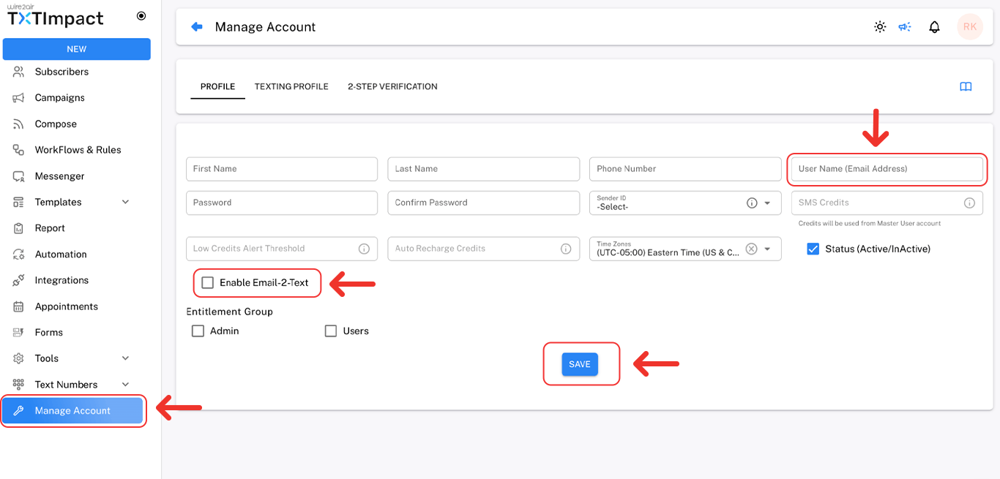
Adding the email address that Niagara Tridium uses as its From address or using it for register in TXTImpact. This whitelists the sender's email address. Otherwise, TXTImpact will reject the email, and no SMS messages will be delivered.
For better understanding Check out our detailed tutorial:
- Once TXTImpact is configured, set up Niagara's EmailService using your SMTP server details, ensuring the From Address matches the whitelisted sender email.
- Finally, configure the EmailRecipient as [10-digit-phone-number]@text2email.net (for example, [email protected]).
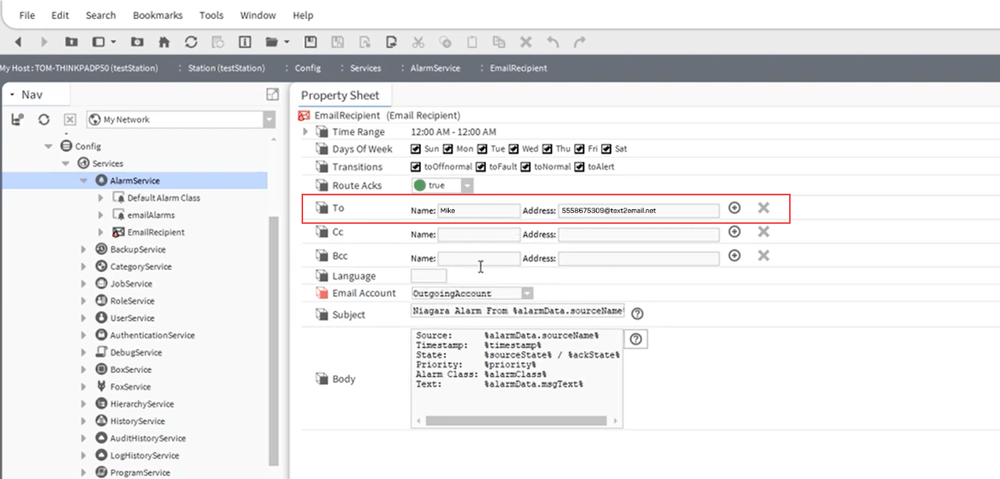
📝 Note: Although Niagara is available in multiple versions and the user interface may vary depending on your deployment, the overall process remains the same: update the alarm notification recipient's email address to your TXTImpact Email-to-SMS address. If you're unsure where to find these settings, contact your BAS administrator or the TXTImpact support team for assistance. |
When an alarm is triggered, Niagara sends an email to this address, TXTImpact converts the email into an SMS, and the alert is delivered directly to the recipient's mobile phone.
👉 Important: In Case If you want to receive alerts on WhatsApp instead of SMS, you can use our Email-to-WhatsApp service too. |
Method 2: Send Niagara Text Alerts Using REST API
For organizations that require more flexibility, faster delivery, greater reliability, and advanced alerting capabilities, REST API integration is the preferred method for sending Tridium Niagara text alerts.
Instead of routing notifications through an email server, Niagara communicates directly with an SMS platform via API calls, enabling real-time message delivery and enhanced control over alert workflows.
For flexible messaging needs, TXTImpact offers a programmable, developer-friendly REST API for delivery tracking, read receipts, message status updates, and handling incoming messages.
Unlike email-to-SMS, there is no dependency on email servers or email gateways, resulting in a more direct and reliable communication path. This makes TXTImpact’s REST API ideal for organizations needing advanced automation, custom workflows, or enterprise integrations.
Method 3: Sending Tridium Niagara Text Alerts Using SMS Gateway Hardware
Another option for sending SMS alerts from Tridium Niagara is through dedicated SMS gateway hardware. Several third-party SMS drivers available on the Niagara Marketplace support this approach by connecting Niagara directly to a GSM modem or SMS gateway device installed on your network.
While this method can work in certain environments, it comes with several drawbacks, including:
- Often involves per-device or per-driver licensing costs.
- Requires a SIM card and an active cellular service plan.
- Requires dedicated hardware to be purchased, installed, and maintained.
- Creates additional points of failure due to hardware dependencies.
- Requires ongoing monitoring and maintenance of the gateway device.
- Limited scalability compared to cloud-based SMS platforms.
This is why this method is generally not recommended for most businesses and organizations as it increases both complexity and operational costs.
In most cases, Email-to-SMS and REST API integrations provide a simpler, more scalable, and more reliable way to deliver Tridium Niagara text alerts without the burden of managing additional hardware infrastructure.
Email-to-SMS vs REST API vs SMS Gateway Hardware
Factor | Email-to-SMS | REST API | SMS Gateway Hardware |
Setup complexity | Easy | Moderate | High |
Hardware required | No | No | Yes |
Upfront costs | Low | Low to moderate | High |
Delivery speed | Good | Excellent | Good |
Coding required | No | Minimal | No |
Cellular plan required | No | No | Yes |
Scalability | Moderate | High | Low to moderate |
Dependency on email server | Yes | No | No |
Advanced automation | Limited | Extensive | Limited |
Best for | Quick and simple deployments | Enterprise-grade alerting and automation | Legacy or specialized environments |
Common Niagara SMTP & SMS Problems
Even after configuring Niagara for email-to-SMS and REST APIs, businesses can still occasionally encounter delivery and other related issues.
Here are some common issues businesses can face with their causes and solutions.
Error | Cause | Solution |
Emails not sent from Niagara | Incorrect SMTP settings | Verify SMTP host, credentials, and port |
Connection timeout | Firewall or network issue | Check connectivity and open required ports |
SMTP authentication failure | Invalid password and username | Update and test SMTP credentials |
SSL/TLS errors | Incorrect encryption settings | Verify SSL/TLS certificates and configuration |
Email-to-SMS texts not received | Incorrect email-to-text address | Validate gateway email address and recipients |
Delayed SMS delivery | Email server or carrier delays | Check SMTP performance or use REST API |
SMS to wrong recipients | Incorrect notification rules or contact groups | Audit escalation paths, recipient lists, and contact group assignments regularly. |
UnknownHostException | Invalid SMTP host or DNS resolution failure | Verify server hostname and DNS settings |
CryptoService missing | Niagara CryptoService not installed or enabled | Install, enable, or restart the CryptoService module |
Alarm not routing | Incorrect alarm class or recipient configuration | Verify alarm routing rules and recipient assignments |
Alerts stopped working | Service outage or expired credentials | Check logs, credentials, and provider status |
Which Tridium Niagara Alarms Should Send SMS?
Not every Niagara alarm needs to trigger a text message. Sending SMS alerts for every event can lead to alert fatigue, causing critical notifications to be overlooked. As a best practice, reserve SMS notifications for alarms that require immediate attention or could impact operations, safety, compliance, or equipment health.
Alarm | Why send it as an SMS? |
Boiler shutdowns | May disrupt heating systems and create safety or operational risks. |
Chiller failures | Can quickly impact occupant comfort, cooling operations, and critical environments. |
Generator faults | May leave the facility vulnerable during a power outage. |
Pump failures | May interrupt water circulation, HVAC performance, or industrial processes. |
High/low temperature thresholds | Extreme temperatures can damage equipment, inventory, or sensitive assets. |
UPS failures | Can jeopardize critical systems that rely on backup power. |
Freezer or refrigeration failures | May result in product spoilage and financial losses. |
Excessive energy consumption | Can indicate equipment malfunctions or costly inefficiencies. |
Smoke detection alarms | Can indicate a developing fire or hazardous condition. |
Unauthorized access attempts | Allows security teams to respond before incidents escalate. |
Database or server failures | May affect alarm processing, historical data, and system performance. |
Critical security breaches | Immediate awareness is essential to protect people and assets. |
Niagara JACE vs Supervisor: Where Should SMS Alerts Be Configured?
In a Niagara deployment, SMS alerts can be configured either on individual JACE controllers or on the Niagara Supervisor, depending on your operational requirements.
Configuring alerts on the JACE ensures that critical notifications continue to be sent even if communication with the Supervisor is lost, making it ideal for life-safety alarms, equipment failures, and single-site deployments. However, managing notification rules and recipient lists across multiple JACEs can become time-consuming as the system grows.
A Niagara Supervisor, on the other hand, provides a centralized platform for managing alarms, recipients, escalations, and reporting across multiple buildings or sites. This simplifies administration and ensures consistent alerting policies.
For most enterprise deployments, the best practice is to use a hybrid approach:
- Configure critical life-safety and equipment alarms on the JACE to ensure alerts continue even if connectivity to the Supervisor is lost.
- Configure enterprise-wide notifications, escalations, reporting, and management alerts on the Supervisor for centralized control.
Best Practices for Niagara SMS Alerting
To maximize effectiveness and prevent alert fatigue, organizations should follow a few key best practices when configuring Niagara SMS notifications.
- Send SMS only for critical alarms such as equipment failures, power outages, safety events, and environmental threshold breaches.
- Keep messages concise with the alarm type, asset name, location, severity, and timestamp.
- Implement escalation rules to notify backup personnel if alarms go unacknowledged.
- Group recipients by role (maintenance, security, facilities, management) for targeted notifications.
- Reduce alert fatigue by eliminating nuisance alarms and non-actionable notifications.
- Test SMS delivery regularly to verify alerts, workflows, and recipient configurations.
- Secure API and SMTP credentials to prevent unauthorized access.
- Leverage centralized management through the Supervisor for multi-site deployments.
- Maintain accurate contact lists and update on-call schedules frequently.
- Monitor delivery reports to identify failed or delayed messages.
- Use multiple notification channels for high-priority alarms when necessary.
- Standardize alert templates to ensure consistent, easy-to-understand notifications.
Why Do Businesses Choose TXTImpact for Niagara Text Alerts?
TXTImpact has been providing business messaging solutions for more than two decades, supporting over 30,000 businesses across a wide range of industries backed by innovative, custom, and quality customer support that builds long-term business relationships.
An Email-to-SMS service has become increasingly important following the discontinuation of free email-to-SMS gateways previously offered by major carriers. Carriers such as AT&T, Verizon, and T-Mobile have retired these services due to deliverability, security, reliability, and operational concerns.
As a result, businesses that rely on email-to-text messaging for critical alerts need a dedicated messaging platform to ensure notifications continue to reach recipients reliably.
For organizations looking to extend Tridium Niagara alarms beyond traditional email notifications, TXTImpact offers multiple integration options designed to support both simple and advanced alerting workflows.
Key capabilities include:
- Email-to-SMS support: Quickly convert Niagara email alarms into SMS notifications without requiring custom development.
- REST API integration: Enable direct SMS delivery from Niagara for faster, more reliable alerting and automation.
- Delivery tracking: Monitor message delivery status to gain visibility into alert transmission and delivery outcomes.
- Business-grade messaging: Designed to support operational, maintenance, safety, and facility management notifications.
- MMS support: Send longer alert messages of up to 1,600 characters using MMS (consumes 2 text credits), allowing more alarm details to be included in a single notification.
- Reliable carrier delivery: Messages are routed through established carrier networks to support dependable notification delivery.
- Scalable deployments: Manage alerting across a single building, multiple facilities, or enterprise-wide Niagara environments.
- Centralized recipient management: Simplify notification routing for technicians, operators, supervisors, and on-call teams.
These capabilities make TXTImpact a practical option for organizations seeking to deliver Niagara alarms to mobile devices while maintaining flexibility, visibility, and scalability across their operations.
Conclusion
Tridium Niagara's built-in alarm management capabilities help organizations monitor critical building systems. However, email alone is often insufficient for time-sensitive notifications. By extending Niagara alerts to SMS, teams can respond faster to events such as equipment failures, environmental issues, power disruptions, and safety events.
If you’re looking for a simple, low-deployment, and faster texting solution, an email-to-SMS solution is a great choice. At the same time, if you need deeper automation, integrations, or custom workflows with greater reliability, REST APIs are the right choice.
TXTImpact, a leading business messaging provider, helps businesses send seamless, quick Niagara text alerts via its email-to-SMS service and a developer-friendly REST API. Businesses can build a more responsive, reliable alert management system tailored to their needs.
To get started, start a free trial with us today or contact us to learn more.
💡 Also Read: How to send Metasys Text Alerts using email to sms Integration |
FAQs
♦ Can Niagara SMS alerts be sent to multiple recipients at once?
Yes. Alerts can be routed simultaneously to multiple technicians, facility managers, security teams, or on-call groups.
♦ Can SMS alerts be escalated if no one responds?
Yes. Many SMS platforms support escalation workflows that automatically notify backup personnel or supervisors when alarms remain unacknowledged.
♦ How can businesses reduce SMS alert fatigue in Niagara?
Limit SMS notifications to critical and actionable alarms, eliminate nuisance alerts, and use severity-based notification rules.
♦ Why are carrier email-to-SMS gateways no longer a reliable option?
Major carriers such as AT&T, Verizon, and T-Mobile have discontinued their free email-to-SMS gateways, making dedicated Email-to-SMS platforms a more dependable alternative.
♦ Can Niagara send MMS messages instead of standard SMS?
Yes, some messaging platforms, such as TXTImpact, support MMS, allowing businesses to send longer alerts and additional alarm details when needed.
About the Author:
 | Tejal Sushir (Content Writer) Tejal Sushir is a content writer with 4+ years of experience writing fresh and insightful content for B2B SaaS companies. She has delivered top-performing and top-ranking blogs in the SMS marketing, Digital Marketing, web hosting, AI & ML, cybersecurity, WordPress, HR Tech, and technical SEO domains. Her meticulous research when writing content ensures industry expertise and keeps up with emerging trends. |