How do TXTImpact Text Credits Work? Simple Guide to SMS, MMS & RCS Text Credits and Optimization Tips
Key Takeaways:
|
If you use TXTImpact for business texting, you’ve probably seen the term text credits. But what exactly are they, how are they used, and how can you manage them smartly?
This guide explains how text credits work, how TXTImpact charges for SMS and MMS, and what plans, add-ons, and rules apply, so you can plan your messaging better and save money.
What Are TXTImpact Text Credits?
SMS credits are like points or tokens used to send messages through TXTImpact. Each plan gives you a certain number of credits every month, and you use them whenever you send a text, MMS, WhatsApp, or RCS messages.
How Many Credits Does One Message Use?
Standard SMS messages use 1 credit for every 160 characters. Longer messages or those with emojis are split into multiple segments, each of which incurs additional credits.
Picture messages (MMS) cost 2 credits each for sending or receiving (inbound or outbound), irrespective of file size.
- A 300-character message uses 2 credits per recipient
- A 500-character message uses 3–4 credits per recipient
Emojis or Special characters :
If your message contains emojis or uses non-English characters (for example, Arabic, Chinese, or Hindi), it switches to Unicode encoding, where the limit per message drops to 70 characters.

Example:
If you send a 145-character SMS to 200 recipients, you’ll use 200 credits (1 credit x 200). If you send a 350-character message with an emoji to 200 recipients, you’ll use around 600 credits (3 credits x 200).
Moreover, TXTImpact automatically tracks your usage. When you’re low on credits, you’ll receive an alert. You can set up low-credit notifications and enable Auto Top-Up to keep your account active. You can also buy extra credits or upgrade your plan anytime.
Here’s a quick look:
Message Type | Credit Use | Description |
Outgoing SMS (up to 160 characters) | 1 credit | Sent message |
Long SMS (over 160 characters) | 2+ credits | Each extra part uses a credit |
Outgoing MMS | 2 credits | Picture or media message |
Incoming MMS | 2 credits | Picture or media message |
Incoming SMS | 0 credits | Free to receive |
Outbound RCS Message(up to 160 characters) | 1 credit | Simple Text message |
Inbound RCS message | 1 credit | Simple Text message |
Long RCS Text message (over 160 characters) | 2+ credits | Each extra part uses a credit |
Outbound RCS Rich Media Texts | 2 credits | Cards, Images, Videos Etc. |
Inbound RCS Rich Media Texts | 2 credits | |
Polls and Surveys | 1 credit | Each response |
Carrier Surcharge | Applies | An extra fee from the mobile carrier |
📝 Note: MMS replies may count as 2 credits, depending on your setup. One MMS message sent or received is two text credits. If you’re sending messages internationally, see TXTImpact’s International SMS Pricing page for rates. |
How Do MMS Attachments Affect Text Credits?
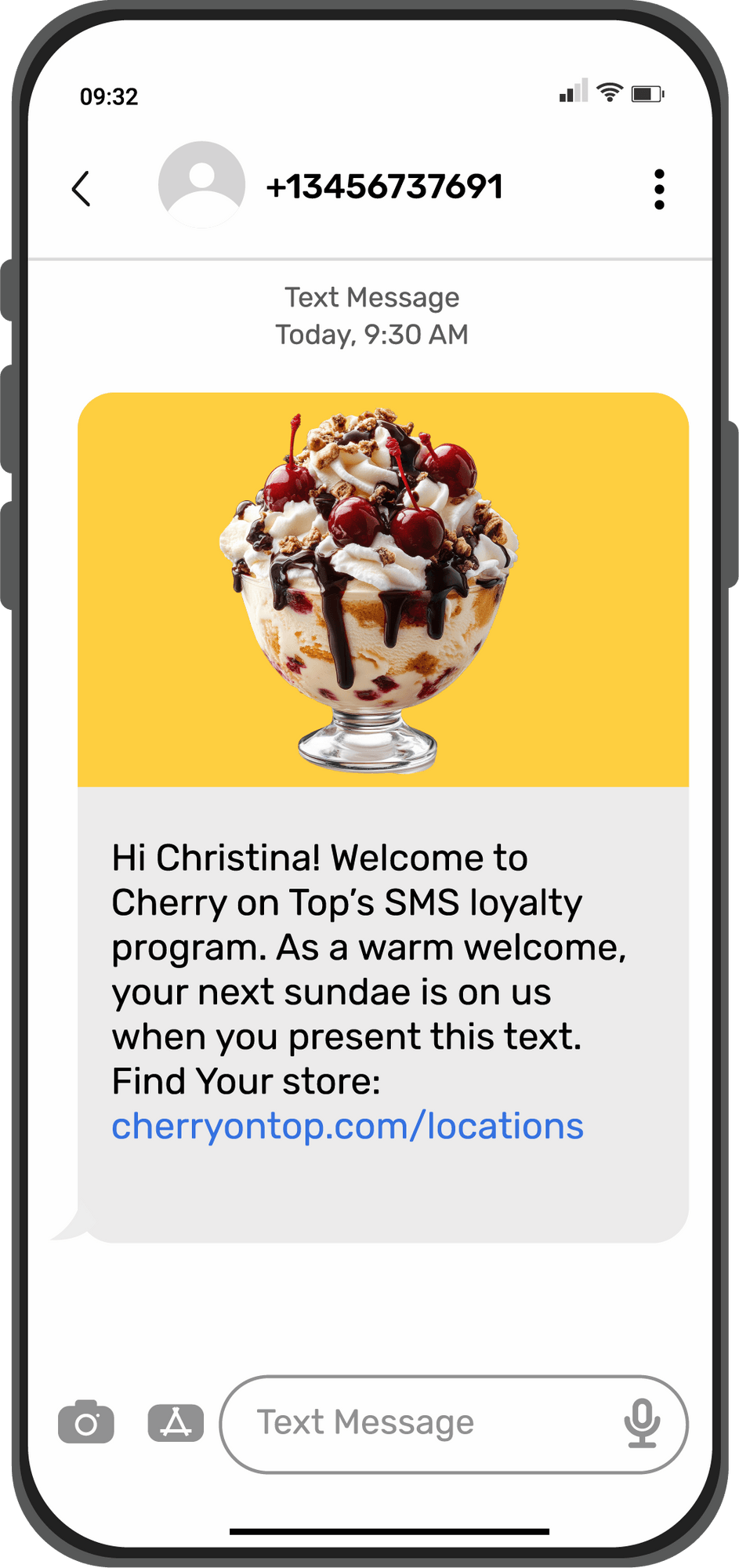
If you include a file like an image, video, or PDF in your message, it is sent as an MMS instead of an SMS. Each MMS typically uses two credits but supports up to 1,600 characters and rich media, making it ideal for visual or content-heavy campaigns.
How Many Credits Does One RCS Message Use?
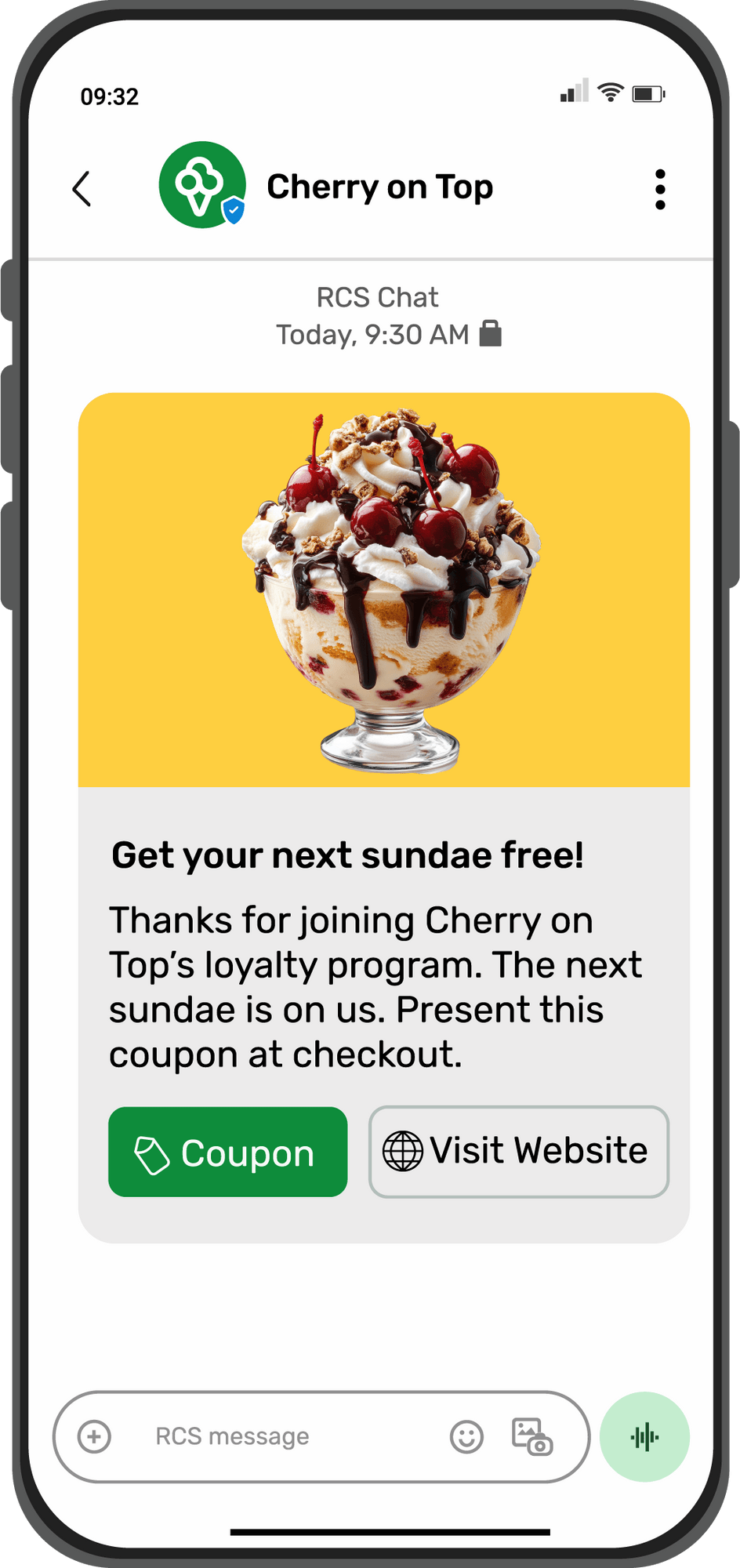
Since RCS messages come in different formats, such as simple text, messages with multimedia, carousels, rich cards, etc., we’ve simplified the credit system to keep things straightforward.
- For inbound/outbound simple RCS text messages: 1 text credit will be used.
- For inbound/outbound multimedia RCS messages (Rich Media, Carousels, Rich Cards, etc.): 2 text credits will be used.
💡 Also Read: RCS vs SMS: What’s the Difference and Which Is Better? |
How do Text Credits Work?
USA
In the USA, one outbound SMS message of up to 160 GSM characters or 70 Unicode characters to one recipient equals 1 credit. Receiving messages is free, but inbound traffic should remain balanced with outbound usage. For example, if you have many inbound messages but send none, inbound traffic may also count toward used credits.
- 1 MMS message sent or received = 2 credits
- Carrier surcharge: $0.0025 for SMS sent from Toll-Free numbers to Verizon, AT&T, and T-Mobile.
- Blocked shortcode rerouting: 0.5 credit for rerouting messages through alternate paths if a carrier blocks them.
Canada
For Canadian numbers, carrier surcharges apply to every message:
- $0.0075 per outbound and inbound SMS
- $0.015 per outbound and inbound MMS
Message Length and Credit Breakdown
Your credit usage increases with message length. Below is how TXTImpact calculates it:
Message Length (Characters) | Credits Used | Counted As |
0–160 | 1 | One message |
161–306 | 2 | Two messages |
307–459 | 3 | Three messages |
460–612 | 4 | Four messages |
613–765 | 5 | Five messages |
766–918 | 6 | Six messages |
919–1,071 | 7 | Seven messages |
1,072–1,224 | 8 | Eight messages |
1,225–1,377 | 9 | Nine messages |
1,378–1,530 | 10 | Ten messages |
Each text segment is billed based on the number of parts your message is split into.
Carrier Surcharges
Mobile carriers like AT&T, Verizon, and T-Mobile charge small extra fees for sending and receiving messages. TXTImpact passes these charges transparently. Check the Carrier Surcharges page.
How Many Text Credits Do I Need for a Survey or Poll Campaign?
A survey campaign usually includes several questions with multiple-choice or open-ended responses, along with a welcome and completion message. Each question or confirmation text counts as one or more credits, depending on length.
For example, if your survey has three questions and is sent to 500 people, you’ll likely need around 4,000 credits in total. It’s always smart to plan your campaign and consult TXTImpact’s sales team for bulk or long-term discount plans.
A SMS polling campaign, on the other hand, consists of a single question with a confirmation reply. If you’re sending a poll to 500 participants, you’ll need at least 500 text credits, assuming each confirmation message stays under 160 characters. Each vote and confirmation text counts as one credit. If your poll includes start or end-time notifications, those also use credits.
How do Email-to-Text and Text-to-Email Affect Text Credits?
By default, only the first 160 characters of an email will be converted into a text message and delivered as an SMS. If you want to increase this limit, go to your Email-to-Text campaign settings, adjust the message length, and save. Each extra segment of 154 characters will cost one additional credit.
How Many Characters Can I Include in a Text Message?
Using the standard GSM 03.38 character set, a single SMS can include up to 160 characters (including spaces). The maximum total message length is 918 characters, which may be split into up to six message parts.
Message Length | Credits Used |
0–160 | 1 credit |
161–306 | 2 credits |
307–459 | 3 credits |
460–612 | 4 credits |
613–765 | 5 credits |
766–918 | 6 credits |
For non-GSM (Unicode) languages like Arabic, Chinese, or Russian, each message segment is limited to 70 characters, and concatenated messages can go up to 402 characters (6 parts of 67 characters each).
How Multilingual or International Languages Affect Text Credit Usage?
If you are looking to send messages in international or multilingual languages other than English, we offer Unicode support. In this case, for non-GSM (Unicode) languages such as Arabic, Chinese, or Russian, each message segment is limited to 70 characters, and concatenated messages can contain up to 402 characters (6 parts of 67 characters each).
Normally, one SMS can hold up to 160 characters. However, if your message includes special symbols, emojis, or non-English characters (such as Arabic, Spanish, German, Hindi, accented letters, or certain symbols), the message automatically switches to Unicode mode.
When this happens:
- Each SMS can carry only 70 characters instead of 160
- A long message gets broken into multiple texts
For example, a 160-character message with Unicode symbols can turn into 3 separate SMS messages. This means higher costs, because you’re charged for each message sent
To avoid this:
- Our Unicode detection tool helps you spot characters that cause this issue
- You can replace those symbols with standard GSM characters
We also offer automatic transliteration, which converts your message into GSM-friendly characters (The message may look slightly different, but it won’t use Unicode.)
Result: Your message stays within 160 characters, is sent as one SMS, and costs less.
How to Use SMS Credits More Efficiently? (Optimization Tips)
Want your text message credits to last longer without annoying your audience? These tips help you do just that:
- Keep messages short: Short texts are usually sent as a single message, so they use fewer credits.
- Send at the right time: Messages sent when people are more likely to read them give you better results for the same number of credits.
- Clean up automatic messages: Regularly check your automated texts and remove ones that don’t perform well or repeat the same information. This helps avoid wasting credits.
- Use Email to MMS for longer texts: When an email sent via the Email-to-Text service exceeds 160 characters, TXTImpact can automatically convert it into MMS instead of SMS, helping reduce SMS credits and optimize messaging costs.
How to Check and Buy SMS Credits?
To check how many SMS credits you have left:
- Log in to your TXTImpact account dashboard.
- On the dashboard, there is Accout Summary section is available as shown in the picture below.
- The Account Summary card or section displays all the SMS credit balance left, keywords Credits and Cyrrebt 1-month charges as well.
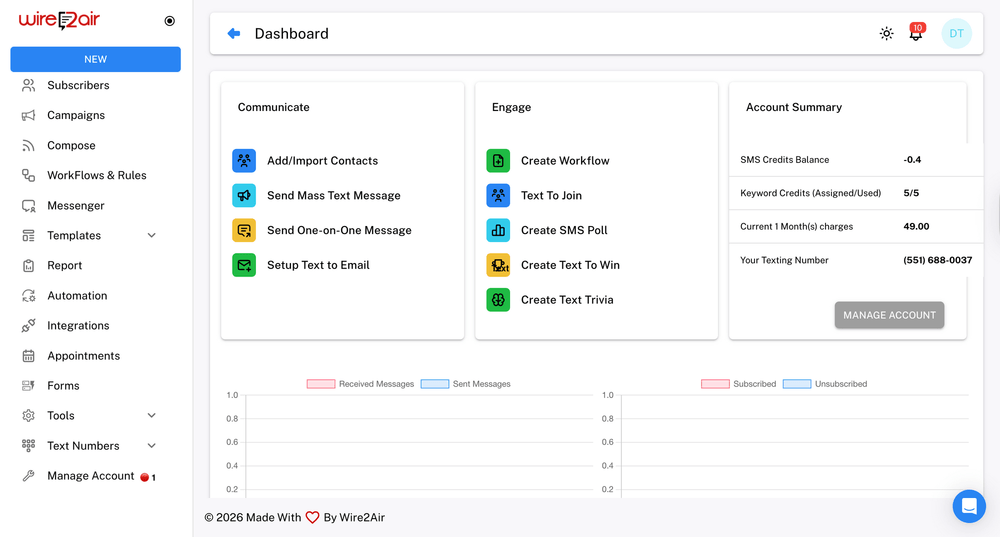
- However, you can also check Text Credits balance by simply > Going to Manage Account. > Click SMS Credit Status to see your remaining balance.
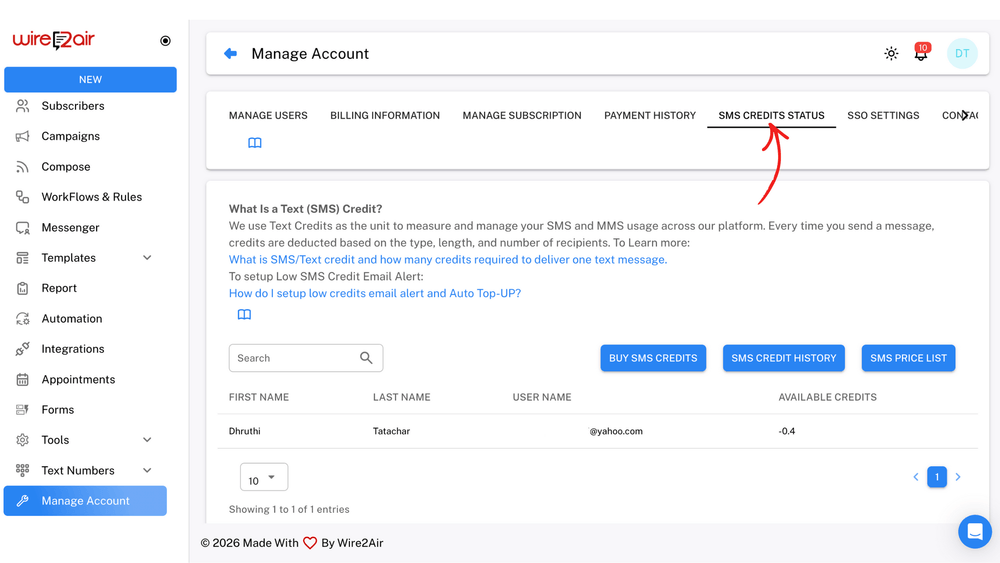
To buy more SMS credits:
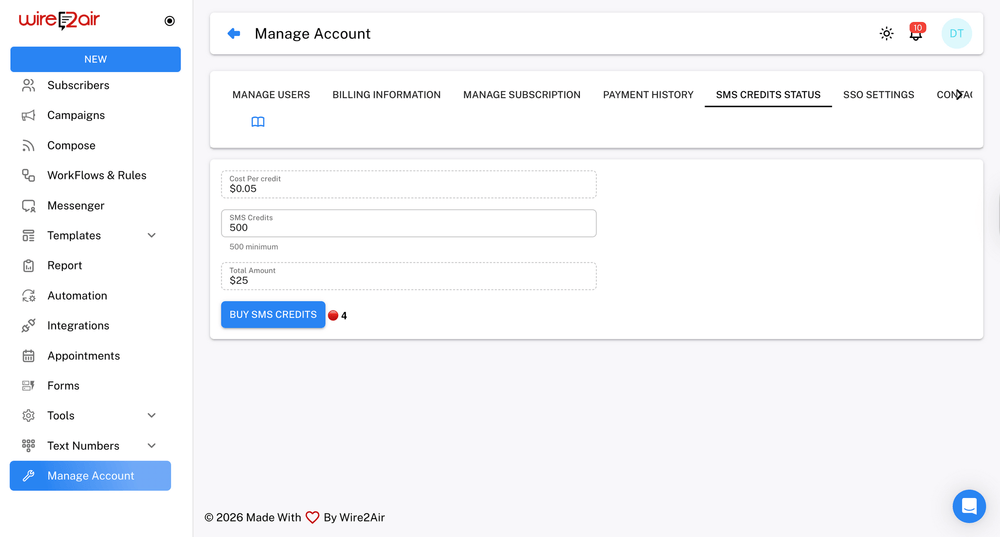
Click Buy SMS Credits in the same menu.
The minimum purchase is 500 credits at $0.05 per credit.
You can use your saved credit card or add a new one for payment.
Final Thoughts
Understanding how TXTImpact text credits work helps your business send messages efficiently and follow carrier rules. TXTImpact offers flexible plans, transparent pricing, and tools to track and manage your credits easily.
Whether you’re a small business or a large company, TXTImpact makes texting simple, reliable, and affordable. Sign up for a TXTImpact free trial today to see how easy business texting can be.
Frequently Asked Questions
♦ How do I get more SMS credits?
You can certainly purchase SMS credits via a monthly subscription plan or by making a one-time purchase from your TXTImpact account.
♦ If I buy SMS credits in the middle of a billing cycle, do I pay full price?
No, you will only pay for the days left in your current plan. For instance, if you purchase 5000 credits one week before renewal, you’ll get all credits immediately but pay only for that week.
♦ How many SMS credits do I need?
The number of SMS credits you need depends on your country, message type, and length. In the States, one SMS costs one credit, and one MMS costs two. If your message is long, it may be split into multiple parts, using more credits.
♦ How many SMS credits do I need for multi-country programs?
If you want to send messages to multiple countries, you’ll need credits for each sending number and destination country. The cost per SMS varies by region; for instance, one credit in the US could be five in the UK, and three in Canada.
♦ Do SMS credits automatically renew?
Yes, your selected number of SMS credits renews every month with your plan. You can upgrade or downgrade anytime, and the new subscription will take effect from your next billing cycle. One-time refills do not renew automatically.
♦ Can I get a refund for unused SMS credits?
TXTImpact doesn’t provide refunds for unused credits unless there’s a system issue or your account was wrongly terminated. Unused credits expire at the end of each billing cycle, so it’s best to buy only what you need each month.
♦ What is a message segment?
A message segment is one portion of a text that fits within the 160-character limit. Longer texts are automatically split into multiple segments, and each segment uses one credit. Keeping your messages short helps reduce credit use and costs.
♦ Why do I see a negative credit balance in my account?
A negative balance occurs when your account has insufficient credits, yet incoming messages from customers continue to be received. TXTImpact allows those texts to come through so you don’t miss them, and the balance adjusts automatically when you add new credits.
♦ What happens once I use up all Text Credits?
To monitor your text credits usage, you can configure a low text credits threshold email alert. Anytime your text credits fall below the threshold, you’ll be notified. At that point, you can either add additional credits to be used for that month or upgrade your account to the next level.
♦ Do TXTImpact Text Credits Expire?
Yes, TXTImpact text credits must be used within your subscription period. Any unused credits will expire and will not roll over to the next month.
♦ Do Automations Use Credits?
Yes, each automated message deducts text credits in the same way as standard campaigns.