Β Celebrating TXTImpact'sΒ 20 Years of Business Texting Excellence. Be part of our journey. Start your free trial today!
Email to Text β Send SMS from Any Email Client
TXTImpact turns your email into a text message and delivers it to any phone worldwide. Replies arrive right back in your inbox as threaded emailsβno new apps, no dashboards, and no coding required.
What is Email to Text?
Your Inbox is Now aΒ Two-Way SMS Channel
Email to text or Email to SMS is a communication tool that lets you send text messages directly from Gmail, Outlook, Apple Mail β or any system that can send an email. No carrier lookup. No coding. No installation.
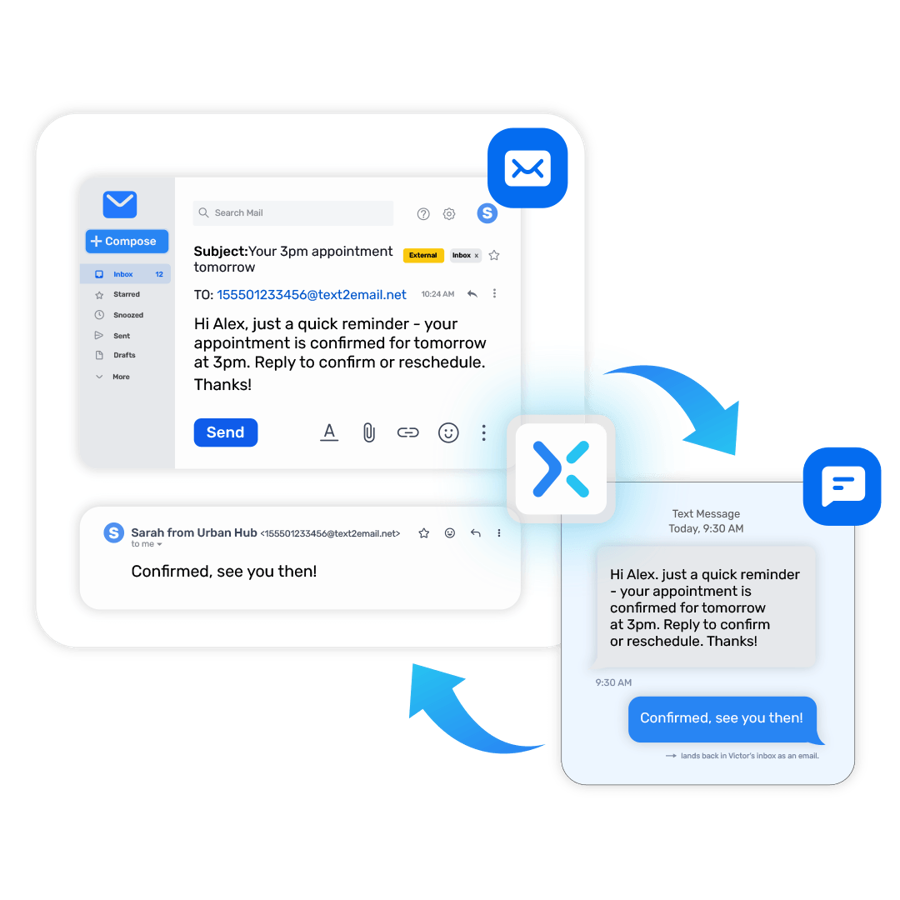
Once registered, TXTImpact converts your outgoing email to SMS and routes it to the recipient's phone. When they reply, the text comes straight back to your inbox, threaded and archived (Text-to-Email) β right alongside the rest of your email.
βΒ No carrier lookup needed
βΒ Works with any email client or SMTP system
βΒ Two-way: replies thread back as email
βΒ Automatic email signature removal
βΒ SMS, MMS, RCS, and WhatsApp delivery
The Free Carrier Email To Text Gateways Are Gone.
TXTImpact Is The Drop-In Replacement.
If your alerts, reminders, or customer texts still route through a carrier's free email gateway, you're on borrowed time β or already broken:
Verizon SHUT DOWN
@vtext.com
Sunsetting by March 31, 2027. Delivery already unreliable.
Rogers (Canada)
SHUT DOWN
@pcs.rogers.com
Throttled or retired for business volumes.
Bell Canada SHUT DOWN
@txt.bell.ca
Gateway throttled/retired. Business use blocked.
Telus / Fido SHUT DOWN
@msg.telus.com
Carrier-agnostic delivery now required for reliability.
Sprint SHUT DOWN
@messaging.sprintpcs.com
poor deliverability (60-70% failure rates).
Boost Mobile
SHUT DOWN
@sms.myboostmobile.com
combat the massive rise in spam & network abuse.
Switch to TXTImpact in MinutesβNo Code Changes Required
Legacy systems like Win-911, Grafana, BAS, monitoring tools, CRMs, and custom applications don't need to be rewritten. Simply create a TXTImpact account, complete yourΒ 10DLC registration with AI wizard, and replace your old carrier email-to-text gateway with [email protected] to restore reliable SMS deliveryβwithout changing your existing application.
β One address, any carrier
No more guessing which carrier your recipient is on. One TXTImpact address reaches anyone.
β 10DLC A2P verified sender
Messages arrive instead of getting silently dropped. Business-grade delivery rates.
β Two-way replies to email
Carrier gateways were one-way. TXTImpact routes replies back as threaded email.
β Keep Your Existing Applications
Your system keeps sending to an email address. Only the address changes.
How It Works
One Technology.Β Two Powerful Use Cases.
Every TXTImpact account gets a unique inbound address that converts any email it receives into an SMS. Replies route back to the sender's inbox, threaded.
You Send Texts From Your Own Inbox
For sales, support, clinics, recruiters
Compose your email message.
Open Gmail, Outlook, Apple Mail, Thunderbird, or any client you use today.
Put the phone number in the To field.
Format: [email protected] β save as a contact for one tap.
SMS Delivered to the Recipient.
No additional app required. Whenever the recipient replies by texting it will land in your inbox as threaded email.
Used by:
Businesses Internal communication, HR,Β sales reps, staffing agencies, recruiters, real-estate agents, clinic front desks, customer support executives.

Send Text Alerts From Any System/Application
For monitoring, alarms, IoT, VoIP, Fixed Landline
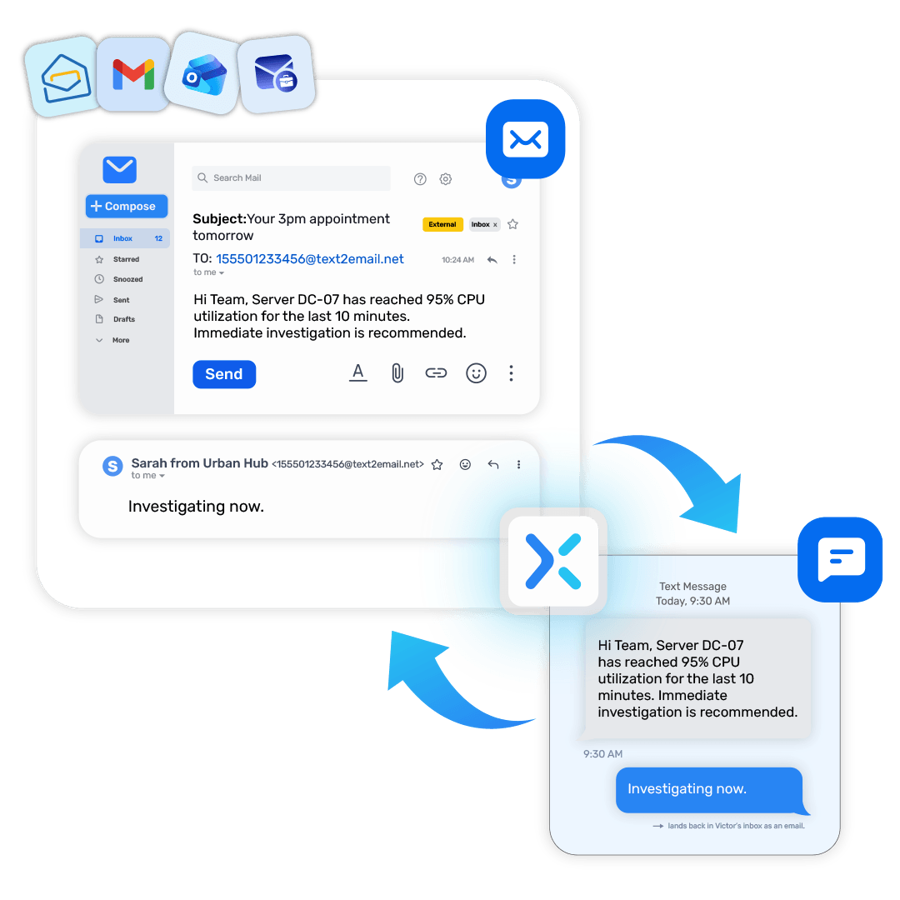
Configure your alert emails with TXTImpact Address.
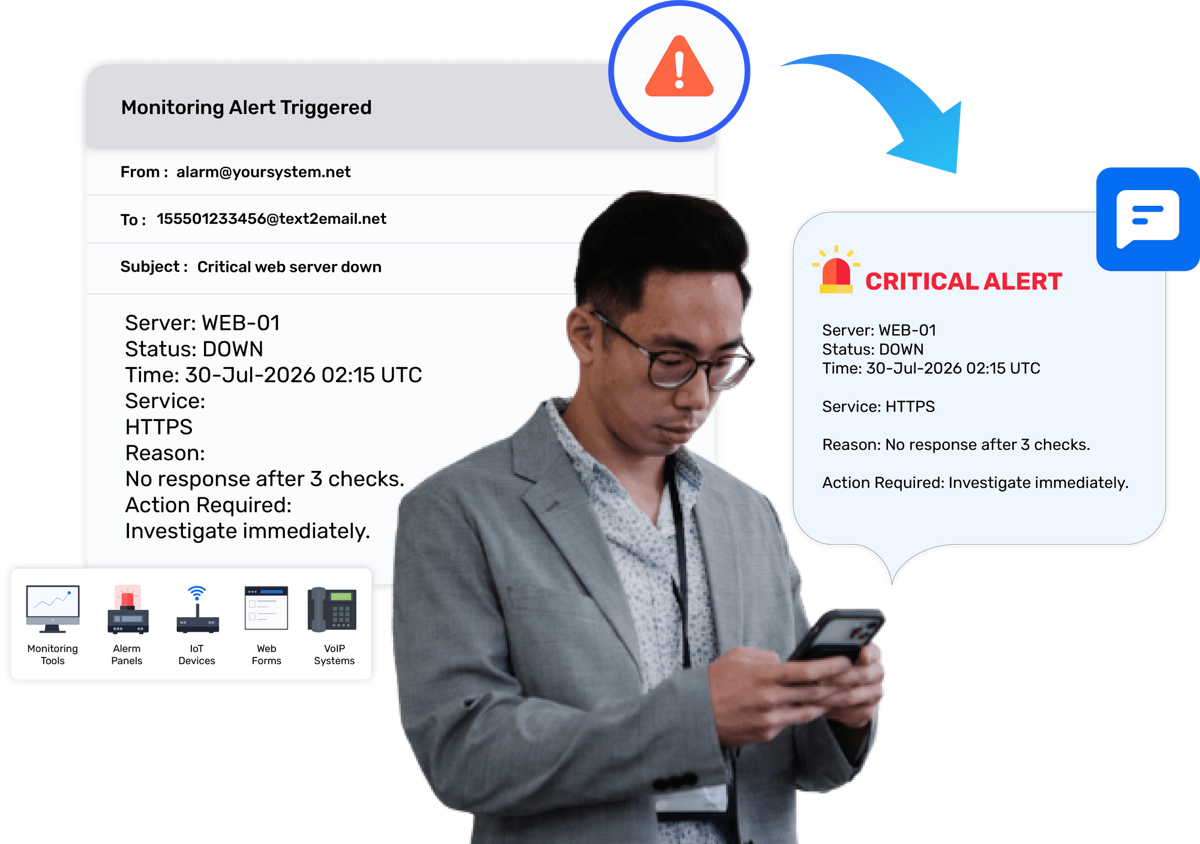
In your Industrial monitoring tool, legacy systems, HMI Systems or anyΒ alarm panel, β add a TXTImpact address as the recipient. Or set a Inbox forwarding rule.
System generates an email alert.
The alert email will be converted into text message and delivered to your phone. No need to rewrite the code or change SMTP settings.
SMS Delivered to the Recipient.
Subject + body delivered instantly. Just Change the on-call person by updating the address with their respective [email protected]Β and it done.
Used by:
BAS systems, healthcare networks, broadcast engineers, security monitoring, SCADA, manufacturing ops, IT Departments/SRE, Legacy Systems.

Built For Every
Email-To-Text Workflow
For Businesses That Manage Communication from Email
ANY EMAIL CLIENTS
Send SMS from any Email
For sales reps and support teams who live in Gmail, Outlook, Apple Mail, etc.
SUPPORT
SMS for customer support
Handle inbound customer texts as email tickets.
APPOINTMENTS
Appointment reminders
Auto-text reminders from any scheduling
tool that can email.
REAL ESTATE
Real estate texting
Text leads and clients without giving
out your cell.
For Systems Where Critical Alerts Can't Be Missed
IT / SRE
Server monitoring alerts
Pipe Datadog, Nagios, Zabbix, CloudWatch to on-call phones.
SECURITY
Alarm panel SMS
DSC, Honeywell, Bosch panels that email alarms.
BROADCAST
Off-air alerts
Silence detectors and stream monitors text the engineer.
WEB FORMS
Web form to SMS
Contact Form 7, WPForms, HubSpot β text leads instantly.
HELP DESK
Help desk & ticketing alerts
Zendesk, Freshdesk, Jira escalations to phone.
LEGACY SYSTEMS
Extend older applications and on-premise systems with reliable SMS alerts
BMS
Receive instant text alerts for HVAC faults and critical BAS alarms.
ERP
ERP & Business Applications
Receive SMS alerts from ERP, CRM, etc. that send email notifications.
DEVOPS
DevOps & CI/CD Notifications
Send build failures, deployment alerts, and pipeline Text notifications directly to your teamΒ
DATABASES
Database Monitoring
Get instant SMS alerts for database failures, replication issues, and performance thresholds.
Compatible with Any System That Sends an Email
No new software to learn, no platform to switch, no IT department to loop in. IfΒ any system or application that can send an email can also send SMS alerts through TXTImpact.
Gmail
Outlook / M365
Apple Mail
Thunderbird
ProtonMail
Fastmail
PagerDuty
Datadog
Nagios
Zabbix
UptimeRobot
AWS CloudWatch
Honeywell
Bosch / DSC
RingCentral
8Γ8 / Zoom Phone
HubSpot
Salesforce
Zendesk
Any SMTP system
Win-911
* Don't see your tool? If it can send an email, it works. Contact Us to Learn More.β
Why Businesses Choose TXTImpact
Successfully Serving businesses since 2006
β No APIs, No Development Work, No IT Headaches
Most messaging platforms require API integrations, developer resources, and ongoing maintenance. TXTImpact works differently. If your application, monitoring tool, CRM, or workflow can send an email, it can send an SMS through TXTImpact.
βΒ Manage Conversations Directly from Email
There's no separate dashboard to monitor. Incoming and outgoing messages stay connected within your existing email workflow, making it easy to search, track, archive, and manage conversations using the tools your team already knows.
βΒ True Two-Way Messaging
When recipients reply, responses are delivered directly to the original sender's inbox. Your sales team, support staff, and on-call engineers can manage their own conversations without sharing a common inbox or switching between platforms.
β Smart 10DLC A2P registration with AI Wizard.
TXTImpact helps businesses send messages through properly registered 10DLC routes in the United States. Our AI- wizard streamlines the process, helping reduce delays, improve deliverability, and get campaigns approved faster.
β Global reach. 800+ carriers.
200 countries, 800+ carriers. The only compatibility test is: can it send an email? Everything else is handled.
Clear per-text pricing with no hidden platform fees. From a handful of messages to millions, you always know what you'll pay.
Everything Your Business Needs
Out of the Box
Receive and reply to text messages directly from your email inbox. Replies thread back to the original sender.
Include a custom signature in every outgoing text, or automatically remove email footers so messages stay clean.
No development skills needed
As long as your application can send an email, it can also send text messages with the help of TXTImpact.
Custom sender ID
Personalize the sender name for brand consistency. Recipients see your business name, not an unknown number.
Auto-reply setup
Set up automated responses to incoming messages. Or Keyword-based Workflows routing forwards messages automatically based on triggers.
Live delivery reports
Real-time delivery confirmation and open rate tracking. Get notified instantly when a message delivery fails.
Message history & logs
Full record of sent and received messages for tracking, compliance, and archiving. Searchable and exportable.
Email domain whitelisting
Restrict message sending to specific email domains for security. Prevents unauthorized use of your account.
Send to multiple phone numbers in one email. Mass texting to entire contact lists from within your inbox.
SMPP & HTTP API
Intelligent HTTP and SMPP interfaces for sending and receiving. Works with any SaaS or legacy system that sends email.
Global coverage
800+ carriers across 200+ countries. Send and receive text messages worldwide without carrier compatibility issues.
Character limit management
Auto-trims email content over the SMS limit, or auto-converts to MMS. Character limit alerts keep you informed.
Email-To-SMS Exclusive Features
Advanced Email To Text Features For Optimized Text Delivery
Emails are built for inboxes β text messages are built for phones. These controls strip out what doesn't belong in an SMS and help you send cleaner messages at lower cost.
Remove common email signature
Automatically strips common sign-off phrases β "Thank you", "Regards", "Best wishes", and similar closings β before converting to SMS so recipients only see your actual message.
Remove email thread
Strips the quoted reply history
from threaded emails so only your
new message is sent as a text β
not the entire conversation chain
Custom footer boundary
Set a custom text string that acts as a cut-off boundary. Any email content appearing after this text is removed before sending.
Include email subject
Prepends the email subject line to the start of the SMS body, so the recipient sees your message topic at the very beginning of the text.
Convert long messages to MMS
When your message exceeds 160 characters, it's automatically sent as a single MMS instead of multiple SMS segments β delivering the full message at a lower credit cost.
When your email includes image or video, they are forwarded to the recipient as an MMS message alongside your text content. Without this enabled, attachments are ignored.
Beyond SMS β Send Across Every Channel
TXTImpact automatically converts your email into the best format based on your Sender ID and recipient capabilities.
Send images, PDFs, and long messages. Emails over 160 characters auto-convert.
2 credits per message
Rich messaging with buttons, branded content, and interactive elements via email.
Branded delivery
Transform emails into verified WhatsApp messages for high-engagement delivery.
Verified business sender
Choose Your Number Type
Text-enable a new number or bring your existing landline. All options support full two-way messaging via email.
10DLC β Most Popular
Two-way messaging with a local area code. Best for high-volume, conversational business texting. A2P 10DLC registered.
Toll-Free
Nationwide reach with high throughput. Ideal for mass communication campaigns and customer support executives.
Landline / VoIP
Text-enable your existing business landline or VoIP number. Keep your number, add SMS.
Shortcode
Short codes offers guaranteed throughput, zero keyword restrictions, and low messaging fees.
Who Benefits From
Sending Texts Via Email
β Call centers
Communicate in a way that's convenient for both parties, without staying on the phone.
β Help desks
Handle pictures, links, and documents over text the same way as email.
β Law firms
Send documents and formal statements over text β securely, with full logs.
β Insurance agents
Communicate with large client volumes, sending pictures and documents over text.
β Mortgage agents
Send clients texts rather than emails they might not check for days.
β Medical clinics
Appointment reminders, no-show reduction, patient follow-ups β all from the inbox.
β Realtors
Text leads and clients in real time without giving out a personal number.
β Educational institutions
Update students and faculty on operating statuses and upcoming events.
β IT / SRE teams
On-call paging and server monitoring alerts direct to the engineer's phone.
β Broadcast engineers
Off-air and transmitter alerts from Burk, Nautel, Inovonics, and more.
β Financial services
Send secure information at the customer's request, including formal documents.
β Fleet & manufacturing
IoT sensor thresholds and equipment alerts to operations manager in real time.
What Customers Say
Customer reviews
"A Reliable SMS Marketing Solution for Businesses"
βMass texting with conditional logic has been our best use in the business. The team also helped us understand how to use it effectively.β

- Snehil P. (from G2)
"Good Customer Service"
βCustomer service representatives, like Dhruthi, have been responsive and diligent in their work, making sure our service remains in working order.β

- Jorge B. (from Trustpilot)
"TXTImpact has truly changed the way weβ¦"
βTXTImpact has truly changed the way we handle recruitment. Reaching candidates by text has been incredibly effective...

- Sachin Jain (from Trustpilot)
Frequently asked questions answered
What is an email to SMS service?
Email to SMS is a service that converts an email into a text message delivered to a mobile phone. With TXTImpact, any system that can send an email β Gmail, Outlook, monitoring tools, alarm panels, web forms, IoT devices β can send a text without code or APIs. Once registered, your message is converted from email to SMS, and replies are forwarded back to your inbox.
How do I send a text from Gmail?
Compose a new email in Gmail. In the To field, enter the recipient's number in the format: [email protected] (replace XXXXXXXXXX with the 10-digit phone number). Write your message in the subject or body. Send. The recipient receives a standard SMS. Their reply comes back to your Gmail inbox as a normal email thread.
Is TXTImpact a replacement for txt.att.net, vtext.com, or tmomail.net?
Yes. TXTImpact is a drop-in replacement for all carrier email-to-SMS gateways. AT&T's txt.att.net shut down June 17, 2025; T-Mobile's tmomail.net stopped in late 2024; Verizon's vtext.com sunsets by March 2027. TXTImpact uses the same email-to-SMS address pattern, with no carrier guessing, verified business delivery, and two-way replies β all things the carrier gateways couldn't do.
Do recipients need to download an app?
No. Recipients receive a standard SMS on their phone β exactly like any other text message. There's nothing for them to install, sign up for, or do differently.
Can I send to multiple phone numbers at once?
Yes. You can address a single email to multiple TXTImpact addresses and each recipient gets an individual SMS. TXTImpact also supports mass texting to large groups directly from your email or our platform.
Do I need to know the recipient's mobile carrier?
No. That's the whole point. Unlike carrier gateways that required you to know whether someone was on AT&T, Verizon, or T-Mobile, TXTImpact routes to the right carrier automatically. One address works for every phone on every carrier in 200+ countries.
How do email signatures get removed from SMS?
TXTImpact automatically detects and removes common email signatures and footers before converting your email to SMS, so recipients don't receive cluttered messages with your full email signature. You can also configure custom signature removal rules for non-standard formats.
What happens when an email exceeds 160 characters?
Emails over 160 characters automatically convert to MMS at 2 text credits per message, allowing the full content to be delivered. You can also configure character limit alerts or auto-trim to keep messages within the standard SMS limit.
Can I automate text messages sent from email?
Yes. Any system that can send an automated email can send automated texts through TXTImpact β appointment reminders, server alerts, web form notifications, and more. No code changes required; just point the existing email output at your TXTImpact address.
Is it secure for business use?
Yes. TXTImpact uses email domain whitelisting so only authorized senders can trigger SMS from your account. All messages are logged and archived for compliance. The platform is 10DLC A2P registered in the US, meeting all TCPA and carrier compliance requirements for business SMS.
Ready To Text From Your Email?
Free trial included. Setup takes minutes. No credit card required.
No credit card Β· No dev skills Β· No carrier lookup Β· Cancel anytime
By using this website you agree to our privacy policies
We use cookies to improve user experience. Choose what cookie categories you allow us to use. You can read more about our Cookie Policy by clicking on Cookie Policy below.
These cookies enable strictly necessary cookies for security, language support and verification of identity. These cookies canβt be disabled.
These cookies collect data to remember choices users make to improve and give a better user experience. Disabling can cause some parts of the site to not work properly.
These cookies help us to understand how visitors interact with our website, help us measure and analyze traffic to improve our service.
These cookies help us to better deliver marketing content and customized ads.