Excel To SMS

Send personalized mass text messages from Excel without logging into our online SMS Marketing platform!

Excel to SMS (2).png

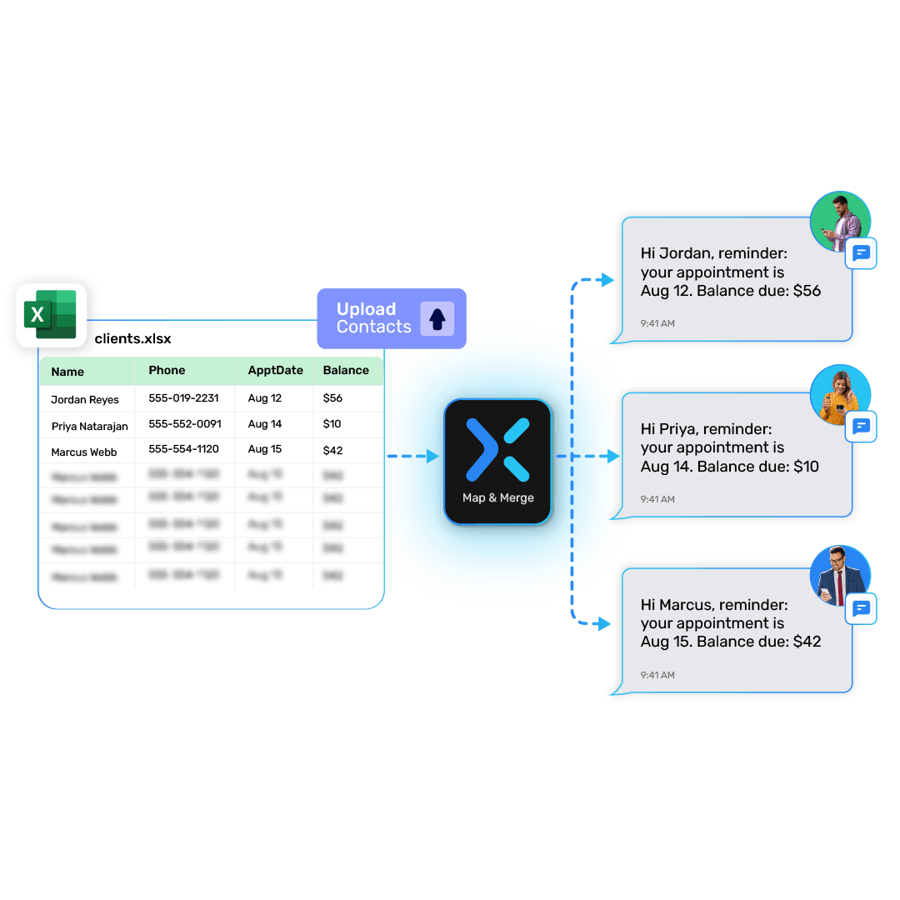
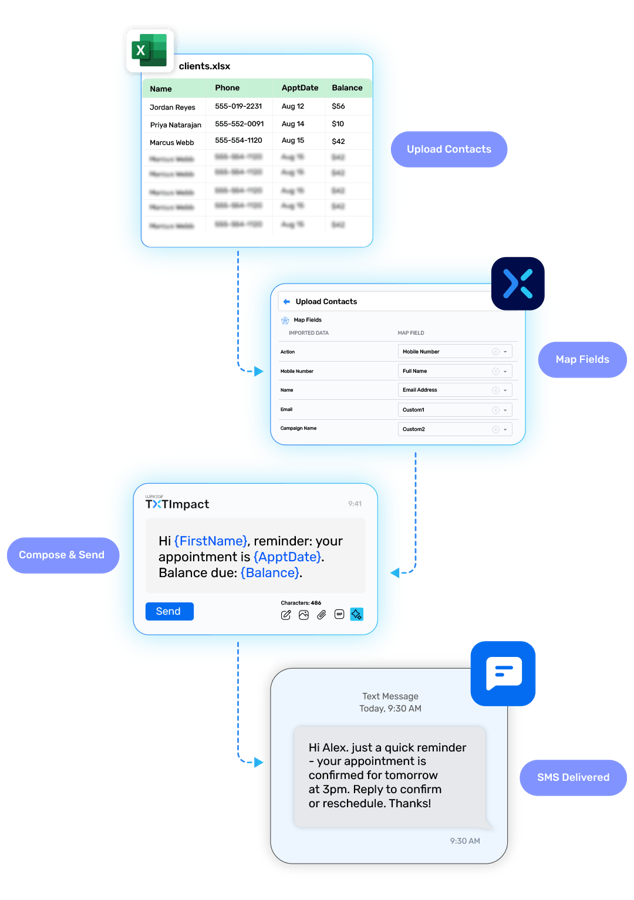
Our Excel to SMS messaging, allows you to send bulk text messages from your Excel spreadsheet. Simply select the recipient’s mobile number and the information you want to include in your message from your Excel columns, and our Excel texting program will automatically create and send personalized messages.

This creates one spot for all information being sent out of Excel.

  • It saves your clients time.

  • It saves you time.

Benefits of using Excel to SMS:

  • Save time and effort:

    Excel to SMS allows you to send bulk text messages in minutes, without having to manually type each message.

  • Personalize your messages:

    You can use Excel to SMS to personalize your messages for each recipient. For example, you can include the recipient's name in the message.

  • Track your results:

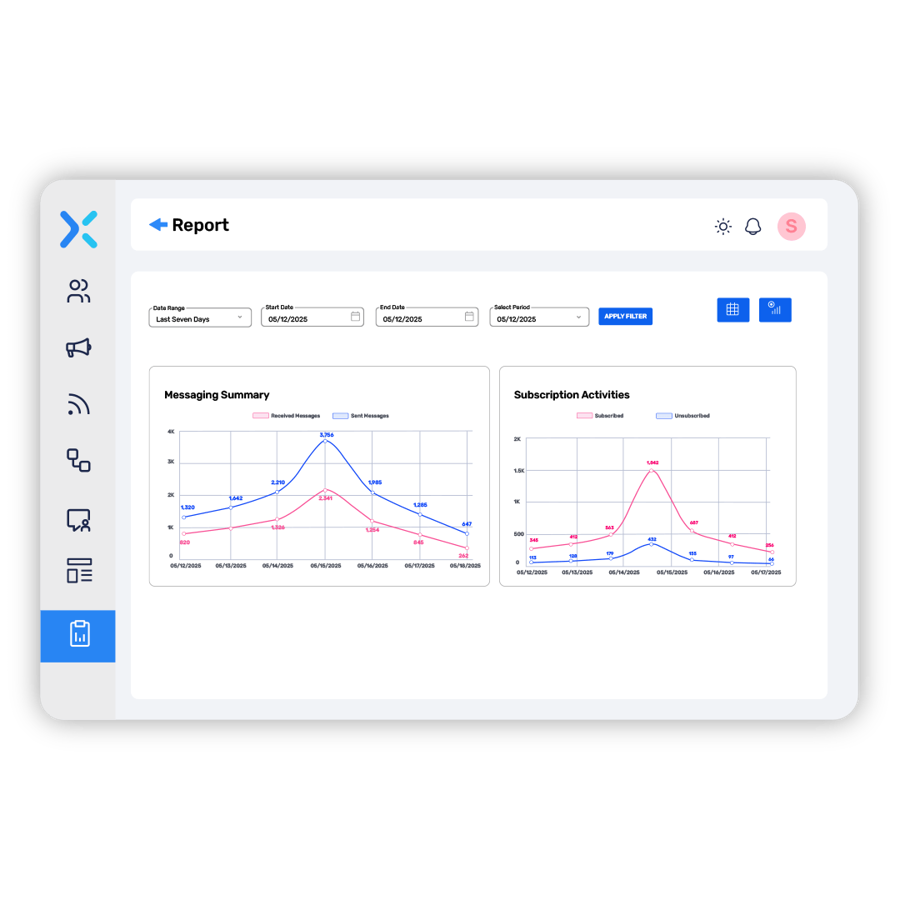
    You can track the results of your Excel to SMS campaigns to see how many messages were delivered, opened, and clicked. This information can be used to improve your future campaigns.

  • Excel to SMS.jpg

    One spot for all information

    It saves your clients time, It saves your time, It can be utilized in various ways across different industries and contexts. Here are some sample uses:

  • Marketing Campaigns

    Send promotional offers, discounts, or product updates to customers based on their preferences and purchase history.

  • Appointment Reminders

    Notify clients of upcoming appointments, reservations, or service appointments, reducing no-shows.

  • Event Invitations

    Invite attendees to seminars, workshops, webinars, or conferences, providing event details and registration information.

  • Emergency Alerts

    Disseminate critical information, such as weather warnings or emergency alerts, to a wide audience quickly.

  • referral.svg
  • Employee Communications

    Keep employees informed about company announcements, policy changes, or training updates.

  • Customer Support

    Provide quick responses to customer inquiries, order confirmations, or delivery updates.

  • Surveys and Feedback

    Distribute surveys or feedback requests to customers or stakeholders, gathering insights for improvement.

  • Payment Reminders

    Send reminders for bill payments, subscription renewals, or pending invoices.

  • message_sent.svg

    Optimize your workflow with Excel-to-SMS integration.

    Automate outreach, reduce manual tasks, and improve message delivery rates. Experience it for free for 15 days.

    Incorporating Texting With Excel

    Features and Common Fields of Use

    One-Stop Sending

    Compose your text message directly from within Excel. This creates one spot for you to accomplish composition, attachment, and sending of information.

    Merging

    Merge information from cells in your spreadsheet. This feature makes it easier for you to send out messages quicker.

    Teacher Certified

    This is a great program to have when sending out grades to students because the information is already there, you just have to add TXTImpact to send it out.

    Recurring Bills

    This feature also works great for those businesses who often send out recurring bills. Take the information that is already there and add only a couple more clicks to send it out to all of your customers' phones.

    Discover other Text Messaging Services by TXTImpact

    Improve communication internally and with customers using TXTImpact Global business text messaging services.

    Mass Texting Service

    Send and receive mass text messages seamlessly to large groups via our user-friendly, web-based platform.

    Text Messenger

    Start a conversation or respond to the customers using a web-based text Messenger application.

    Text to Email

    Receive text and MMS messages as an e-mail and send replies as a text message!

    Outlook Text Message

    Outlook Text Messaging Service allows users to send SMS Text Messages to colleagues and customers from Microsoft Outlook 2007, Outlook 2010, and Sharepoint 2010.

    Email to Text

    Send text/ picture messages from any e-mail client. This includes, but is not limited to, Outlook, Lotus Notes, Gmail, Yahoo, company e-mail, and Exchange server.

    Appointment Reminders

    Reduce your customer no-shows with automated text appointment reminders and follow-up systems and increases your bottom-line revenue

    Recurring Text Messages

    Send automated recurring text alerts on a preset schedule. Send same message or a different from the message pool. Ideal for daily verse, payment, medication reminders.

    International SMS Service

    Send text messages to over 800 operators in over 200 countries and reach billions of mobile users.

    Click to Text Form

    Convert website visits, allow customers to initiate a text conversation with your business right from the website.

    Mass Texting Mobile App

    TXTImpact's app enables businesses to send text messages to any person or group using the iOS or Android app.

    Ready to get started 🎉

    Contact us or sign up for a free trial now.

    Cookie Settings

    By using this website you agree to our privacy policies

    Cookie Settings

    We use cookies to improve user experience. Choose what cookie categories you allow us to use. You can read more about our Cookie Policy by clicking on Cookie Policy below.

    These cookies enable strictly necessary cookies for security, language support and verification of identity. These cookies can’t be disabled.

    These cookies collect data to remember choices users make to improve and give a better user experience. Disabling can cause some parts of the site to not work properly.

    These cookies help us to understand how visitors interact with our website, help us measure and analyze traffic to improve our service.

    These cookies help us to better deliver marketing content and customized ads.