T-Mobile email to text Discontinued: Best Tmomail.net Alternative That Actually Work
Several legacy carriers and messaging service providers, such as AT&T, Verizon, and T-Mobile, have discontinued their email-to-text services due to spam and unreliability.
While AT&T recently announced the discontinuation on June 17, 2025, T-Mobile didn’t make a special announcement; instead, the service gradually became unreliable in November 2024 and completely stopped working in December 2024.
If you were a long-time user of T-Mobile’s email-to-SMS or SMS-to-Email service and have experienced the disruptions and effects of discontinuation, you’re at the right place. In this blog, we’ll look at the reasons behind T-Mobile’s discontinuation of email-to-text and the best alternative for your business.
What is Email-to-Text and Why Do Businesses Use It?
Email-to-text or email-to-SMS is a messaging service that allows you to send text messages to your customers from emails. Meaning, using a specific format, you send an email to a particular customer’s mobile, which is then converted into an SMS and delivered to the specified mobile number.
The format that most carriers use is [email protected] or [email protected].
For instance, T-Mobile followed this format -> "numbertmomail.net". It allowed businesses to send text messages at scale from their email inboxes, without using a phone number.
Businesses extensively benefit from this service:
Email-to-text is highly simple to use, enabling businesses to reach customers at scale from their emails.
The simplicity and wide reach allow businesses to send quick alerts, reminders, and critical updates instantly to their customers on their mobile devices.
Email-to-text is a highly cost-effective way to broadcast updates and showcase products without complex setup or integration.
Besides, businesses don’t need to rely on external software or application downloads. Instead, they can easily send emails from existing email clients like Gmail and Outlook with no hassle.
Why is T-Mobile's email-to-text not working?
Despite several benefits and conveniences for businesses, why did T-Mobile discontinue its email-to-SMS service and risk losing potential customers
There are several reasons behind it, including:
1. Service became unreliable and unreachable
T-Mobile began experiencing DNS resolution issues around November 2024, with several users reporting that tmomail.net no longer resolves or that the domain no longer has an IP address.
Meaning, the DNS entries to tmomail.net were taken down or became non-functional, restricting emails sent to the server from routing through the gateway. Despite multiple tests with different DNS providers, including Google, Cloudflare, and Comcast, the DNS failure issue persisted.
This was a clear indication of service failure, leading T-Mobile to ultimately shut down email-to-text, affecting thousands of businesses that relied on it.
2. ‘Consumer-only’ stance for text messaging
T-Mobile now has an explicit “consumer-only” rule, according to which you can exchange messages with one another if you’re a regular customer for free.
However, if you’re a company sending messages through automated software or an application, T-Mobile requires you to send those through approved aggregators or messaging partners who charge fees. This was a decision T-Mobile took to control spam, ensure security, and earn revenue through business texting.
Since email-to-text or tmomail.net allowed businesses to send messages to customers for free, it bypassed T-Mobile’s “consumer-only” stance and monetization approach, resulting in the shutdown of their email-to-text service.
3. A move towards ‘Verified Business Calling.’
T-Mobile is heavily investing in Verified Business Calling (VBC) or ‘Branded Calling,’ which is another move towards monetizing their business messaging services. Branding calling allows businesses to add their brand name, logo, and brand colors, similar to Rich Communication Services (RCS).
Since T-Mobile’s email-to-text service was free, it didn’t fit their VBC model or strategy, so they ultimately phased out the feature.
4. The security and 10DLC pressure
Considering the ongoing compliance and monitoring obligations and the increasing fraud and spam risks, T-Mobile now requires all business and non-consumer messages to be approved by aggregators with associated fees.
This was necessary because the simplicity of open email gateways and the lack of sender verification often enabled fraudulent messages and spam, risking customer data and hampering the experience.
With no such security measures included in email-to-text, T-Mobile had to shut it down to move towards a secure and verified business messaging service.
Common Errors Faced by T-Mobile’s Email2Text Users
When T-Mobile’s email2text or email-to-text service was being decommissioned and facing problems, here are the most common errors users came across:
- DNS failure or “Host Not Found.”
- T-Mobile SMS gateway error AUP#MXRT
- Messages not delivered or delayed
- Server temporarily unavailable
- The email account does not exist
- “Unable to deliver messages” notifications
- Carrier filtering/silent blocking
- Messages sent in the wrong order
- Missing or corrupting MMS attachments
Who is Affected by T-Mobile’s Email-to-Text Service Shutdown?
Several departments and industries that use T-Mobile’s email-to-text services were affected by its discontinuation. Here are the industries and businesses that felt the most impact:
IT and operations infrastructure that relies on email-to-SMS to send outage notifications, downtime alerts, failure alerts, and security warnings at scale to its employees and clients.
Healthcare providers and small clinics used email-based systems to send medication alerts, appointment booking reminders, and test notifications to the patients.
Software developers using legacy integrations, automated systems, Python scripts, and old systems and software face email-to-text failure with T-Mobile since its discontinuation.
Schools, colleges, and non-profit organizations that use email-to-text to send emergency alerts, bulk reminders, critical updates, and schedule announcements at scale to the students and parents.
HR and safety teams that needed email-to-SMS services to send urgent workplace updates, emergency office notifications, and reminders for training or office events across multiple departments.
Financial institutions to send policy updates, fraud alerts, payment confirmations, and payment reminders using email-to-text services.
Retail and eCommerce businesses that use email-to-text to send rewards, exclusive offers, product showcases and announcements, sales announcements, and order updates to boost customer engagement.
TXTImpact: An Excellent T-Mobile Email-to-text Alternative
If you’ve been affected by T-Mobile’s email-to-text service shutdown and are looking for a messaging provider, TXTImpact is the right choice.
TXTImpact is a leading messaging service provider, serving 30,000+ customers across North America and worldwide with several reliable services, including email-to-SMS messaging, text-to-email, Email to MMS, Polling and Survey using Multiple Messaging Channels, SMS marketing, RCS, and many more features.
Its highly intuitive, secure, reliable, and scalable nature makes TXTImpact ideal for all types and sizes of businesses.
How Does Email-to-Text Work With TXTImpact?
TXTImpact allows businesses to easily send text messages to their customers from emails. Using a specific format, [email protected], businesses can send emails, which get converted into SMS and delivered to customers’ mobile devices.
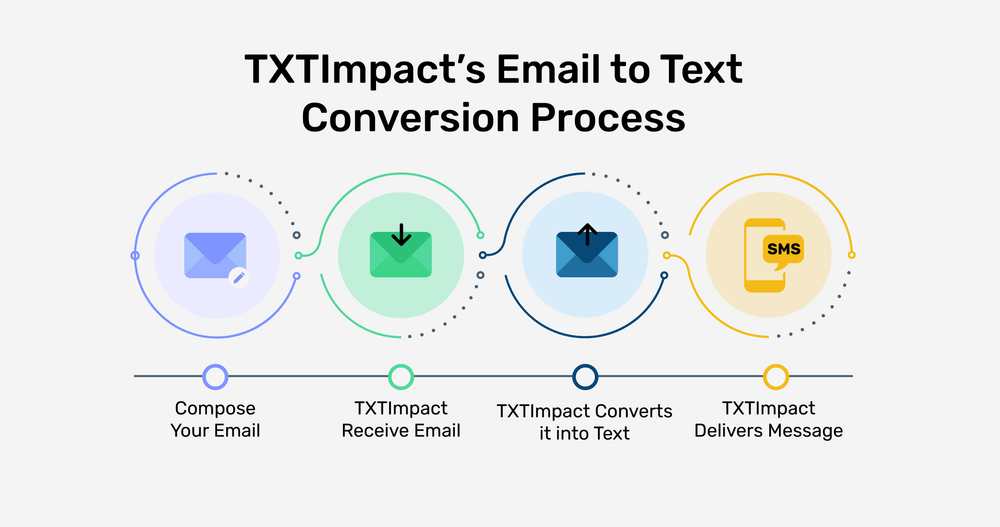
This simple setup does not requires complex integration and extra costs, making it a highly convenient option for businesses aiming to reach customers at scale and send crucial updates and notifications.
Here’s how TXTImpact’s email-to-SMS works:
- Send an email to: [email protected]
- TXTImpact converts it into an SMS
- The recipient receives it instantly on their phone
- When they reply → it comes back to your email inbox thanks to TXTImpact’s Text to email feature.
Perks of Choosing TXTImpact’s Email-to-Text Services
Choosing TXTImpact’s email-to-text services has numerous benefits, including:
Automatically removes email footer, signature, disclaimers, and HTML formatting for clean, seamless message delivery
Adds a branded signature optimized for SMS formatting
Let's you customize the sender’s name to maintain full branding consistency
Provides a central dashboard to manage users and control access permissions
Converts long emails (over 160 characters) into MMS instead of costly multi-segment SMS
Significantly reduces delivery costs by sending long messages at just 2 credits via MMS
Supports rich media, you can add images, PDFs, and short videos using MMS
Also allows you to seamlessly deliver SMS, MMS, RCS, or WhatsApp messages via Email based on your Sender ID preference (multi-channel compatibility)
Sends instant alerts when a message delivery fails
Converts customer replies into emails (via Text to Email) and sends them directly to your inbox no manual effort required
Offers enhanced reporting with delivery status, timestamps, and link tracking.
Allows you to set up auto-replies for better, continuous conversations
Securely archives past messages for compliance and future reference
Saves time with direct email-to-message delivery while improving real-time engagement and customer satisfaction

How to Switch from T-Mobile Email-to-Text to TXTImpact? (Simple and Easy Steps)
If you’re looking for a T-Mobile email-to-text alternative, switch to TXTImpact. TXTImpact ensures an easy migration process with dedicated support and no hassle. Let’s take a look at the migration process when switching to TXTImpact’s email-to-text service.
There is no complicated migration process, no long process, just:
1. Sign up with TXTImpact
To sign up and create an account, visit our website, TXTImpact, and register for a trial business texting account.
Once you log in successfully and choose the best-suited plan for your business, configure email settings and verification, and set up your contact and subscriber lists for your messaging campaigns by either uploading a file full of contact numbers or adding numbers manually.
2. Configure your messaging number
Depending on your business requirements, the next step is to configure the messaging number. For instance, if you’re looking for large-scale transactional and promotional messaging, go for short codes.
On the other hand, if you need a number for standard messaging, choose 10DLC; for customer support or nationwide communications, go with toll-free numbers.
TXTImpact supports all these types of texting number options to streamline and facilitate number configuration depending on your specific business needs.
3. Enable TXTImpact’s Email-to-SMS
Once you have the email settings configured, you can draft and format crisp email messages and send them to a recipient’s phone number via TXTImpact’s domain, which is [email protected].
📝 Note: Replace the “phonenumber” with your recipient's phone number |
TXTImpact allows you to add your business name and authorized email address to the email settings and compose crisp email messages that you can easily manage from your email inbox. Additionally, you can also configure templates and automated triggers from recurring email notifications.
4. Conduct A/B tests before going live
Before fully launching your email-to-SMS campaign with TXTImpact, run A/B tests and send internal samples to test whether the campaign works as expected. Review delivery, formatting, email reply functionality, and other conditions to ensure reliability, seamless conversation flow, and that the messages are delivered to the right recipients.
5. Conduct user training and update documentation
To ensure smooth adoption and onboarding of TXTImpact’s email-to-text service, provide comprehensive training, KT, and internal documentation to help your team become familiar with the new setup, dashboard, and workflow.Proper guidance and training will also help your team to efficiently use and manage reports and automation tools, enabling seamless integration and onboarding.
TXTImpact vs T-Mobile: Why TXTImpact is the Right Choice For Email-to-Text?
Feature | T-Mobile’s Email-to-text | TXTImpact’s Email-to-text |
Availability | Discontinued in December 2024 | Available with new updates |
Carrier independence | T-Mobile numbers only | Covers global and all U.S. carriers |
Clean message format | No processing and limited formatting | Auto-removal of signatures and clean formatting |
Message tracking | Limited | Engagement and delivery reporting |
Team access | Limited | Multi-user access with company-wide role permissions and centralized management |
Integration options | Basic | Works with any email client, web app, SaaS,CRM and Legacy Systems |
Security features | Basic carrier-level filtering | Encryption, brand verification, and TCPA and CTIA compliant |
Support | Limited | Dedicated customer support |
Best Practices When Switching Your Email-to-Text Service
Follow these best practices when switching your email-to-text messaging service from T-Mobile to a reliable service provider, like TXTImpact:
Choose a reliable messaging provider, like TXTImpact, with direct carrier connections and high delivery rates.
Use the right messaging route and type, such as 10DLC/TFN or short code, depending on the volume and use case.
Identify critical systems and workflows that depend on email platforms.
Ensure to register your business traffic to avoid message blocking or carrier filtering.
Update all integrations and platforms that use "tmomail.net" and change it to TXTImpact’s domain.
Ensure compliance with TCPA and other local and carrier regulations for consent and opt-ins.
Closely monitor delivery reports to review failures and optimize your campaign for success.
Conclusion
There is no complicated migration process, no long process, just: T-Mobile may have ended its email-to-text messaging service, but you don’t have to give up on leveraging the benefits and convenience of email-to-SMS.
If you want to switch from T-Mobile to another reliable email-to-SMS provider, TXTImpact’s got you.
TXTImpact provides several business messaging solutions, including text-to-email, email-to-text, SMS marketing and cheapest mass texting service, with features such as two-way messaging, domain whitelisting, and global coverage.
It also offers message delivery confirmations and character limit alerts, ensuring accurate text formatting and compliance with no manual effort.
Ready to send texts from emails securely and affordably? Sign up for a free trial today or simply contact us to get started.
Frequently Asked Questions
♦ Why are T-Mobile and other carriers shutting down email-to-text services?
Most U.S. carriers, like T-Mobile, AT&T, and Verizon, are shutting down or have already shut down their email-to-text messaging services due to reasons such as unreliability, spam, open gateways, a leap towards monetization, and a lack of security.
♦ What makes TXTImpact different and ideal as a T-Mobile email-to-text alternative?
Unlike carriers like T-Mobile and Verizon, TXTImpact provides a secure, reliable email-to-text messaging service with features such as carrier-approved delivery, encryption and compliance, two-way messaging, enhanced analytics, and verified sender identity.
♦ Can TXTImpact handle large-scale and automated alerts?
Yes, TXTImpact supports scalability and high-volume transactional messaging with automation features, including auto-replies, automated reminders, recurring text alerts, and scheduled texting to send text messages at scale.
♦ Will my message formatting change when switching providers?
You don’t have to worry about SMS formatting when you choose TXTImpact. TXTImapct’s email-to-SMS automatically removes signatures and footers, ensuring clean and professional message formatting.
♦ How secure is TXTImpact compared to other email-to-text providers?
TXTImpact provides security, encryption, email domain whitelisting, and TCPA and CTIA compliance regulations, ensuring the utmost security and preventing risks of spam, fraud, and unauthorized traffic.
♦ Do you need a dedicated phone number to send email-to-text messages?
Yes, while you need a dedicated, professional phone number to send email-to-text messages, TXTImpact makes this process easy and convenient by offering toll-free numbers, 10DLC, and shortcodes, helping you ensure compliance with carriers.
About the Author:
 | Rahul Kumar (Marketing Specialist) Rahul Kumar is a Digital marketer with 7+ years of experience in SEO, AEO, SMS marketing, WhatsApp marketing, SaaS, and WordPress. He has led successful growth campaigns for startups and tech brands, combining data-driven strategies with compelling content. His work has been featured on top SaaS blogs, and he’s known for turning complex ideas into high-converting digital strategies. |