How to Send Metasys Text Alerts: Email-to-SMS & REST API Integration Guide
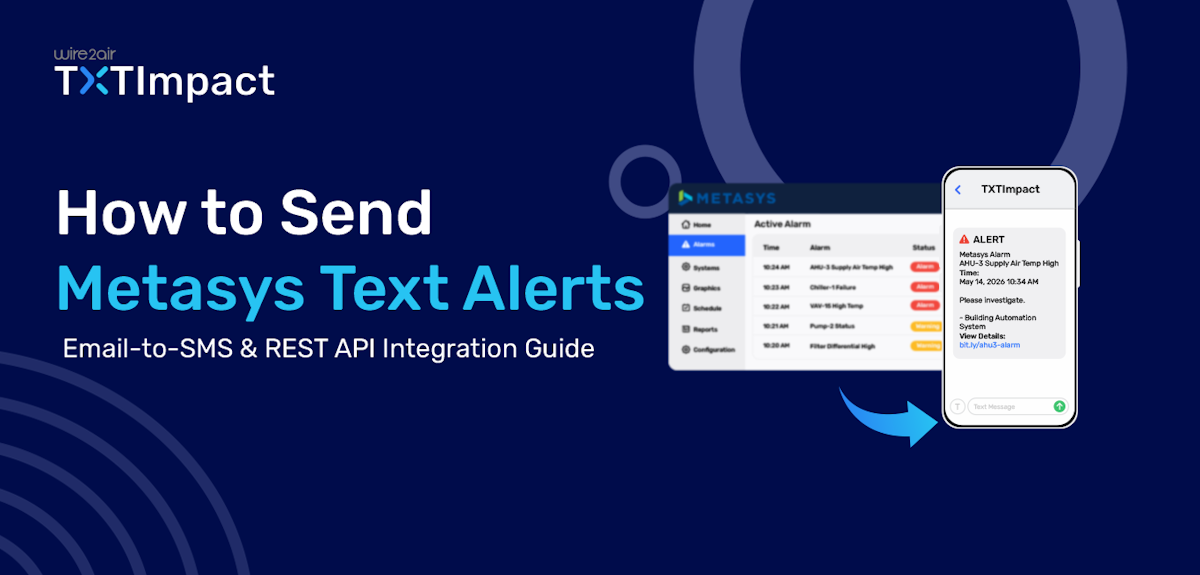
When critical building systems experience failures or abnormal conditions, sending timely notifications to the right authorities is essential to prevent downtime, safety risks, and costly disruptions.
Metasys, Johnson Controls' building automation system, monitors and manages HVAC, energy, security, and other facility operations, generating alerts when issues require attention. While Metasys can send alarm email notifications, SMS alerts are much more powerful and provide a faster, more reliable way to reach maintenance teams, facility managers, and on-call staff.
In this guide, we’ll explain how you can easily integrate SMS notifications with your BMS or BAS systems via TXTimpact’s reliable email to sms and REST API options and deliver Metasys alerts directly to mobile devices.
Key Takeaways:
|
What are Johnson Controls Metasys Text Alerts?
Metasys primarily uses email notifications to alert users about alarms, events, or system conditions detected within the Metasys Building Automation System (BAS).
However, these notifications can also be delivered as text messages (SMS) by integrating Metasys with an Email-to-SMS gateway or an SMS API.
This allows maintenance teams, facility managers, and on-call personnel to receive critical alerts directly on their mobile phones when issues such as HVAC equipment failures, temperature threshold breaches, power outages, security incidents, or other operational disruptions occur.
By delivering notifications directly to mobile devices, Metasys text alerts help ensure that urgent issues are noticed and addressed quickly, reducing response times and minimizing potential downtime.
Why Send Metasys Alerts as SMS Instead of Email?
Here are the benefits of sending Metasys alerts as SMS instead of email:
- Higher visibility: Text messages appear directly on mobile devices, reducing the chance of alerts being overlooked.
- Faster delivery and response times: SMS messages are typically seen and acted upon more quickly than emails.
- No crowded inboxes: Critical SMS notifications don’t get buried among routine crowded email inboxes.
- Better support for on-the-go teams: Maintenance staff and on-call personnel can receive SMS alerts wherever they are.
- Ideal for urgent events: Particularly effective for HVAC failures, power outages, security incidents, and temperature threshold breaches.
- Reduced downtime: Faster awareness of issues helps teams respond before problems escalate.
- Enhanced business continuity: Helps organizations maintain smooth and uninterrupted building operations.
How Does Johnson Controls Metasys Send Alert Notifications?
Metasys follows a structured Remote notification process to detect critical events and communicate them to the appropriate personnel.
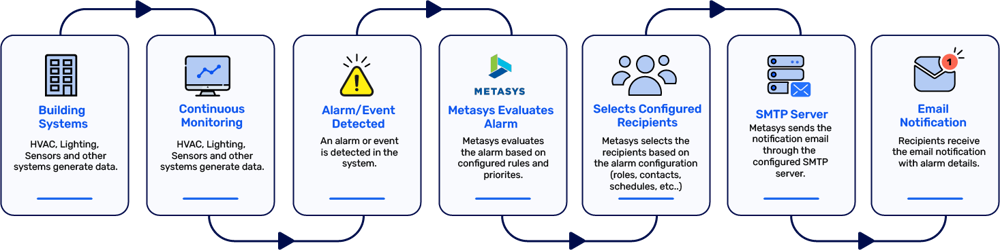
Johnson Controls Metasys continuously monitors connected building systems for alarms and critical events. When a predefined condition is detected, the system evaluates the alarm, identifies the configured recipients, and sends a remote notification.
By default, Metasys uses an SMTP (Simple Mail Transfer Protocol) server to deliver these notifications as emails to facility managers, technicians, or other designated personnel. Email is the platform's primary built-in notification method.
However, Metasys does not natively support SMS notifications. To receive alarms as text messages, organizations typically use one of these approaches:
- Email-to-SMS Gateway: Converts Metasys email alerts into SMS messages.
- REST API Integration: Uses the Metasys API to trigger SMS notifications through a dedicated business texting platform.
How to Send SMS Alerts from Metasys (Setup Guide)
There are two methods to send SMS alerts through Metasys: through an email-to-SMS gateway and through REST APIs. Let’s take a look at each one of them.
Method 1: Sending Metasys SMS Alerts Through TXTImpact’s Email-to-SMS
Email-to-SMS is one of the simplest and most cost-effective ways to enable SMS notifications for Metasys alerts. It leverages Metasys' existing email notification capabilities to deliver alarms as text messages without requiring custom development or REST API integrations.
In the past, many businesses relied on free carrier email-to-text gateways. However, most major U.S. carriers (AT&T, Verizon, T-Mobile etc.) have discontinued these services due to security, spam, and reliability concerns. As a reliable replacement, TXTImpact's Email-to-SMS service converts Metasys email alerts into SMS messages, ensuring critical notifications reach the right personnel quickly.
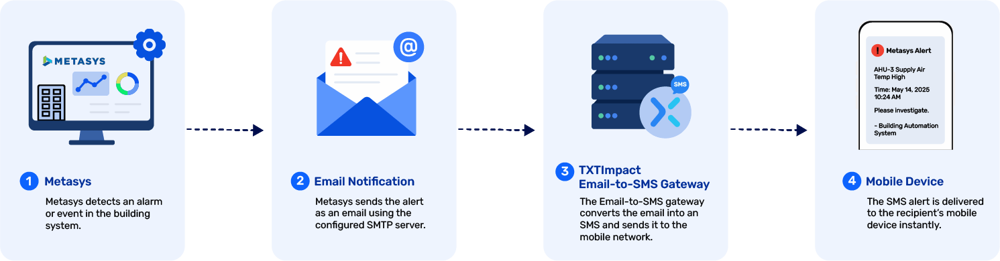
Here’s how Email-to-SMS works with Metasys remote notifications:
- Metasys detects an event or an alarm
- Metasys generates an email notification
- The email is sent to an Email-to-SMS gateway address
- The gateway converts the email into an SMS message
- The text message is delivered to the recipient's mobile phone
The TXTImpact’s email-to-SMS gateway follows a simple workflow:
Without additional software, coding, or carrier lookup, TXTImpact’s email-to-SMS allows you to send SMS directly from Metasys or any email client. All you need to do is follow the steps mentioned below:
The first step is to sign up for a TXTImpact account and complete your 10DLC registration quickly After that enable the Email-to-Text service. To do this, log in to your TXTImpact account, navigate to Features → Email to Text, and turn the service on.
- The first step is to sign up for a TXTImpact account and complete your 10DLC registration quickly and then enable the Email-to-Text service.
To do this, log in to your TXTImpact account, navigate to Manage Account →Click on Add User → Complete your Profile by adding username i.e. Sender email (email address that Tridium NIagara uses as its From Address.) → and fill up all the required details, plus do not forget to click on Enable Email to text service check box.
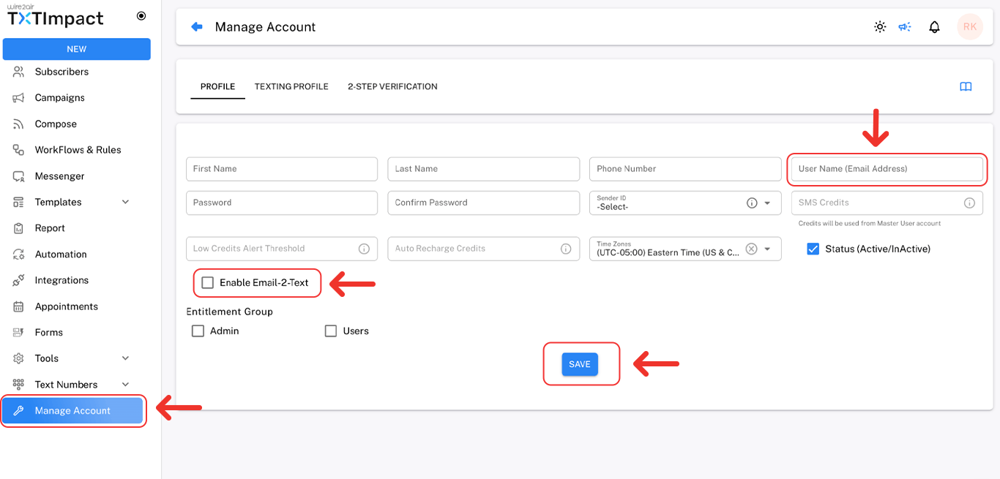
Next, register or add the email address that Metasys uses as its From address in TXTImpact. This whitelists the sender's email address. Otherwise, TXTImpact will reject the email, and no SMS messages will be delivered.
For more details Check out our detailed tutorial about sending email-to-SMS with TXTImpact.
Once TXTImpact is configured, set up Metasys Email Service using your SMTP server details, ensuring the From Address matches the whitelisted sender email.
Finally, configure the Email Recipient as [10-digit-phone-number]@text2email.net (for example, [email protected]).
You can get in touch with your BAS administrator or Book demo to learn how this works.
But before configuring Metasys Email Recipient alarm settings, make sure Johnsons Control Metasys is already configured to send email notifications, if not, configure its SMTP settings first and enable email notifications.
Now you are ready to set up Text notifications in Metasys.
- Navigate to Remote Notifications in the Metasys UI.
- Enter the Label or the name of the incident/alarm event.
- Set the priority of the alert.
- Assign email addresses or the recipients you want to send SMS notifications in the format [recipientsphonenumber]@text2email.net.
- Open the Email Settings section.
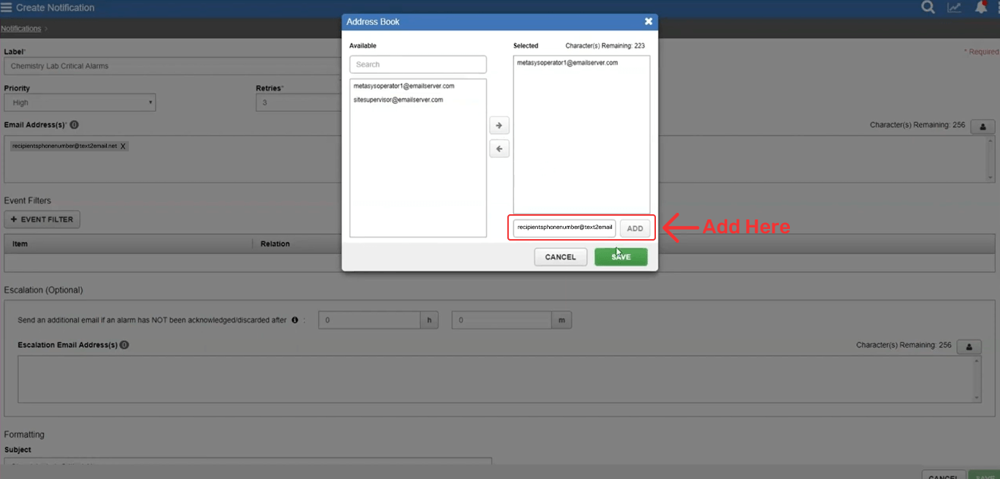
Add relevant Event Filters depending on the event status, priority, and authorization category.
Optionally configure Escalation, a second text after a set time if the first text isn't acknowledged (requires Alarm Ack Required set to True on the object).
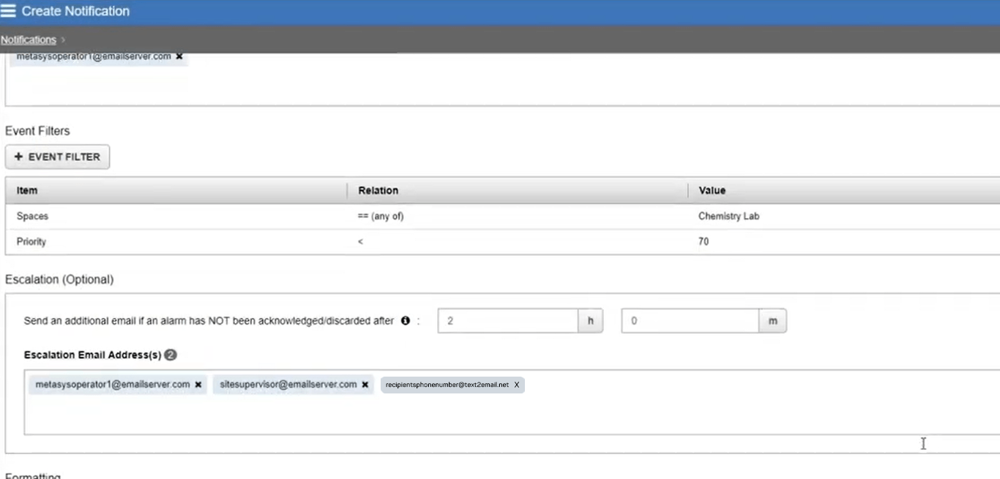
Under Formatting, trim the Include fields to keep messages short; Priority, Message, and Item Description are usually enough; every extra field risks the SMS getting split or truncated.
SAVE the configuration and verify that Metasys can successfully send outbound emails via the email-to-text gateway.
Before relying on the system for production alerts, send a test email. Testing helps identify configuration issues before a real emergency occurs.
Version Note: Johnsons Control Metasys is available in multiple versions, and the interface may differ depending on your deployment. Although menu names and screen layouts can vary, the overall process is generally the same: update the alarm recipient email address to your TXTImpact Email-to-SMS address. If you need help locating the appropriate settings, contact your BAS administrator or the TXTImpact team. |
👉 Important: In Case If you want to receive alerts on WhatsApp instead of SMS, you can use our Email-to-WhatsApp service too. |
Method 2: How to Send Metasys Text Alerts Using REST API
For organizations that require greater reliability, scalability, and control over their alerting workflows, REST API integration is often the preferred approach.
Instead of relying on email notifications and gateway conversions, a REST API allows Metasys events to be sent directly to an SMS platform, which then delivers text messages to the appropriate recipients in real time.
It enables advanced capabilities such as automated alert routing, delivery tracking, escalation workflows, custom message formatting, and integration with other business systems.
TXTImpact offers a programmable, developer-friendly REST API for delivery tracking, read receipts, message status updates, and incoming message handling.
Here’s how the REST API workflow works:
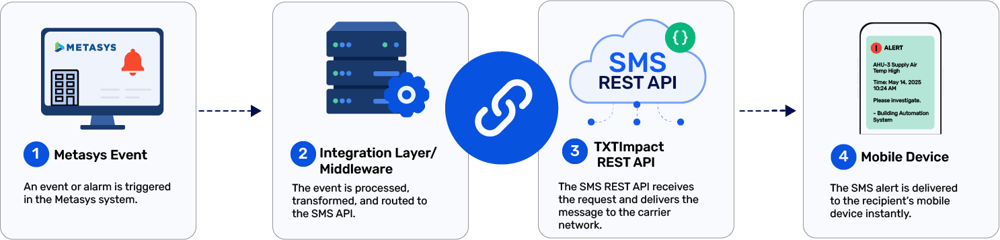
Unlike Email-to-SMS, which depends on email delivery and processing, API-based messaging provides a direct communication path, resulting in faster and more predictable message delivery.
Email-to-SMS vs. REST API: Which Method Is Best for Metasys Text Alerts?
Both Email-to-SMS and REST API integrations allow Metasys alerts to be delivered as text messages, but they serve different needs.
Email-to-SMS is the easier option to implement. It uses Metasys' existing email notification system to convert alerts into SMS messages, making it ideal for organizations looking for a quick, low-maintenance solution. However, delivery speeds and reporting capabilities may be limited.
REST API integrations provide a direct connection between Metasys and an SMS platform, enabling faster delivery, better reliability, delivery tracking, and advanced automation. While they require more setup, they are better suited for organizations that depend on real-time, mission-critical alerts.
Factor | Email-to-SMS | REST API |
Setup complexity | Low | Moderate |
Deployment speed | Fast | Moderate |
Coding required | No | Yes |
Delivery reliability | Good | Excellent |
Delivery tracking | Limited | Advanced |
Scalability | Moderate | High |
Automation | Basic | Advanced |
Best for | Small to mid-sized businesses | Large facilities and enterprises |
Common Metasys Alarm Notifications Worth Sending as SMS
Alarm notification type | Description |
HVAC Equipment Failures | Alerts maintenance teams when critical HVAC equipment such as chillers, boilers, or air handling units malfunction. |
Temperature Threshold Violations | Notifies staff when temperatures exceed predefined limits in sensitive environments like data centers, labs, or healthcare facilities. |
Security and Access Control Events | Alerts security teams about unauthorized access attempts, forced entries, or access control system issues. |
Generator and Backup System Failures | Alerts operators when backup power systems or generators experience faults or fail to activate properly. |
Fire and Life-Safety Alarms | Informs responsible personnel of fire alarms, smoke detection events, and other safety-critical incidents requiring urgent action. |
Power Outages and Utility Failures | Sends immediate alerts when power loss or utility disruptions impact building operations. |
Water Leaks and Environmental Alerts | Notifies maintenance staff of water leaks, flooding risks, humidity issues, or other environmental hazards. |
Critical System Faults | Reports controller failures, communication issues, network disruptions, or other faults affecting building system performance. |
Energy Consumption Anomalies | Identifies unusual energy usage patterns that may indicate inefficiencies or equipment problems. |
Metasys SMS Alerts Troubleshooting Tips
Despite proper configuration of the alerting system, occasional issues can affect SMS delivery. Here are some common SMS alerting issues and tips for troubleshooting them.
- Text alerts not being delivered: If texts are not being delivered, verify recipient phone numbers, API credentials, or email-to-SMS addresses. Also check whether the SMS provider is experiencing service disruptions.
- Delayed SMS alerts: Review SMTP server performance, network connectivity, or API response times that may be slowing message delivery.
- Missing critical alerts: Verify that alarm priorities and event filters include all events that should trigger SMS notifications.
- Incorrect recipients receiving alerts: Confirm notification rules, recipient groups, and distribution lists are added and configured correctly within Metasys.
- SMS content is truncated: Shorten SMS alerts and prioritize only essential information to ensure the content stays within SMS character limits.
- API integration failures: Review endpoint configurations, API logs, and error responses to identify connectivity or formatting issues.
- Email-to-SMS conversion failure: Confirm that emails are being sent successfully from Metasys and that the Email-to-SMS gateway address is configured correctly.
- Too many non-critical alerts: Refine alarm filters and notification rules to reduce alert fatigue and ensure only actionable messages are sent via SMS.
Best Practices for Metasys SMS Alerting
- Prioritize critical alarms: Reserve SMS notifications for high-priority events that require immediate action.
- Avoid alert fatigue: Limit unnecessary notifications to prevent important alerts from being overlooked.
- Use clear, concise messages: Include essential details such as the equipment name, alarm type, severity, and timestamp.
- Create escalation workflows: Automatically notify supervisors or backup personnel if critical alerts go unaddressed.
- Segment alert recipients: Route notifications to the appropriate teams based on alarm type and responsibility.
- Test alert workflows regularly: Verify that SMS notifications are delivered successfully.
Why choose TXTImpact for Metasys SMS alerts?
With more than two decades in the industry, TXTImpact has earned the trust of over 30,000 businesses through its reliable, robust, and value-for-money platform backed by innovative, custom, and concierge-level support that builds long-term business relationships.
TXTImpact helps organizations send Metasys notifications beyond email, delivering critical building alerts directly to mobile devices.
Whether you're using email-to-SMS or a REST API integration, TXTImpact provides the tools needed to ensure important alarms reach the right personnel quickly and reliably.
Here’s what makes TXTImpact an ideal email-to-SMS solution to send critical Metasys alerts:
- Email-to-SMS support: Easily convert Metasys email notifications into text messages without custom development.
- Robust REST API: Integrate Metasys with TXTImpact's SMS API for real-time alert delivery and advanced automation.
- Reliable message delivery: Ensure critical alarms reach maintenance teams, facility managers, and on-call staff without delay.
- Multi-recipient alerting: Send notifications to multiple users, departments, or escalation groups simultaneously.
- Automated alert routing: Route alerts to the appropriate personnel based on alarm type, severity, or location.
- Delivery reporting: Track message status and confirm whether alerts have been successfully delivered.
- Scalable messaging infrastructure: Support alerting needs across single facilities, multi-site operations, and enterprise environments.
- 24/7 alert accessibility: Keep teams informed wherever they are with direct mobile notifications.
By combining Metasys with TXTImpact's messaging capabilities, organizations can improve response times, reduce operational disruptions, and ensure critical building events receive immediate attention.
Conclusion
Metasys SMS alerts help businesses respond faster to critical building events, reducing downtime and improving operational efficiency.
Whether you choose email-to-SMS for its simplicity and quick deployment or REST API integration for greater reliability and automation, both methods ensure important alerts reach the right people when they matter most.
By prioritizing critical notifications, following alerting best practices, and using a reliable SMS platform, facility teams can stay informed and take timely action on HVAC failures, power outages, security incidents, and other urgent events.
TXTImpact helps businesses seamlessly send Metasys notifications to mobile devices and build a more responsive, reliable alert management system without any coding requirement. Start a free trial if you’re looking for a reliable email-to-SMS solution or contact us to learn more.
FAQs
♦ Can Metasys SMS alerts be sent to multiple recipients simultaneously?
Yes. Metasys alerts can be configured to notify multiple maintenance teams, supervisors, or on-call personnel simultaneously through Email-to-SMS or API integrations.
♦ Can I create different notification rules for different alarm types?
Yes. Metasys allows administrators to configure separate notification rules based on event type, severity, equipment, or user group.
♦ How often should Metasys SMS alert configurations be tested?
It's recommended to test alert workflows at least quarterly and after any major system changes to ensure notifications are delivered correctly.
♦ What information should be included in a Metasys SMS alert?
A good alert should include the equipment name, alarm type, severity level, location, and time of occurrence so recipients can quickly assess and respond to the issue.
♦ Can SMS alerts help meet facility compliance and operational requirements?
Yes. Real-time SMS notifications can support faster incident response, improve operational accountability, and help organizations maintain service-level and compliance standards.
About the Author:
 | Rahul Kumar (Marketing Specialist) Rahul Kumar is a Digital marketer with 7+ years of experience in SEO, AEO,SMS marketing, WhatsApp marketing, SaaS, and WordPress. He has led successful growth campaigns for startups and tech brands, combining data-driven strategies with compelling content. His work has been featured on top SaaS blogs, and he’s known for turning complex ideas into high-converting digital strategies. |