How to Send SMS Alerts from Honeywell Alerton Compass BAS (2026 Guide)
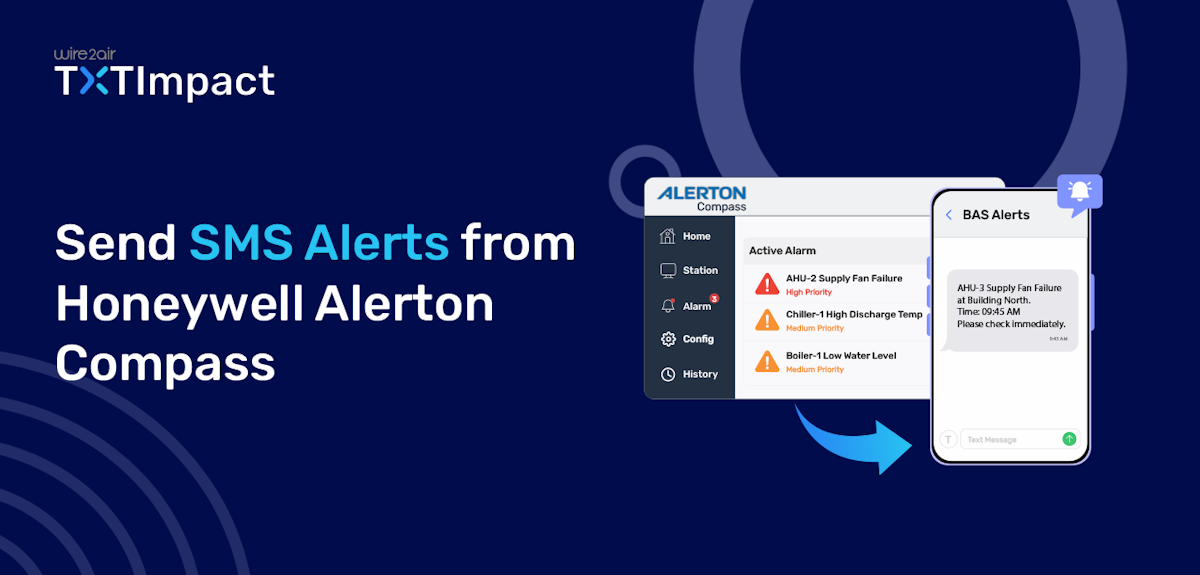
Honeywell Alerton Compass is a widely used building automation system (BAS) that helps facility teams monitor HVAC equipment, manage alarms, analyze trends, and maintain building performance from a centralized interface.
In facilities that rely on Honeywell Alerton Compass BAS, alarms are commonly delivered through workstation alerts or email notifications. Many Compass deployments are already configured to send email notifications whenever critical events occur.
However, emails can be overlooked, delayed, or buried in crowded inboxes. SMS alerts provide a faster and more direct way to notify operators of urgent events.
In this guide, we’ll learn how to send SMS alerts from Honeywell Alerton Compass BAS using an email-to-SMS solution or an API Integration, enabling quicker response times and reduced equipment downtime without complex integrations or additional hardware.
Key Takeaways:
|
Why SMS Alerts Matter for Critical HVAC & Building Alarms?
In modern facilities, even a minor HVAC or building system issue can quickly escalate into a costly and major problem if it is not addressed in time. These systems often rely on email notifications to send critical alerts, but the effectiveness of these alarms depends on how quickly the right personnel are informed.
SMS alerts matter in such situations, as they provide a direct, immediate communication channel that helps ensure critical alerts reach technicians, facility managers, and on-call staff wherever they are.
Unlike emails, which can be delayed or overlooked in crowded inboxes, SMS messages are typically read within minutes of delivery, enabling faster response and resolution.
For facilities such as hospitals, manufacturing plants, schools, data centers, and commercial buildings, every minute of downtime can have operational and financial consequences. By delivering alarms directly to mobile phones, SMS notifications help organizations:
- Respond to critical issues faster
- Reduce equipment downtime and service disruptions
- Minimize damage caused by unresolved faults
- Improve after-hours and weekend monitoring
- Ensure on-call personnel never miss urgent alarms
- Enhance overall building reliability and operational efficiency
When integrated with Honeywell Alerton Compass, SMS alerts enhance existing alarm workflows by providing real-time visibility into critical events, helping facility teams take quick action before small issues become major problems.
Why Traditional Carrier Email-to-SMS No Longer Works
Many Honeywell Alerton Compass users previously relied on free carrier Email-to-SMS gateways to receive alarm notifications as text messages. However, this method is no longer a reliable option for critical building alerts.
The process was simple: Compass would send an email to a carrier-specific address (such as a phone number followed by a carrier domain), and the carrier would forward that email as an SMS message to the recipient's phone.
Here’s how the old workflow with carrier gateways worked:
Honeywell Compass Alerts → SMTP email → [email protected] → SMS sent
While this approach was convenient and cost-effective, it has become increasingly unreliable in recent years. Many mobile carriers, including AT&T, Verizon, and T-Mobile, have reduced support for Email-to-SMS services, imposed stricter filtering policies, or discontinued the service altogether.
As a result, organizations that still depend on carrier gateways often experience missed alerts, delayed messages, and inconsistent delivery.
Here are some factors that contributed to the decline of traditional carrier Email-to-SMS services:
- Carrier shutdowns: Many major carriers have discontinued or limited Email-to-SMS gateway services.
- Spam filtering: Legitimate alarm emails can be blocked or filtered out.
- Unreliable delivery: Messages may be delayed, dropped, or never delivered.
- No delivery visibility: There is no way to track message status or troubleshoot failures.
- Difficult to manage: Supporting multiple carriers across multiple recipients can become cumbersome.
This is why organizations need a more dependable solution, especially for critical HVAC and building alarms. Dedicated Email-to-SMS services offered by platforms like TXTImpact provide reliable SMS delivery while allowing Compass to continue using its existing email notification workflow.
Two-way to Send SMS Alerts From Honeywell Alerton Compass
There are two methods to send SMS alerts through Honeywell Alerton Compass: via the TXTImpact email-to-SMS gateway and via the REST API. Let’s take a look at each one of them.
Method 1: TXTImpact Email-to-SMS Gateway (Recommended)
TXTImpact provides a dedicated email-to-SMS service that converts Compass alarm emails into SMS messages and delivers them directly to designated recipients.
Unlike carrier gateways, TXTImpact is designed for business-critical notifications and offers reliable delivery, centralized recipient management, distribution lists, and support for multiple carriers and locations. Here’s how the new workflow with Honeywell Compass alerts works with TXTImpact’s email-to-SMS:
Honeywell Compass alerts → Alarm email → TXTImpact email-to-SMS gateway → SMS → Maintenance team
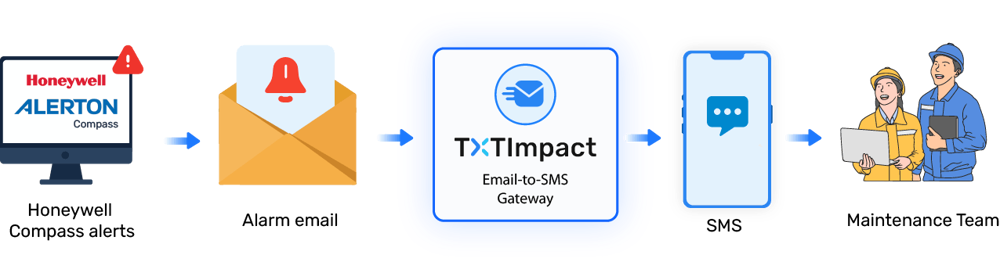
Without any coding expertise, custom programming, GSM modem, or hardware installation, TXTImpact’s email-to-SMS works with any email client or SMTP system, eliminating configuration complexity.
Let’s get into configuring SMS alerts for Alerton Compass through email-to-SMS:
- Before configuring SMS alerts, it’s important to confirm that Alerton Compass is successfully generating and sending alarm emails. Verify whether alarm notifications are enabled, SMTP settings are configured correctly, and recipients are receiving emails. If your email alarm notifications are already configured, you can skip this step and proceed to the next step.
- The first step is to sign up for a TXTImpact account and enable the Email-to-Text service. To do this, log in to your TXTImpact account, navigate to Manage Account →Click on Add User → Complete your Profile by adding username i.e. Sender email (email address that Alerton Compass uses as its From Address.) → and fill up all the required details, plus do not forget to click on Enable Email to text service check box.
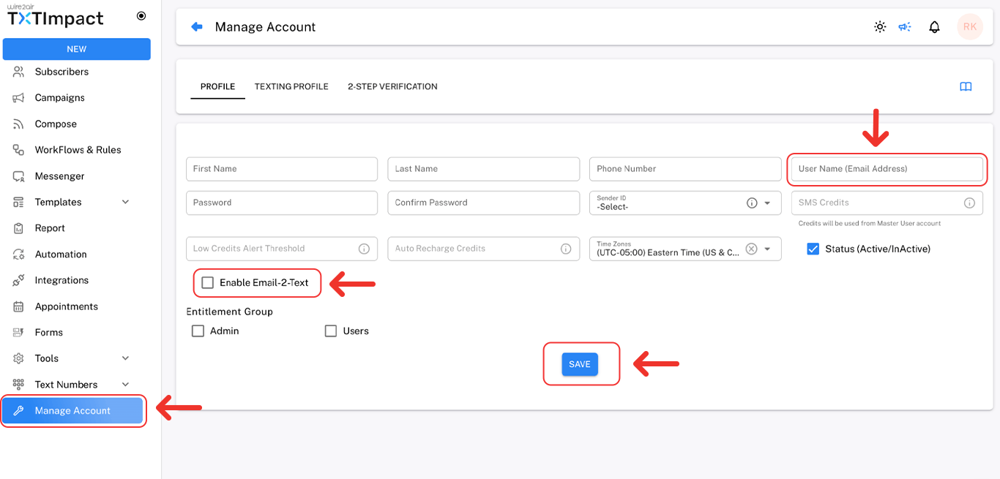
Adding the email address that Alerton Compass uses as its From address in TXTImpact whitelists the sender's email address. Otherwise, TXTImpact will reject the email, and no SMS messages will be delivered.
For better understanding Check out our detailed tutorial given below or Book demo with us and learn how to configure TXTImpact for Email to text.
- Once TXTImpact is configured, set up Alerton's EmailService using your SMTP server details, ensuring the From Address matches the whitelisted sender email.
- Finally, configure the Email Recipient of Alerton Compass and add [10-digit-phone-number]@text2email.net (for example, [email protected]) to start receiving text alerts.
📝 Note: Alerton Compass is available in multiple versions, and the user interface may vary depending on your deployment. However, the overall process remains the same: update the recipient's email address in your alerton compass alarm configuration with TXTimpact’s [email protected] format. If you're unsure where to find these settings, contact your BAS administrator or our TXTImpact support team for assistance. |
- Not every BAS event needs an SMS. It’s important to reserve SMS alerts for high-priority conditions that require immediate attention. So, the next step is to identify the alarms that should trigger SMS notifications. Examples include power outages, chiller or boiler failures, AHU shutdowns, water leak detection, high- and low-temperature alarms, etc.
- After configuration is complete, trigger a test alarm to verify the SMS workflow and ensure that the notification reaches the intended recipients. Regular testing helps ensure your notification process remains reliable when real emergencies occur.
👉 In Case If you want to receive alerts on WhatsApp instead of SMS, you can use our Email-to-WhatsApp service. To learn more, contact us or book a demo. |
Method 2: TXTImpact SMS API
For organizations that need more flexibility than a standard email-to-SMS solution, TXTImpact also offers an SMS API Integration. Instead of converting alarm emails into SMS, the API allows applications, middleware, or integration platforms to send SMS messages directly through TXTImpact.
This approach is typically used when businesses want greater control over their message content and escalation workflows. The programmable SMS API also supports delivery tracking, read receipts, message status updates, and handling incoming messages.
The general workflow of TXTImpact’s REST API looks like:
Alerton Compass alarms → Integration/Middleware → TXTImpact SMS API → SMS delivered to mobile phone
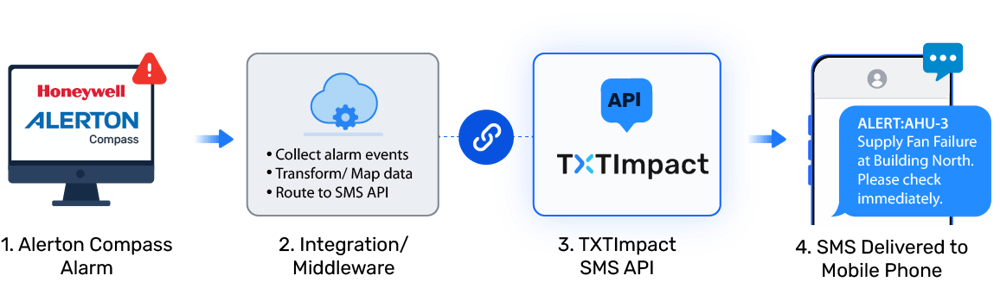
When a critical alarm occurs, the integration captures the event and sends the relevant alarm details to the TXTImpact API, which then delivers the SMS to the designated recipients.
Thus, unlike email-to-SMS, which relies on email servers and gateways, the SMS API provides a direct communication channel for sending text messages, making it ideal for businesses needing advanced automation, custom workflows, or enterprise integrations.
Common Alarm Notifications You Can Receive as SMS
Not every building automation event requires a text message. SMS alerts are most effective when reserved for high-priority alarms that need immediate attention from facility managers, maintenance teams, or on-call technicians.
With Honeywell Alerton Compass and TXTImpact, you can receive SMS notifications for a wide range of critical building and HVAC events, including:
Factor | Example SMS notifications | Why it matters |
HVAC Equipment Failures | Chiller failures, boiler faults, AHU shutdowns, VAV box issues, cooling tower alarms | Helps prevent equipment downtime and service disruptions. |
Power & Electrical Events | Power outages, UPS alarms, generator faults, electrical failures | Enables faster response to power-related disruptions. |
Communication Failures | Controller offline alerts, BACnet communication loss, network failures | Ensures visibility into BAS connectivity issues. |
High/Low Temperature Alarms | Server room overheating, freezer temperature issues, critical space temperature deviations | Protects occupants, equipment, and temperature-sensitive assets. |
Refrigeration & Cold Storage Alarms | Refrigeration equipment failures, cold room temperature excursions, freezer alarms | Protects perishable inventory and compliance requirements. |
Water Leak & Flood Detection | Water leak alarms, condensate overflow alerts, flood sensor alarms | Helps minimize property damage and repair costs. |
Fire & Life-Safety Events | Smoke control faults, fire system supervisory alarms, emergency ventilation issues | Supports rapid response to critical safety events. |
Security & Access Control Events | Unauthorized access attempts, critical door alarms, security system faults | Improves building security and incident awareness. |
Email-to-SMS vs SMS API: Which Should You Choose?
Depending on your business needs, you can choose between email-to-SMS and SMS API. Let’s learn the difference between the two.
Feature | Email-to-SMS | SMS API |
Coding required | No | Yes |
Uses existing email alarms | ✓ | Requires integration |
Setup time | Minutes | Moderate |
Automation flexibility | Limited | Extensive |
Best for | Existing Compass systems | Custom applications |
For most Honeywell Alerton Compass deployments, email-to-SMS is the simplest and fastest option. Since Compass already supports email alarm notifications, you can simply route those emails through TXTImpact and begin receiving SMS alerts without modifying your BAS configuration, writing code, or deploying additional software.
However, the TXTImpact SMS API is better suited for businesses that require advanced workflows, automation, custom message formatting, or centralized alert management across multiple systems.
Best Practices for BAS SMS Alerts?
Follow these best practices when sending BAS SMS alerts from Alerton Compass to help improve response times and reduce alert fatigue.
- Prioritize critical alarms: Reserve SMS alerts for events that require immediate attention, such as equipment failures, temperature excursions, power outages, water leaks, and communication failures. You can deliver less urgent notifications via email.
- Send alerts to the right teams: Ensure you route alarms to the teams responsible for handling them. For example, you can send HVAC faults to maintenance teams, while power-related alarms may be directed to facilities or electrical staff.
- Use consistent alarm naming: Standardized alarm descriptions make it easier for technicians and facility teams to identify and respond to issues quickly.
- Keep text messages clear and concise: When you send SMS alerts, recipients should be able to understand the issue at a glance. Ensure you include key details such as the alarm name, location, affected equipment, and security level for clarity.
- Create distribution groups: Use group notifications for critical alarms to ensure multiple team members receive the alert, reducing the risk of a single missed notification.
- Test alert delivery routinely: Schedule periodic SMS alert tests to verify that alarms are generated correctly and SMS notifications reach all intended recipients.
- Avoid alert fatigue: Most importantly, focus SMS notifications on actionable, high-priority events that genuinely require immediate response. Too many text messages can cause important alarms to be ignored.
Why Choose TXTImpact to Send Alerton Compass SMS Alerts?
TXTImpact is a leading business communications provider for over two decades in the industry, serving over 30,000 businesses across the globe.
Offering reliable, robust, custom, yet innovative services, TXTImpact streamlines business communications through its multichannel capabilities, delivering the best value for money.
When it comes to sending Alerton Compass SMS alerts, TXTImpact offers both an email-to-SMS service and a programmable, developer-friendly SMS API, helping businesses send the right alerts to the right personnel.
Here are the key capabilities of TXTImpact that make it an ideal email-to-SMS solution to send critical Alerton Compass alerts:
- Email-to-SMS service: Quickly convert Alerton Compass email alarms into SMS notifications without requiring custom development.
- REST API integration: Enable direct SMS delivery from Alerton Compass for faster, more reliable alerting and automation.
- Business-grade messaging: Designed to support operational, maintenance, safety, and facility management notifications.
- MMS support: Send longer alert SMS of up to 1,600 characters using MMS (consumes 2 text credits), allowing more alarm details to be included in a single notification.
- Delivery tracking: Monitor message delivery status to gain visibility into alert transmission and delivery outcomes.
- Reliable carrier delivery: Messages are routed through established carrier networks to support dependable notification delivery.
- Scalable deployments: Manage alerting across a single building, multiple facilities, or enterprise-wide Niagara environments.
TXTImpact's SMS capabilities with Honeywell Alerton Compass allow businesses to boost response times, reduce operational disruptions, and ensure critical building events receive immediate attention.
Conclusion
Honeywell Alerton Compass offers powerful alarm monitoring capabilities, but ensuring those alarms reach the right people at the right time is equally crucial. While email notifications remain a common alerting method, SMS alerts offer a faster and more reliable way to reach the right team.
Whether you choose TXTImpact's email-to-SMS gateway for quick deployment or its SMS API for advanced automation, both solutions enable real-time alert delivery without disrupting existing BAS operations.
Organizations can improve response times, reduce equipment downtime, and minimize operational risks by implementing SMS notifications and following alerting best practices.
TXTImpact allows businesses to seamlessly send Alerton Compass notifications to mobile devices and build a more responsive, reliable alert management system without any coding requirement. Start a free trial if you’re looking for a reliable email-to-SMS solution or contact us
to learn more.
💡 Also Read: How to Send text alerts from Tridium Niagara BAS?How to Send Text alerts from Johnsons Control Metasys BAS? |
Frequently Asked Questions
♦ Can Honeywell Alerton Compass send SMS alerts to multiple technicians at the same time?
Yes. Using TXTImpact, you can configure multiple recipients or distribution groups so critical alarms are delivered to entire maintenance or facility teams simultaneously.
♦ What happens if an alarm email fails to be sent from Compass?
Since Email-to-SMS relies on alarm emails, the SMS will not be generated if the email is not sent. Regular testing of SMTP and notification settings is recommended.
♦ Are SMS alerts suitable for multi-site building operations?
Absolutely, SMS notifications can be configured for multiple facilities, making it easier to monitor and respond to alarms across different locations.
♦ How often should Alerton Compass SMS alert configurations be tested?
Most facilities should perform test notifications at least quarterly, or whenever alarm workflows, recipient lists, or system configurations are updated.
♦ Can contractors or third-party service providers receive Alerton Compass SMS alerts?
Yes, external maintenance vendors, service contractors, and on-call technicians can be added as SMS recipients when appropriate.
About the Author:
 | Rahul Kumar (Marketing Specialist) Rahul Kumar is a Digital marketer with 7+ years of experience in SEO, AEO, SMS marketing, WhatsApp marketing, SaaS, and WordPress. He has led successful growth campaigns for startups and tech brands, combining data-driven strategies with compelling content. His work has been featured on top SaaS blogs, and he’s known for turning complex ideas into high-converting digital strategies. |