How to Send SMS Alerts from Distech Controls BAS (2026 Guide)
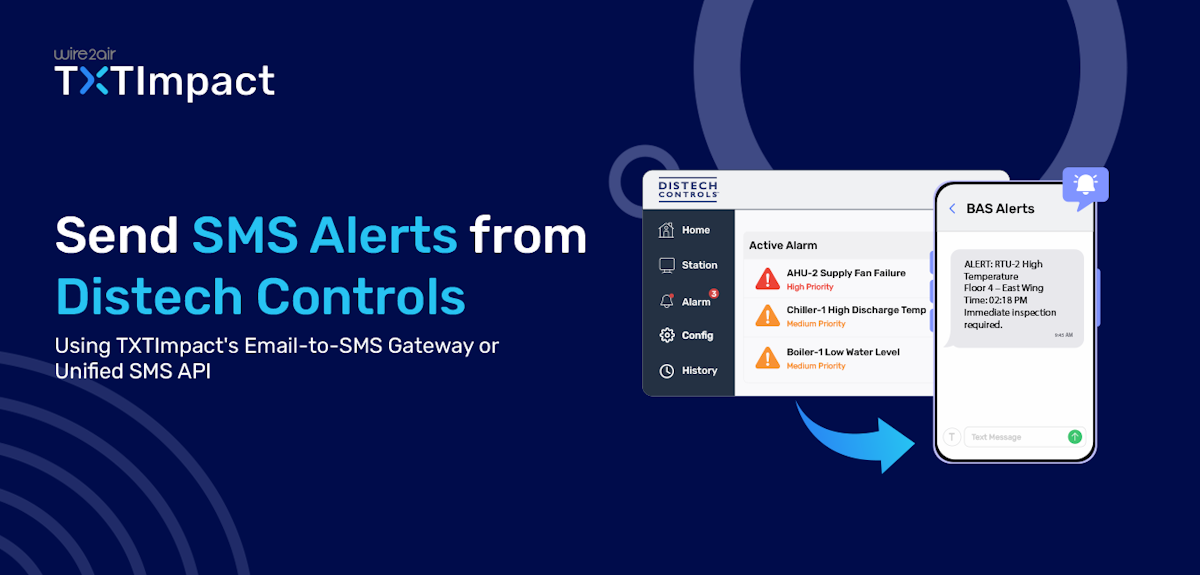
Building automation systems are designed to monitor and control critical building operations, but alarm notifications are only effective if they reach the right people at the right time.
While Distech Controls BAS can generate alarm emails for events such as HVAC failures, temperature excursions, power outages, and equipment faults, email notifications can easily be overlooked, delayed, or buried in crowded inboxes.
SMS alerts, on the other hand, offer a faster and more reliable way to notify technicians, on-call staff, and facility managers when immediate action is required.
In this guide, we'll explore how to send SMS alerts from Distech Controls BAS via an email-to-SMS solution, the benefits of text-based alarm notifications, and best practices to ensure critical alerts are never overlooked.
Key Takeaways:
|
Why SMS Notifications Matter For Critical HVAC & Building Alarms
Building Automation Systems (BAS) continuously monitor HVAC equipment, power systems, refrigeration units, pumps, and other critical infrastructure, but alarms and alerts are only effective when the right personnel are notified immediately.
Traditional email alerts can be delayed, overlooked, or lost in crowded inboxes, especially outside normal business hours. Facility managers and technicians may not constantly monitor email, which can lead to slower response times and prolonged equipment downtime.
SMS alerts provide a faster and more direct communication channel. Text messages are delivered directly to mobile devices and are typically read within minutes, helping maintenance teams respond to issues before they become major failures.
Key benefits of SMS alerts for building automation alarms include:
- Faster Response Times: Instantly notify technicians of critical alarms.
- Reduced Equipment Downtime: Address issues before they impact building operations.
- Improved Emergency Awareness: Ensure urgent alarms are seen during nights, weekends, and holidays.
- Lower Maintenance Costs: Early intervention can prevent expensive repairs and equipment damage.
- Better Occupant Comfort and Safety: Quickly resolve HVAC, temperature, ventilation, and safety-related issues.
- Enhanced SLA Compliance: Help facility teams meet response-time requirements and service commitments.
- Reliable Mobile Delivery: Reach on-call personnel wherever they are, without requiring access to email or a workstation.
Whether it's a chiller failure, high-temperature alarm, power outage, water leak, or communication fault, SMS alerts help ensure that critical building events receive immediate attention, minimizing operational disruptions and protecting both assets and occupants.
Can Distech Controls Send SMS Alerts Instantly?
The short answer is yes; Distech Controls alarms can be delivered as SMS alerts almost instantly, but most deployments do not provide native SMS messaging out of the box.
Distech Controls Building Automation Systems are designed to generate and manage alarms from connected HVAC, energy, lighting, and facility equipment. When an alarm occurs, such as a chiller fault, temperature excursion, power failure, or communication loss, the system typically triggers notifications via email, alarm consoles, dashboards, or integrated supervisory software such as EC-Net.
However, since SMS is not the primary notification method in many Distech Controls installations, organizations often use an email-to-SMS gateway or an SMS integration platform to convert alarm emails into text messages.
2 Ways to Send SMS Alerts From Distech Controls
There are two ways to send SMS alerts and notifications from Distech Controls: via the TXTImpact email-to-SMS gateway and via the REST API.
Method 1: How to Configure Distech Controls Text Alerts via Email Gateway (Recommended)
TXTImpact provides a dedicated email-to-SMS service that converts Compass alarm emails into SMS messages and delivers them directly to designated recipients.
Here’s how to setup TXTImpact’s email-to-SMS service to send Distech Controls notifications:
- The first step is to sign up for a TXTImpact account and enable the Email-to-Text service.
To do this, log in to your TXTImpact account, navigate to Manage Account →Click on Add User → Complete your Profile by adding username i.e. Sender email (email address that Distech Controls uses as its From Address.) → and fill up all the required details, plus do not forget to click on Enable Email to text service check box.
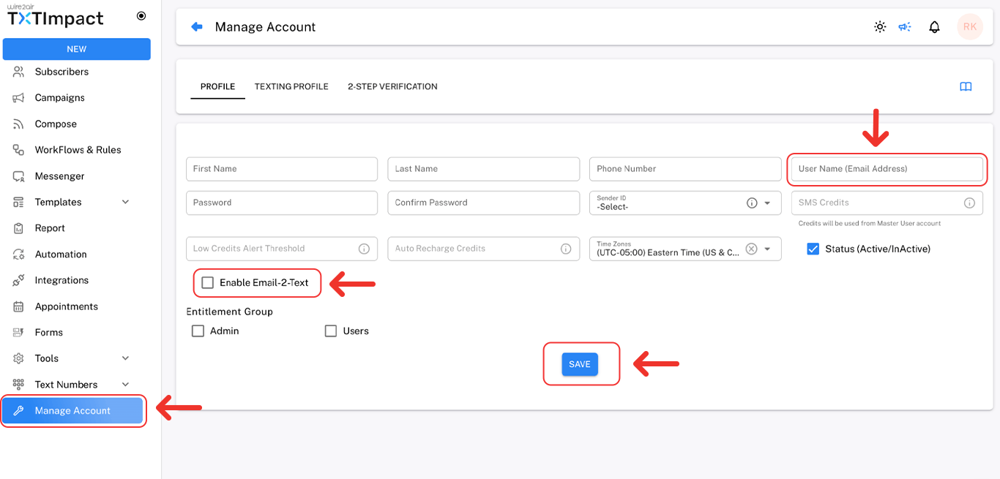
Similarly, complete the Texting Profile and check the Email-to-Text option to activate the service. Once enabled, you are ready to receive text alerts.
Adding the email address that Distech Controls uses as its From address or using it for registration in TXTImpact. This whitelists the sender's email address. Otherwise, TXTImpact will reject the email, and no SMS messages will be delivered.
For better understanding Check out our detailed tutorial:
Once TXTImpact is configured, set up Distech Controls Email Service using your SMTP server details, such as Hostname, Port, Username, Password and ensuring the From Address matches the whitelisted sender email.
You can also get in touch with your BAS administrator for SMTP settings and Book demo with us and learn how to configure TXTImpact for Email to text.
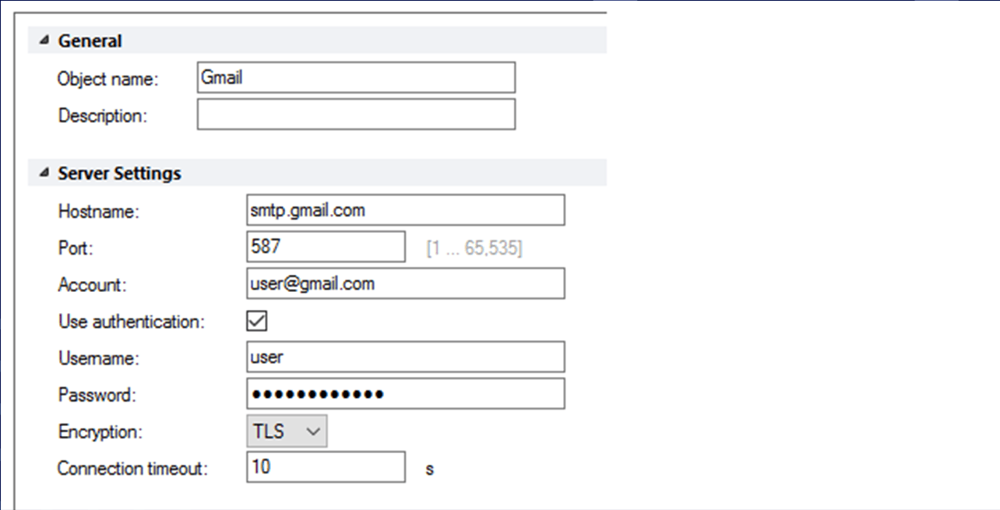
- Finally, configure the Email Recipient according to this format → [10-digit phone number]@text2email.net to convert the email into SMS notifications and send it to the designated phone number.
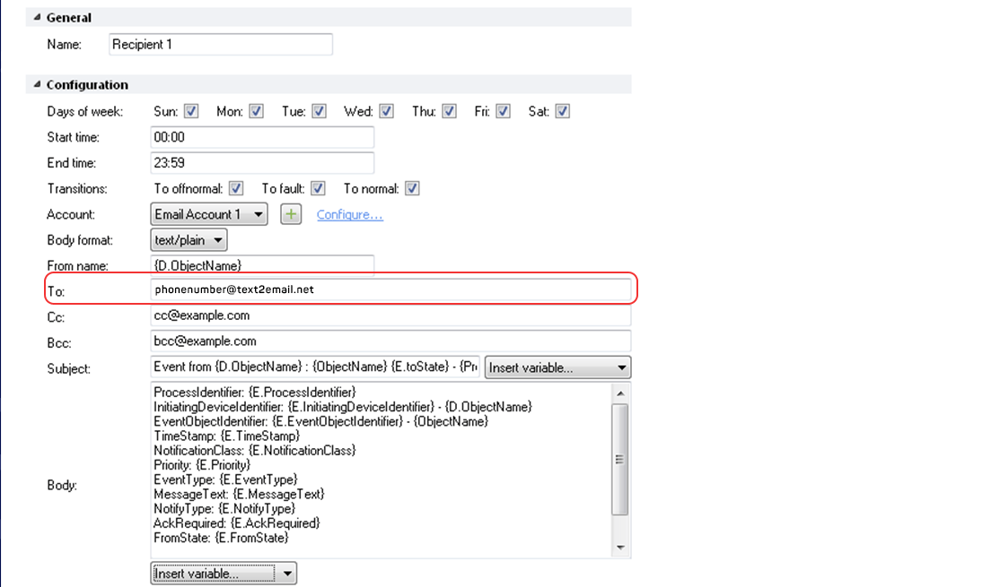
For example, in the above screenshot, make sure to add the TXTImpact configured email address [email protected] in the “To” field in the above configuration.
- Finally, trigger a test alarm to verify that the SMS was delivered correctly to the intended recipients.
You may encounter certain issues related to delivery failure or messages cut or shortened. Here are some troubleshooting tips for the same:
- No SMS delivery: Check SMTP configuration
- Cut message: Shorten message length or characters
- Unauthorized text: Whitelist sender address
- Email delivery failure: Check alarm wiring
👉 Important: In Case If you want to receive alerts on WhatsApp instead of SMS, you can use our Email-to-WhatsApp service too. |
Method 2: Send Distech Control Text Alerts Using REST API
Compared to an email-to-SMS service, it offers advanced capabilities, including alert routing, escalation workflows, custom message formatting, and integration with other business systems.
Instead of sending SMS notifications via an email server, the REST API enables real-time delivery and greater control over alert workflows by connecting Distech Controls directly to the SMS platform through API calls.
TXTImpact offers a developer-friendly, programmable SMS messaging API that also supports delivery tracking, message status updates, read receipts, and handling incoming messages.
Here’s how the REST API workflow works:
Distech Controls Alarm → Integration Layer/Middleware → SMS API → Mobile device
Unlike email-to-SMS, which relies on email servers and gateways, the SMS API provides a direct channel to send SMS messages, making it suitable for businesses with advanced automation, enterprise integrations, and custom workflow needs.
Email-to-SMS vs SMS API: What Should You Choose?
Here’s the difference between email-to-SMS and using an SMS API to send Distech Controls SMS notifications.
Feature | Email-to-SMS | SMS API |
Coding skills requirement | No | Yes |
Setup time | Minutes | Typically needs hours, but it’s instant within minutes with TXTImpact |
Uses existing email alarms | Yes | No |
Integration work requirement | No | Yes |
Customization | Basic | Advanced |
Automation flexibility | Limited | Extensive |
Best for | Most Distech Controls Deployments | Custom Applications & Enterprise Integrations |
Email-to-SMS is the recommended option for most Distech Controls installations because it works with existing alarm email notifications and requires little to no configuration changes. You simply need to route alarm emails through an email-to-SMS service, and they are delivered as SMS to the appropriate technicians or facility staff.
An SMS API is better suited for businesses that need advanced workflows, custom message formatting, integrations with CMMS or ticketing systems, or automated escalation logic. While it offers greater flexibility, it also requires development resources and ongoing maintenance.
What Types of Distech BAS Alarms Should Be Sent as SMS?
It’s not crucial to send every Distech BAS alarm as a text message. Sending too many SMS alerts can lead to alert fatigue, causing critical notifications to be overlooked.
Thus, as a best practice, SMS alerts should be reserved for high-priority alarms that require immediate attention to prevent equipment damage, safety risks, occupant discomfort, or operational disruptions.
Here are the types of Distech Controls BAS alarms that are typically the best candidates for SMS notifications:
Alarm type | Example alarm | Why it should be sent as SMS |
HVAC Equipment Failure | AHU failure, fan failure, compressor trip | Can quickly impact building comfort and equipment performance. |
Temperature Excursions | High or low room temperature | Can damage sensitive equipment, inventory, or occupied spaces. |
Power & Electrical Alarms | Power outage, UPS fault, generator failure | Immediate action may be required to maintain operations. |
Pump Failures | Chilled water pump or circulation pump failure | Can disrupt HVAC and building operations if left unresolved. |
Smoke & Fire System Alerts | Smoke detection, fire system fault | Critical life-safety events requiring immediate awareness. |
Refrigeration alarms | Freezer or cold storage temperature alarms | Protects temperature-sensitive products and assets. |
Security & Access Alarms | Unauthorized access, critical door alarms | Helps security teams respond to potential threats quickly. |
Controller or Network Failures | Controller offline, BACnet communication loss | May prevent proper monitoring and control of building systems. |
By limiting SMS alerts to these critical alarm categories, facilities ensure that urgent issues receive immediate attention while preventing unnecessary message overload and alert fatigue.
Best Practices When Sending Distech BAS SMS Alerts
Following these best practices is crucial when sending Distech Controls BAS SMS alerts to help improve response times.
- Prioritize life-safety and equipment-critical events such as HVAC failures, power outages, water leaks, and temperature excursions.
- Include key alarm details like building name, equipment ID, alarm type, and timestamp in every SMS alert.
- Create escalation paths so alerts are automatically sent to supervisors if the primary recipient does not respond.
- Send alerts to on-call personnel rather than large groups to reduce confusion and duplicate responses.
- Use clear, concise message formats that can be understood at a glance.
- Maintain and regularly update recipient lists to ensure alerts reach the correct technicians and facility managers.
- Test SMS notifications periodically to verify alarm routing and delivery performance.
- Review alarm thresholds regularly to minimize nuisance alarms and false notifications.
- Use SMS alongside email notifications for added visibility and redundancy.
- Standardize alarm naming conventions to help recipients quickly identify the affected system and location.
- Monitor delivery reports to confirm critical alerts are delivered successfully.
Why Choose TXTImpact to Send Distech Controls SMS Alerts?
TXTImpact is a highly reliable business communication service provider that converts Distech Controls alarm notifications into reliable SMS alerts without requiring complex integrations, custom development, or additional hardware.
With over 20 years in the industry, TXTImpact has served over 30,000 businesses across industries, meeting their business communications needs with high reliability, innovation, and customer satisfaction.
With major carriers such as AT&T, Verizon, and T-Mobile discontinuing their email-to-text gateways due to reliability, deliverability, security, and operational issues, choosing a dedicated, reliable messaging provider is of the utmost importance for businesses.
Whether you're managing a single building or a bunch of facilities, TXTImpact helps ensure critical alarms reach the right people quickly. Here are some reasons why you should choose TXTImpact to send critical SMS alerts:
- Simple email-to-SMS integration with your existing Distech Controls email alarm workflows.
- Doesn’t require custom scripts, API development, or specialized programming expertise.
- Reliable SMS API for custom integrations for organizations that need custom workflows
- Supports multiple recipients, enabling you to send the same alert to multiple team members, departments, or escalation groups simultaneously.
- Designed for operational and mission-critical communications where timely delivery matters.
- Easily manage notifications for multiple buildings, campuses, warehouses, or remote sites from a single platform.
- Supports messages up to 1,600 characters via MMS, enabling more detailed alarm information when needed.
With both email-to-SMS and SMS API options available with TXTImpact, organizations can choose the approach that best fits their Distech Controls deployment and notification requirements.
If you want to receive alerts on your preferred channel, like WhatsApp, you can also choose our Email-to-WhatsApp service, which helps send critical alarms and alerts to WhatsApp numbers. This is particularly useful if your employees/staff predominantly use WhatsApp for communication. Contact us to learn more.
Conclusion
Critical BAS alarms are only valuable if the right people receive them in time to take action. While Distech Controls BAS can effectively monitor HVAC systems and other building assets, relying solely on email notifications can lead to missed or delayed responses.
Whether you choose an email-to-SMS solution for quick deployment or an SMS API for advanced workflows, adding text messaging to your alarm strategy can significantly improve response times, reduce downtime, and enhance operational reliability.
TXTImpact provides both options for businesses to send seamless, quick Distech Controls SMS alerts via its email-to-SMS service and a developer-friendly REST API. With these services, businesses can build a more reliable and responsive alert management system for their communication needs.
Start a free trial if you’re seeking a reliable email-to-SMS solution or contact us to get started.
💡 Also Read: How to Send text alerts from Tridium Niagara BAS? |
FAQs
♦ Can I send Distech Controls alarms as text messages without changing my BAS configuration?
Yes. If your system already sends alarm emails, you can use an Email-to-SMS service to convert those emails into SMS alerts with minimal configuration changes.
♦ Can I customize the content of Distech Controls SMS alerts?
Yes, alerts can include details such as the building name, equipment ID, alarm type, severity level, and timestamp.
♦Can SMS alerts help reduce equipment downtime?
Yes. By notifying personnel immediately when critical alarms occur, SMS alerts enable faster response times and help prevent minor issues from becoming major failures.
♦ Do I need a GSM modem to send Distech Controls alerts?
No, an email-to-SMS solution eliminates the need for dedicated GSM hardware.
♦ Can I send Distech Controls SMS alerts to multiple technicians simultaneously?
Yes. SMS alerts can be configured to notify multiple recipients, departments, or escalation groups simultaneously.
About the Author:
 | Tejal Sushir (Content Writer) Tejal Sushir is a content writer with 4+ years of experience writing fresh and insightful content for B2B SaaS companies. She has delivered top-performing and top-ranking blogs in the SMS marketing, Digital Marketing, web hosting, AI & ML, cybersecurity, WordPress, HR Tech, and technical SEO domains. Her meticulous research when writing content ensures industry expertise and keeps up with emerging trends. |