Text-2-Win
Boost sales, enhance brand awareness, foster loyalty, and elevate customer acquisition through Text-To-Win Sweepstakes.

Text-2-Win
Boost sales, enhance brand awareness, foster loyalty, and elevate customer acquisition through Text-To-Win Sweepstakes.
Features of The Campaign
Choose Your Date
Run instant-win campaigns or manually
select winner at a later date.
Change Winner Rate
Control number of winners depending
on what is being given away.
Multi-Media Capabilities
Send mobile coupons, picture, or Video message along to winners or losers.
Date Variability
Set start and end dates for
your campaign.
Information Capturing
Capture e-mail addresses, names,
and/or ZIP codes.
Sectioned-Off Contests
Activate age and location
Qualification Gate.
Who Can Use Text Giveaways?
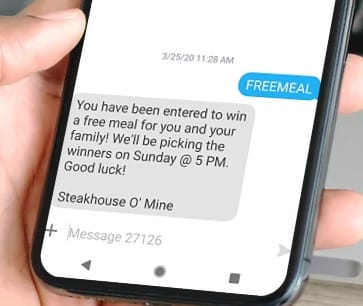
Restaurants
Restaurants can use giveaways to build their texting list for giving out daily specials at a later time.
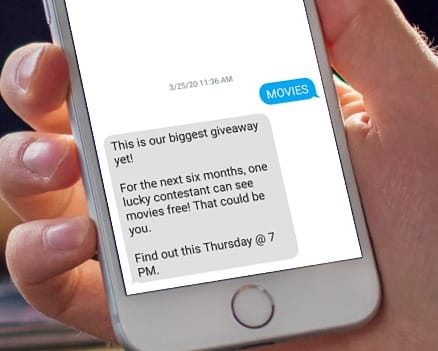
Movie Theaters
Movie theaters can use the text giveaway to start a texting list that can let customers know all about promotions and new movies coming out.
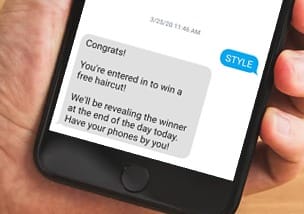
Salons
Salons are great for giveaways because building a texting list for them means building a clientele grouping that will keep coming back.
Discover other SMS Marketing Features
TXTImpact's SMS Marketing solutions : Affordable, Smart, Engaging. Elevate your brand with targeted, automated campaigns for business growth.
An Autoresponder (Text Auto-Reply) allows customers to request real-time business or product information via a text message.
Contact collection via a "text-to-join" campaign is an easy to implement marketing tactic feature which allows mobile users to opt-in to a text marketing list. Collect name, email address, and zip code using this feature
Import your existing clients' contacts from CSV or Excel. Option to remove any invalid or landline numbers from the list.
Plan and schedule your mass texting campaign. Scheduling a text message or SMS marketing message is just as easy as sending them.
Personalizing helps businesses sell products and feel more connected to the customer.
Website Signup Widgets allow you to collect mobile numbers, names, and email addresses from the visitors of your website
Do you stay on the road away from the computer most of the time? Enable send from phone option for your lists and send a text/MMS message directly from your phone.
Use trackable short links in your text messages and see which users were clicking which links.
Send text messages up to 1000 characters combined with pictures, videos, speech, and audio for the ultimate messaging experience.
With the TXTImpact Social Connect feature, when you send an SMS or MMS message to your audience either from online or from your phone.
Send unique coupons to your customers through text messages, increasing loyalty, and customer satisfaction.
Collect birthdays using the TXTImpact text to join campaign and our system will automatically send your customers birthday text messages, picture messages, and greeting cards!
The drip messages will release a series of text or picture messages to a customer within minutes, hours, or days from the opt-in time.
Stay in compliance, add age-gate to your text to win campaigns to target only those who meet the age requirement.
Create subscriber segments based upon subscriber’s data like area code, date subscribed, date of birth, age, and any of the custom fields.
The TXTImpact Mobile Engagement Platform supports emojis across all campaigns and all triggered messages.
Customers can request sales flyers, deals, or coupons from stores near their location.
Text to Win FAQ's
How do people enter text contests?
People can enter a text contest by sending a keyword to a specific phone number (short code or long code) provided by the business. For example, a user might text the word “WIN” to 27126 to enter a giveaway.
With TXTImpact’s Text-to-Win feature, businesses set up a unique keyword and promote it through marketing channels. When users text the keyword, they’re automatically added to the contest list and receive an instant confirmation message. Optionally, businesses can collect additional information (like name or email) through follow-up messages. All entries are tracked, and winners can be selected manually or at random from the TXTImpact dashboard.
How are winners selected in a TXTImpact's Text to Win contest?
TXTImpact offers two ways to select winners:
Randomly using the built-in "Pick a Winner" tool.

Manually by downloading the list of entrants and choosing a winner offline.
You can even set automatic instant-win logic where the system notifies winners in real time (e.g., every 100th entry wins).
Can someone enter multiple times in Text-to-win contest?
By default, TXTImpact allows only one entry per mobile number to keep contests fair. However, you can adjust settings to allow daily, weekly, or multiple entries, depending on your campaign rules.
Can I collect more info after someone enters (like name or email)?
Yes. TXTImpact supports data collection flows. After a user enters, you can send automated follow-up messages asking for:
All responses are linked to the user’s phone number.
How will participants know if they’ve won?
Winners can be notified in several ways:
-Immediately, through an auto-response like: “🎉 Congrats! You’ve won!”
Can I run multiple contests at the same time?
Absolutely. TXTImpact supports multiple keywords, so you can run several contests simultaneously—each with its own rules, autoresponders, and reporting.
What kind of reports do I get?
TXTImpact provides detailed real-time reports on:
Ready to get started 🎉
Contact us or sign up for a free trial now.