Make your messages more engaging and emotion-evoking with the power of emojis
Gain attention of customers using emojis!
Make your messages more engaging and emotion-evoking with the power of emojis
Gain attention of customers using emojis!
How Are Brands Using Emojis?
Brands use emojis more to gain attention or evoke an emotion.
A text message with emojis is an eye-catcher, so getting someone's attention using emojis makes texting easier.
In the year 2017, the use of emojis has grown 20% in marketing campaigns.
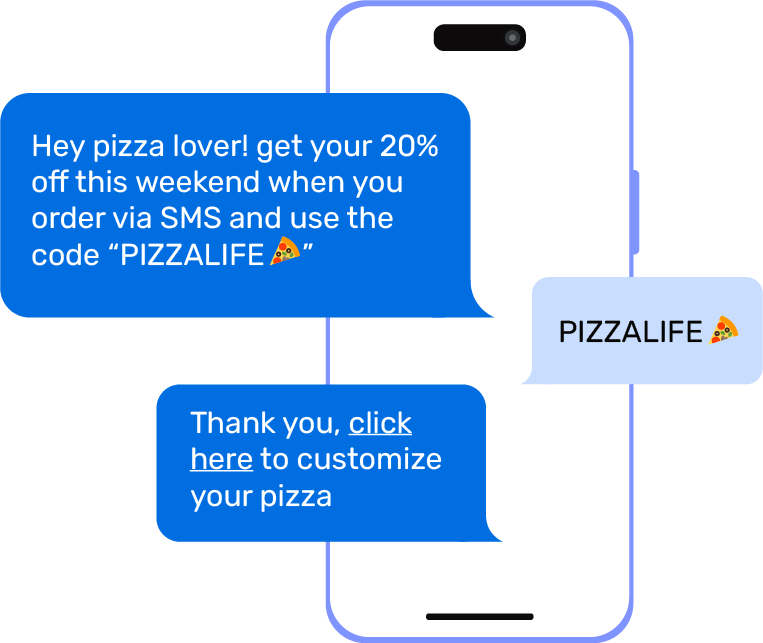
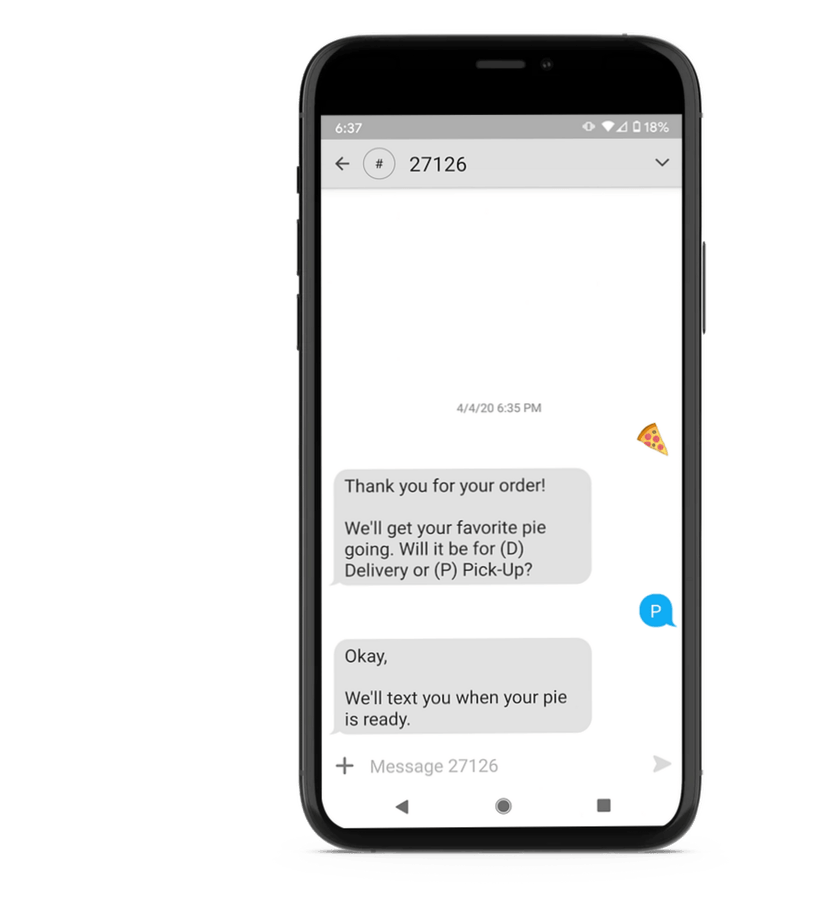
Domino’s generated a lot of excitement among pizza eaters when, with the help of some mysterious pizza emoji, it announced the introduction of text-emoji ordering.
It allowed its customers to order a pie with just an emoji.
SMS Marketing Features
An Autoresponder (Text Auto-Reply) allows customers to request real-time business or product information via a text message.
Contact collection via a "text-to-join" campaign is an easy to implement marketing tactic feature which allows mobile users to opt-in to a text marketing list.
Instantly reach customers, employees, or any large audience worldwide. Simple and easy to use Mass Texting software.
Plan ahead and schedule your mass texting campaign. Scheduling a text message or SMS marketing message is just as easy as sending them.
Website Signup Widgets allow you to collect mobile numbers, names, and email addresses from the visitors of your website
Use trackable short links in your text messages and see which users were clicking which links.
Send text messages up to 1000 characters combined with pictures, videos, speech, and audio for the ultimate messaging experience.
The drip messages will release a series of text or picture messages to a customer within minutes, hours, or days from the opt-in time.
A Short Code is a 5-6 digit code that can be a number or stand for your brand name or service.
FAQ
How many characters are allowed in my message when I use emojis?
A single message with emojis is limited to 70 characters as opposed to a standard text message of 160 characters. Most emojis take up 2 characters in the 70 character message, while some take up 4 characters in the 70 character message.
How do I enter an emoji in my message? Windows 10
Look for the keyboard icon in the Windows taskbar in the lower-right corner to bring up the Windows Touch Keyboard. Then click on the face to the left of the space bar and to the right of the Ctrl button in the Windows Touch Keyboard.
How do I enter an emoji in my message? Windows 8
You’ll want to add a keyboard button to your Taskbar by right-clicking anywhere on it and hovering over Toolbars. Next select, Touch Keyboard in the menu. Now you should have a Touch Keyboard button in your Taskbar. Just click on that button and you can access emoji on Windows 8.
Discover all other SMS Marketing Features
TXTImpact's SMS Marketing solutions : Affordable, Smart, Engaging. Elevate your brand with targeted, automated campaigns for business growth.
An Autoresponder (Text Auto-Reply) allows customers to request real-time business or product information via a text message.
Contact collection via a "text-to-join" campaign is an easy to implement marketing tactic feature which allows mobile users to opt-in to a text marketing list. Collect name, email address, and zip code using this feature
Import your existing clients' contacts from CSV or Excel. Option to remove any invalid or landline numbers from the list.
Plan and schedule your mass texting campaign. Scheduling a text message or SMS marketing message is just as easy as sending them.
Personalizing helps businesses sell products and feel more connected to the customer.
Website Signup Widgets allow you to collect mobile numbers, names, and email addresses from the visitors of your website
Do you stay on the road away from the computer most of the time? Enable send from phone option for your lists and send a text/MMS message directly from your phone.
Use trackable short links in your text messages and see which users were clicking which links.
Send text messages up to 1000 characters combined with pictures, videos, speech, and audio for the ultimate messaging experience.
Text To Win sweepstakes is a great option for SMS Marketing which involves your prospects and customers in a fun way.
With the TXTImpact Social Connect feature, when you send an SMS or MMS message to your audience either from online or from your phone.
Send unique coupons to your customers through text messages, increasing loyalty, and customer satisfaction.
Collect birthdays using the TXTImpact text to join campaign and our system will automatically send your customers birthday text messages, picture messages, and greeting cards!
The drip messages will release a series of text or picture messages to a customer within minutes, hours, or days from the opt-in time.
Stay in compliance, add age-gate to your text to win campaigns to target only those who meet the age requirement.
Create subscriber segments based upon subscriber’s data like area code, date subscribed, date of birth, age, and any of the custom fields.
Customers can request sales flyers, deals, or coupons from stores near their location.
Ready to get started 🎉
Contact us or sign up for a free trial now.