RCS Approval Guide: Carrier Requirements, Brand Verification & How to Get Approved Faster
RCS is one of the most integral evolutions in the business messaging industry, offering brands a secure, branded, and interactive communication medium compared to SMS. With features like rich media, branded sender profiles, carousels, read receipts, and suggested replies, RCS delivers highly engaging, app-like experiences within customers’ native messaging applications.
While launching and implementing Bulk RCS campaigns might seem more complicated than SMS, it’s not really. It does involve a few verification and approval steps, but getting an RCS agent registered with the carrier is essentially the same as getting toll-free or 10DLC numbers approved.
Additionally, to ensure high security and prevent risks from spam, phishing, and fraudulent messaging, RCS operates within a tightly governed ecosystem that requires businesses to undergo a formal approval process before sending RCS messages.
This blog dives deep into the step-by-step process of RCS approval, its importance, requirements, and best practices to enable a compliant and secure RCS messaging campaign.
Jump to: |
Understanding RCS Messaging Approval: What Is It?
While Business texting or SMS marketing require mandatory 10DLC registration with minimal pre-validation, RCS business messaging is built around trust and transparency, with additional security and approval layers.
RCS approval is a mandatory review and verification process that requires businesses and brands to complete before sending RCS messages. The process requires businesses to verify their brand, intended use cases, and message templates with carriers, often in collaboration with Google or service providers.
Every RCS message is tied to and associated with a verified business profile, known as an RCS Agent, which displays the brand name, logo, and other business details.
The RCS approval process validates this brand identity, ensuring it has permission to message users and that it follows compliance and carrier policies.
RCS Carrier Support Across North America and Canada
RCS adoption has significantly increased worldwide, with major carriers supporting this advanced business messaging service, especially since iOS 18 supported RCS.
In the United States, North America leads RCS enterprise adoption, with major mobile carriers and operators, including AT&T, Verizon, T-Mobile, and US Cellular, offering and supporting RCS messaging.
In addition to these main carriers, several prepaid carriers and MVNO (Mobile Virtual Network Operator) brands also support RCS for businesses.
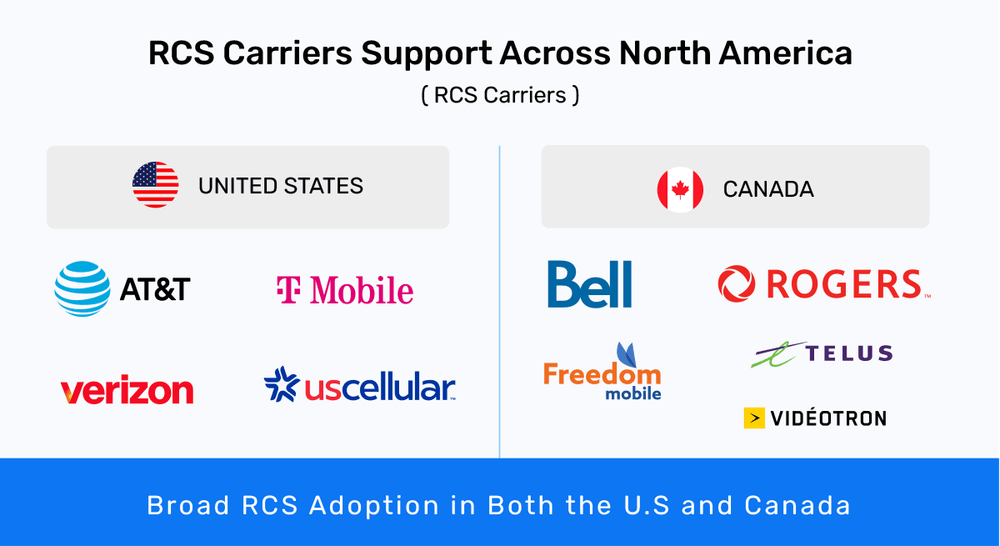
Similarly, in Canada, major carriers, such as Bell, Rogers, Freedom Mobile, and TELUS, have rolled out RCS support, closely following the U.S.
Thus, carriers and operators across the globe are gradually adopting RCS business messaging, enabling a safer, interactive, and engaging messaging experience.
What You Should Know and Expect From an RCS Approval Process
The RCS approval process is required to ensure high user trust and balance security with high customer expectations. While the process may seem more structured and critical than SMS onboarding or approval, it’s important to understand what to expect from it to help you plan resources, timelines, and campaigns more effectively.
Here’s what you should expect and know before going through the RCS messaging approval.
1. The process is multi-layered, not instant
The RCS approval process is multi-layered. To send RCS messages to your customers and get your business approved, you need to have it reviewed and approved at the agent, brand, and use-case levels. For this, it’s important to submit critical business information, clear opt-in explanations, a business website link, and message samples. Any inconsistencies w.r.t missing privacy and consent policies, unclear use cases, or mismatched branding slow down or block the approval process.
2. SMS backup
Every RCS campaign must include an SMS backup and safety net in case the recipient’s device doesn’t support RCS or isn’t enabled. This requires businesses to have an approved SMS Sender to pair with the RCS campaign.
In case the carrier or user’s device doesn’t support RCS, the messages automatically fall back to SMS, requiring businesses to use their current SMS registration (such as 10DLC, short code, or toll-free number registration) when launching RCS campaigns.
3. Varying approval timelines
The RCS approval process varies from business to business and may take from a few days to a couple of weeks, depending on the business messaging provider, carrier involvement, and the complexity of the use cases.
Sensitive industries and promotional campaigns typically undergo and require a deeper and more extensive security check. This is to verify each brand and business and ensure a trusted messaging ecosystem.
4. Feedback and revisions
Rejections are common in the RCS approval process, especially when it comes to first-time applicants. You need to be open to feedback and revisions, which can be fixed by refining message content, improving documentation, and clarifying opt-in methods.
RCS Approval Process Key Requirements & Prerequisites
Here are the key requirements businesses must meet before initiating RCS approval:
1. Brand and business information
Provide your business name and information, including your brand’s website URL, a short description of what your organization does, and your industry/vertical. This helps carriers understand your business and its use case.
2. Consistent branding assets
RCS enables a branded messaging experience, requiring businesses to upload their high-resolution brand logo, display name, and brand colors, and a brief tagline/welcome message.
3. Messaging use case and content outline
Businesses are required to clearly explain the reason for messaging users and the type of messages they wish to send via RCS, whether transactional, promotional, or conversational. It’s also important to provide a concise sample message content and use case for each message type.
4. Explicit opt-in and opt-out details
Businesses are required to demonstrate how users receive RCS messages in case they opt in. For instance, whether using web forms, QR codes, apps, keywords, etc.
Besides, businesses are also required to provide proof for explicit opt-in instructions and simple opt-out instructions to prevent risks of rejection.
5. Privacy, compliance, and legal requirements
The process also requires businesses to provide compliance-related information, including the regions or countries from which to send RCS. You’ll also need to demonstrate compliance with other applicable regulations, such as live privacy policy and terms of service, lack of prohibited and restricted content, and alignment with GDPR, TCPA, and regional regulations.
6. Google brand verification
You are also required to confirm your brand and business with Google via email. After you submit your application through your messaging platform and aggregator, you’ll receive an email from the Google RCS Business Messaging Team to confirm that you intend to use RCS for your business use cases.
Step-by-Step RCS Approval Process
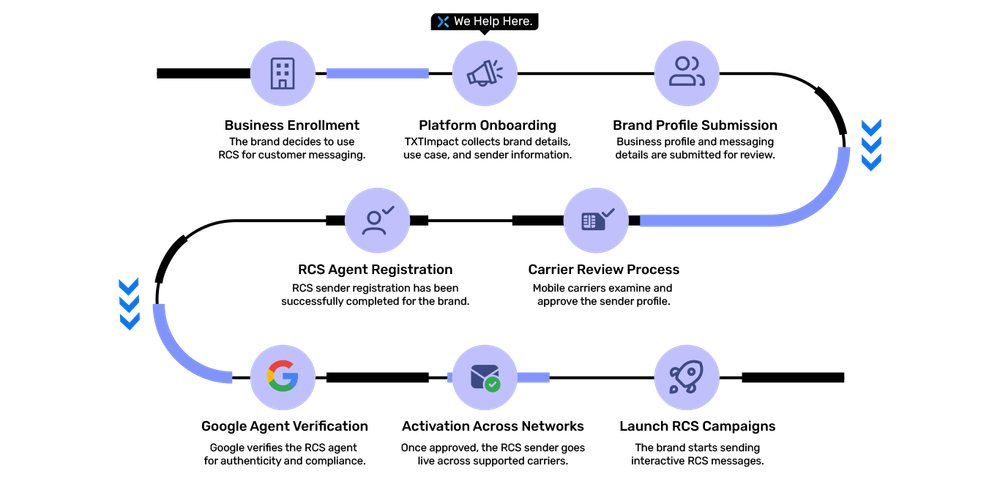
The RCS approval process follows a structured workflow designed to verify your business, validate its messaging intent, and ensure compliance with carrier policies and Google. Here’s the core and critical process for RCS approval:
1. Select a suitable RCS messaging provider
Working with a reliable and authorized RCS messaging provider makes the approval process a lot easier and streamlined.
By working closely with a CPaaS or messaging provider, it becomes easier to handle and manage the documentation, eligibility, and timelines. Besides, choosing a reliable provider also significantly reduces the approval speed.
TXTImpact streamlines and significantly facilitates RCS approval with a self-starter setup process. It offers a full RCS Gateway API support for direct integration with your existing workflows. Besides seamless integration, we also offer ready-to-use templates and a unified multi-platform experience.
2. Submit business details
Once you’re onboarded with your RCS provider, you’ll need to submit your brand and business information for verification, including legal business name and logo, registered business address, business website and contact details, brand description, and industry category.
Google validates this business information to ensure your brand's credibility, transparency, and legitimacy.
3. Create and configure the RCS Agent
The RCS Agent displays your brand’s verified business profile within users’ native messaging applications. Whenever users receive your RCS messages, they’ll be able to see your brand name and identity with the help of the RCS Agent.
To configure the RCS Agent, you must upload your business name, logo, business description, welcome messages, and other crucial information, so users can see who they are messaging.
4. Define messaging use cases and submit relevant samples
Defining clear use cases and the purpose of sending RCS messages is a crucial step in the RCS approval process.
Whether you wish to send promotional, transactional, conversational, or lead generation messages, you must explicitly mention the use case along with details, like the target audience, message frequency, and entry points for them to receive or interact with your RCS messages.
At the same time, it’s also crucial to submit realistic message samples and examples, including details, text copy, suggested actions and replies, CTAs, rich media, and multi-step conversational flows (if applicable). Ensure that the samples are clear, comply with applicable compliance guidelines, and align with your use cases.
5. Opt-in and compliance overview
Sending unsolicited messages to users without their opt-in consent is strictly against legal compliance. Similar to SMS, carriers require that businesses adhere to RCS campaigns to the same consumer protection rules, such as TCPA. Share and submit information, like
- Clear documentation of opt-in collection
- Clear and simple opt-out instructions
- Explicit user consent confirmation
- Privacy policy and regulatory compliance checks
The opt-out process may include enabling users to send keywords, such as “STOP,” for them to stop receiving RCS messages.
GDPR, and opt-in and opt-out controls to stay vigilant with regional compliance.
💡 Also Read: 13 Proven Strategies to Build a Compliant Opt-in Subscriber List |
6. Google review and carrier validation
Google conducts comprehensive quality assurance and policy checks, including content and branding checks, security and abuse prevention, and carrier-specific reviews. You can receive change requests or feedback from Google in this phase.
Sometimes, the process, including brand changes and use cases, may also require re-approvals.
How Long Does RCS Approval Take? (RCS Approval Timelines)
The RCS approval timeline varies based on multiple factors, including use case complexity, regional carrier involvement, and how quickly feedback is addressed. For most businesses, the approval window ranges from a few days to several weeks, depending on the factors mentioned.
Here’s a typical RCS approval timeline for brands and businesses:
- Brand approval typically takes 2-5 business days after submission of all business details and website information. Unclear branding and business credentials can often cause delays in the approval process.
- RCS Agent approval usually takes 3-7 business days, including review of your business name, logo, description, and welcome message.
- Use case/campaign approval can take anywhere from 5 to 10 business days, depending on the message type and use case.
- Carrier validation and reviews additional days and even weeks, especially in the U.S. markets, for promotional or high-volume messaging.
Common Reasons for RCS Approval Rejection
Here are some of the most common reasons why RCS approval processes may get rejected:
Inaccurate or incomplete business information, like mismatched names or incorrect addresses.
Inconsistent branding across channels with a mismatched RCS agent identity on the website and other social media presences.
An incomplete or non-compliant website lacking product/service information or privacy policy details.
Missing or weak opt-in explanation with unclear instructions on how users consent to receive messages.
Overly broad, vague, or unclear use cases with vague descriptions, like “marketing messages,” without a clear intent or value proposition.
Unclear opt-out mechanism, with users finding it difficult to opt-out from messaging campaigns.
Aggressive or spam-like messaging samples, with excessive CTAs, pushy language, and misleading claims.
Non-compliant or poor-quality media assets, with incorrect dimensions, low-resolution images, or inappropriate visuals.
Undefined or high-frequency message volume with unspecified or excessive message frequency limits.
Failure to respond to revisions promptly, with delayed or incomplete responses to the feedback provided.
Best Practices to Avoid RCS Approval Pitfalls and Ensure Faster, Smoother Approval
RCS approval is mandatory and can take time, but it doesn’t have to be complicated or unpredictable. Brands that submit clear information, stay compliant, and plan ahead usually get approved faster with fewer rejections.
Follow these proven tips to avoid common RCS approval delays:
1. Use Your Existing SMS Approval
If your business already has an approved short code or 10DLC SMS campaign, you’re off to a good start.
Carriers have already reviewed your business
Using the same phone number and message type helps
SMS fallback is still required, so this setup is needed anyway
This doesn’t guarantee instant approval, but it shows you’re a trusted sender.
2. Prepare All Documentation in Advance
Before applying, make sure you have everything ready:
Business details and website info
Clear opt-in and opt-out flow
Privacy policy and compliance details
Branding assets (logo, name, description)
Sample RCS messages
Missing or unclear information is one of the biggest causes of delays.
3. Keep Branding Consistent Everywhere
Your branding should match across:
Your website
RCS agent name and description
Logo and brand visuals
Inconsistent names, logos, or descriptions often trigger extra reviews.
4. Clearly Explain Your Use Case
Be specific about the messages you plan to send.
✔ Good example:
“We will send order confirmations, delivery updates, and occasional promotions.”
⦸ Avoid vague descriptions like:
“We will message customers.”
Clear use cases help carriers approve faster.
5. Get Your Branding Assets Right
Your RCS profile is what users see in their inbox, so it should look professional.
Your logo should be:
Square (1:1 ratio)
Between 224 × 224 and 1024 × 1024 pixels
- PNG or JPG format
- Clean, sharp, and recognizable
6. Explain Opt-In and Opt-Out Clearly
This is critical for approval.
You must explain:
How users agree to receive messages (form, app, keyword, etc.)
What happens when users send STOP (instant unsubscribe)
How HELP messages are handled (support or contact info)
Step-by-step explanations or videos help reduce approval friction.
7. Define Message Frequency Upfront
Clearly state how often users will receive messages (for example, transactional only or weekly updates).
Avoid sending too many promotional messages or creating unclear expectations.
8. Avoid Pushy or Misleading Messaging
Stay away from:
Overly sales-driven language
Too many CTAs
False urgency or misleading offers
Message should feel helpful, respectful, and user-first.
9. Include a Demo or Screenshots
If possible, include:
Screenshots or a short video of real RCS messages
Examples of buttons, cards, or carousels
A clear opt-out example
This shows reviewers that your RCS campaign is real and ready.
10. Start Early and Plan for Review Time
RCS approval can take 8–16 weeks.
- Apply early, especially for time-sensitive campaigns
- Expect questions or small revision requests
- Build buffer time into your launch plan
11. Respond Quickly to Feedback
If carriers or Google request changes, reply quickly and clearly to keep the process moving.
12. Work With a Trusted Messaging Partner
A reliable RCS provider can:
Review your application before submission
Catch issues early
Handle carrier follow-ups
Speed up the approval process
Using an experienced partner can save weeks of unnecessary delays.
Conclusion
RCS business messaging is a huge advancement in the mobile messaging industry, allowing businesses to share an interactive and engaging messaging experience to its customers. While the RCS approval process may seem daunting, it’s a crucial step towards ensuring a security-driven and trusted messaging experience.
Choosing the right RCS provider can significantly streamline RCS approval for your business. If you’re looking for an RCS business provider, choose TXTImpact. TXTImpact’s RCS business messaging offers a simple setup and onboarding process, with features like seamless integration, ready-to-use templates, and comprehensive technical resources to ensure a hassle-free experience.
Contact us to get in touch or if you have any questions, or book a demo to learn more.
Related blogs you can also read: |
FAQs
♦ Can multiple teams and departments use the same approved RCS Agent?
Yes, as long as the message content aligns with the approved use cases, multiple teams can use the same RCS Agent. However, new purposes and use cases, such as customer support and marketing, may require additional approvals under the same RCS Agent.
♦ Is it possible to temporarily disable an approved RCS Agent?
Yes, brands and businesses can temporarily pause and disable agents through their RCS service providers without losing the approved status. However, excessively long periods of inactivity may need re-validation when reusing the agent and restarting new campaigns.
♦ Can brands personalize RCS messages after approval?
Yes, personalization is possible and permitted as long as it aligns with the approved use case and messaging structure.
♦ What happens if a carrier changes its RCS policies after approval?
Various carriers may update policies over time. If, after approval, new policies and rules affect your existing campaigns, either Google or your service provider may request re-approval or updates to remain compliant.
♦ What’s the biggest misconception about RCS approval?
The biggest and most common misconception about RCS approval is that it’s a one-time checkbox, when in reality it’s an ongoing, continuous process with compliance, user experience, and quality assurance consistently monitored within a trusted framework.
About the Author:
 | Rahul Kumar (Marketing Specialist) Rahul Kumar is a Digital marketer with 7+ years of experience in SEO, AEO,SMS marketing, WhatsApp marketing, SaaS, and WordPress. He has led successful growth campaigns for startups and tech brands, combining data-driven strategies with compelling content. His work has been featured on top SaaS blogs, and he’s known for turning complex ideas into high-converting digital strategies. |