What Is RCS Messaging? Next-Generation Business Texting Explained
Introduction
SMS has served businesses well in the past few decades, helping them reach a wide audience for business communications. However, today’s digital and smartphone era requires a much more advanced and engaging communication medium, like Rich Communications Services (RCS), to meet customer expectations.
RCS, first introduced in 2008, has recently gained more traction and popularity since Apple introduced iOS 18 support for RCS, making it compatible with both Android and iOS devices.
So, how does RCS benefit your business more than SMS? And how and when can you use RCS to transform your business communication? Let’s find out.
Jump to: |
What is RCS Business Messaging?
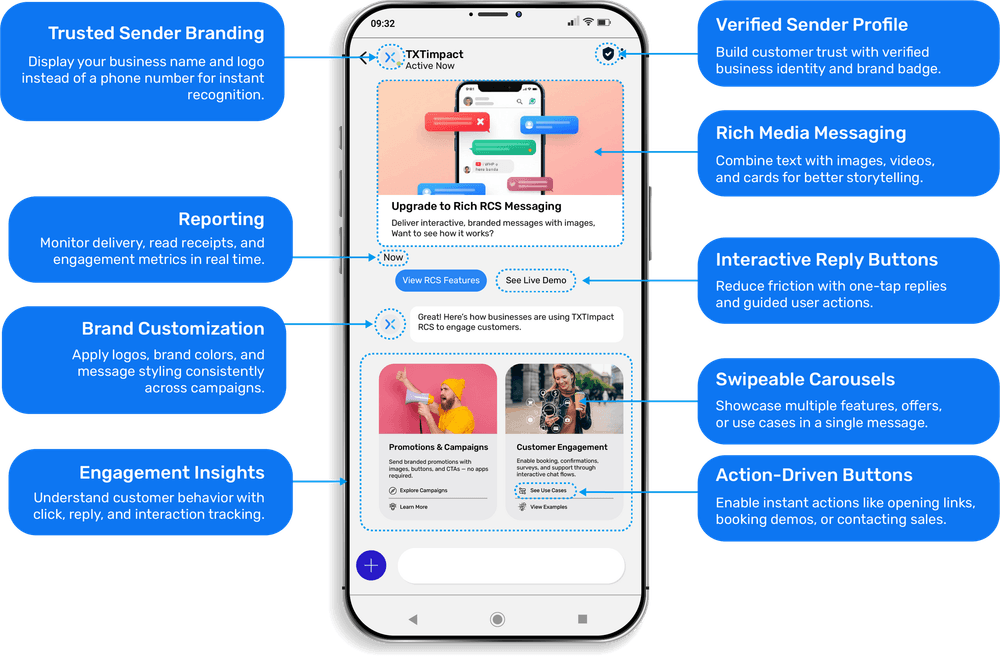
RCS, or Rich Communication Services, is an advanced messaging protocol developed by GSMA that enhances SMS capabilities, enabling brands to offer their customers an interactive, secure, and branded communication experience
Unlike SMS, RCS supports multimedia messaging. This means businesses can include visually appealing images, videos, and carousels in messages, using different RCS message types, formats, or categories to boost customer engagement and interaction.
At the same time, RCS also allows businesses to include interactive features and elements, such as CTAs, quick reply buttons, group chat capabilities, and more.
What’s important to note is that RCS delivers this enhanced, engaging messaging experience directly to users’ native messaging applications, without requiring them to install any additional software.

1. What is RCS Chat?
RCS Chat is the consumer-facing name for RCS (Rich Communication Services), a modern messaging protocol that works over mobile data or Wi-Fi. It offers the same basic functionality as SMS or two-way texting but includes advanced features like typing indicators, read receipts, and file sharing.
2. How does RCS Business Messaging Work?
Unlike SMS and MMS, which use traditional cellular network protocols, RCS relies on Wi-Fi or an internet connection to enable brands to send and receive interactive messages.
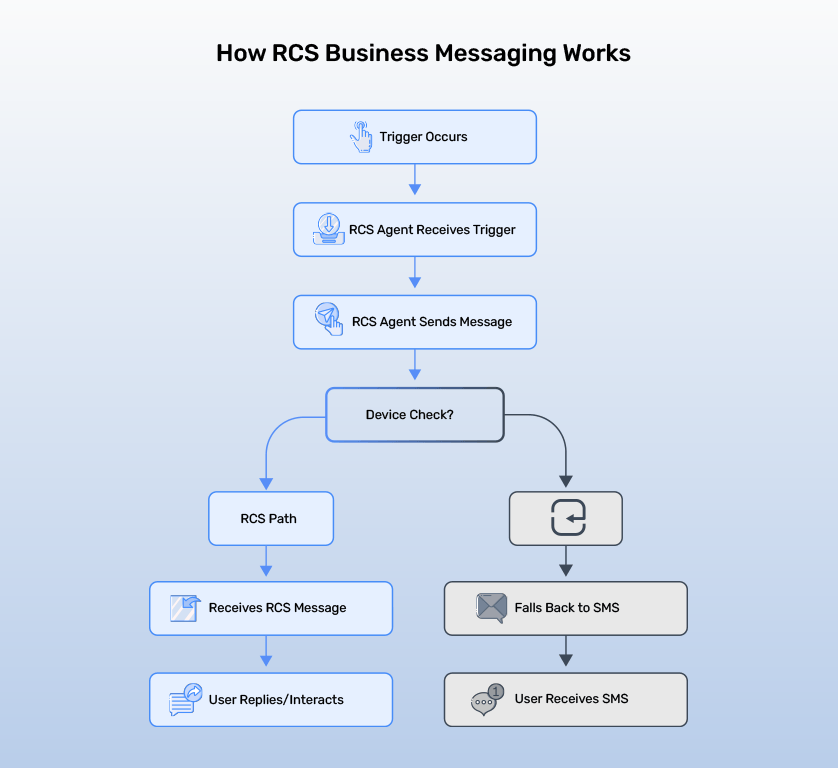
To use RCS, businesses need an RCS Agent, which acts as a verified business identity for brands. So, RCS conversations occur between your brand’s RCS Agent and users. Typically, it’s the RCS Agent that initiates a conversation with a user, either directly or in response to a specific trigger.
Depending on your campaign or use case, the trigger could be anything, like:
User signs up for your account
The user’s shipment is dispatched
User contacts customer support for help in chat
A daily 4 pm reminder to send evening-time snacks deal.
The RCS Agent sends the configured RCS messages once it receives these triggers, to which users can choose to reply or react.
In case the user’s device does not support RCS, the message automatically falls back to traditional messaging solutions, like SMS.
3. What is an RCS Agent?
An RCS Agent is a verified, branded messaging identity approved by mobile carriers and Google. It includes key details about your business, like your name, logo, and contact information so customers know exactly who they’re hearing from. Unlike traditional SMS or MMS, where messages come from random long codes or shortcodes, RCS messages are sent from Your Brand. This makes every interaction more trusted and recognizable to your audience.
RCS vs SMS, MMS, iMessage & WhatsApp: Key Differences You Should Know
There are significant differences between RCS and SMS, as well as between MMS and other OTT platforms like WhatsApp.
- While SMS is a simple and global communication platform that helps businesses reach a wide audience with text messages, MMS goes beyond text, enabling images, GIFs, and videos within messages.
- RCS, on the other hand, enhances both SMS and MMS capabilities, allowing businesses to offer an interactive, branded, and secure business messaging experience.
- When it comes to differences between RCS and OTT platforms like WhatsApp, unlike WhatsApp, which requires an app download, RCS doesn’t require a third-party app, making it convenient for both customers and businesses. Read: RCS Vs Whatsapp (Detailed Comparison)
- Here is a Quick comparison chart on how RCS is different from SMS, MMS, iMessage, and even WhatsApp.
Features | RCS
| SMS | MMS | iMessage | WhatsApp |
Message character limit | 8,000 characters | 160 characters | 1,600 characters | No character limit | No character limit, supports long messages |
Connectivity | Internet and Wi-Fi connectivity | Cellular network infrastructure | Cellular network infrastructure | Internet and Wi-Fi connectivity | Internet and Wi-Fi connectivity |
Media support | High-resolution images, GIFs, videos, and carousels | Text only, no media supported | Basic images and audio | Supports high-resolution images, GIFs, and stickers | Supports high-resolution images, GIFs, and stickers |
Verified branding | Verified sender identity with business name and logo | No | No | No | Yes, with the WhatsApp Business verified badge |
Interactive elements | Buttons, calendar links, quick and suggested replies | No | No | Limited, with emoji reactions and Apple Pay and app extensions | Quick replies, buttons, CTAs, and list menus |
Delivery confirmation | Read and delivery receipts with typing indicators | Delivery receipts only | Delivery receipts only | Read and delivery receipts | Read and delivery receipts |
Typing indicators | Yes | No | No | Yes | Yes |
Analytics and reporting | Read and delivery receipts and engagement rates | Only delivery reports | Only delivery reports | Limited insights with no native analysis | Yes, with delivery and read receipts with read engagement |
SMS fallback | Yes | No | No | Yes | No |
Application download requirement | Not required | Not required | Not required | Not required | Required |
Key Features of RCS Business Messaging
Here are the key features and capabilities of RCS that make it a game-changing communication tool for businesses, especially when compared to SMS:
High-resolution media sharing: With RCS, you can hook and attract customers with high-resolution and appealing images, videos, GIFs, and carousels when promoting products and services.
Higher character limit: Unlike SMS, which limits messages to 160 characters, RCS allows businesses to send longer messages up to 3,072 characters.
Interactive elements: RCS supports interactive and dynamic features, such as clickable buttons, quick replies and suggested replies, and carousels, to enhance customer engagement.
Larger file sizes: RCS lets you send high-resolution images and videos up to 100 MB.
Enhanced group messaging: RCS supports renaming chats, adding and removing people, and organizing conversations with ease.
Branding and verification: Send branded business messages with RCS, including your business name, logo, colors, font, and other branding elements to establish credibility and authority.
Enhanced security: RCS supports end-to-end encryption between messages, making it more reliable and secure than SMS.
Rich insights and analytics: RCS provides detailed data on message delivery, read receipts, open receipts, message read times, typing indicators, and CTAs, enabling informed decision-making.
What Are The Benefits of RCS For Your Business?
RCSs’ enhanced capabilities help them provide numerous benefits to businesses, including:
Enhanced brand trust and recognition: The ability to include the company name, logo, and a verified brand identity significantly builds customer trust towards the message they receive. It also helps customers verify the business’s authenticity and legitimacy, reducing risks of spam and phishing attacks.
Interactive customer engagement: The rich media and interactive elements of RCS enhance the customer experience and drive conversions, click-through rates, and 42% better engagement than traditional messaging platforms.
Boosted open and response rates: The branded RCS messaging and customer trust lead to higher open and read rates. At the same time, the visually appealing and interactive message elements lead to better customer responses and engagement.
Advanced analytics and improved strategies: Businesses can leverage the advanced analytics and read and delivery receipts along with the CTAs to track the message or campaign performance and optimize customer interactions.
No additional downloads and cost-effective: RCS delivers messages in customers’ native mobile applications, requiring no app downloads. This minimal reliance on third-party applications and higher RoI make RCS a cost-effective solution for businesses.
What are the Use Cases of RCS?
Businesses can use RCS messaging for several purposes and use cases, including:
Customer service: RCS significantly enhances customer service and experience with rich media capabilities, read receipts, and typing indicators, enabling customers to take quick actions such as browsing products, using quick-reply buttons to schedule appointments, and clicking links to complete a purchase.
Marketing and promotional campaigns: Using videos, high-resolution images, product carousels, and QR codes, businesses can create visually appealing and interactive marketing campaigns to attract customers and prompt quick action.
Transactional messaging: RCS allows businesses to streamline financial transactions with intuitive and interactive payment flows. At the same time, it also facilitates businesses to send payment confirmations, branded fraud alerts, service reminders, and account confirmations directly to customers’ native messaging applications.
Personalized recommendations: Businesses can leverage data such as customers’ browsing behavior, preferences, and purchase history to deliver tailored recommendations via RCS rich elements, enhancing the customer experience.
Real-time alerts and notifications: Another way RCS facilitates the customer journey and experience is through real-time alerts. Businesses can send real-time order tracking details, appointment or event reminders, location sharing, and delivery updates via interactive RCS elements.
Customer feedback and surveys: RCS provides an engaging, streamlined survey experience for customers. Customers can complete post-purchase satisfaction surveys, customer service feedback forms, and NPS (Net Promoter Score) surveys using elements such as emojis, stars, forms, or quick reply buttons.
Security and authentication: RCS helps businesses ensure security and verification through Two-Factor Authentication (2FA) prompts, OTP delivery, and fraud prevention alerts, with instant quick-verification buttons.
Customer retention: RCS helps businesses to enhance customer loyalty and engagement with messages that include exclusive birthday deals, loyalty rewards and points, re-engagement campaigns, and interactive polls and surveys, improving customer retention.
| 💡 Want to learn more about different RCS use cases? Check out this blog that outlines 12+ RCS use cases with real-world examples. |
Several industries benefit from RCS use cases, including retail and e-commerce, as well as finance and banking.
Here’s a breakdown of the industries with the respective RCS use cases:
Retail - Order tracking, cart recovery, product showcases, product discovery and promotions, and personalized offers.
Banking - Fraud and transaction alerts, secure authentication, fraud prevention, loan or policy applications, payment reminders, and account updates.
Healthcare - Health reports, appointment reminders and scheduling, prescription delivery, and wellness campaigns.
Travel and hospitality - Travel updates, booking confirmations, real-time updates, post-travel updates, and upselling opportunities.
Logistics and delivery - Shipment tracking, order rescheduling, delivery feedback, and delivery proof of confirmation.
Media and entertainment - Content promotions, event reminders, interactive polls, and surveys.
Automotive - Vehicle launch campaigns, service reminders, and post-service feedback.
How Businesses Can Implement RCS for Customer Engagement?
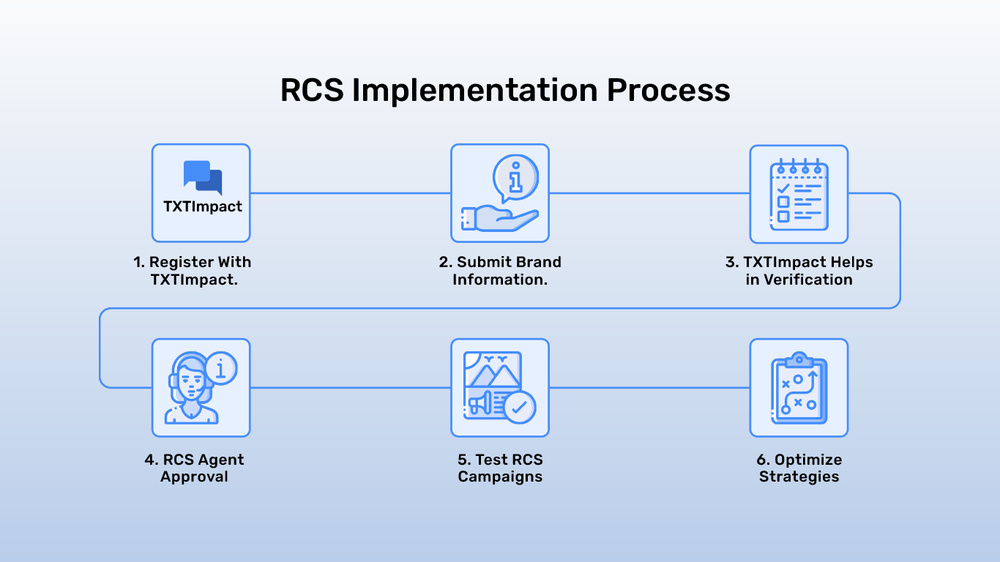
Generally, to apply or implement RCS within your communication campaigns, you’ll need to partner with RCS service providers, such as TXTImpact, that offer a complete platform for businesses to send RCS messages.
Here’s the step-by-step process to implement RCS for your business messaging campaigns:
Register with TXTImpact to sign up for your RCS account.
Submit basic brand information, including business name, logo, tagline, URL, industry/vertical, use cases, opt-in & opt-out details, and a short description of your business.
TXTImpact will verify your business and handle the RCS Agent approval process so you don’t have to.
Once your business is approved, you can start testing and running test RCS campaigns to validate the performance and optimize strategies.
RCS Best Practices: What Businesses Must Do To Drive Maximum Impact?
Here are some of the best RCS practices businesses and brands must follow to drive maximum impact from RCS rich media capabilities and interactive features.
Choose a Reliable RCS Service Provider, Such as TXTImpact, that provides secure, reliable, and branded RCS messaging services to businesses with enhanced capabilities.
Know your audience to tailor and personalize the RCS messages to specific audiences to drive maximum engagement and relevance.
Ensure content design and strategy by using high-quality rich media, keeping messages concise, including clear CTAs, and sending personalized messages.
Ensure optimal timing and frequency of messages by limiting the number of messages to avoid overwhelming customers.
Enable omnichannel integration across multiple communication channels, such as RCS, SMS, email, and WhatsApp, to provide a consistent messaging experience.
Blend automation and human support to support complex queries, use chatbots for FAQs, and enable a fallback option for human support to ensure customer satisfaction.
Ensure compliance and privacy by obtaining customer opt-ins, following regional regulations, and providing easy customer opt-outs.
Leverage insights and analytics by monitoring metrics like open and delivery rates and click-through rates to strategize and refine the campaign performance.
Continuously test, monitor, and optimize the campaigns by monitoring key metrics, performing A/B testing, and gathering user feedback to measure the campaigns’ effectiveness.
How to Enable RCS On Your Phone?
RCS works on both Android and iPhone devices.
Here’s how you enable RCS on your iPhone:
If you have an iPhone device that supports iOS 18+, here are the steps to enable RCS on your device:
Go to the ‘Settings’ -> ‘Messages.’
Toggle RCS Messages to ‘On’
Ensure your Wi-Fi or mobile data is enabled
RCS is now enabled on iPhone devices, and you can start seeing high-resolution images, typing indicators, and other RCS features in your messaging inbox.
Here are the steps to follow to enable RCS on your Android device:
Open Google Messages
Tap on your profile photo in the top right corner -> select ‘Message Settings.’
Go to RCS Chats
Turn on RCS Chats and ensure your device is connected to Wi-Fi or mobile data
How Secure is RCS Than SMS/MMS?
In 2024, phishing attempts rose by 18% globally, and an average American today receives 41 spam text messages per month. This primarily happens when users can’t distinguish a legitimate business message from spam.
RCS eliminates this by providing enhanced security features to businesses, including:
A verified, branded sender ID: Brands can add their brand name and logo to RCS messages with business authentication, instantly boosting brand recognition and customer trust while reducing fraud.
Encryption in transit: RCS messages are securely encrypted when in transit to avoid interception.
End-to-end encryption: RCS enables end-to-end encryption as part of the GSMA RCS Universal Profile 3.0, ensuring encrypted and private messaging between iPhone and Android when fully implemented.
Privacy compliance: Businesses must ensure compliance with data protection laws, like GDPR, and opt-in and opt-out controls to stay vigilant with regional compliance.
💡 Also Read: 13 Proven Strategies to Build a Compliant SMS Opt-in Subscriber List |
At the same time, reliable RCS providers, like TXTImpact, offer secure end-to-end encryption and 10DLC compliance registration to facilitate verification for your business and ensure the utmost security.
What are the Challenges/Limitations of RCS Adoption?
Despite its growing adoption and benefits, RCS faces specific limitations, such as:
Carrier and regional fragmentation: Not all carriers or devices worldwide support RCS yet. Global RCS standardization is necessary to overcome this limitation.
Device compatibility issues: Several lower-end Android devices and Apple devices running iOS versions older than 18 don’t support RCS.
Technical complexity: RCS setup and integration isn’t as simple as SMS and requires longer deployment with brand verification, platform integration, and so on.
What is the Future of RCS Business Messaging?
RCS is set to become the future of messaging and business communications, with enhanced capabilities and a higher RoI than traditional SMS. The RCS market, which reached $2.87 billion in 2025, is projected to skyrocket to $8.89 billion by 2030.
Here are some key areas that are set to promote the future of RCS in business messaging:
Enhanced spam protection and universal end-to-end encryption
Deeper integration and automation
Advanced analytics and personalization capabilities
Broader adoption with global carrier and platform support
Based on the industry trends and projections and our 15-Year Industry Study Report, there’s no denying that RCS is the future of business messaging, with the potential to transform customer communications and interactions through intuitive, interactive UX.
So, if you want to hook and retain customers and beat the competition, RCS is a non-negotiable communication solution for your business’s success.
Conclusion
Your business needs RCS messaging to stay relevant and meet customer expectations. But choosing the right service provider is critical to running efficient, streamlined messaging campaigns.
TXTImpact, a leading business text messaging provider, is soon to launch RCS business messaging, enabling businesses to share high-resolution images, carousels, and other interactive elements with their customers, all with a branded identity.
Whether you’re a startup or an established business, join our 5,000+ happy clients to avail the benefits of our texting platform and see wonders work for your business.
To Get Started with RCS, contact our Sales team and send rich messages to your clients.
Related blogs you can also read: |
Frequently Asked Questions
♦ Will RCS replace SMS?
RCS won’t replace SMS entirely. SMS has a wide reach, and RCS, being an internet-dependent platform, relies on SMS as a fallback when certain carriers, regions, or devices don’t support it.
♦ How much does RCS messaging cost?
The cost of RCS messaging varies by provider. TXTImpact offers an affordable RCS messaging solution with no hidden fees or charges to help businesses drive higher conversions and engagement.
♦ What if the user’s device does not support RCS?
If the user’s device doesn’t support RCS or doesn’t have RCS enabled, the message falls back to SMS, ensuring guaranteed message delivery.
♦ Does RCS require a special app like WhatsApp?
No, unlike OTT platforms like WhatsApp, RCS doesn’t require an application download. Instead, all messages get delivered to the customer device’s native messaging application.
♦ What is the difference between RCS and iMessage?
RCS and iMessage both support rich media sharing and features like typing indicators and insights. However, while iMessage is Apple’s native messaging platform, RCS supports both Apple and Android devices, offering a wider audience reach than iMessage. Learn more RCS vs iMessage differences with our blog.
About the Author:
 | Rahul Kumar (Marketing Specialist) Rahul Kumar is a Digital marketer with 7+ years of experience in SEO, AEO,SMS marketing, WhatsApp marketing, SaaS, and WordPress. He has led successful growth campaigns for startups and tech brands, combining data-driven strategies with compelling content. His work has been featured on top SaaS blogs, and he’s known for turning complex ideas into high-converting digital strategies. |