


QR Code to Text Message: How to Create a Free QR Code to Send an SMS

Key Takeaways:
- QR codes can simplify SMS engagement by opening a customer’s messaging app with a pre-filled phone number and message.
- Use SMS QR codes for more than opt-ins, including promotions, customer support, events, feedback, and loyalty programs.
- Pair every QR code with a clear CTA so customers know what happens when they scan it.
- Make QR codes easy to scan with adequate size, contrast, white space, and proper placement.
- Keep pre-filled SMS messages short and relevant to reduce friction for customers.
- Test QR codes before publishing to ensure the correct number, keyword, and message are loaded.
- Track QR-driven engagement where possible to understand which campaigns and placements generate results.
- TXTImpact’s free QR Code Generator can create customized SMS QR codes for text-based marketing campaigns.
A QR code to text message lets people start an SMS conversation by scanning a code with their phone.
Instead of typing a phone number manually, the scan opens their messaging app with your number already entered. You can also add a pre-filled message, such as “JOIN,” “INFO,” or “QUOTE.” The customer can review or edit the message and then tap Send.
Whether you want to collect SMS subscribers for bulk texting, let customers contact your business, or make it easier to request information, an SMS QR code can turn a printed or digital QR code into a direct text messaging channel.
In this article, we’ll show you how to easily generate a Free QR code with TXTImpact and explore its use cases for your business.
What Is a QR Code to Text Message?
A QR code to text message, also called an SMS QR code, is a QR code that opens a user's messaging app with a phone number and an optional message pre-filled. The user can review or edit the message before tapping Send.
It’s often confused with QR code to plain text, but QR code to text message differs from other types of QR codes:
- QR code → SMS: Opens a text message with a phone number and, optionally, a pre-filled message.
- QR code → Website: Opens a webpage or URL.
- QR code → Plain text: Displays text stored inside the QR code.
The main purpose of an SMS QR code is to make starting a text conversation easier. Instead of asking someone to remember a phone number and type a message, you can give them a code to scan. But how can you create a free QR code that lets people send text messages with a quick scan?
Introducing TXTImpact’s Free QR Code to Text Message Generator
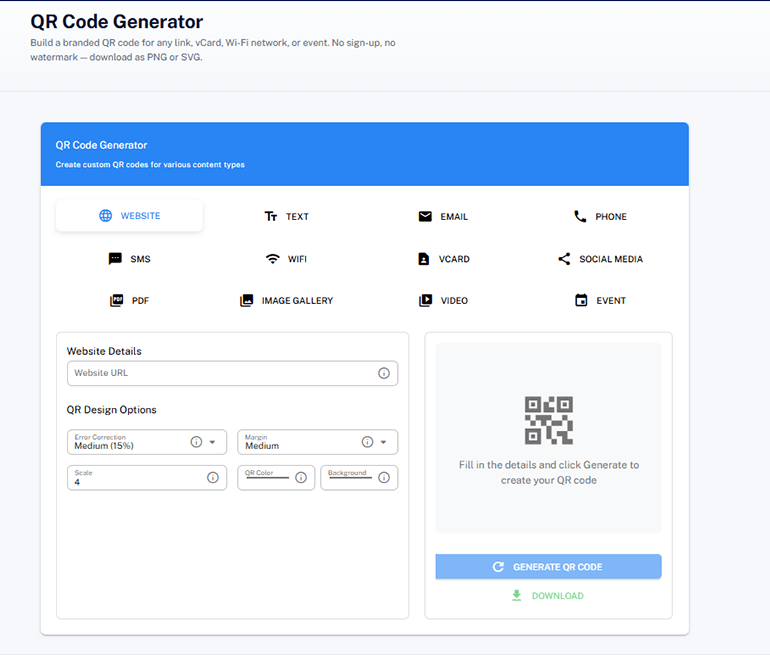
Make it easier for customers to text your business with a free QR code that opens a new SMS conversation when scanned. With the TXTImpact Free SMS tool QR code generator, you can create a QR code that includes your business phone number and an optional pre-filled message.
Enter the phone number you want customers to text, add a short message such as JOIN, INFO, or QUOTE, and generate your QR code.
When someone scans it with their phone, their messaging app opens with the phone number and message pre-filled. They can review the message, make changes if needed, and tap Send.
You can then download the QR code and use it across both digital and printed materials, including websites, flyers, posters, business cards, event displays, receipts, and promotional materials.
How the TXTImpact Free QR Code Generator Works?
Using the generator is straightforward:
- Enter the phone number: Add the number where you want to receive text messages.
- Add a pre-filled message: Enter the message you want to appear when someone scans the QR code. For example, use JOIN for an SMS signup or QUOTE for a quote request.
- Generate your QR code: Create the QR code with the phone number and message you provided.
- Download and share it: Download the generated QR code and place it wherever you want customers to scan and text you.
The QR code does not send a message automatically. It simply opens a new text message with the details pre-filled, giving the customer control to review and send it.
How Does a QR Code to Text Message Work?
A QR code to text message works by turning a simple scan into a ready-to-send SMS. Instead of asking someone to enter a business phone number and type a message manually, the QR code can provide both pieces of information in advance.
When a person scans the QR code with their smartphone, their messaging app opens with the recipient's phone number already entered.
If the QR code includes a pre-filled message, that message will also appear in the message field. The user can review or edit the message and then tap Send.
The process looks like this:

For example, imagine a restaurant placing a QR code on its table with the instruction “Scan to Text Us.” The QR code can be configured with the restaurant's phone number and a pre-filled message such as “MENU.”
When a customer scans the code, their messaging app opens with the restaurant's number as the recipient and “MENU” in the message field. The customer can then send the text without typing the number or keyword manually.
Does a QR code automatically send a text?
No. An SMS QR code does not automatically send a message when someone scans it. It only prepares the text message and opens it in the user's messaging app.
The customer still has to review the message and tap Send. This distinction matters for QR codes used in SMS marketing or subscriber signups because scanning the code and sending the message are separate actions.
For example, a business could create a QR code with the keyword JOIN as the pre-filled message. When someone scans it, their messaging app opens with the business number and “JOIN” ready to send.
When the customer sends that keyword to your business number, you can use it with campaigns such as Text-2-Join, Text Survey, Text-2-Win, or Text-2-Trivia, depending on the campaign and consent requirements.
How to Create a Text-2-Join Campaign Successful via QR Code?
If you're wondering how to use a QR code for a successful Text-to-Join campaign or any campaign that requires opt-in or consent, follow these steps in TXTImpact.
Learn how to set up your Text-to-Join campaign and generate a free QR code with TXTImpact.
1. Create a Text-2-Join keyword in the TXTImpact dashboard

Here, select your SMS number and SMS account, and choose whether you want single opt-in, double opt-in, or to collect customer data such as email, name, address, etc.

Add a relevant and suitable keyword in the ‘Keyword’ field with a suitable message, and click on ‘Save.’
2. Enter your Text-2-Join keyword in TXTImpact’s QR Code Generator
Open TXTImpact’s free QR code generator tool and select ‘SMS’ from the list of features available.

In the ‘SMS Details,’ enter the Phone Number you want contacts to text and the Message or the keyword you have set in your Text-2-Join campaign.
You can also customize the QR Design Options by adjusting the margin, scale, QR color, background, and error correction.
Once all details are added, click ‘GENERATE QR CODE’ and click the ‘DOWNLOAD’ button to download the QR code for the campaigns.
3. Use the QR Code for your campaigns
You can use this QR code for all your SMS marketing needs, including flyers, brochures, product packaging, posters, social media posts, email campaigns, and landing pages.
When customers scan the QR code, their messaging app opens with the phone number and pre-filled message or keyword you specified. They can review the message and send it to your business to start the conversation or join your SMS campaign.
For SMS marketing, place the QR code alongside a clear call to action, such as “Scan to Get 10% Off” or “Scan to Subscribe to Our Updates.” This helps customers understand what happens after they scan the code and encourages more people to engage with your campaign.
QR Code to Text Message Examples
An SMS QR code can do more than simply give customers another way to contact your business. The QR code, call to action, and pre-filled message can work together to guide the customer toward a specific action.
For example, a business can ask customers to scan a QR code to join an SMS list, request a quote, get product information, contact support, register for an event, or provide feedback. The pre-filled message can identify what the customer wants, making it easier for the business to understand and respond.
Here are some practical ways to use a QR code to text message:
| Use case | Example CTA | Pre-filled message | What happens next? |
|---|---|---|---|
| SMS opt-in | Scan to Join Our Text List | JOIN | The customer sends the keyword to start the sign-up process. |
| Customer inquiry | Scan to Text Us | INFO | The customer sends a text requesting more information. |
| Customer support | Scan to Get Help | HELP | The customer can start a support conversation. |
| Request a quote | Scan to Get a Quote | QUOTE | The business receives a request from a potential customer. |
| Product inquiry | Scan to Learn More | PRODUCT | The customer can ask about a specific product or service. |
| Appointment request | Scan to Request an Appointment | APPOINTMENT | The customer can start a conversation about scheduling. |
| Feedback | Scan to Share Your Feedback | FEEDBACK | The customer can begin a feedback conversation. |
How Businesses Can Use QR Codes For Text Messaging
Here are some of the ways businesses can use QR codes for text messaging.
1. QR Codes for SMS Opt-ins
Businesses can place a QR code on a sign, flyer, receipt, product insert, or other customer-facing material with a CTA such as:
Scan to Join Our SMS List Scan and send JOIN to receive exclusive offers and updates.
When a customer scans the code, their messaging app opens with the business number and JOIN already entered. The customer can review and send the message to begin the signup process.
This removes the need for customers to type a phone number and keyword manually. It can also make SMS signup more visible in physical locations where a traditional online signup form may not be practical.
💡 Also Read: 13 Proven Strategies to Build a Compliant SMS Subscriber Opt-in List
2. QR Codes for SMS Marketing and Subscriber Growth
Businesses can use QR codes to connect offline marketing with their SMS marketing campaigns.
A printed advertisement, poster, direct-mail piece, event display, or product insert can include a QR code that starts a text conversation. This gives customers a direct path from seeing an offer to interacting with the business through SMS.
For example:
Want Exclusive Offers? Scan to join our text list.
Once customers have appropriately opted in, businesses can use their SMS platform to send relevant promotional messages, updates, reminders, or other permitted communications.
3. QR Codes at Events
Events create several opportunities to use SMS QR codes because attendees are already carrying their phones and may need information quickly.
Businesses and event organizers can place QR codes on:
- Booth displays
- Posters
- Name badges
- Registration desks
- Event programs
- Presentation slides
- Promotional materials
For example:
Scan to Receive Event Updates
The QR code could open a text message with EVENT pre-filled. After the attendee sends the message, the organizer can continue the interaction through the appropriate SMS workflow.
4. QR Codes on Product Packaging
Product packaging is another useful place for an SMS QR code because customers may need assistance after purchasing a product.
A business could place a QR code on a box, label, product insert, or receipt with a CTA such as:
Need Help With Your Product? Scan to Text Support.
The QR code can open a message with HELP already entered.
This gives the customer a straightforward way to start a support conversation without searching for a support phone number. You can use the same approach to answer product questions, provide information, or direct customers to the right support process.
5. QR Codes for Lead Generation
Businesses can use SMS QR codes to turn interest into a direct sales conversation.
Instead of asking prospects to fill out a lengthy form, a business can give them an option to start a text conversation.
For example:
Interested in Our Services? Scan to request a quote.
The QR code could open a message with QUOTE pre-filled.
Other examples include Scan to Text for Pricing, Scan to Request a Demo, Scan to Book a Consultation, and Scan to Ask a Question.
Once the prospect sends the message, the business can continue the conversation and collect any additional information needed.
6. QR Codes for Customer Support
Businesses can also use QR codes to make it easier for existing customers to reach the right team.
For example, a business could add an SMS QR code to a receipt or product documentation:
Need Help? Scan to Text Us
A pre-filled keyword such as HELP can identify the purpose of the incoming message. For products or services that have different support needs, businesses could make the CTA more specific:
Having Trouble With Setup? Scan to Text Support
Need Help With Your Order? Scan Here
Questions About Your Account? Scan to Text Us
The more specific the CTA, the easier it is for customers to understand what the QR code is intended for.
7. QR Codes for Customer Feedback
Businesses can use SMS QR codes to make it easier for customers to provide feedback immediately after an interaction.
For example, a restaurant receipt could include:
How Was Your Experience? Scan to Send Feedback.
The QR code could open a message containing FEEDBACK.
A customer can send the message and begin a feedback conversation. Businesses can also connect the initial interaction to an appropriate SMS survey or feedback workflow when available.
This can be useful for restaurants, events, retail stores, service businesses, hotels, and customer support teams.
8. QR Codes for Appointments and Bookings
Appointment-based businesses can use QR codes to make the first step of scheduling more convenient.
A salon, service provider, consultant, repair company, or other appointment-based business could display:
Need an Appointment? Scan to Text Us
The QR code could open a message containing APPOINTMENT.
The customer can send the message and continue the conversation with the business to discuss availability, services, or other scheduling details.
9. QR Codes at Tourist Attractions and Physical Locations
You can place SMS QR codes almost anywhere customers physically interact with a business. Examples include storefronts, posters, flyers, receipts, business cards, product packaging, event booths, restaurant menus, and more.
The CTA should explain the reason for scanning.
For example:
Scan to Text Us for Today's Specials
or:
Scan to Request a Quote
This is more effective than displaying a QR code by itself because customers know what action the scan is expected to start.
10. QR Codes in Digital Marketing
Although QR codes are commonly associated with printed materials, businesses can also use them in digital environments.
For example, a business could include an SMS QR code in websites, emails, digital advertisements, presentations, and social media graphics.
However, consider the context before adding one. If someone is already viewing your website on their phone, a direct Text Us link may be more convenient than asking them to scan a QR code displayed on the same device.
QR codes are especially useful when the audience views the content on one screen and scans it with another device.
How to Use QR Codes for SMS Marketing?
QR codes can turn offline and digital marketing touchpoints into direct SMS interactions. Here are some practical ways to use them:
- Grow SMS subscribers: Add QR codes to your website, social media posts, flyers, packaging, receipts, and other marketing materials to give customers a quick way to join your SMS list.
- Collect leads: Use QR codes at trade shows, events, storefronts, business cards, and brochures to let prospects sign up for text updates and become potential leads.
- Promote offers and discounts: Connect QR codes to exclusive coupons, discounts, flash sales, or limited-time promotions and encourage customers to scan and subscribe to receive the offer by text.
- Use QR codes at physical locations: Place QR codes on storefronts, counters, menus, posters, product displays, and packaging to turn in-person interactions into SMS subscribers and customers.
- Combine QR codes with SMS campaigns: Use campaign-specific QR codes to drive customers into SMS promotions, contests, loyalty programs, surveys, or other campaigns while tracking which placements generate the most engagement.
Can You Send a QR Code by Text Message?
Yes, you can send a QR code through a text message, but it’s important to distinguish between sending a QR code and using a QR code to start an SMS conversation.
- Send a QR code via SMS/MMS: You can send a QR code as an image through MMS, allowing recipients to scan it with another device or use a compatible image-scanning feature on their phone to access the encoded information or link. QR codes can provide quick access to websites, event details, coupons, payment pages, Wi-Fi information, and other destinations without requiring recipients to search for them manually.
- SMS QR code: An SMS QR code works in the opposite direction. The recipient scans the code with their phone camera, which opens a pre-filled text message that they can send to a designated number.
- Use both together: Businesses can send a QR code through MMS as part of a campaign and use an SMS QR code in other marketing materials to encourage customers to start a text conversation.
QR Code to Text Message vs. Other QR Codes
Not all QR codes perform the same action when scanned. The main difference is what the QR code is programmed to do.
An SMS QR code is specifically designed to open a text message, while other QR codes can direct users to a website, display information, start a phone call, or open an email.
| QR Code type | What happens when scanned? |
|---|---|
| SMS QR Code | Opens a text message with a phone number and message pre-filled. |
| URL QR Code | Opens a website or specific webpage. |
| Phone QR Code | Opens the phone dialer with a number ready to call. |
| Email QR Code | Opens an email composer with the recipient, subject, or message pre-filled. |
| Plain-text QR Code | Displays the text encoded in the QR code. |
With TXTImpact's Free QR Code Generator, you can create different types of QR codes from one tool, including SMS, URL, plain-text, phone, and email QR codes. This lets businesses choose the QR code type based on the action they want customers to take, whether that's sending a text, visiting a webpage, calling a business, or sharing information.
Best Practices for Creating a QR Code to Text Message
A QR code works only when people understand why they should scan it and what happens next. Use these best practices to make your SMS QR codes easier to understand, scan, and act on.
- Use a clear call to action: Tell users exactly what they should do, such as “Scan to Text Us,” “Scan to Get a Quote,” or “Scan to Join Our SMS List.”
- Tell users what happens after scanning: Explain that scanning will open their messaging app with a phone number and a pre-filled message, so they know what to expect.
- Keep the pre-filled message short: Use simple messages or keywords such as “JOIN” or “DEAL” so users can quickly review and send the text.
- Test before printing: Scan the QR code on multiple devices where possible and confirm that the correct number, message, and SMS experience work as expected.
- Make the QR code large enough to scan: Size the QR code appropriately for where it will appear and leave enough clear space around it so customers can scan it easily.
- Provide an alternative way to text: Give users a manual option alongside the QR code, such as “Scan to Text JOIN or Text JOIN to 800-XXX-XXXX,” so they can participate without scanning.
QR Code SMS Marketing Compliance
When using QR codes for SMS marketing, make the opt-in clear and transparent.
- Use a clear CTA: Tell users exactly what they are signing up for before they scan and opt in.
- Explain the opt-in: Clearly state the types of messages users will receive and the purpose of the SMS program.
- Disclose message frequency: Tell subscribers how often they can expect messages where applicable.
- Include message and data rates disclosure: Let users know that message and data rates may apply where required.
- Provide Privacy Policy and Terms: Give users easy access to your Privacy Policy and Terms before or during the opt-in process.
- Include STOP/HELP instructions: Provide opt-out and help instructions where applicable.
- Obtain appropriate consent: Make sure users actively consent to receiving SMS marketing messages before sending them.
- Keep compliance current: Requirements can vary by campaign, audience, carrier, and jurisdiction, so these practices are not a guarantee of compliance.
💡 Also Read: SMS Compliance Checklist
Conclusion
QR codes offer a simple way to connect customers with your SMS marketing campaigns by turning a quick scan into a text message or opt-in.
From promotions and customer support to event updates and subscriber growth, businesses can use QR codes across both online and offline marketing channels. The key is to make the experience clear, easy to scan, and relevant to the campaign.
With TXTImpact’s free QR Code Generator, you can create customized SMS QR codes that open a customer’s messaging app with your business number and a pre-filled message or keyword. Contact us if you have any questions or need help exploring the tool.
FAQs
How to use QR codes for SMS subscriber growth?
Place QR codes on high-visibility marketing touchpoints such as storefronts, event materials, product packaging, flyers, direct mail, and digital ads. Pair each code with a compelling offer and a clear SMS opt-in CTA.
Can I customize an SMS QR code?
Many QR code generators, including TXTImpact, allow you to customize elements such as the QR code's color, size, margins, and design. Always test the customized code to ensure it remains easy to scan.
Can I add a pre-filled message to a QR code?
Yes. An SMS QR code can include a phone number and a pre-filled message that appears in the user's messaging app after scanning.
What should I include next to an SMS QR code?
Include a clear call to action explaining what customers will receive after opting in, along with applicable messaging disclosures, frequency information, and STOP/HELP instructions.
What is the difference between an SMS QR code and a text QR code?
An SMS QR code opens a pre-filled text message for sending, while a text QR code stores plain text that is displayed when scanned.

Written byTejal Sushir
Content Writer/Blogger - TXTImpact
Tejal Sushir is a content writer with 4+ years of experience writing fresh and insightful content for B2B SaaS companies. She has delivered top-performing and top-ranking blogs in the SMS marketing, Digital Marketing, web hosting, AI & ML, cybersecurity, WordPress, HR Tech, and technical SEO domains. Her meticulous research when writing content ensures industry expertise and keeps up with emerging trends.
Related posts
sms-workflows SMS Marketing for Liquor Stores: How to Age-Gate Your Text Club and Stay Compliant Automatically
SMS marketing for liquor stores, wineries and breweries: what 10DLC and toll-free allow, how to age-gate sign-ups by text, and campaign ideas and templates.
sms-marketing Text Messaging for Insurance Agents: 9 Uses, Compliance Rules and Templates
How insurance agents and agencies use texting for quotes, renewals, payments and claims, the TCPA and 10DLC rules to follow, and copy-ready SMS templates.
pricing SMS Segments Explained: Why One Text Can Cost 3x (Unicode, Emojis and Smart Quotes)
SMS segments are the real currency of texting. Learn how GSM-7 vs Unicode, emojis and Word smart quotes multiply credits and carrier surcharges, and how to avoid it.


