How to Send SMS/MMS Notification From HMI Systems for Industrial Monitoring?
Industrial companies and environments often rely on fast, reliable communication to mitigate downtime risks, maintain operational efficiency, and improve workplace safety.
While Human-Machine Interface (HMI) systems make it easier for operators to visualize data and monitor machines and industrial processes in real time, critical and emergency alerts can still be missed if they are confined to on-screen dashboards or control rooms.
If the operators or technicians are not physically present near the machines or HMI systems, missing critical notifications like equipment failure alerts, production updates, or maintenance reminders can lead to major problems and operational risks.
This is where SMS and MMS notifications or Alerts play a valuable role, ensuring operational continuity by sending alerts directly to operators or technicians on their mobile devices.
In this article, we’ll explore the mechanisms behind sending automated HMI SMS notifications and MMS alerts, their benefits and use cases in the industrial ecosystem.
Key Takeaways
|
Jump to: |
Why Industrial HMI Systems Need SMS and MMS Notifications?
HMI and SCADA systems continuously monitor industrial processes. However, relying solely on audible alarms or control room dashboards is not enough in modern industrial environments.
Here are the top reasons, or rather limitations, of HMI systems that lead them to depend on SMS and MMS notifications to avoid disruptions and maintain operational flow.
- Dashboard or control room dependency: Industrial alerts and notifications are typically displayed within HMI or SCADA dashboards located in control rooms. If operators are away from their workstations or managing multiple systems simultaneously, critical alerts may go unnoticed, increasing the risk of downtime.
- Delayed email communication: Email alerts are slower and typically less reliable for time-sensitive industrial communications. Operators may not be able to constantly monitor inboxes during shifts, especially on manufacturing floors or in the field operations where desktop access is limited.
- Alarm fatigue: Industrial facilities generate hundreds of alarms daily. Continuous alarms and an audible industrial alert system can overwhelm operators, increasing the risk of overlooking or missing critical alerts. This is called alarm fatigue and often reduces response effectiveness and increases operational risk.
- Limited remote accessibility: Traditional alerts are often restricted to on-site systems. For remote monitoring alerts, field service operations, or distributed plants, operators may not receive critical notifications quickly enough without mobile communication.
- Escalation challenges: Without automated messaging systems and workflows, unresolved notifications, such as machine failure alerts or maintenance alerts, may remain unattended. Manual escalation processes slow incident response, increasing the risk of downtime, operational disruptions, and delays.
Why SMS and MMS Notifications Matter in Industrial Environments?
SMS and MMS notifications offer a faster and more direct way to communicate critical alerts and time-sensitive information to operators, technicians, and maintenance teams. Here are the benefits of SMS messaging systems, their role in industrial automation, and why they work best for critical alerts and notifications.
- High open and read rates: Unlike emails, SMS is read immediately after delivery, within seconds or a few minutes, improving visibility and response times for urgent alerts and notifications.
- Instant delivery for critical alerts: SMS is delivered almost instantly within seconds, making it ideal for machine failures, emergency notifications, and operational disruptions that require immediate action.
- Reliable during internet disruptions: Industrial facilities may occasionally experience network outages or unstable network connections. SMS communications through cellular networks provide an additional layer of security and reliability in such cases.
- Doesn’t rely on mobile applications: SMS is sent to the mobile devices’ default messaging apps, eliminating the reliability of software installations, internet-based applications, or smartphones.
- Supports automated workflows: SMS notifications can be triggered automatically by sensor thresholds, production anomalies, machine failures, safety incidents, or predictive maintenance systems, enabling real-time automation and reducing manual intervention.
- Better coordination across teams: SMS alerts can altogether notify plant managers, supervisors, safety officers, maintenance teams, and remote engineers simultaneously, improving collaboration during emergencies and operational incidents.
- Improved operational response time: By instantly notifying the right operator or personnel, businesses can reduce downtime, improve maintenance efficiency, and accelerate troubleshooting.
At the same time, while SMS is ideal for short texts, MMS adds visual communication capabilities that are highly valuable in industrial environments.
💡Also Read: Consumer Texting Behavior Report 2026: How U.S. Companies/Businesses Use SMS Today |
How SMS and MMS Alerts Work in HMI Systems?
Industrial SMS alerting systems typically follow a structured automation workflow where machine data automatically triggers messaging events.
Here’s a typical workflow of how SMS and MMS alerts work in HMI systems to notify key operators and technicians.
Step 1: Sensors or machines detect an event
Industrial machines and equipment generate operational data through PLCs, temperature sensors, pressure sensors, flow meters, motion detectors, IoT devices, and safety systems.
When the system meets a predefined condition, such as abnormal vibration, overheating, or equipment stoppage, it triggers an alert.
Step 2: SCADA or PLC processes the data
The Programmable Logic Controller (PLC) or SCADA platform analyzes this incoming machine data and determines whether the event exceeds configured thresholds.
Examples include:
- The safety alarm is triggered
- Temperature exceeds safe operating range
- Tank level drops below minimum threshold
- Conveyor belt unexpectedly stops
Once the threshold is validated, the SCADA or PLC system sends the event to the HMI platform.
Step 3: HMI system triggers the alert
The HMI system acts as the control layer and visualization where the workflows are managed and the alarms are displayed. Once the system detects the event, the HMI system can:
- Log the event
- Generate an alarm notification
- Trigger automation scripts
- Activate external communication workflows
Once the trigger is triggered, the HMI then initiates the SMS or MMS notification process through an integrated messaging platform.
Step 4: SMS API or gateway sends the message
The alert data and information are then passed through an SMS gateway or cloud messaging API. The messaging system processes the request and sends notifications to designated recipients.
The notification may include:
- Alert severity
- Machine ID
- Timestamp
- Images or screenshots (via MMS)
- Recommended action
Step 5: Operators receive real-time alerts
Operators, technicians, supervisors, and field engineers receive notifications directly on their mobile devices, enabling immediate action regardless of location.
This workflow helps reduce downtime, improve industrial responsiveness, and accelerate troubleshooting.
How to Set Up SMS/MMS Alerts from HMI Systems Using TXTImpact?
SMS and MMS notifications with HMI systems allow industrial businesses to automate critical alerts and improve operational response times. With TXTImpact, businesses can send real-time alerts and notifications for safety alerts, equipment failures, maintenance reminders, production issues, and remote monitoring events.
Depending on the system architecture and industrial environment, businesses can integrate TXTImpact with HMI systems using SCADA middleware, APIs, or email-to-SMS workflows for legacy infrastructure.
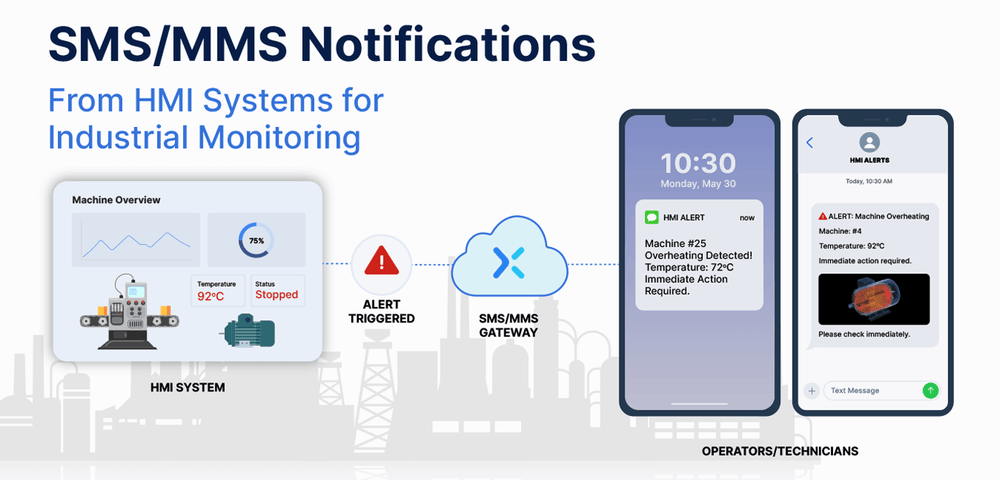
Here are some ways to send SMS and MMS notifications from HMI systems using TXTImpact.
1. API-based integration
API integration is one of the most scalable and efficient methods for connecting HMI systems with TXTImpact. Most modern SCADA, HMI, and industrial automation systems support REST APIs, webhook functionality, or scripting engines, enabling automatic, real-time SMS and MMS alerts.
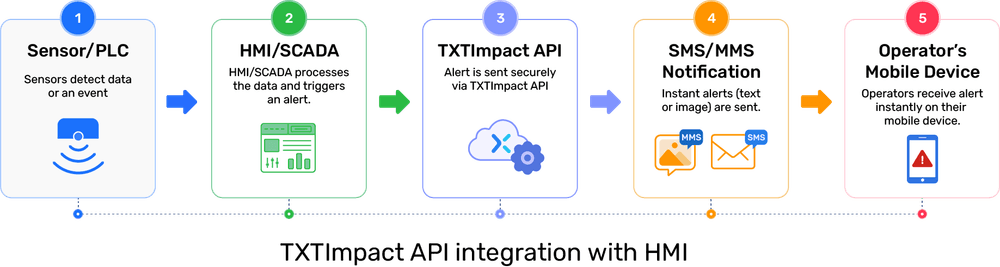
Here’s how the API integration works with TXTImpact:
- An industrial event occurs within the PLC or HMI system
- The HMI platform detects the alarm condition
- An API request is sent to TXTImpact
- TXTImpact processes the request and delivers the SMS or MMS notification instantly
This enables fully automated communication without manual intervention.
A typical API workflow includes:
2. SCADA Middleware Integration
Some industrial applications rely on SCADA middleware or intermediary automation platforms to manage communication between messaging services and HMI systems. This approach is particularly useful for facilities with complex infrastructure, legacy industrial equipment, and multiple data sources.
Popular industrial platforms, such as Siemens and Allen-Bradley, commonly use this setup in oil and gas facilities, manufacturing plants, utilities, and warehouses.
In the SCADA middleware integration workflow, the PLC handles machine-level operations, while the HMI or SCADA system monitors the data, applies alert logic, and sends notifications when problems occur.
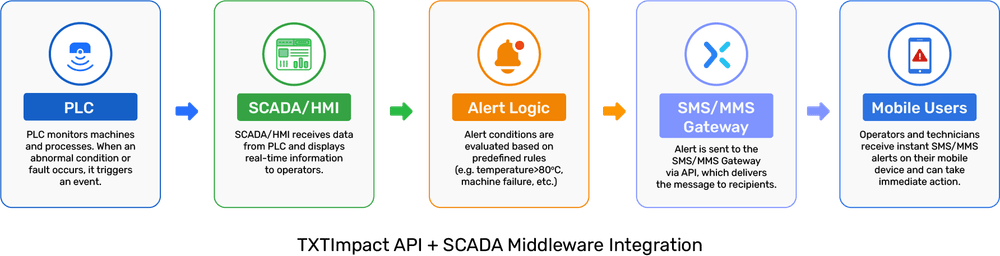
Here’s how the workflow works:
- PLC collects machine data, such as pressure levels, motor status, machine temperature, fault conditions, and emergency alarms.
- PLC sends data to the SCADA/HMI system.
- The SCADA system evaluates alert conditions and also prioritizes them based on priority, such as emergency, warning, and critical.
- SCADA triggers SMS or MMS alerts. Once the alert condition is confirmed, the SCADA system sends the alerts through cloud SMS API, an SMS gateway, or the middleware platform.
3. Email-to-SMS service
Several HMI, SCADA and Legacy systems may not support modern APIs or middleware integrations. In such cases, email-to-SMS or email-to-MMS provides a simple, effective alternative for sending critical industrial alerts and notifications via TXTImpact.
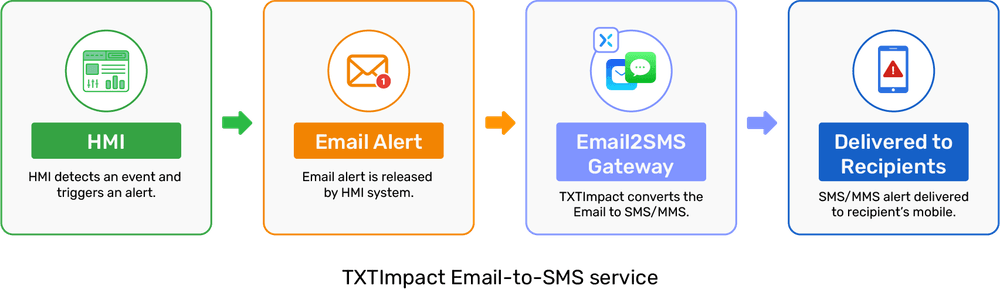
For example, If you are using a popular HMI system Maple EbPro that doesn’t support API integration, You can simply implement SMS/MMS notifications via TXTImpact’s email to sms service. Here’s how you can do it:
How to Send SMS/MMS Notifications via Maple Systems HMI (EBPro)
In EBPro, any alarm or event can be configured to send an email when a specified trigger condition is met. On Maple Systems Advanced and Smart cMT HMIs, this built-in SMTP email capability can also be used to deliver SMS and MMS notifications directly to users.
These SMS/MMS alerts work through the TXTImpact Email-to-SMS Gateway service, which converts email messages into text or MMS and delivers them to recipients’ mobile phones.
To send an SMS or MMS, simply enter the recipient’s address in the following format:
Whether your message includes plain text or media attachments, it will automatically be converted into an SMS or MMS and delivered to the specified phone number.
To set up notifications, add each recipient’s name and contact details in the Recipients list, then assign them to a Group.
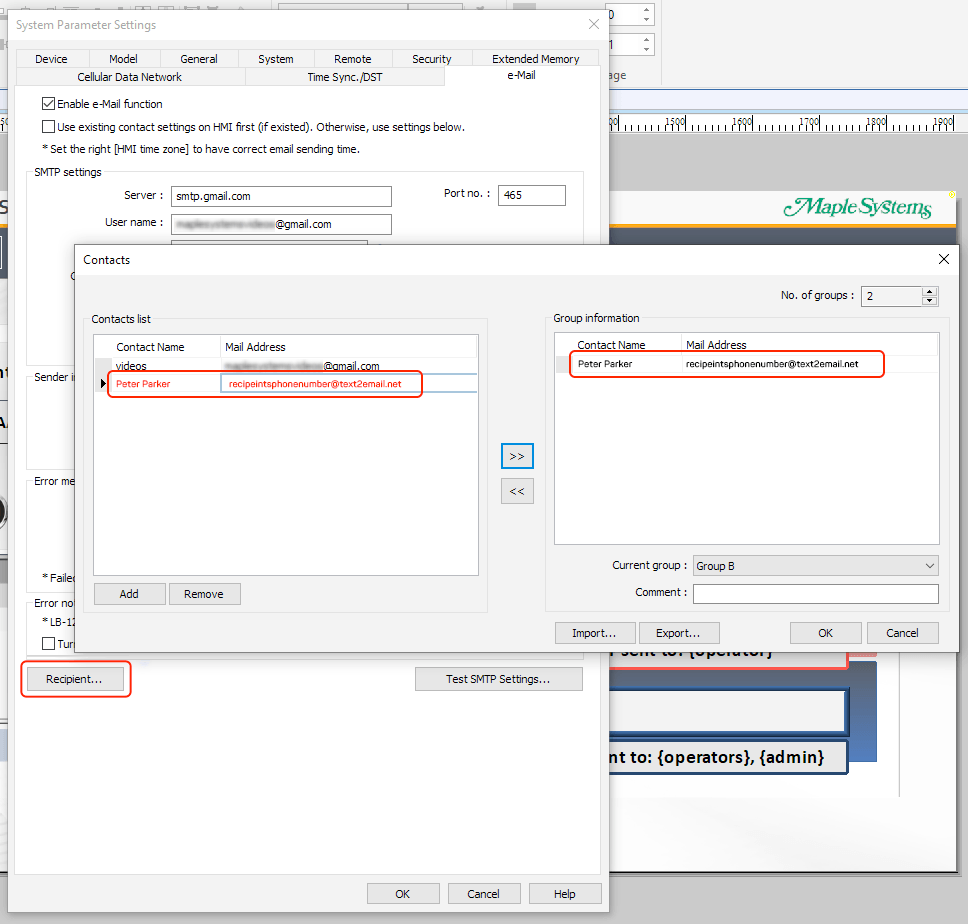
Once configured, you can use the “Test SMTP Settings” option and select the recipient group to send a test message and verify the setup.
After recipients are configured, proceed to create or edit Alarms and Events. Enable the Email option and assign the appropriate Group so that users receive notifications whenever the defined events occur.
Here’s how TXTImpact’s email-to-SMS works:
Legacy systems generate alarm emails automatically when specific events occur. These emails are then forwarded to TXTImpact, which then converts them into SMS or MMS notifications and delivers them to designated recipients.
Here’s the typical workflow of TXTImpact’s email-to-SMS gateway:
- The industrial alarm is triggered
- SCADA or HMI system sends email alerts
- TXTImpact receives emails
- Email content is converted into SMS or MMS
- Alert is delivered to mobile devices
Benefits of email-to-SMS integration include fast deployment, minimal infrastructure changes, support for legacy systems, and cost-effective modernization.
Use Cases of SMS/MMS Notifications From HMI Systems
SMS and MMS alerts and notifications help industrial businesses improve response time, strengthen safety, reduce downtime, and support better industrial automation workflows.
Here are the critical use cases of SMS and MMS notifications from HMI systems for different industries.
1. Email-to-SMS service
One of the most common use cases of SMS notifications in industrial environments is equipment failure monitoring. When machines experience abnormal behavior, the HMI system can instantly send alerts to maintenance teams and operators.
Common examples of equipment failures include generator failure, motor overheating, conveyor belt stoppage, hydraulic failure, pump malfunction, and compressor shutdown.
An example SMS alert for equipment failure in the smart industries includes: “Equipment warning: Robotic Arm 5 stopped responding on Assembly Line B.”
2. Production downtime notifications
Unexpected production interruptions can significantly affect manufacturing efficiency and operational costs. HMI systems can automatically notify supervisors and production managers when downtime occurs.
Examples of production downtime include material stoppage, assembly line stoppage, packaging machine failure, robotics malfunction, and power interruptions.
An example of a production downtime notification in a manufacturing plant includes: “Packaging line 2 stopped due to low material supply.”
3. Predictive maintenance notifications
Modern industrial systems use IoT devices and sensors to detect early warning signs before machines fail. HMI systems can automatically send SMS alerts when maintenance thresholds are reached.
Excessive runtime hours, high vibration levels, rising temperature levels, low lubricant levels, and filter replacement reminders are examples of predictive maintenance alerts.
An example of a predictive maintenance notification in the energy and utilities industry includes, “Predictive Maintenance alert: Motor temperature on Line 4 exceeded normal operating range.”
💡 Also Read: SMS for IoT: How Machine-to-Machine (M2M) Communication Uses SMS for Real-Time Alerts |
4. Safety and emergency alerts
Industrial environments require immediate communication during emergencies. SMS alerts help businesses rapidly inform personnel about a dangerous situation.
Common safety alerts include gas leaks, chemical spills, fire alarms, emergency shutdowns, electrical faults, and unauthorized access attempts.
An example of a safety and emergency alert in the oil and gas industry includes, “Gas leak detected in Zone 2. Evacuate immediately and follow safety protocol.”
For example, companies like Petrolink can use TXTImpact’s REST API to integrate with their HMI systems for SMS alerts and notifications, or they can use the email-to-text service if API integration is not available.
5. Inventory or warehouse notifications
Industrial warehouses and logistics operations also benefit from HMI-based SMS alerts and notifications. Common alerts include low inventory warnings, loading dock delays, conveyor system failures, storage temperature issues, and automated storage system faults.
An example of logistics and warehouse management includes, “Inventory level for Component X is below reorder threshold.”
6. Shift management and workforce communication
HMI systems can also support workforce coordination and operational communication, such as overtime alerts, maintenance scheduling, shift change reminders, attendance notifications, and task completion updates.
An example of shift management and workforce communication alert includes, “Your shift at plant 2 starts at 6 AM tomorrow. Please report 10 minutes early.”
SMS vs MMS in Industrial HMI Alert Systems
Here are the key differences between SMS and MMS in industrial HMI alert systems.
Feature | SMS alerts | MMS alerts |
Content type | Text only | Text plus images and videos |
Speed | Fast | Slightly slower |
Message size | Small | Larger |
Internet requirement | No app required | No app required |
Best for | Critical alerts | Visual diagnostics |
Industrial use cases | Alarms, faults, warnings | Images, screenshots, inspections |
Data context | Basic information | Detailed visual information |
Cost | Lower | Higher than SMS |
While SMS is preferred for time-sensitive, urgent alerts that require immediate action, MMS is useful for visual information that helps teams better understand or diagnose a situation.
SMS is typically ideal for fast emergency communication, high-volume notifications, simple machine alerts, and automated operational updates. At the same time, MMS is best for visual diagnostics, security monitoring, equipment inspection, and advanced troubleshooting.
Conclusion
SMS and MMS notifications are essential for modern industrial automation and HMI systems. Unlike traditional alerting methods, SMS and MMS provide fast, reliable communication directly to mobile devices without requiring specialized apps or internet access.
Whether integrated through APIs, SCADA middleware, or legacy email-to-text systems, these messaging workflows help industrial businesses improve response time, strengthen workplace safety, reduce downtime, and build smarter, more connected operations.
With TXTImpact, you can send critical alerts and notifications to your operators and technicians via SMS gateway API or the email-to-SMS service, with features such as two-way messaging, message delivery confirmation, keyword-based routing, and more.
If you’re looking for a business messaging service to send alerts and notifications to your industrial technicians and operators, choose TXTImpact to send texts in real time and avoid operational disruptions, downtime, and delays.
Start a free trial or contact us to learn more.
FAQs
♦ What industries benefit the most from HMI SMS and MMS notifications?
Industries that heavily rely on automation and industrial monitoring benefit the most from HMI SMS alerts. This includes oil and gas, manufacturing, utilities, water treatment, mining, pharmaceuticals, warehousing, and energy sources.
♦ Can HMI systems send SMS directly?
Yes, modern HMI systems can send SMS alerts directly through SMS APIs, middleware integrations, or gateways. Once the HMI detects an alarm condition or a predefined event, it can automatically trigger SMS notifications to supervisors, operators, or maintenance teams in real-time.
♦ What is required for HMI SMS integration?
HMI SMS integration typically requires an HMI or SCADA platform, a messaging service provider like TXTImpact, an API or gateway connectivity, and predefined alert logic. Depending on the infrastructure, some middleware platforms, such as MQTT, OPC QA, or Node-RED for advanced automation workflows.
♦ Can SCADA systems send SMS alerts?
Yes, SCADA systems can automatically send SMS alerts when they detect abnormal sensor readings, machine failures, or operational disruptions. Most SCADA platforms support SMS integration through SMS gateways, APIs, email-to-SMS services, or industrial middleware.
♦ How does MMS work in industrial systems?
MMS allows industrial systems to send multimedia alerts that include screenshots, images, CCTV snapshots, inspection reports, or diagnostic visuals, along with text messages. MMS is particularly useful for remote troubleshooting, visual incident verification, and equipment inspections.
♦ What is the best SMS API for HMI systems?
The best SMS API for an HMI system should offer real-time delivery, MMS support, high reliability, easy integration, automation capabilities, and delivery tracking. TXTImpact provides SMS API solutions for automated notifications, industrial alerting, email-to-SMS workflows, and two-way messaging in HMI and SCADA environments.
About the Author:
 | Rahul Kumar (Marketing Specialist) Rahul Kumar is a Digital marketer with 7+ years of experience in SEO, AEO, SMS marketing, WhatsApp marketing, SaaS, and WordPress. He has led successful growth campaigns for startups and tech brands, combining data-driven strategies with compelling content. His work has been featured on top SaaS blogs, and he’s known for turning complex ideas into high-converting digital strategies. |