How to Send Email to Text in 2026: Step-by-Step Guide
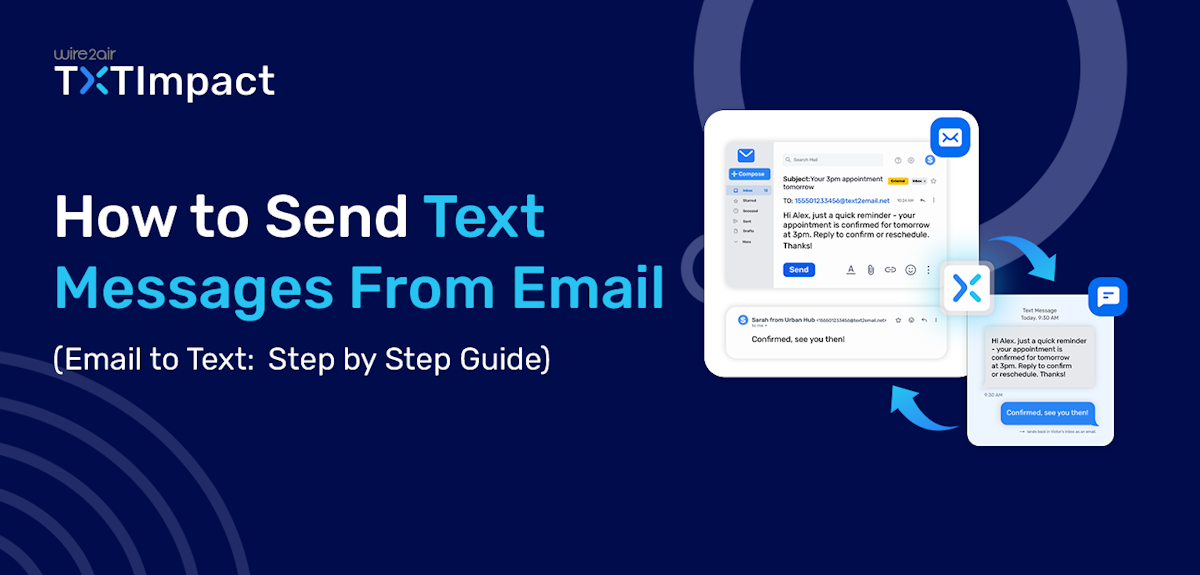
Sending a text message from email isn't easy than you might think. But if you’ve searched for instructions before, you may have come across the traditional method of using a mobile carrier’s email-to-SMS gateway, such as Verizon’s vtext or AT&T’s email-to-text service.
The problem? Several carrier-based gateways are being discontinued or becoming obsolete, making this method less reliable than it once was.
So, what’s the easiest, secure and reliable way to send a text from Gmail, Outlook, or another email client today? In this guide, we’ll walk you through the traditional carrier-gateway method, explain why it’s becoming less practical, and show you how modern email-to-text services like TXTImpact let you send SMS messages without knowing the recipient’s carrier.
Whether you need to send a quick text from your inbox or regularly send business messages, you’ll find the method that works best for you. Let’s get started.
Key Takeaways:
|
What is Email-to-Text?
Email-to-text, or email-to-SMS, is a messaging method that allows you to send a text from your email account, whether you use Gmail, Outlook, Apple Mail, or other business tools and email applications.
Instead of opening an SMS platform or a messaging application, you can simply compose an email and send a message to the designated recipient's mobile number through an email-to-SMS gateway.
Email-to-SMS provides businesses with a simple way to add SMS to existing communication workflows without requiring employees to learn a separate messaging platform. Teams can use it to send appointment reminders, service updates, internal messages, alerts, and customer notifications.
How Does Email-to-Text Work?
Email-to-SMS typically uses a gateway to convert an email into an SMS. Here’s the simple process or workflow:
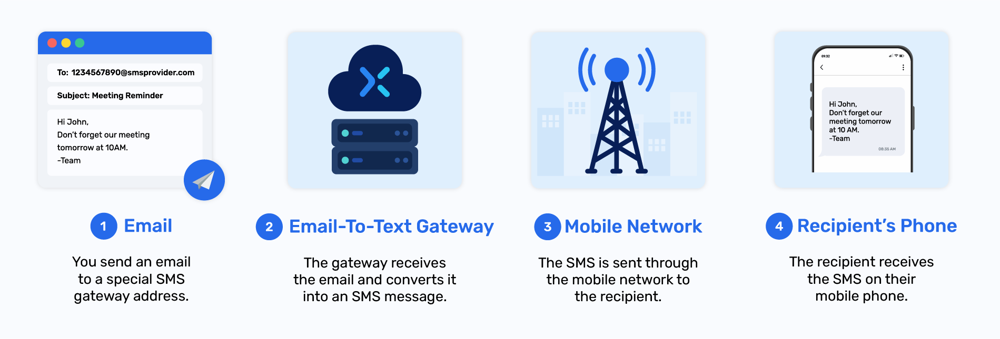
Email → Email-to-text gateway → Mobile Network → Recipient’s phone
- Compose an email using Gmail, Outlook, or another email client.
- Send it to the configured SMS destination provided by your email-to-SMS service.
- The gateway converts the email into an SMS.
- The message is delivered to the recipient’s mobile phone through the carrier network.
If supported, the recipient can also reply to the SMS, with the response routed back to your email or messaging platform.

How to Send Email to text or SMS (3 Methods)
You can send a text message directly from Gmail, Outlook, or another email client via three methods : use a carrier Free email-to-SMS gateway, use a dedicated email-to-text service, or connect email to SMS through an integration or automation.
3 Ways to Send Email to Text Messages:
1. Use a carrier email-to-SMS gateway
Enter the recipient’s phone number followed by their carrier’s SMS gateway domain, such as [email protected], in the To field. This traditional method requires you to know the recipient’s mobile carrier. However, several carrier email-to-text gateways have been discontinued or changed, so availability can vary.
2. Use an email-to-text service
A dedicated service such as TXTImpact lets you send SMS from your existing email client without knowing the recipient’s carrier. The service handles message routing and can provide features such as delivery reports and two-way messaging.
3. Use an email-to-text integration or automation
Businesses can connect email with an SMS platform through an API, automation tool, or email forwarding rule. This can automatically turn specific emails into text messages for alerts, notifications, reminders, and other workflows.
Note: Carrier's Free email-to-SMS gateways were once a convenient option, but some major carriers have discontinued or changed their legacy services. If you're looking for a more consistent way to send business texts from email, a dedicated email-to-text service is an alternative. We explain the limitations of carrier gateways in the next section. See the carrier's list that discontinued the email to text service in USA and Canada.
Why Were Free Carrier Email-to-SMS Gateways Shut Down, and Why Do Businesses Need to Replace Them?
Many Traditional Free carrier email-to-SMS gateways providers such as AT&T, T-Mobile, Telus, Bell Canada, etc., have already discontinued their email-to-SMS service because of unreliable delivery, rising phishing, spam, and security threats, data security concerns, and a lack of scalability.
Here’s why businesses must replace traditional, carrier-based email-to-text gateways:
- Carrier-specific routing is inconvenient as it requires businesses to know the recipient's mobile carrier, making it difficult to send messages to customers across multiple networks.
- Many legacy gateways provide little or no information about whether a message was successfully delivered, lacking visibility and making it difficult to identify failed alerts or troubleshoot delivery problems.
- Carrier gateways were primarily designed for simple email-to-text communication. Managing multiple carrier gateways, large recipient lists, and routing rules becomes difficult as message volume grows, lacking scalability.
- Traditional carrier gateways may not provide a reliable two-way messaging workflow, which is necessary for interactive, two-way communication.
- Legacy carrier gateways generally offer limited integration and automation options for connecting SMS with business systems such as CRMs, help desks, Messaging APIs, business applications, BAS and HVAC systems, and monitoring systems.
Moving to a dedicated email-to-SMS platform provides a more centralized and future-ready approach, while allowing businesses to continue using familiar email-based workflows.
Is Verizon vText Being Discontinued?
vText was Verizon’s legacy email-to-text service that allowed users to send an email to a Verizon mobile number as an SMS. The traditional format used the recipient’s 10-digit phone number followed by @vtext.com.
Verizon has now begun shutting down its legacy email-to-text functionality. According to Verizon, the shutdown is expected to be completed by March 31, 2027, although some senders may lose access before that date. Verizon also notes that vText messages may already be blocked or filtered in some cases.
What Is the vText Alternative?
For businesses that rely on email-to-text messaging, Verizon points to its Enterprise Messaging (EMAG) as a replacement for Vtext/VZPix gateway users.
Another option is a dedicated email-to-SMS provider such as TXTImpact. Instead of using a Verizon-specific gateway address, you can send messages through the provider's email-to-text service without having to identify the recipient's carrier.
This approach can be useful for businesses that need email-to-text messaging across Verizon, AT&T, T-Mobile, and other carriers, along with features such as delivery reporting, automation, and two-way messaging.
How to Send a Text From Email Using an Email-to-Text Service TXTImpact
TXTImpact provides an easy-to-use email-to-SMS gateway. Instead of switching to a separate messaging application. You can compose the message in your existing email client and let the gateway convert it into an SMS.
Here’s how the process works:
Step 1: Set up your TXTImpact account
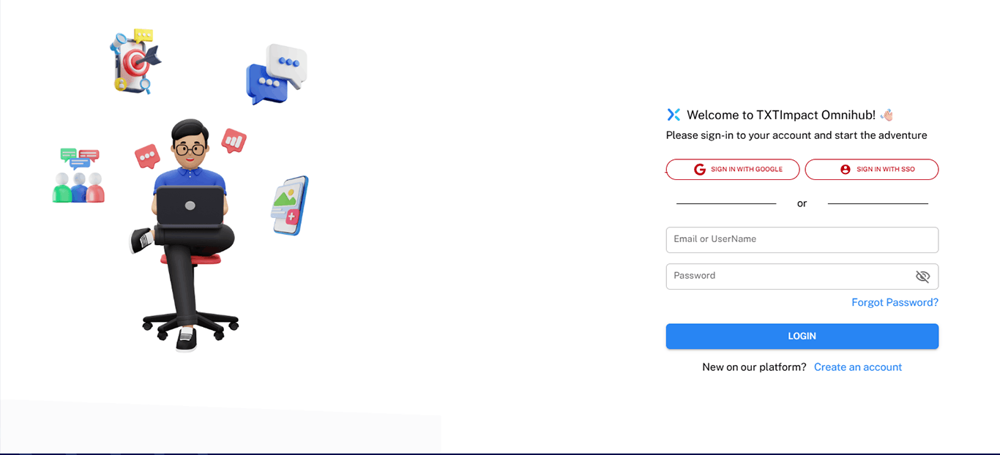
Enter your TXTImpact credentials and login to the TXTImpact Omnihub account if you’re an existing user. If you're a new user, set up your account by clicking the Create an account option.
Step 2: Set up and customize email-to-SMS settings
To set up email-to-text settings on the TXTImpact dashboard, go to Manage Account → Manage Users, and click on the edit button for the existing user under Action from which you want to send an email.
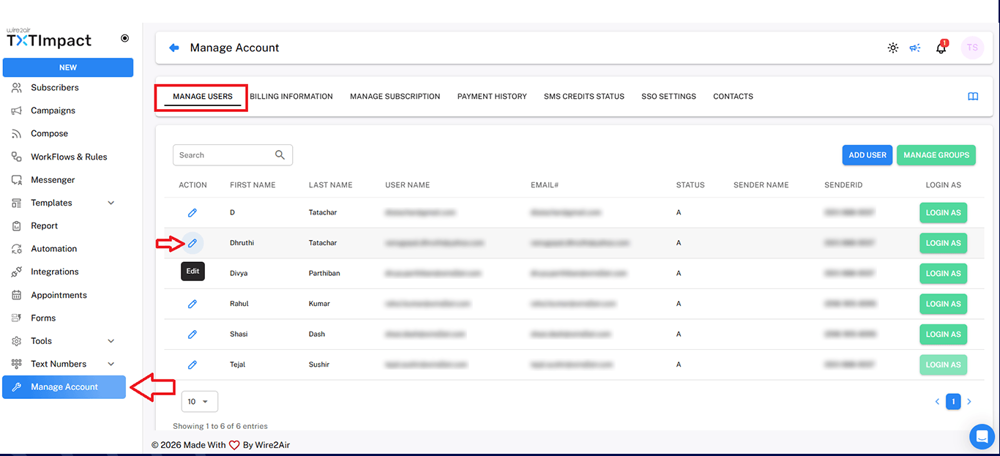
Click on Texting Profile, check the ‘Enable Email-to-Text’ checkbox, and click the ‘Save Text Profile’ button.
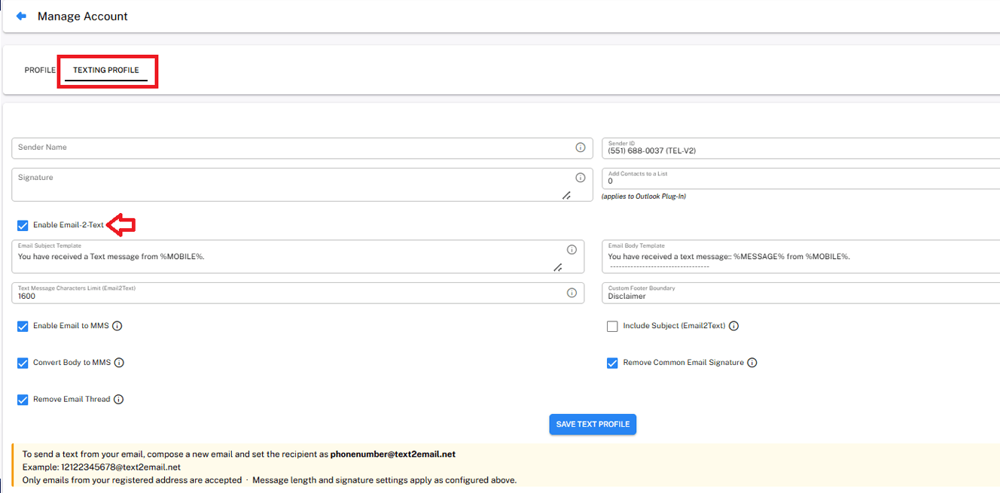
Once enabled, you can easily customize the email-to-text settings and details, including the email subject template, email body template, and character limit, and click on the ‘SAVE TEXT PROFILE’ button to save the configuration.
Step 3: Compose and send the email
Open your preferred email client, such as Gmail, Outlook, Apple Mail, or Thunderbird, to compose an email and send email-to-text alerts.
To send email-to-text with TXTImpact, compose the email content and format the recipient address in the ‘To’ field in this format → [email protected].
Make sure to keep the email body short, clear, and customer-friendly.
Once you send the email, TXTImpact’s email-to-SMS gateway will process and convert the email into an SMS and deliver it to the respective recipients.
Step 4: Run a test campaign before launching
Before launching your email-to-text campaign, send a test email to your business number to confirm it works as expected. Check if
- The message is delivered to the desired recipient
- The message is not truncated
- Attachments are included, if any
💡 Also Read: How to send MMS Picture from email (email to MMS)? |
How to Send a Text From Gmail?
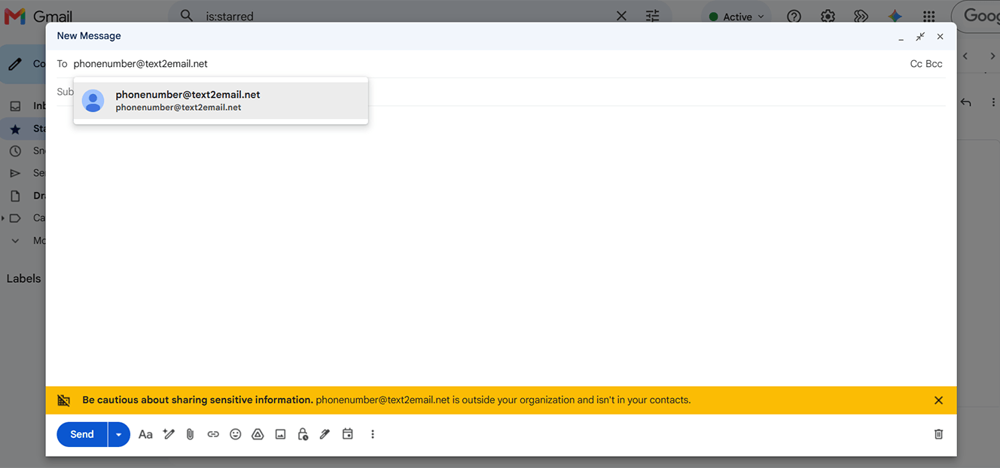
Once the TXTImpact email-to-text settings are configured, you can easily send texts from your Gmail inbox by configuring Gmail as your email client. To do so, open your Gmail inbox to compose a new email, and set the recipient address in the ‘To’ field as shown in the image below.
How to Send a Text From Outlook?
Just like Gmail, you can send text messages from your Outlook inbox directly to your customers’ phone numbers using TXTImpact’s Email-to-Text service. Once configured, you can send SMS messages from Outlook by entering the recipient’s phone number in the designated email address ([email protected]) format without switching between apps.
If you use Outlook App or Microsoft 365, there’s an even simpler option. TXTImpact’s dedicated Outlook Add-in lets you send text messages directly from the Outlook app without setting up Email-to-Text. You can text customers and contacts right from your Outlook inbox, making business texting a seamless part of your everyday workflow.
Can You Send a Text From Email Without Knowing the Carrier?
When you use a dedicated email-to-SMS service, you generally do not need to know which mobile carrier the recipient uses. The service handles the carrier identification and routing in the background.
With traditional carrier email-to-SMS gateways, you typically need to know the recipient’s carrier and use the corresponding carrier-specific gateway address. This makes the process inconvenient and difficult to manage at scale.
A dedicated email-to-SMS gateway, on the other hand, simplifies the process:
Your Email → Email-to-SMS Gateway → Recipient’s Carrier → Mobile Phone
In most cases, you only need the recipient’s mobile number, and the gateway handles the technical routing and delivers the SMS through the appropriate carrier network.
This is especially beneficial for businesses sending messages to customers across different carriers, making it easier to maintain a single email-to-SMS workflow instead of managing multiple carrier-specific gateway addresses.
TXTImpact Email-to-Text vs Traditional Free Carrier Gateways
Both TXTImpact email-to-SMS services and carrier Free email to text gateways allow you to send text messages from an email account, but they work differently.
Carrier gateways rely on a specific mobile carrier's email-to-SMS address, while dedicated email-to-SMS services handle the routing and delivery for you.
Feature | Email-to-SMS | Carrier gateway |
Carrier knowledge | Usually not required | Usually required |
Setup | Simple | More manual |
Carrier dependency | Low | High |
Delivery tracking | Often available | Usually limited |
Automation | Supported | Limited |
Two-way messaging | Often supported | Limited or unavailable |
API integration | Available | Generally available |
Reliability and Security | More reliable and secure, while adhering to all compliance requirements, including TCPA and 10DLC. | Can be inconsistent, prone to spam, pose security risks, and subject to discontinuation. |
Scalability | Suitable for businesses, legacy systems and no code integration solution. | Better for basic/legacy use |
For ongoing business communication, a dedicated email-to-text service is generally the better choice. It eliminates carrier-specific routing, provides greater scalability, and can offer features such as delivery tracking and two-way messaging.
Choose TXTImpact as Your Email-to-Text Provider
For businesses looking to replace legacy carrier email-to-SMS gateways, TXTImpact provides a carrier-independent way to send SMS directly from existing email workflows.
TXTImpact provides an intuitive, efficient, and reliable email-to-text solution for businesses, with no coding, no app installation required, no carrier lookup, and no technical expertise requirement.
Here are some features that make TXTImpact a stand-apart email-to-SMS provider:
- Integrates well with any email client (Gmail, Apple Mail, Outlook, etc.)
- Works with any industrial monitoring tool (HMI, Nagios, IoT, etc.)
- Supports email domain whitelisting to restrict sending messages to specific email addresses
- Supports multichannel compatibility, across email-to-MMS, email-to-RCS, and email-to-WhatsApp
- Offers a 10DLC AI Campaign Wizard that facilitates and streamlines the registration process into a few quick steps
- Provides real-time reporting and delivery reports for easy analysis and future campaigns.
- Supports auto-replies, enabling businesses to respond to incoming messages automatically.
- Automatically removes footers and signatures from email in the SMS, saving SMS credits.
- Provides responsive, dedicated US-based support that responds during business hours instead of routing through offshore tiers.
For businesses that rely on customer notifications, appointment reminders, BAS/HVAC alerts, IT notifications, or other time-sensitive communications, TXTImpact provides a centralized email-to-text solution without requiring a complete change to the existing communication workflow.
Conclusion
Email-to-text remains a convenient way to send SMS without leaving your email workflow. While carrier-specific gateways can work for basic use cases, their availability and functionality can vary. A dedicated email-to-SMS service provides an alternative for businesses that need centralized routing, delivery reporting, automation, or two-way messaging.
TXTImpact lets businesses send texts from Gmail, Outlook, Apple Mail, and other email clients, without carrier lookup. Explore TXTImpact Email-to-Text or start a free trial to see how it works.
FAQs
♦ How do I send an email as a text?
Sign up for an email-to-SMS service with TXTImpact, configure your email-to-text settings, enter the recipient’s mobile number in the required format, compose your message, and send the email.
♦ Is Verizon vText still available?
No. Verizon's legacy vText email-to-text service is being discontinued, so businesses should consider moving existing workflows to a dedicated email-to-SMS solution.
♦ Can I send long messages from email as SMS?
Yes, but long messages may be split into multiple SMS segments. The number of segments can affect message delivery and usage costs. It’s best practice to keep SMS content short and clear to save costs and improve responses.
♦ Can TXTImpact send texts from Gmail and Outlook?
Yes. TXTImpact supports sending email-to-text messages through common email clients, including Gmail and Outlook.
♦ Does email-to-SMS require coding?
No, a dedicated email-to-SMS service lets businesses send texts from existing email clients without development skills or API integration.
♦ How to Send an Email to a Verizon Phone?
You can send an email to a Verizon phone using an email-to-SMS gateway, but Verizon’s traditional free email-to-text gateway is no longer available. Businesses can use a dedicated email-to-SMS service like TXTImpact to deliver emails as text messages.
About the Author:
 | Sandeep Gulyani (Co-founder Wire2air TXTImpact) Sandeep Gulyani is the Founder of Wire2air TXTImpact, a leading Mass texting and business text service for sending SMS alerts, reminders, notifications, and marketing campaigns to customers and employees worldwide. With over 25 years of experience in technology and innovation, Sandeep has built TXTImpact as a platform that simplifies communication. |