How to Set Up Delta Controls to Send Text Alerts Notifications
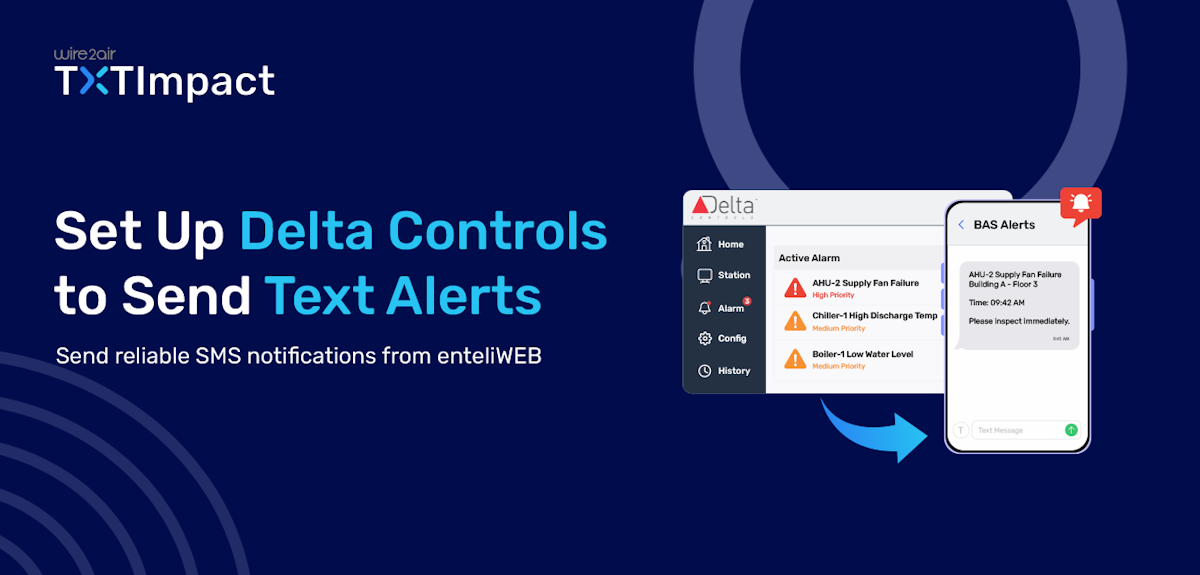
Delta Controls is one of the widely used Building Automation Systems (BAS) that allows organizations to manage and monitor HVAC equipment, energy usage, environmental conditions, and critical building operations.
In case of issues like equipment failure or operational damage, sending quick and critical alerts to the right personnel is essential to maintain operational continuity. While Delta Controls enteliWEB generates email alarm notifications for equipment faults and system events, relying solely on email alerts results in delayed responses, and alerts are often overlooked.
This is why using SMS alerts for critical notifications makes a huge difference. SMS notifications provide a faster and more effective way to send critical alarms and ensure they are seen immediately by facility managers and maintenance teams.
This article will take you through two effective ways to send Delta Controls text alerts using email-to-SMS and an SMS API, along with benefits and best practices for reliable alarm delivery.
Key Takeaways:
|
Why Do SMS Alerts Matter For Critical Building Alarms?
In building automation systems, when a chiller fails, a boiler shuts down, or temperatures move outside acceptable limits, even a short delay in response can lead to equipment damage, occupant discomfort, increased energy costs, or operational disruptions.
While several Delta Controls installations send alarms via email, emails can be overlooked, missed outside normal working hours, or filtered into cluttered inboxes. SMS alerts, on the other hand, help eliminate these challenges by delivering notifications directly to a technician's mobile phone, making them much harder to miss.
Here are the reasons why SMS alerts matter for critical building alarms:
Faster response times: Technicians are notified within seconds of an alarm occurring.
Improved visibility: Text messages are typically read much faster than emails.
Better after-hours coverage: On-call staff can receive alerts even when they are away from their desks.
Reduced downtime: Quick action can prevent minor issues from becoming major failures.
Protection of critical assets: Immediate awareness helps safeguard HVAC equipment, servers, refrigeration systems, and other vital infrastructure.
Enhanced occupant safety: Critical temperature, air quality, and ventilation issues can be addressed more quickly.
More reliable emergency notification: SMS provides a direct communication channel during urgent situations.
For facilities that depend on critical and uninterrupted building operations, SMS alerts provide an enhanced layer of assurance that important alarms are noticed and acted upon as quickly as possible.
3 Ways To Send Delta Controls Text Alerts
For organizations looking to receive Delta Controls alarms as text messages, there are two common approaches. The first is Email-to-SMS, and the other is SMS API. Let’s take a look at both of them.
Method 1: Send Delta Controls Text Alerts Using Email-to-SMS (Recommended)
TXTImpact provides a highly reliable email-to-SMS service that helps businesses convert Delta Controls alarm emails into SMS and deliver them to the designated phone number. It comes with several crucial features, including two-way messaging, MMS support, global coverage, character limit management, and more.
Setup TXTImpact Email to SMS Service.
Follow these steps to setup email-to-SMS with TXTImpact and send Delta Controls SMS alerts:
- First Sign up Free with TXTImpact → Next, log in to your TXTImpact account and go to Manage Account → Add User
Complete the new user's profile by entering the Username, which should be the same email address that Delta Controls uses as its From address when sending emails.
Fill in the remaining required details, then check the Enable Email-to-Text Service box before saving the user.
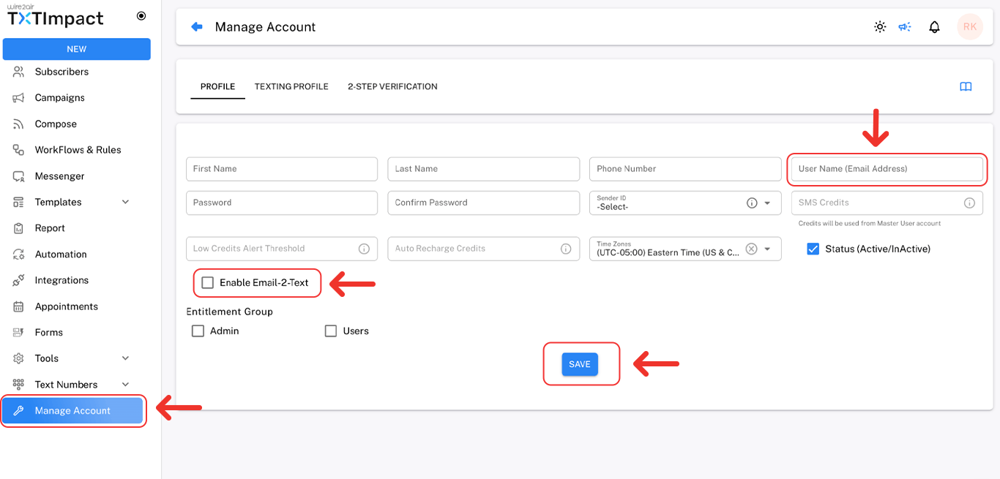
Next, complete the Texting Profile and enable the Email-to-Text option to activate the service.
When creating the user, make sure to use the same email address that Delta Controls uses as its From address. This email address is automatically added to TXTImpact's whitelist, allowing it to send Email-to-Text messages.
If a different email address is used, TXTImpact will reject incoming emails from Distech Controls, and no SMS alerts will be delivered.
Check out our detailed tutorial about: sending email-to-SMS with TXTImpact.
Now, setup Delta Controls’ email configuration in enteliWeb’s settings.
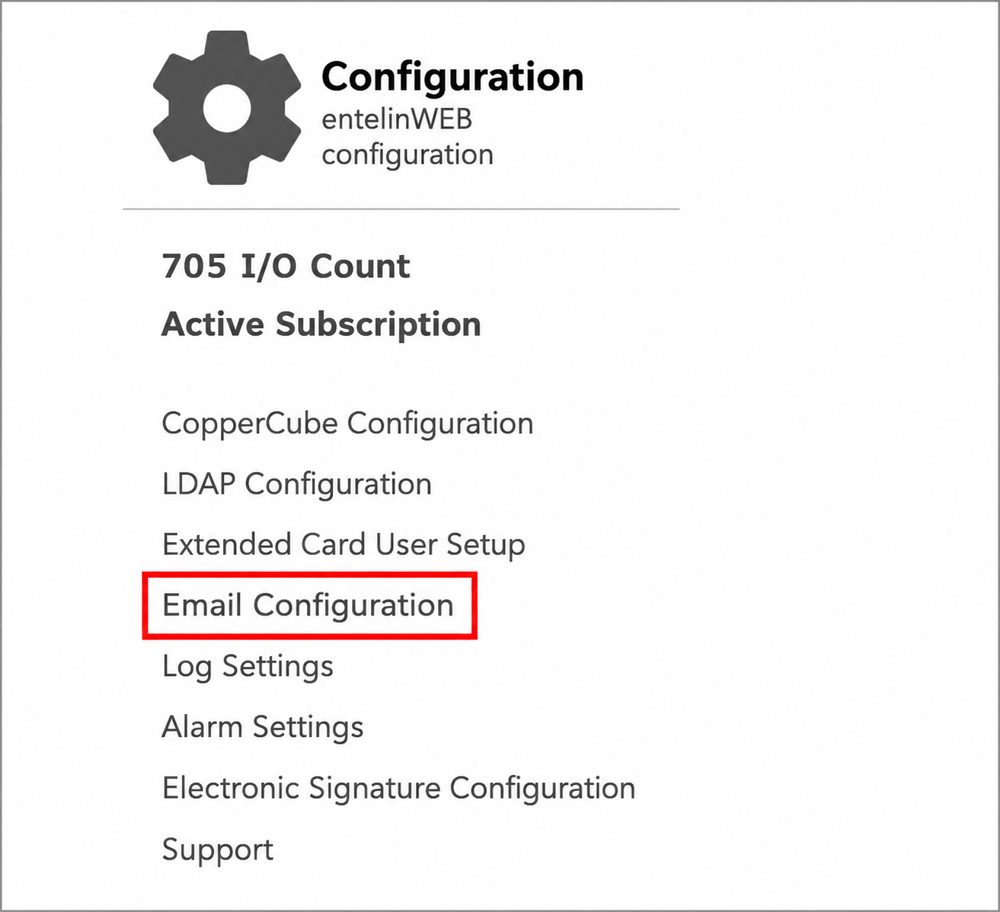
- Open the Administration page by selecting the gear icon
- Under Configuration, select Email Configuration
- Under SMTP server settings, enter your business’s SMTP server information, Port number, Username, and Password.
- Under the Email sender setting, enter your Sender email address, sender name, and the enteliWeb hostname.
- Select Save, and select Test configuration. If the settings are properly configured, a test email will be sent to the entered Sender email address.
Make sure to add the whitelisted email address in the Sender email address field to ensure SMS delivery.
- The next step is to add the recipient’s email address. For this:
Open the Administration page by selecting the gear icon
Under Sites and Users, select Users
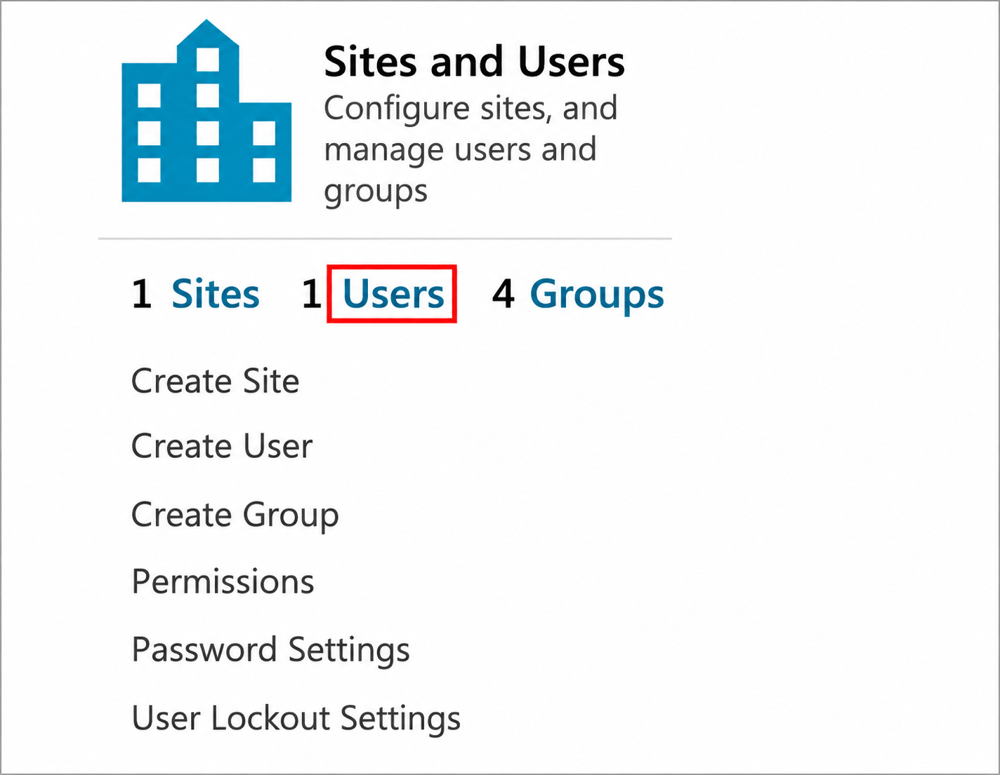
Select or click on Create User to send the email alerts.
Enter the user’s or recipient’s email address in the Email address field.
Here, make sure to add TXTImpact’s dedicated email address in the Email address field in this format → [email protected].
- Finally, select critical alarms for which you want to send SMS alerts and send a test alarm to verify whether SMS was delivered successfully to the right recipients.
- If you come across any issues related to delivery or others, follow these troubleshooting tips:
Email delivery failure: Check alarm wiring
No SMS delivery: Check SMTP configuration
Cut message: Shorten message length or characters
Unauthorized text: Whitelist sender address
📝 Note: If you want to receive alarm notifications on WhatsApp instead of SMS, you can use our Email-to-WhatsApp service too. |
Method 2: Send Delta Controls Alerts Using an SMS API
An SMS API is ideal for organizations that require more advanced alerting capabilities with greater control, flexibility, and reliability for sending SMS alerts.
Instead of relying on email notifications, the API passes the alarm data to an SMS platform through an API connection, which then generates and delivers SMS alerts to designated recipients.
This approach is typically used and preferred in enterprise environments that need to trigger alarms through automated workflows, support complex notification rules, or integrate with third-party applications.
To support these enterprise needs, TXTImpact offers a developer-friendly SMS API that supports conversational messaging across all channels effortlessly.
While SMS APIs provide significant flexibility, they generally require more setup effort than email-to-SMS and may involve custom development or middleware platforms. However, TXTImpact eliminates the setup complexity and helps you with every step and configuration.
Check our API documentation for more information.
Method 3: Third-party SMS Gateway Hardware
Before the popularity and wide availability of cloud-based messaging services, many organizations used SMS gateway hardware to send text messages from building automation systems. These solutions typically consist of a GSM modem or SMS gateway device connected to the network, along with a SIM card and cellular service plan.
When an alarm occurs, the BAS sends the notification to the gateway device, which then transmits the message through the cellular network.
However, this approach comes with several challenges, including:
- Additional hardware costs
- SIM card and cellular plan expenses
- Complex deployment and troubleshooting
- Limited scalability
- Device maintenance and monitoring
- Potential hardware failures
- Dependency on local cellular signal strength
Unlike cloud-based messaging services, hardware gateways create another piece of infrastructure that must be installed, secured, updated, and maintained.
For most Delta Controls deployments, email-to-SMS or SMS API solutions offer a simpler, more reliable, and more scalable approach to delivering alarm notifications.
Since these cloud-based methods eliminate the need for on-site hardware while offering easier management and higher flexibility, they have become the preferred choice for modern BAS SMS alerting.

Email-to-SMS vs SMS API vs SMS Gateway Hardware: The Preferred Method to Send SMS Alerts
Not all methods of sending Delta Controls SMS alerts offer the same level of simplicity, reliability, and scalability. The best option depends on your organization's technical requirements, available resources, and existing alarm workflow.
Feature | Email-to-SMS | SMS API | SMS Gateway Hardware |
Coding requirement | No | Yes | No |
Setup time | Instant | Typically needs hours, but it’s instant within minutes with TXTImpact | Hours to days |
Ongoing maintenance | Low | Medium | High |
Uses existing email alarms | Yes | No | Sometimes |
Hardware requirement | No | No | Yes |
Reliability | High | High | Depends on hardware and carrier |
Scalability | High | High | Limited |
Upfront cost | Low | Moderate | High |
Best for | Most BAS deployments | Advanced integrations | Legacy environments |
Common Delta Controls Alarm Notifications That Should Be Sent via SMS
Not every Delta Controls alarm requires a text message. Sending too many notifications can lead to alert fatigue, causing important alarms to be overlooked. The following Delta Controls alarms are commonly considered high-priority and are ideal candidates for SMS notifications.
Alarm Type | Why should it be sent as SMS? |
HVAC equipment failure | Unexpected AHU, RTU, VAV, or fan failures can quickly affect building conditions and require immediate response. |
High temperature alarm | Excessive temperatures may indicate cooling system issues and can damage temperature-sensitive equipment or products. |
Server or BAS Workstation Failure | Loss of supervisory systems can limit visibility into building operations and active alarms. |
Power Failure or Utility Outage | Building operators need immediate awareness of power disruptions to activate contingency plans. |
Critical Sensor Failure | Failed temperature, pressure, humidity, or airflow sensors can affect system performance and control accuracy. |
Generator failure | Backup power systems must be operational during outages, making generator alarms highly critical. |
Refrigeration or Cold Storage Alarm | Critical for facilities storing temperature-sensitive products, pharmaceuticals, or food inventory. |
Smoke Control or Life Safety Interface Alarm | Critical events that may impact occupant safety and require immediate investigation. |
Security System Integration Alarm | Unauthorized access, door alarms, or critical security events often require immediate response. |
Communication loss | Loss of communication with controllers, devices, or network segments can leave parts of the building unmonitored. |
Common Delta Controls SMS Alerts Issues and Troubleshooting
Even with a properly configured setup, SMS alerts may occasionally fail due to email, network, or notification configuration issues.
The table below highlights common problems and quick fixes.
Issue | Cause | Solution |
SMS not received | Incorrect recipient or Email-to-SMS address | Verify recipient details and send a test message. |
Delayed SMS delivery | Email server delays | Review email routing and server performance. |
Alarm email not sent | SMTP configuration issue | Check SMTP settings, credentials, and connectivity. |
Duplicate SMS alerts | Multiple notification rules | Remove duplicate alarm routing paths. |
Alarm triggers but no SMS | Alarm not linked to SMS workflow | Check alarm notification configuration. |
Not all recipients received SMS alerts | Incorrect notification group | Verify recipient lists and alert assignments. |
SMS text truncated | Message exceeds SMS limits | Shorten message content or use long-message support. |
Intermittent delivery | Network or email issues | Review network connectivity and delivery logs. |
Best Practices For Delta Controls SMS Alerting
Follow these best practices to help improve response rates of your Delta Controls SMS alerting system:
- Avoid alert fatigue by filtering out informational and low-priority alarms that do not require immediate action.
- Implement escalation procedures to notify additional personnel if a critical alarm is not acknowledged within a specified timeframe.
- Create role-based notification groups so technicians, facility managers, and supervisors receive only relevant alerts.
- Include meaningful alarm details such as equipment name, location, and alarm condition to help technicians respond faster.
- Keep messages concise and actionable so recipients can quickly understand the issue without reading lengthy texts.
- Standardize alarm priorities across facilities to maintain consistent notification practices.
- Maintain accurate contact lists and regularly update on-call schedules to ensure alerts reach the correct personnel.
- Test SMS notifications regularly to verify alarm routing, message delivery, and recipient information.
- Document alert response procedures so personnel know exactly how to respond when a critical SMS is received.
Why Businesses Use TXTImpact For Delta Controls SMS Alerts
TXTImpact is a leading business communication provider offering reliable email-to-SMS service and SMS API to help businesses send Delta Controls SMS alerts with ease.
With over two decades of experience, TXTImpact has served over 30,000 businesses across the globe and across industries, offering maximum reliability, scalability, unparalleled customer support, and the latest innovative services.
Several major carriers, including AT&T, Verizon, and T-Mobile, shut down and discontinued their free email-to-text gateways due to issues related to security, deliverability, and operations, making businesses switch to more reliable and dedicated email-to-text service providers.
TXTImpact helps organizations meet this gap by providing a reliable and affordable business-grade alternative that works with existing BAS alarm workflows while providing the following reliable features:
- Easy Email-to-SMS Integration: TXTImpact allows organizations to convert Delta Controls alarm emails into text messages without modifying their existing BAS configuration.
- SMS API for Advanced Integrations: For organizations that require custom workflows, TXTImpact provides an SMS API that can integrate with building management, monitoring, and ticketing systems.
- MMS Support for Detailed Alerts: TXTImpact supports messages up to 1,600 characters, enabling longer and more detailed alerts to be delivered.
- Reliable Delivery for Critical Notifications: Building alarms often require immediate attention. TXTImpact is designed to support business-critical messaging where timely delivery matters.
- Scales Across Multiple Facilities: Whether managing a single building or multiple locations, TXTImpact can also support growing notification requirements with ease.
Moreover, TXTImpact also supports the Email-to-WhatsApp service, allowing businesses to send critical Delta Controls alerts to WhatsApp numbers if their users or employees are predominant WhatsApp users. This helps ensure maximum message visibility and responses.
Contact us today to learn more about this service.
Conclusion
Delta Controls provides powerful alarm monitoring capabilities. However, ensuring recipients receive timely notifications is critical when temperature issues, equipment malfunctions, power outages, or other BAS emergencies occur.
Converting Delta Controls alarms into SMS alerts helps ensure notifications reach the right personnel quickly, reducing response times and minimizing operational disruptions.
While SMS gateway hardware remains an option, Email-to-SMS and SMS API solutions offer a more reliable, scalable, and cost-effective approach for most organizations.
TXTImpact provides both solutions, email-to-SMS service and a developer-friendly REST API to help businesses to send quick Delta Controls SMS alerts effortlessly. These services allow businesses to build a more reliable and responsive alert management system for their communication requirements.
If you need an alerting system for your existing Delta Controls BAS workflow, contact us to get started or start a free trial to learn more.
💡 Also Read: |
FAQs
♦ Can Delta Controls send SMS alerts to multiple technicians at the same time?
Yes. SMS alerts can be routed to multiple recipients, teams, or on-call groups simultaneously for faster response.
♦ Which is better for Delta Controls alerts: Email-to-SMS or SMS API?
Email-to-SMS is ideal for most deployments due to its simplicity, while SMS APIs are better suited for advanced integrations and automation.
♦ How quickly are Delta Controls SMS alerts delivered?
Delivery times vary by provider and carrier, but SMS alerts are typically delivered within seconds of the alarm being generated.
♦ Can I send Delta Controls alarms to WhatsApp instead of SMS?
Yes. Some messaging providers, such as TXTImpact, support Email-to-WhatsApp or WhatsApp API integrations for delivering alarm notifications.
♦ What information should a Delta Controls SMS alert include?
At a minimum, include the equipment name, location, alarm type, severity, and timestamp to help recipients act quickly.
About the Author:
 | Rahul Kumar (Marketing Specialist) Rahul Kumar is a Digital marketer with 7+ years of experience in SEO, AEO,SMS marketing, WhatsApp marketing, SaaS, and WordPress. He has led successful growth campaigns for startups and tech brands, combining data-driven strategies with compelling content. His work has been featured on top SaaS blogs, and he’s known for turning complex ideas into high-converting digital strategies. |