Celebrating TXTImpact's 20 Years of Business Texting Excellence. Be part of our journey. Start your free trial today!
SMS Recruiting Tool
Reach, Screen, And Hire Candidates Faster With SMS Recruiting Platform
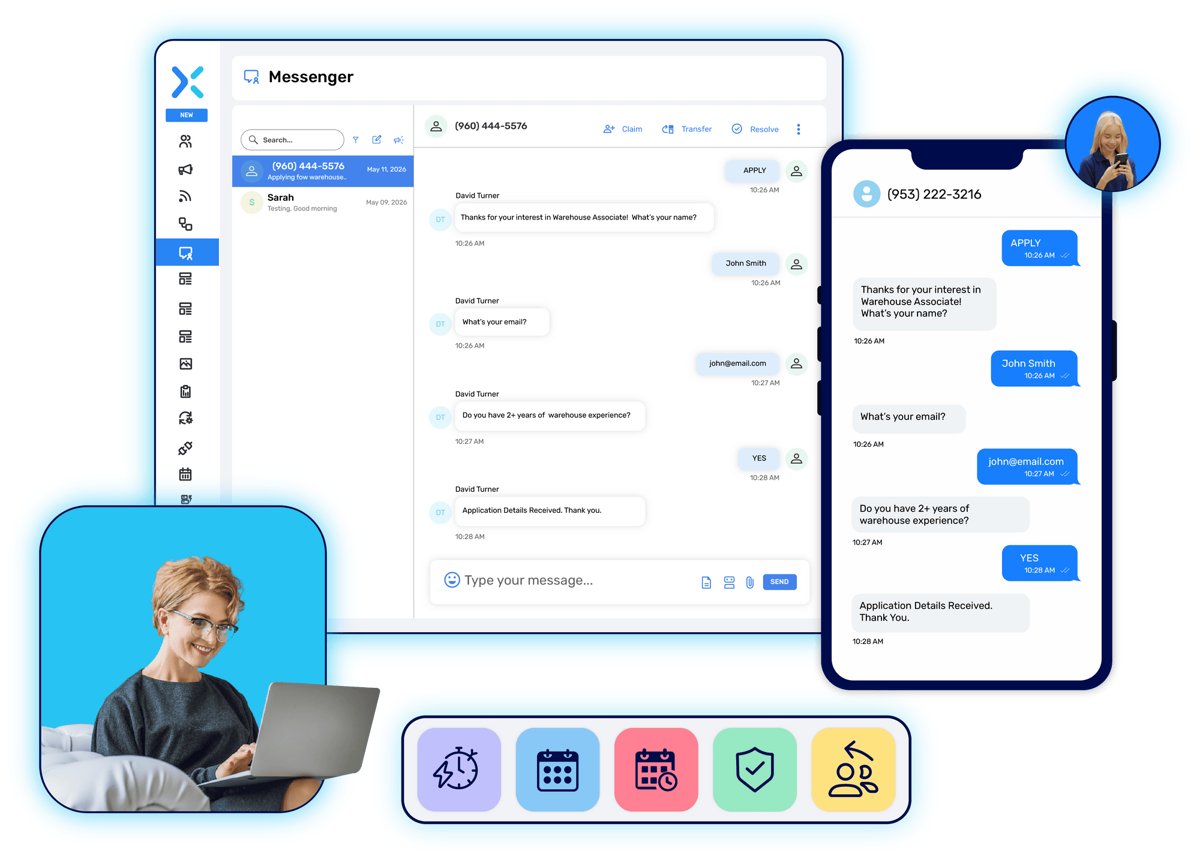
TXTImpact's SMS recruiting software built around one job: keep candidate conversations moving. Send job opportunities, answer questions, schedule interviews, and follow up, all by text. So fewer qualified candidates lose interest while waiting for a callback.

Used by recruiting and staffing teams since 2006 · No contract required · Set up in minutes
Minutes
Typical time for a text to be read, versus hours for email
Mobile-first
Most candidates search for and apply to jobs from a phone
20+ years
TXTImpact has supported recruiting teams with SMS since 2006
What is SMS Recruiting
Text Messaging, Built Into Your Hiring Process
SMS recruiting means using text messages to reach, engage, screen, and communicate with candidates throughout hiring, instead of relying only on phone calls and email. Recruiters use it to send job opportunities, answer questions in real time, schedule interviews, and keep candidates updated from application to offer.
A dedicated SMS recruiting platform differs from texting off a personal phone because it adds two-way messaging at scale, automation, templates, candidate segmentation, compliance safeguards, integrations with the systems you already use, and reporting on what's working — so one recruiter can manage the conversation volume of a much larger team.
Calls Go Unanswered. Texts Get Read.
Candidates aren't always available to answer a phone call especially during a shift, an interview, or when they don't recognize the number. Reaching them by text on a channel they already use can keep hiring conversations moving instead of letting them stall in voicemail.
✓ Candidates respond faster
A text is usually read within minutes. A voicemail or unread email can sit for hours, and by then a fast-moving candidate may have already accepted another offer.
✓ Follow-ups happen sooner
A quick text after an application or interview keeps the candidate warm, without waiting for a callback window that may never line up.
✓ Interview coordination is easier
Proposing a time, confirming it, and sending a reminder are each a single text no phone tag to lock in a slot.
✓ Engagement stays higher
Two-way texting lets candidates ask a quick question and get an answer in the moment, instead of leaving the process because they couldn't get through.
✓ Past candidates are easier to re-engage
A segmented list of prior applicants means a new opening can go out as a targeted text instead of starting sourcing from zero.

Candidate Outreach
Reach And Engage Candidates With SMS
Get a new opening in front of the right candidates, then keep the conversation going one-to-one.
Job opportunity outreach
Send a new opening to a candidate list the moment it's approved, instead of waiting for the next scheduled email blast. See mass texting
Applicant follow-ups
Confirm an application was received, ask for a missing detail, or nudge a candidate who went quiet, without a manual call list.
Talent-pool re-engagement
Reach back out to strong candidates from past roles the moment a matching opening appears, instead of starting sourcing over.
Segmented candidate messaging
Group candidates by role, location, skill set, or pipeline stage so each message only reaches the people it's relevant to.
1:1 and Mass conversations
Handle a single candidate conversation in real time, or send a mass text about the same opportunity to an entire list at once both from the same inbox.
Lower the barrier to apply
Text-to-apply captures interest before it fades
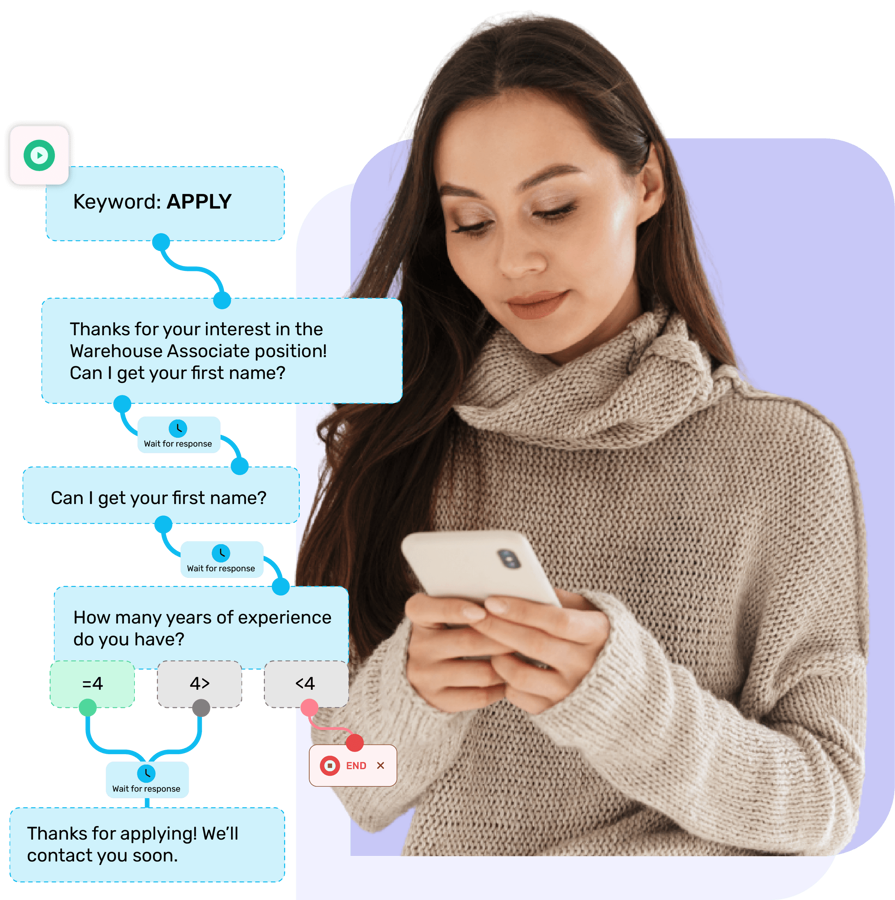
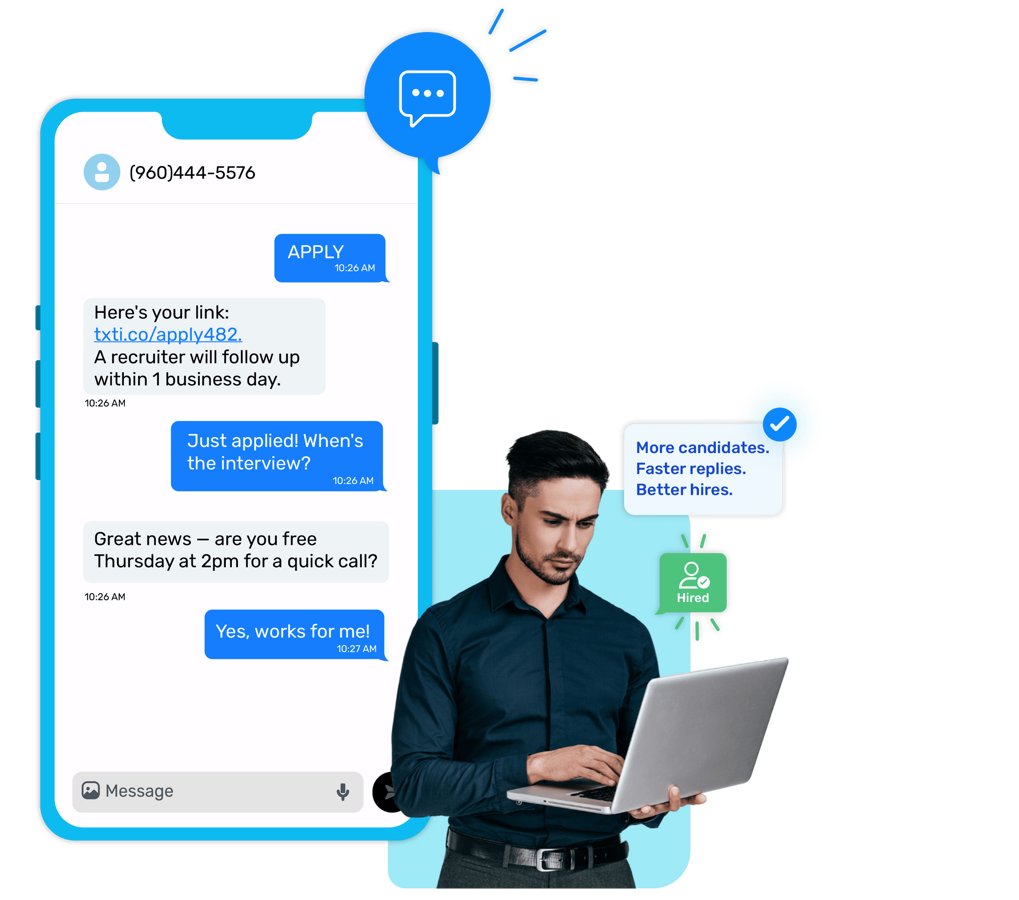
A candidate who has to find a link, open a form, and create an account often doesn't finish. Text-to-apply cuts that down to one message.
Automate Recruitment from Application to Interview
Advertise a keyword on a job posting, flyer, or at a job fair. Candidates text the keyword to apply, then SMS Workflows can automate the next steps from collecting candidate information and screening applicants to sending interview scheduling instructions. Keep the recruitment process moving through automated text conversations, with less manual follow-up required.

Candidate Screening
Screen And Qualify Candidates By Text
Answer candidate questions and gather what you need to qualify someone, without a scheduled call for basic information.
Two-way candidate conversations
Recruiters and candidates go back and forth on availability, pay rate, or requirements in real time.
Text-based screening (MultiTrivia)
Run a multi-question screening interview by text. A candidate texts a keyword, answers a sequence of automated questions, and every response is stored automatically.
Keyword-triggered responses
Set up automatic replies for common candidate questions, like job details or application status, so answers go out instantly.
Interview Coordination
Schedule Interviews And Keep Candidates Moving
Every step between "qualified" and "in the room" is a message a candidate can answer in seconds.
Interview invitations
Propose a time and ask for a reply, instead of trading voicemails to find a slot that works.
Confirmations and reminders
Ask for a one-word confirmation, then send an automatic reminder the day before to cut down on no-shows.
Rescheduling
When plans change, a candidate can text back a new time instead of the interview silently falling through.
Next-step notifications
Let a candidate know what happens after the interview — timeline, who they'll hear from, and when — so they're not left guessing.
Automation
Automate Candidate Communication
The repetitive parts of recruiting — reminders, status updates, first replies — don't need a person doing them one at a time.
Build a sequence that moves a candidate from application to interview reminder to offer message without manual follow-up.

Generate and personalize outreach texts, job alerts, and follow-ups in seconds instead of writing every message from scratch.
Candidate status messages
Automatically notify a candidate when their status changes, so "did I hear back?" doesn't become a support request.
Templates
Save reusable templates for job alerts, interview confirmations, and offer messages so recruiters aren't retyping the same text daily.
Workflow features
Manage Candidate Conversations From The Tools You Already Use
Email-to-Text and Outlook texting aren't separate messaging channels — they're a way to work SMS from an inbox your team already lives in all day.
Email-to-text and text-to-email
Route candidate texts to and from a shared team email address, so recruiters can manage responses from a shared inbox instead of a separate texting app.

Outlook and Microsoft 365 texting
Send outreach, interview reminders, and follow-ups directly from Outlook without switching tools. See Outlook texting
Shared recruiting inbox
Multiple recruiters can see and reply to the same candidate thread, so a conversation doesn't stall just because one person is out.
Multichannel Messaging
Recruit Candidates Across Multiple Messaging Channels
SMS, MMS, RCS, and WhatsApp are the messaging channels TXTImpact supports — reach a candidate on the one they actually use.
The default channel for job alerts, screening, and interview coordination — works on any phone, no app required.
Send interactive "Apply Now" and "Confirm Interview" buttons inside the thread on supported devices. See RCS
Reach candidates who prefer WhatsApp, especially for remote or international roles. See WhatsApp
Integrations
Connect SMS Recruiting With Your ATS, CRM, And Recruiting Stack
TXTImpact is built to plug into the systems your recruiting team already runs on, so candidate messages sync instead of living in a separate app.
Seamless ATS Integrations And Workflow Optimization
TXTImpact can integrate with major applicant tracking systems like Bullhorn, Greenhouse, Workday, and Oracle Taleo via Unified API or a no-code Email-to-Text solution. Dedicated connectors are also available for Zapier and Salesforce, with additional connectors for Zendesk, Constant Contact, and Mailchimp. This keeps candidate messages synced automatically, reducing manual data entry and improving recruiter productivity.
Ready to send
Recruiting Text Message Templates
Swap in your own details and send as-is, or drop these into a Workflow so they go out automatically.
Opportunity
Hi [Name], [Company] has a new [Job Title] opening in [Location] paying [$Rate]. Reply YES to hear more or APPLY for the link. Reply STOP to opt out.
Application follow-up
Hi [Name], we received your application for [Job Title]. We're reviewing it now and will text you with next steps soon.
Interview invitation
Hi [Name], we'd like to schedule an interview for [Job Title]. Are you available [Date/Time]? Reply YES to confirm or suggest another time.
Interview reminder
Reminder: your interview for [Job Title] is tomorrow at [Time] with [Interviewer], [Location/Link]. Reply C to confirm.
Candidate screening
Text SCREEN to answer 3 quick questions about your availability and experience for [Job Title]. Takes under 2 minutes.
Offer / hiring
Hi [Name], congratulations! [Company] would like to offer you the [Job Title] position at [$Rate], starting [Date]. Reply YES to accept.
End to end
SMS For The Hiring Lifecycle
Source ➜
Text-to-apply and job alerts turn passive candidates into applicants
Engage ➜
Follow-ups and two-way texting keep candidates responsive
Screen ➜
Text-based screening qualifies candidates without a call
Interview ➜
Text-based screening qualifies candidates without a call
Hire ➜
Offer messages and confirmations close the loop by text
Re-engage
Segmented lists bring past candidates back for the next opening
Text Candidates With Confidence
Recruiting texts are still regulated messages under TCPA rules, so consent, opt-out handling, and 10DLC number registration matter.
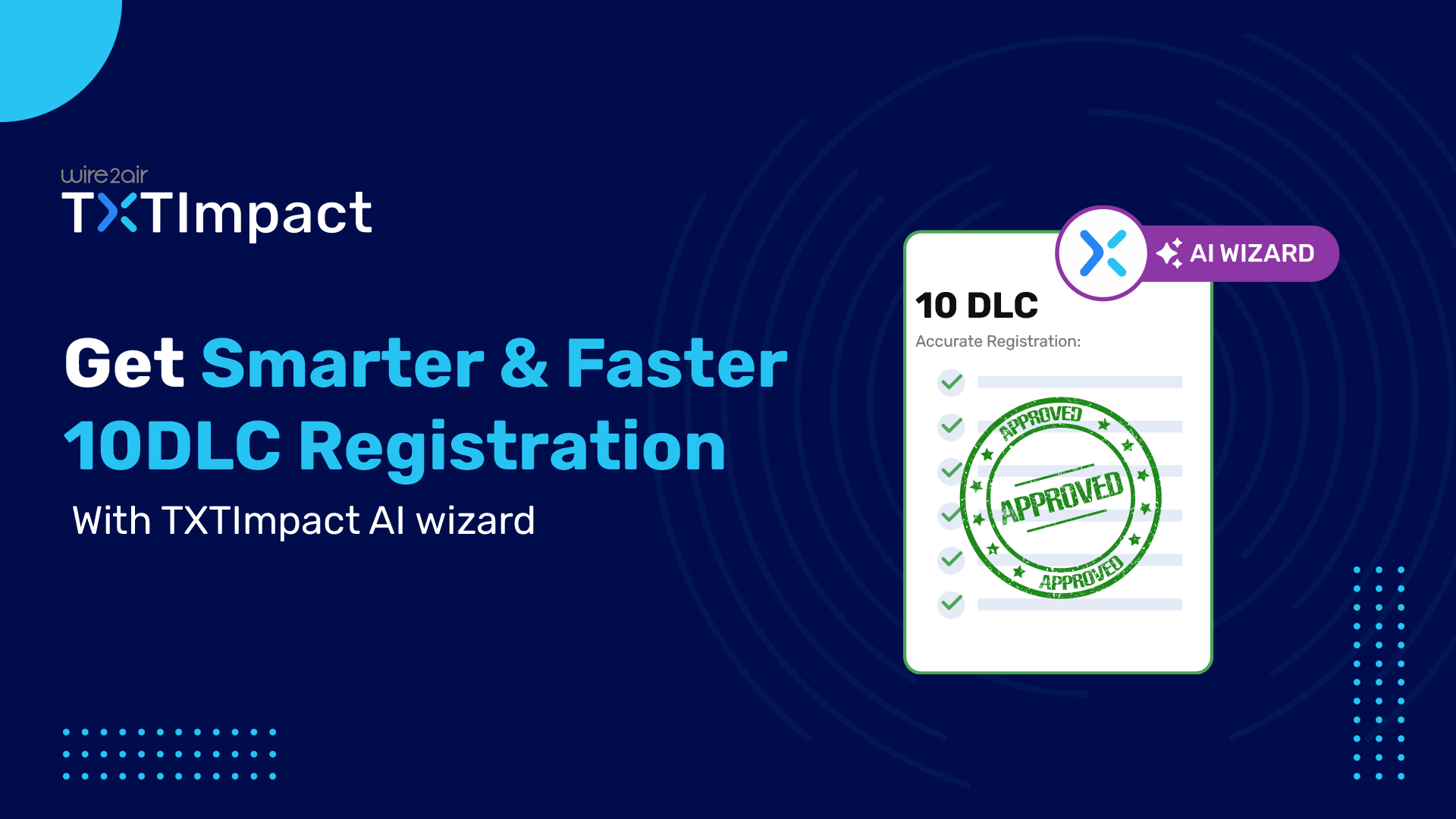
✓ Get fast, easy 10DLC registration with TXTImpact’s AI Wizard—a smart, built-in, AI-guided registration tool that streamlines the process, helps you avoid common errors, reduces the chance of rejection, and lets you complete registration without any expert assistance.
✓ Built-in opt-out (STOP) handling on every campaign
✓ Toll-free and short code options for higher-volume sending
✓ Ongoing guidance via our SMS Compliance Guide
The AI Wizard helps you submit a stronger registration — final approval still depends on carrier review.

Who it's for
Built For Teams That Hire On A Deadline
Swap in your own details and send as-is, or drop these into a Workflow so they go out automatically.
Staffing & recruiting agencies
High-volume, fast-turnaround candidate recruitment. For placement, shift, and workforce communication, see SMS for staffing agencies.
Corporate recruiting teams
In-house recruiters managing candidate pipelines across multiple open reqs.
Talent acquisition teams
Ongoing sourcing and pipeline nurture across roles and departments.
Healthcare recruiters
Fast credential checks and interview coordination for clinical and support roles.
High-volume hiring teams
Managing hundreds of applicants for the same role without losing track of anyone.
Seasonal & event hiring
Job fair keyword campaigns that convert walk-up interest into applications instantly.
What Staffing Agencies Say About TXTImpact Text Recruiting Platform
"TXTImpact has truly changed the way we handle recruitment. Reaching candidates by text has been incredibly effective — people actually respond, and they respond fast. What used to take hours now takes minutes."
— Sachin Jain, Verified Trustpilot review, Nov 2025
CEO, BuzzClan
Pricing That Scales With Your Pipeline
TXTImpact offers flexible plans for businesses of every size, with generous text credits and better value as your messaging volume grows. Plans start at $29/month with 750 Text credits, with higher-tier plans including more credits to support larger candidate outreach campaigns.
No annual billing contract required— 90-day credit rollover for Business Plans
FAQ
Common Questions
What is SMS recruiting?
SMS recruiting is the use of text messaging to reach, engage, screen, and communicate with candidates throughout the hiring process, instead of relying only on calls and email.
How does SMS recruiting software work?
An SMS recruiting platform lets a team send and receive text messages with candidates at scale, with automation, templates, segmentation, and compliance tools that a personal phone doesn't provide.
How do recruiters use text messaging to reach and manage candidates?
Recruiters use SMS to send job opportunities, follow up on applications, answer candidate questions, schedule interviews, confirm details, and re-engage past applicants when a new role opens.
Can candidates reply to recruiting texts?
Yes. TXTImpact supports two-way texting, so candidates can ask questions, confirm availability, or respond to screening questions directly in the thread.
Can I send interview reminders and confirmations by text?
Yes. You can send interview invitations, ask for confirmation, send a reminder before the interview, and handle rescheduling, all by text.
What is text-to-apply?
Text-to-apply lets a candidate text a keyword, like APPLY or JOBS, and instantly receive a link or next step, reducing the friction of a full application form.
Can SMS recruiting integrate with my ATS or CRM, like Bullhorn, Greenhouse, Workday, or Oracle Taleo?
TXTImpact can connect to these and other ATS platforms through an API, a no-code Email-to-Text workflow, or connectors like Zapier and Salesforce, so candidate messages sync with the system you already use.
Can recruiters manage candidate texts from an inbox they already use, like Outlook?
Yes. Email-to-Text and Outlook texting let recruiters send and reply to candidate texts from their existing email inbox, as a workflow feature rather than a separate app.
Is SMS recruiting compliant with texting laws?
Yes, when done with proper consent and opt-out handling. TXTImpact includes built-in opt-out support and guidance on 10DLC registration and TCPA compliance.
What is 10DLC, and why does it matter for recruiting texts?
10DLC is the registration carriers require for local numbers sending business texts in the U.S. TXTImpact's AI Wizard guides you through registration, though final approval timing depends on carrier review.
What's the difference between SMS recruiting and traditional recruiting communication?
Traditional recruiting relies mainly on phone calls and email, which candidates often miss or delay answering. SMS recruiting adds a channel candidates typically read within minutes, with automation to keep conversations moving.
Start Reaching Candidates Faster
Try TXTImpact's SMS recruiting platform free — no CRM required, no long-term contract.
By using this website you agree to our privacy policies
We use cookies to improve user experience. Choose what cookie categories you allow us to use. You can read more about our Cookie Policy by clicking on Cookie Policy below.
These cookies enable strictly necessary cookies for security, language support and verification of identity. These cookies can’t be disabled.
These cookies collect data to remember choices users make to improve and give a better user experience. Disabling can cause some parts of the site to not work properly.
These cookies help us to understand how visitors interact with our website, help us measure and analyze traffic to improve our service.
These cookies help us to better deliver marketing content and customized ads.