Celebrating TXTImpact's 20 Years of Business Texting Excellence. Be part of our journey. Start your free trial today!
SaaS SMS Service
The SaaS SMS Service That Lets You Add Texting to Your Software — Fast
Add messaging capabilities to your SaaS platform without building the infrastructure from scratch. Integrate a unified API for SMS, MMS, RCS, and WhatsApp, or use a no-code Email-to-Text integration to connect your existing workflows without writing code.
15-day free trial · no credit card · no setup fee
Why It Works
Why SaaS Companies Should Text
of text messages are opened, making SMS one of the most reliably seen channels a SaaS platform can use.
Source: CTIA
of leads say they'd rather receive a text than a phone call, favoring async, low-friction communication.
Source: FranchiseHelp
of text messages get a response, well above typical email reply rates for account or support outreach.
Source: Gartner
What is a SaaS SMS Service?
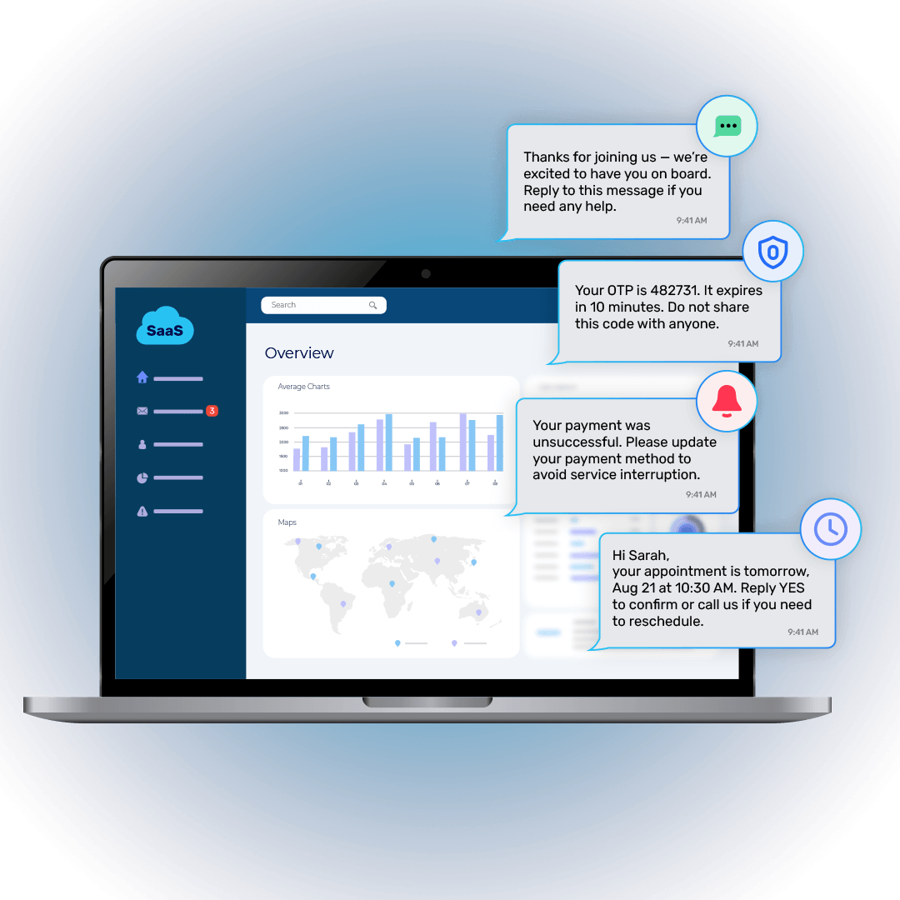
A SaaS SMS service provides the messaging infrastructure you need to add texting capabilities to your software. Whether you need SMS, MMS, RCS, or WhatsApp, messages can be triggered by events and actions within your application, while incoming messages can flow back into your platform. Your team integrates the messaging layer into your product once, rather than managing messaging through a separate SMS tool, allowing you to send text notifications directly from your SaaS application.
on_registration
on_login_attempt
on_payment_event
on_subscription_change
on_trial_expiring
on_account_change
on_support_request
on_app_notification
How-To-Integrate
How To Add Texting To Your SaaS Application
When adding texting to your SaaS, you have two options: build it into your application or connect it to your existing workflows. Here’s how both options work and how to choose the right one for your team.
PATH A
Unified API Integration
For teams with development resources who want messaging triggered natively from inside the application.
→ Messaging triggered directly by application events
→ Fine-grained control over logic and timing
→ One integration point for SMS, MMS, RCS & WhatsApp
→ Custom workflows tied to product behavior
Connect your application to the unified API
Map application events (signup, payment, login, etc.) to message triggers
Choose SMS, MMS, RCS, or WhatsApp Channel.
Go live — messages send automatically from your app's logic
PATH B (No Code Integration)
Email-to-Messaging Integration
For teams that don't want to rewrite existing application code just to add messaging.
→ Uses email-triggered workflows as-is
→ No-code / minimal-code approach
→ Minimal development effort
→ Faster way to get messaging live
Keep your existing email notifications.
Route the notification to the TXTImpact email-to-text gateway, such as [email protected].
TXTImpact delivers it to your preferred channel SMS, MMS, RCS or Whatspp
| Requirement | Unified API | Email-to-Messaging |
|---|---|---|
| Deep application integration | Yes | Not required |
| Development effort | Higher | Lower |
| Existing email workflow | Not required | Useful |
| Rewrite application logic | May be required | Not required |
| SMS / MMS / RCS / WhatsApp | Yes | Yes |
| Best for | Developer-led integration | Minimal/no-code approach |
Use Cases
Where SaaS Companies Actually Use SMS
Email is the default notification channel — and the easiest to ignore. SMS solves one specific problem: getting time-sensitive information in front of a user fast, on a channel they actually check. Here's where that plays out in a real SaaS product.
Security
OTP & Authentication
Text-based OTP reaches users on a device they're already holding and reduces failed logins from delayed email delivery.
Lifecycle
Customer Onboarding
Welcome messages and setup reminders help new users get further into your product before momentum drops off.
Revenue
Trial Expiration
A reminder a few days before — and on the last day — gives you one more real shot at converting a free user.
Billing
Payment Notifications
Upcoming payments, failed charges, renewals, and expiring cards — surfaced before they become involuntary churn.
Security
Account Alerts
New device logins and password changes flagged immediately, not the next time someone checks email.
Support
Two-Way Conversations
Customers text a question and get a real answer — no portal login, no hold music.
Growth
Marketing & Engagement
Product updates and offers to opted-in users — kept clearly separate from transactional messaging.
Mass Texting
Bulk Messaging
Let your users send bulk SMS and MMS messages directly from your SaaS platform using their existing contacts and workflows.
Operations
Real-Time Alerts
System errors, workflow failures, service disruptions, and other critical events can trigger instant SMS alerts — so your users know when something needs attention.
On Your Website
Also Add Texting Directly To Your SaaS Website
The API and email-to-messaging paths handle the backend, triggering messages from your application or your existing notifications. Click-to-text and QR codes handle the front end: giving website visitors a direct way to start a text conversation with your business, no development work required. Both are especially well suited to customer support, inbound enquiries, lead generation, and SMS opt-in — the moments where a visitor is ready to reach out right now.
A link or button on your website that lets visitors send you a text straight from their mobile phone — instead of filling out a contact form or picking up the phone. It's a lower-friction alternative to widgets that make visitors fill out a form before they can start texting.
→ Quick answers.
Visitors get more complicated questions answered faster than waiting on a form submission.
→ Better conversion.
Making it easier to reach you increases the odds a visitor signs up or buys.
→ One more channel.
Adds texting alongside chat, email, and phone as a way customers can reach your team.
Best for: customer support, inbound enquiries, and pricing/sales questions.
A generated QR code that opens a text conversation when scanned — usable on your website, in-app screens, printed materials, or onboarding emails. It's a way to bridge offline and digital touchpoints into the same texting channel your team already manages.
→ Works anywhere.
Place it on packaging, signage, receipts, or a pricing page
— not just online.
→ No typing required.
Visitors scan and text, without saving a number or
filling a form.
→ Same inbox.
Conversations started by QR code land in the same place
as click-to-text and API-triggered messages.
Best for: lead generation, SMS opt-in, and offline-to-digital touchpoints.
Channels
SMS, MMS, RCS & WhatsApp For SaaS
Different messages call for different channels. Availability can vary by carrier, device, and country.
Broadest reach
Ideal for OTP, alerts, and time-sensitive notifications that need to land on any mobile device.
Branded messaging
A more visual, business-branded alternative to SMS on supporting devices and carriers.
Sending Numbers
Texting Number Options For SaaS Platforms
The right number type depends on your sending volume, use case, and how fast you need to launch. TXTImpact supports multiple options so you're not boxed into one.
High Volume
Toll-Free Texting
A dedicated toll-free number enabled for SMS/MMS, with higher throughput than standard long codes and a comparatively fast registration process.
Best for: OTP, billing alerts, and notification volume that needs to scale quickly.
Standard
10DLC
A standard 10-digit local number registered for application-to-person messaging, requiring brand and campaign registration before sending.
Best for: Conversational, two-way messaging with a local-feeling number.
Highest Throughput
Dedicated Short Codes
A short, 5–6 digit number leased exclusively to one sender, built for the highest message volumes with minimal filtering risk.
Best for: Mass texting, alerts, and marketing at significant scale.
Existing Number
Hosted SMS
Text-enabling a business's existing landline or VoIP number so customers can text the number they already call — while calls continue to route as normal.
Best for: Support and sales teams that want texting on a number customers already know.
Automation
SaaS SMS Automation
Connect messaging to lifecycle events so notifications go out automatically — through the API or through email-to-messaging.
User signs up → Welcome SMS
User requests login verification → OTP SMS
Subscription payment fails → Billing alert
Trial is about to expire → Reminder text
Customer requests help → Two-way SMS
conversation opens

TXTImpact vs. Traditional SMS API-Only Solutions
An API-only provider is a reasonable choice if you're building the rest of the messaging stack yourself. TXTImpact is built for a broader set of SaaS teams.
With TXTImpact, you also get
✔ No-code/minimal-code email integration
✔ Multi-channel messaging: SMS, MMS, RCS, WhatsApp
✔ A business messaging dashboard — not just an API
✔ Built-in automation and two-way communication
✔ Contact management in one place
✔ Compliance-oriented tooling
API-only providers require you to build
✔ Contact management from scratch
✔ Opt-out handling logic
✔ Message templating systems
✔ Reporting and analytics
✔ A separate no-code option (usually none exists)
✔ Everything beyond raw message sending
Compliance
SaaS SMS Compliance
Adding messaging comes with responsibilities that sit with the sending business, not just the platform.
Opt-out handling
Honor STOP requests automatically and consistently.
TCPA
U.S. requirements around consent and automated messaging.
10DLC registration
Register your brand and use case for standard long-code sending.
Data & privacy
GDPR considerations for EU users; HIPAA where applicable.
Message classification
Transactional vs. marketing messages carry different requirements.
TXTImpact provides tools that support this work — including Fast 10DLC registration support via AI Assist and consent-related features — but compliance is a shared responsibility. Using a messaging platform does not, on its own, make a SaaS company's messaging program compliant.
Why TXTImpact
Why Choose TXTImpact For SaaS Messaging?
✔ Two integration options. Unified API for deep integration, or email-to-messaging to launch without rewriting code.
✔ Multi-channel from one platform. SMS, MMS, RCS, and WhatsApp — not just plain text.
✔ API and business platform in one. Developers get an API; support, success, and marketing get a usable dashboard.
✔ Email-to-messaging capability. A practical path if you already run notifications through email.
✔ Automation built in. Connect messaging to signup, billing, trial, and support events.
✔ Two-way communication. Customers can reply — support and success can actually converse.
✔ Business texting tools. Mass texting, polling, and surveys for teams beyond engineering.
✔ Contact management. Opt-in status and conversation history in one place as you scale.
✔ Compliance-oriented features. Support for 10DLC registration and consent management.
✔ 15-day free trial. No credit card, no setup fee — test both integration paths before committing.
✔ Competitive Pricing. TXTImpact offers competitive industry rates with a wide range of powerful texting features.
FAQ
Frequently Asked Questions
What is a SaaS SMS service?
A SaaS SMS service is a messaging platform that lets software companies send automated, transactional, and marketing text messages to their users — through an API, a dashboard, or existing workflows — without building their own SMS infrastructure.
What is the best SMS service for SaaS companies?
It depends on your integration needs. Teams with development resources who want messaging triggered directly by application events typically want an API-first platform. Teams that want to launch faster without rewriting application code benefit from a platform that also supports email-to-messaging, like TXTImpact.
How can SaaS companies use SMS?
Common use cases include OTP and login verification, onboarding messages, trial expiration reminders, billing and payment notifications, account security alerts, customer support conversations, and marketing announcements.
Does TXTImpact offer an SMS API for SaaS?
Yes. The unified API supports SMS, MMS, RCS, and WhatsApp, and can be triggered from your application's existing events, workflows, and systems.
Can I add SMS without rewriting my SaaS application?
Yes. Email-to-messaging lets you route existing email-triggered notifications through TXTImpact and deliver them as SMS, MMS, RCS, or WhatsApp — without rebuilding your application's notification logic.
What is email-to-SMS integration?
Email-to-SMS is a no-code or minimal-code way to convert an email your application already sends into a text message, by routing the existing email workflow through TXTImpact for delivery as SMS (or MMS, RCS, WhatsApp).
Can SaaS platforms send MMS?
Yes. TXTImpact supports MMS through both the unified API and email-to-MMS, allowing SaaS companies to send image and media-based messages alongside standard SMS.
Can SaaS businesses use RCS and WhatsApp?
Yes, where supported. TXTImpact's unified API and email-to-messaging integration both extend to RCS and WhatsApp. Availability can vary by carrier, device, and country.
Can SaaS companies automate SMS notifications?
Yes. Messaging can be tied to lifecycle events — signup, login, billing, trial expiration, support requests — so notifications go out automatically rather than being sent manually.
What is the difference between SMS API and email-to-SMS?
An SMS API requires development work to integrate messaging directly into your application's code and event triggers. Email-to-SMS uses your existing email notification workflow as the trigger instead, requiring little to no new development.
Is SMS suitable for SaaS onboarding and authentication?
Yes. SMS reaches users quickly on a device they're already holding, making it effective for OTP and login verification, and for onboarding since welcome and activation messages are more likely to be seen than an unopened email.
Is SMS legal for SaaS companies
Yes, SMS is legal for SaaS companies when messaging is sent in accordance with applicable laws, regulations, and carrier requirements. Depending on your use case and where you send messages, this may include collecting and documenting user consent, honoring opt-out requests, registering A2P 10DLC campaigns in the U.S. where required, and following applicable messaging rules.
Start Sending Messaged from your SaaS Platform
in Either Direction🎉
15-day free trial · no credit card · no setup fee
By using this website you agree to our privacy policies
We use cookies to improve user experience. Choose what cookie categories you allow us to use. You can read more about our Cookie Policy by clicking on Cookie Policy below.
These cookies enable strictly necessary cookies for security, language support and verification of identity. These cookies can’t be disabled.
These cookies collect data to remember choices users make to improve and give a better user experience. Disabling can cause some parts of the site to not work properly.
These cookies help us to understand how visitors interact with our website, help us measure and analyze traffic to improve our service.
These cookies help us to better deliver marketing content and customized ads.