How to Forward WhatsApp Messages to Email Automatically (Step-by-Step Guide)
WhatsApp has become a primary communication channel for businesses, handling everything from customer inquiries and sales leads to appointment requests and support conversations.
However, when critical messages remain only in WhatsApp, teams that rely on email can miss critical updates, clients’ queries, or struggle to keep communication organized.
Hence, forwarding these WhatsApp messages to email automatically, similar to text-to-email, helps businesses centralize conversations, enhance collaboration, maintain records, and respond faster without constantly monitoring the app.
In this guide, you'll learn how to forward WhatsApp messages to email step by step using TXTImpact. We'll also cover the benefits, common use cases, setup process, and best practices to help you streamline your business communications.
⚠️ Disclaimer: TXTImpact can only automatically forward incoming WhatsApp Business messages to one or more email addresses, as long as your WhatsApp Business number is connected with TXTImpact. This does not apply to forwarding personal WhatsApp messages to email. |
Key Takeaways:
|
Why Forward WhatsApp Messages to Email?
Forwarding WhatsApp messages to email ensures every message, inquiry, or update reaches the right people instantly, making communication more organized, collaborative, and easier to manage.
Here are the key benefits of forwarding WhatsApp messages to email:
- Automatically delivering WhatsApp texts to email ensures critical customer inquiries, support requests, and urgent updates aren't overlooked.
- Keep teams on the same page by sharing WhatsApp conversations with multiple team members or departments, making collaboration easier.
- Helps maintain a centralized communication record by making it easier to track and audit email communications for future reference.
- Improve response times as teams that primarily work from email can see and act on WhatsApp messages immediately.
- Support department-based workflows by routing sales inquiries, customer support requests, billing questions, or service issues directly to the appropriate email inbox for faster resolution.
- Work within existing email workflows by enabling employees to continue using familiar email tools while still receiving WhatsApp texts, reducing the need to constantly switch between applications.
- Simplify documentation and compliance, allowing businesses to maintain communication records more efficiently for reporting or compliance requirements.
- Protect business continuity by ensuring accessible customer conversations, preventing communication bottlenecks and delays.
How Does WhatsApp-to-Email Forwarding Work?
Just like Email-to-WhatsApp that automatically sends critical emails to WhatsApp numbers for quick access, WhatsApp-to-Email keeps teams in touch with conversations and helps them respond promptly to customer inquiries.
As long as your WhatsApp Business number is connected to TXTImpact, you can easily automate the WhatsApp-to-email process with a simple workflow.
Customer sends a WhatsApp message to your WhatsApp Business number ↓ The message is received on your WhatsApp Business number connected with TXTImpact ↓ TXTImpact securely captures the incoming message ↓ The message is automatically forwarded to the configured email address(es) ↓ Your team receives the email and takes the appropriate action
|
Thus, whether you’re handling customer support, sales inquiries, appointment requests, or service updates, WhatsApp-to-email helps streamline communication for businesses. Instead of requiring teams to monitor WhatsApp throughout the day, every incoming text is delivered directly to their email inboxes.
Step-by-Step Process to Receive WhatsApp Messages to Email Using TXTImpact
TXTImpact makes it easy to automatically forward incoming WhatsApp Business messages to one or more email addresses, as long as your WhatsApp Business number is connected with TXTImpact.
This is highly imperative because you cannot forward all WhatsApp messages; like for instance, from your personal WhatsApp account. Connecting your WhatsApp Business number with TXTImpact is crucial, and for that you need to complete Meta verification. Let’s take a more detailed look at it.
Follow these steps to get started with TXTImpact:
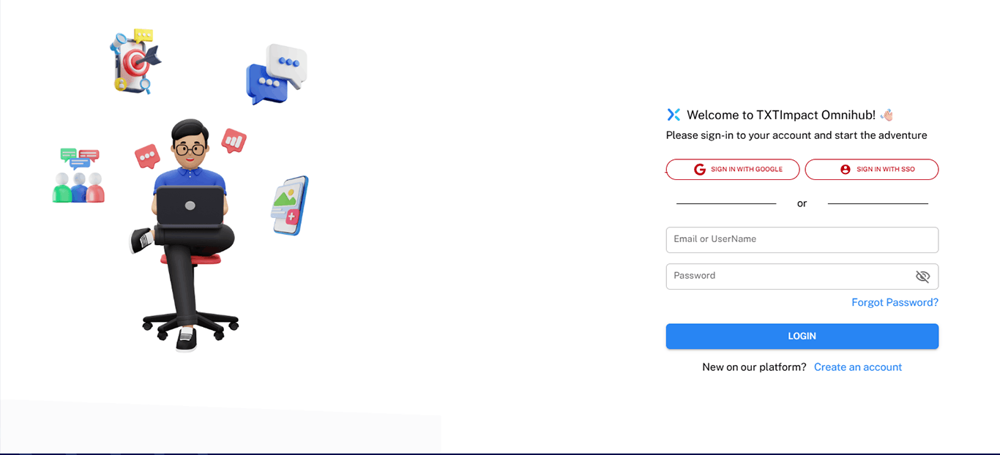
Step 1: Login to your TXTImpact account
Sign in to your TXTImpact Omnihub account using your credentials. If you're a new user, create an account and complete the initial setup process.
Step 2: Complete Meta Verification & Connect Your WhatsApp Business Account
Once logged in, navigate to Text Numbers → WhatsApp on the dashboard.
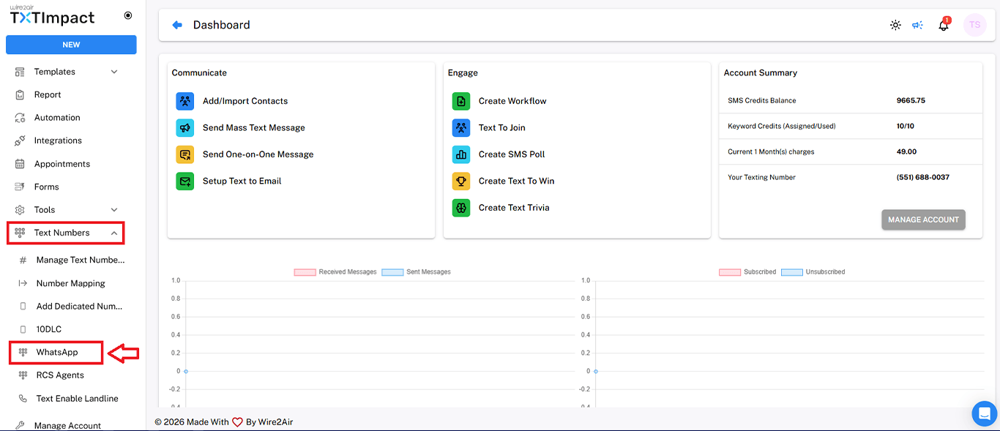
This is where you’ll be able to manage all WhatsApp numbers linked to your WhatsApp Business Account.
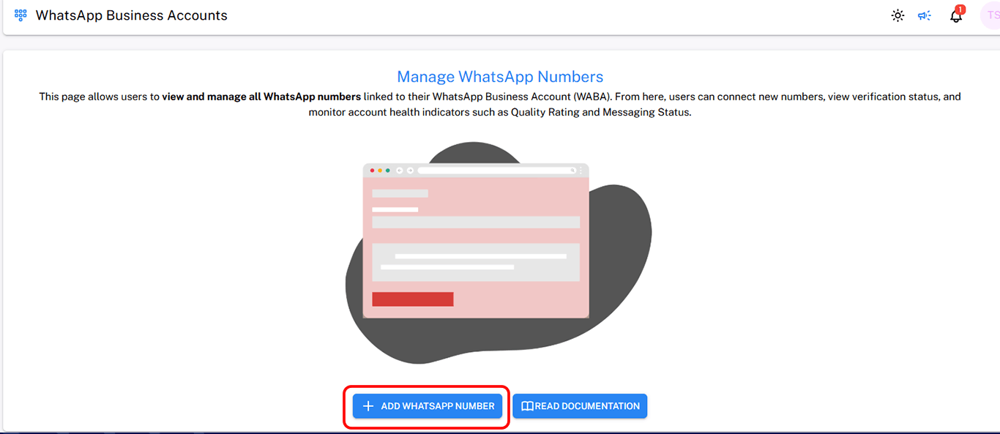
Click on Add WhatsApp Number, and you’ll be directed to a Facebook login page for Meta verification.
You can either log in to your existing Facebook business account or create a new one. Once your account is verified, your WhatsApp business number will be added to the dashboard.
Your WhatsApp Business account and number must be connected to TXTImpact before TXTImpact can receive incoming WhatsApp messages for that business number.
Step 3: Configure WhatsApp Forwarding Settings
Once your WhatsApp Business number is connected, navigate to Workflows & Rules in the dashboard → INBOX RULES and click this button → "INBOX RULES".
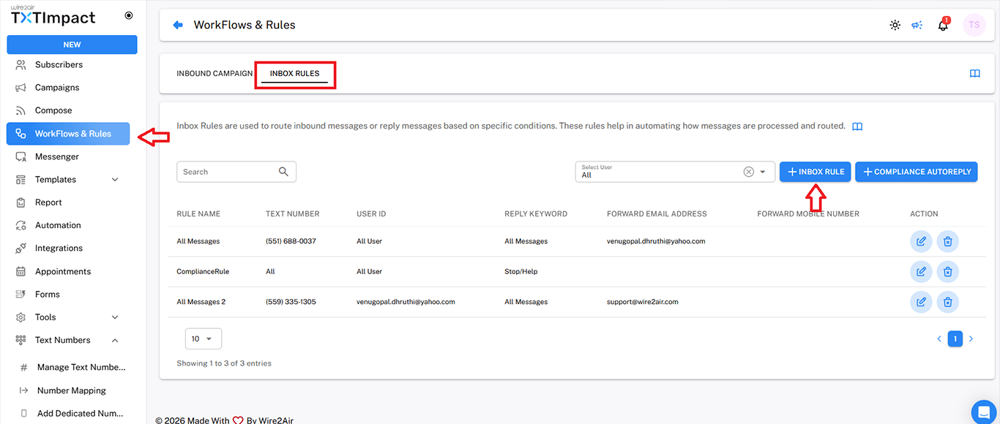
Here you can set rules and actions to forward WhatsApp chats to email.
Configure the Inbox rule for the WhatsApp number from which you want to receive messages in the Forward to Mobile field and the email address where incoming WhatsApp messages should be forwarded.
Depending on your workflow requirement, you can route WhatsApp messages to an individual, a team, or a shared business inbox.
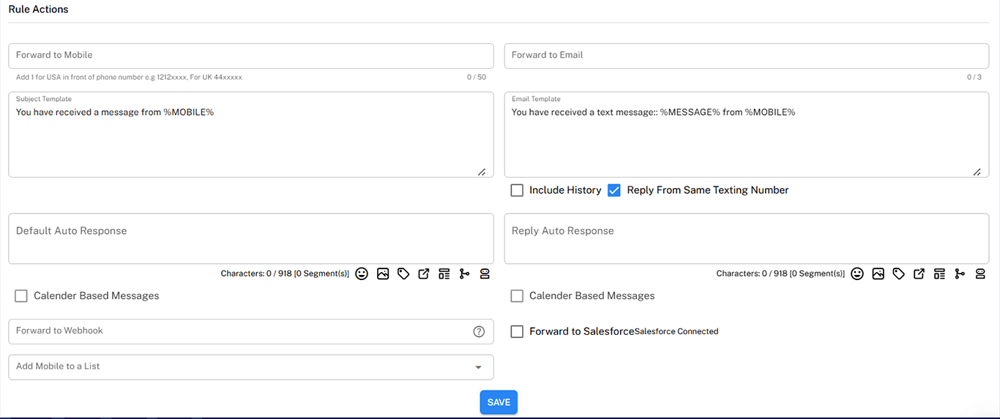
Make sure to tick the checkbox ‘Reply From Same Texting Number’ to automatically send the replies you send to customers via email to their WhatsApp numbers.
Add auto-response messages if needed, then click the Save button.
Step 4: Test the configuration
Before running a campaign, send a test WhatsApp message to your business number and verify that it arrives in the configured email inbox and ensure the following:
- The email is delivered successfully
- Message content is displayed accurately
- Sender details appear correctly
- Messages are routed to the correct recipient(s)
- Attachments (if applicable) are included
If everything looks correct, your WhatsApp-to-email forwarding setup is complete.
Forward WhatsApp Messages to Your Preferred Email Client (Gmail or Outlook)
Once WhatsApp-to-email forwarding is configured successfully in TXTImpact, businesses can receive WhatsApp messages directly in Gmail, Outlook, or any email clients. This allows teams to manage WhatsApp conversations through the email platforms they already use, without constantly switching between applications.
Whether it’s WhatsApp to Gmail or WhatsApp to Outlook, businesses can centralize customer inquiries, improve collaboration, speed up response times, and maintain organized communication records.
You can also send messages to shared inboxes or department-specific email addresses, making it easier to route sales and service requests to the right teams. TXTImpact supports this flexible email-forwarding workflow, allowing you to integrate WhatsApp communication into their existing email-based workflows.

Common Business Use Cases to Forward WhatsApp Messages to Email
WhatsApp-to-email provides several crucial use cases to help businesses reach the right audience and efficiently and effectively respond to customer queries. Here are different areas where you can use WhatsApp-to-email service for your business:
- Customer support: Forward customer questions and service requests from WhatsApp directly to your support team's shared inbox. This allows agents to respond promptly, collaborate on complex queries, and maintain a record of every conversation.
- Order updates: Retailers and eCommerce businesses can route order-related questions, return requests, shipping inquiries, and delivery updates to their customer service or fulfillment teams for faster resolution.
- Sales and lead inquiries: Sales teams can automatically send new sales inquiries from WhatsApp to their team's email. This makes it easier to quickly qualify leads, follow up with prospects, and ensure no business opportunity is missed.
- Appointment requests: Healthcare providers, salons, consultants, and automotive service centers can forward appointment bookings, cancellations, and rescheduling requests to staff responsible for scheduling and customer communication.
- HR & recruitment: Recruiters can receive job applications, interview confirmations, candidate questions, and employee inquiries sent via WhatsApp directly in their email, making recruitment communication easier to manage.
- Healthcare communications: Hospitals and healthcare clinics can forward patient inquiries, appointment requests, prescription questions, and follow-up messages to the appropriate administrative staff while maintaining organized communication records.
Common Issues and Troubleshooting
WhatsApp-to-email forwarding can occasionally encounter common issues due to configuration and connectivity problems. Here are some common problems and quick fixes:
Issue | Possible cause | Solution |
Delayed emails | Temporary network or service issue | Check connectivity and allow a few moments for delivery before testing again |
Emails not received | Incorrect recipient email or forwarding rule is disabled | Verify the email address and ensure the forwarding rule is active |
Duplicate emails | Multiple rules are forwarding the same message | Check for overlapping rules and remove unnecessary ones |
Messages routed incorrectly | Incorrect or overlapping routing rules | Review and update the forwarding conditions |
Sender details missing | Incomplete message formatting or configuration | Check the email forwarding format and sender information settings |
WhatsApp connection fails | Account authorization or authentication issue | Reconnect the WhatsApp Business account and verify permissions |
Emails go to spam | Email provider incorrectly classifies forwarded messages | Check the spam/junk folder and whitelist the sending address if necessary |
Forwarding suddenly stops | Disabled automation, expired authorization, or configuration change | Check account status, forwarding rules, and WhatsApp connection |
Attachments not received | Media or file configuration limitations | Review supported media settings and forwarding configuration |
Security Considerations and Best Practices When Running WhatsApp-to-Email Campaigns
Follow these security and privacy considerations and best practices when sending and receiving WhatsApp-to-Email messages.
- Get Proper Consent: Forward or use customer messages only when you have appropriate permission and follow applicable privacy requirements.
- Restrict Email Access: Forward messages only to authorized employees and shared inboxes.
- Protect Sensitive Data: Avoid forwarding confidential customer or financial information unless necessary.
- Use Clear Routing Rules: Define rules based on keywords, customer groups, or message types.
- Avoid Inbox Overload: Send messages only to necessary recipients instead of forwarding everything to everyone.
- Maintain Consistent Follow-Up: Assign ownership so every forwarded inquiry has a clear next action.
- Segment Recipients: Route messages to relevant sales, support, billing, or operations teams.
- Monitor Email Accounts: Regularly review account access and remove inactive users.
- Follow Privacy Regulations: Ensure WhatsApp-to-email workflows comply with applicable data protection and industry requirements.
- Monitor Delivery: Regularly check whether forwarded messages are reaching the intended inboxes.
- Update Rules Regularly: Remove outdated recipients and modify workflows as teams or campaigns change.
- Review Campaign Performance: Monitor response rates, conversions, missed inquiries, and routing issues.
Who Should Use WhatsApp-to-Email Forwarding?
WhatsApp-to-Email forwarding can benefit a bunch of industries, including:
Industry | Example use case |
Healthcare | Customer complaints, product support requests, refund requests, service issues, warranty inquiries |
Retail and eCommerce | Order status questions, return requests, refund queries, product availability, delivery issues, exchange requests |
Sales and marketing | New lead notifications, product inquiries, quote requests, demo requests, campaign responses, pricing inquiries |
Real estate | Property inquiries, price requests, site-visit bookings, buyer questions, rental inquiries, document requests |
Hospitality | Room reservations, check-in questions, booking modifications, cancellation requests, guest requests, amenity inquiries |
Field services | Maintenance requests, repair bookings, technician dispatch, service status updates, emergency service requests |
Logistics and transportation | Shipment tracking, delivery status, pickup requests, address changes, delivery complaints, proof-of-delivery inquiries |
HR and recruitment | Job inquiries, candidate applications, interview scheduling, document requests, interview confirmations, candidate follow-ups |
B2B and manufacturing | Dealer inquiries, distributor support, quotation requests, order updates, technical support, product availability |
Why Choose TXTImpact For WhatsApp-to-Email Forwarding?
TXTImpact provides highly reliable and intuitive WhatsApp-to-Email service that allow businesses to connect their WhatsApp Business number to TXTImpact and automate workflows to handle incoming customer texts.
With 20+ years of experience serving 30,000+ businesses, TXTImpact offers enterprise-grade services with the utmost security and reliability, while ensuring ease of use and concierge customer support.
Here are the reasons why you should choose TXTImpact for WhatsApp-to-Email forwarding:
Multiple Email Recipients: You can send messages to individual users, teams, shared inboxes, or department-specific addresses with TXTImpact to any email client, including Gmail, Outlook, and more.
Centralized Communication: Keep WhatsApp conversations accessible alongside existing email-based customer communication.
Flexible Message Routing: Create intuitive workflows to direct different types of WhatsApp inquiries to the appropriate teams.
10DLC registration with AI Wizard: Automate and facilitate the 10DLC registration process with our AI Wizard for effortless, compliant verification.
No complex API or development needed: TXTImpact offers a simple integration and onboarding process, eliminating complex development requirements.
Live delivery reporting: Get real-time delivery reporting and confirmation with open rate tracking to avoid message failure.
Competitive pricing: Get clear and competitive per-text pricing details with no hidden platform fees.
Global reach: TXTImpact provides extensive global coverage in 200+ countries via 800+ carriers, with no compatibility issues.
Conclusion
Forwarding WhatsApp messages to email makes it easier for businesses to centralize customer communications, improve response times, and ensure important inquiries are not missed. However, it’s only valuable if the emails reach the right executives at the right time.
TXTImpact allows businesses to automate WhatsApp-to-email forwarding, route messages to the right teams, and manage conversations through familiar email workflows without complex development.
From sales and customer support to healthcare, logistics, and recruitment, this approach can simplify communication across a range of business use cases.
If you’re looking for live delivery reporting, flexible routing, global reach, and enterprise-grade services, start a free trial with us today or contact us to learn more.
FAQs
♦ Can I forward WhatsApp messages to multiple email addresses?
Yes. Messages can be routed to multiple recipients, shared inboxes, or department-specific email addresses based on your workflow requirements.
♦ Do I need coding to export WhatsApp chat to email?
No. TXTImpact provides a workflow-based setup, so businesses can configure WhatsApp-to-email forwarding without developing a complex API integration.
♦ Can WhatsApp images and attachments be forwarded to email?
Attachments can be included where supported by the configured forwarding workflow. Businesses should test the required media types before deployment.
♦ What should I do if WhatsApp messages aren't reaching email?
First, verify the recipient email address, forwarding rule, WhatsApp connection, and spam folder. Then send a test message to identify where the workflow is failing.
♦ Does TXTImpact support global WhatsApp communication?
TXTImpact states that it provides global reach across 200+ countries and 800+ carriers, making it suitable for businesses managing communications across multiple markets.
About the Author:
 | Tejal Sushir (Content Writer) Tejal Sushir is a content writer with 4+ years of experience writing fresh and insightful content for B2B SaaS companies. She has delivered top-performing and top-ranking blogs in the SMS marketing, Digital Marketing, web hosting, AI & ML, cybersecurity, WordPress, HR Tech, and technical SEO domains. Her meticulous research when writing content ensures industry expertise and keeps up with emerging trends. |