Meta WhatsApp Usernames & BSUID Explained: Everything Businesses Need to Know (2026 Guide)
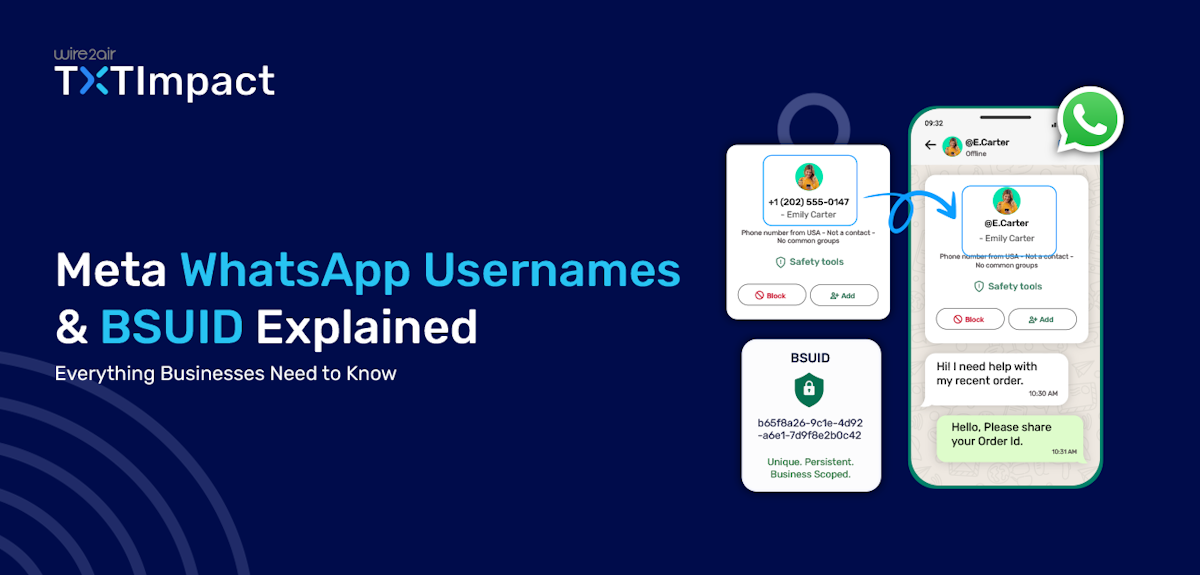
WhatsApp is introducing and gradually rolling out one of its biggest privacy updates yet with the rollout of Usernames and Business Scoped User IDs (BSUIDs).
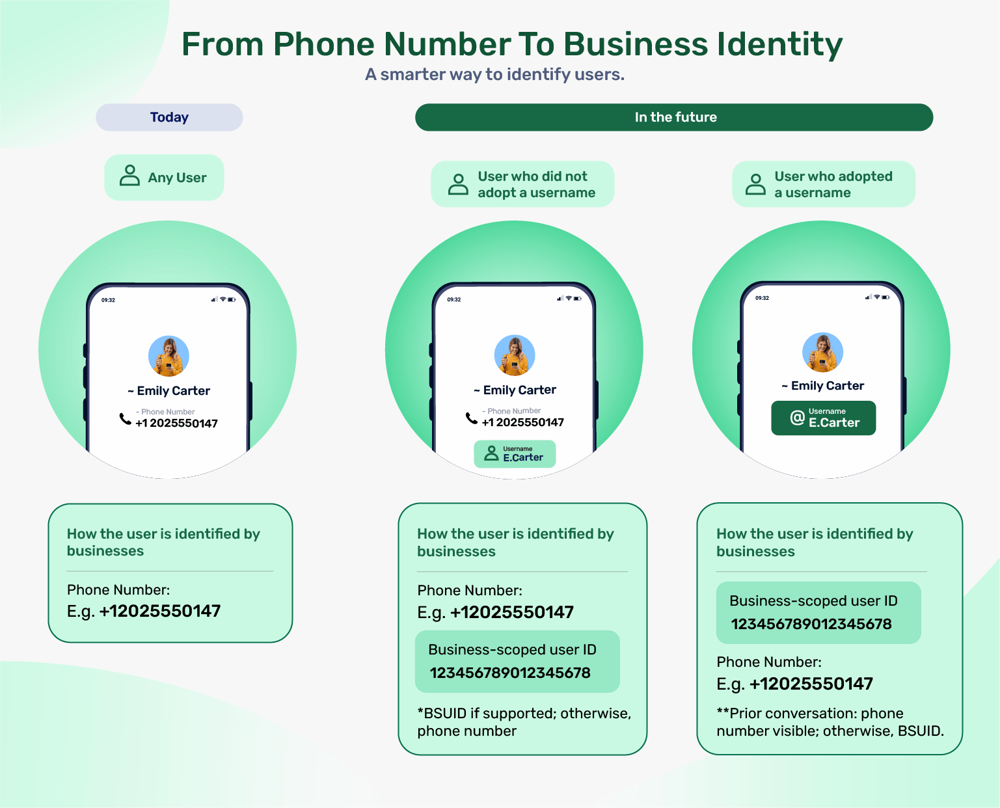
Instead of sharing their phone numbers, users will soon be able to connect with businesses using a unique username, while businesses identify customers through a secure, business-specific ID.
This change enhances user privacy without disrupting business conversations, but it also introduces important updates for companies using the WhatsApp Business Platform, Cloud API, CRMs, chatbots, and third-party integrations.
This article explains what WhatsApp Usernames and BSUIDs are, how they work, what they mean for businesses and developers, and the steps you should take to prepare for this new messaging experience.
Key Takeaways:
|
What are WhatsApp Usernames?
WhatsApp Usernames are a new identity feature that allows users to connect with people and businesses without sharing their phone numbers.
Instead of using a mobile number as the primary way to identify an account, users can create a unique username that others can use to find and message them. This update is designed to enhance privacy while making it easier to start conversations on WhatsApp.
For example, a customer can share their WhatsApp username with a business instead of revealing their personal phone number, helping protect sensitive contact information while maintaining a seamless messaging experience.
Unlike a display name, a WhatsApp username is unique to each account and must follow Meta's naming rules. No two users can have the same username, making it a reliable identifier for initiating conversations.
Here are some of the key features of WhatsApp Usernames:
- Protects user privacy by preventing exposing user’s phone number
- Unique to each account, preventing duplicate usernames
- Works alongside existing WhatsApp accounts
- Ease to share with businesses, friends, or communities.
- Supports secure business messaging
- Can be updated by users
Benefits of Introducing WhatsApp Usernames
WhatsApp Usernames make it easier and more secure for users and businesses to connect by reducing reliance on phone numbers. This privacy-focused feature strengthens the messaging experience while maintaining seamless communication.
Here’s how WhatsApp usernames benefit both businesses and users:
- Enhanced user privacy: Users can start conversations without revealing their personal phone numbers, giving them greater control over who can access their contact information.
- Improved security: Keeping phone numbers private helps reduce unwanted contact, spam, and the risk of personal information being misused.
- Consistent user identity: A username provides a unique, recognizable identity that users can share across different interactions, even if they choose not to share their phone number.
- Easier customer-business communication: Customers can connect with businesses using a unique username, creating a simpler and more privacy-friendly way to initiate conversations.
- Better customer trust: By offering a more private way to communicate, businesses can build confidence among customers who may be hesitant to share their personal contact details.
- Aligning with modern messaging platforms: Many messaging apps already use usernames as a privacy-first identifier. By introducing Usernames, WhatsApp is adopting a similar approach while preserving its end-to-end encrypted messaging experience.
Reserving a WhatsApp Username
WhatsApp also allows you to claim or reserve a unique username that becomes your public identity on the platform.
Once the feature is available for your account, you can choose a username in your WhatsApp settings. If the username is available and meets WhatsApp's naming requirements, it is reserved exclusively for your account, meaning no other user can claim it.
If your preferred username isn't available, you'll need to choose a different variation. You can also change your username later, subject to WhatsApp's policies and availability.
Here’s how you can reserve a username through WhatsApp Manager:
- Open WhatsApp Manager
- Go to Phone number in the left menu
- Go to profile → Username
- Click on Create → Enter your desired username
- Click on Save and close the platform
Alternatively, you can also reserve a username in Meta Business Suite. Check out the official WhatsApp documentation for the steps.
What is Business Scoped User ID (BSUID)?
A Business Scoped User ID (BSUID) is a unique identifier that WhatsApp assigns to a user for a specific business. So, whenever a user texts you a username, WhatsApp sends you a BSUID instead of a phone number.
Unlike a phone number, a BSUID is private, business-specific, and generated automatically by WhatsApp. This means the same user can have a different BSUID for each business they interact with, preventing businesses from tracking users across different organizations and enhancing user privacy.
The BSUID also enables chatbots, APIs, CRMs, and other integrations to recognize returning customers, maintain conversation history, and automate workflows.
In short, while WhatsApp Usernames are the public identity that users share, the BSUID is the private identifier that businesses use behind the scenes to manage customer conversations securely.
BSUID Example and Format
A typical BSUID looks something like this:
US.98234756108423579164 📝 Note: This is a fictional example for demonstration purposes. The actual format and values are generated automatically by WhatsApp. |
Let’s understand the components of a BSUID:
- Prefix: Two-letter country code derived from the user’s WhatsApp phone number. It also indicates that the value is a Business Scoped User ID issued by WhatsApp. Example: US.
- Separator: Separates the prefix from the unique identifier. Example,.
- Unique identifier: A randomly generated, business-specific identifier that uniquely represents a user for a particular business, without exposing their phone number. Example: 98234756108423579164.

How WhatsApp Username and BSUID Work Together?
A BSUID allows businesses to identify customers without accessing or storing their phone numbers. Here’s how typically WhatsApp username and BSUID work together:
User creates a WhatsApp Username ↓ User messages a business using the Username ↓ Business receives the message via the WhatsApp Business Platform ↓ WhatsApp generates and shares a unique BSUID with that business ↓ Business stores the BSUID in its CRM or application ↓ Future conversations continue using the same BSUID, even if the user changes their Username
|
For businesses, this means while customers use usernames to initiate conversations, businesses use BSUIDs to uniquely identify customers behind the scenes.
Instead of relying solely on phone numbers, CRMs, chatbots, and API integrations can use the BSUID as the primary customer identifier. This approach enables businesses to maintain conversation history and automate workflows while enhancing user privacy.
What Changes For Businesses With the Introduction of WhatsApp Usernames?
While WhatsApp Usernames improve user privacy, they also introduce a new way for businesses to identify and manage customer conversations. Here's what changes:
Phone numbers may no longer be visible for customers who message using a WhatsApp Username.
BSUID becomes the primary customer identifier instead of relying solely on phone numbers.
Review API integrations and webhooks to ensure they can process and store BSUIDs.
Update CRMs and databases to store and identify customers using BSUIDs.
Modify chatbots and automation workflows that currently use phone numbers for customer identification.
Enhance customer privacy by reducing the need to collect or store personal phone numbers.
Prevent duplicate customer records by mapping conversations to the correct BSUID.
Train support teams to understand the new customer identification model.
What Stays the Same?
- Businesses can continue to reply to and manage conversations as usual.
- Customers can still message businesses through WhatsApp.
- Existing chat history and messaging workflows remain intact.
- Most changes occur behind the scenes in CRMs, APIs, and integrations rather than in day-to-day customer interactions.
Next Action Steps & Implementation Checklist For Businesses and Developers
Businesses need to prepare their systems to ensure a seamless transition during the WhatsApp Usernames rollout. Follow this checklist and implementation steps below to prepare:
- Audit your current WhatsApp workflows to identify where phone numbers are used as customer IDs.
- Add a dedicated BSUID field to your CRM/database schema (don't overwrite phone number, store both).
- Update chatbots, automations, and reporting/analytics logic to treat BSUID as a first-class identifier rather than an edge case.
- Audit third-party integrations (Shopify, HubSpot, Salesforce, WooCommerce, etc.) for phone-number-only assumptions.
- Ensure existing customer records can be mapped correctly during the transition.
- Review customer support processes to ensure agents understand how BSUIDs work.
- Test customer journeys for users who message using WhatsApp Usernames.
- Build a "Request Contact Info" flow into onboarding for use cases that require a real phone number (shipping, OTP, SMS fallback).
- Claim and reserve your Business Username(s) across all numbers/WABAs now, with backup name options.
- Plan your OTP/authentication fallback strategy separately from general messaging.
- Update internal documentation and team training before the feature is widely available.
- Monitor application logs for identifier-related errors after rollout.
Common Developer Mistakes During BSUID Migration
Developers must avoid these common mistakes to ensure a smooth transition from phone number-based identification to BSUIDs.
Mistake | Why it’s an issue | Best Practice |
Using phone numbers as the primary ID | Users with Usernames may not share their phone number. | Use BSUIDs as the primary identifier |
Ignoring webhook updates | New identifier fields may be missed. | Update webhook handlers to support BSUID. |
Not storing BSUID | Returning customers can't be reliably identified. | Save the BSUID for every customer conversation. |
Creating duplicate customer records | Customer history becomes fragmented. | Map existing records to the correct BSUID. |
Using Username as the customer ID | Usernames can change over time. | Use Username for display; use BSUID for identification. |
Not updating chatbots or automation | Bots may fail to recognize returning users. | Update workflows to identify customers using BSUID. |
Skipping testing | Integrations may fail after rollout. | Test APIs, webhooks, CRM, and chatbot flows before deployment. |
Limitations of BSUID That Businesses Must Be Aware Of
While WhatsApp Usernames and BSUIDs offer significant privacy benefits, businesses should be aware of a few limitations as the feature rolls out.
- Gradual rollout: WhatsApp Usernames are being introduced in phases, so the feature may not be available to all users or businesses immediately.
- Username availability: Usernames must be unique, so preferred names may already be taken or unavailable.
- Optional feature: Not every WhatsApp user will create or use a username. Businesses should be prepared to support both username-based and phone number-based conversations.
- BSUID is business-specific: The same customer receives a different BSUID for every business, so it cannot be used to identify users across multiple businesses or platforms.
- Usernames can change: Since users can update their usernames, it’s crucial not to use them as permanent customer identifiers. Instead, rely on the Business Scoped User ID (BSUID).
- System updates required: Businesses using CRMs, chatbots, APIs, or custom integrations may need to update their systems to support BSUIDs.
- Developer testing required: Developers must test existing webhook handlers, databases, and automation workflows to ensure compatibility before the feature is fully rolled out.
- No public user directory: Usernames are not intended to function as a searchable public directory, eliminating businesses' ability to discover users by browsing usernames.
- Transition period: During the rollout, businesses may encounter a mix of customers using phone numbers and others using usernames, requiring support for both identification methods.

Choose TXTImpact For Effective and Future-Ready WhatsApp Business Communications
As WhatsApp evolves with Usernames and Business Scoped User IDs (BSUIDs), businesses need a messaging platform that can adapt to these changes.
TXTImpact’s WhatsApp Business Messaging Platform helps you manage both phone number-based contacts and BSUIDs to ensure seamless conversation management.
Whether you're managing customer support, sending notifications, automating conversations, or integrating WhatsApp with your CRM, TXTImpact provides the tools to streamline engagement while supporting modern messaging standards.
Here are the key features and capabilities of TXTImpact’s WhatsApp Business:
- One-way and two-way messaging to reply to alerts, notifications, promotional, and transactional messages.
- Rich and interactive elements, such as GIFs, PDFs, images, videos, and buttons to enhance interactivity and boost engagement.
- Bulk broadcasting to send scalable, mass WhatsApp messages with no hassle.
- Email-to-WhatsApp, to send WhatsApp messages via email and deliver to the desired recipient.
- WhatsApp-to-Email, to receive customer responses via WhatsApp directly in your inbox and stay connected with your customers.
- SMS/MMS fallback to ensure messages fall back to SMS or MMS if your customers don’t have WhatsApp installed on their mobile devices.
- Official Whatsapp API to integrate whatsapp messaging capabilities with your system.
Thus, with robust APIs, automation capabilities, and expert implementation support, you can confidently prepare for WhatsApp’s latest privacy-focused updates and continue delivering seamless customer experiences as the platform evolves.
Conclusion
WhatsApp Usernames and BSUIDs represent a significant step toward more private and secure business messaging. While customers gain greater control over their personal information and privacy, businesses must adapt by moving from only phone number-based identification to BSUIDs for customer management.
The good news is that while most messaging workflows remain unchanged, only the underlying customer identification process evolves. By updating your CRMs, APIs, chatbots, and integrations, you can ensure a smooth transition and stay ahead of the rollout.
It’s also crucial to choose the right and reliable messaging provider to ensure a smooth transition. TXTImpact supports the new WhatsApp Usernames rollout and provides the tools and features you need to deliver seamless WhatsApp communications with your customers.
Start a free trial today to explore our WhatsApp Business or contact us to get started.
💡 Also Read: 12 Best whatsapp Marketing platforms for bulk messaging |
FAQs
♦ Will WhatsApp Usernames replace phone numbers completely?
No. Phone numbers will still be used for account registration and verification. Usernames simply provide an alternative way to connect without sharing your number.
♦ Will existing WhatsApp Business conversations continue to work?
Yes. Existing conversations, messaging workflows, templates, and customer support processes will continue to function. Most changes occur behind the scenes in how customer identities are managed.
♦ How can businesses prepare for the WhatsApp Username rollout?
Businesses should update their CRMs, APIs, chatbots, and databases to support BSUIDs, test integrations, and train teams on the new privacy-first customer identification model.
♦ Is the Business Scoped User ID (BSUID) the same for every business?
No, a user receives a different BSUID for each business they interact with, preventing businesses from tracking users across different organizations.
♦ Can a user change their WhatsApp Username?
Yes, users can update their Username, subject to WhatsApp's availability and naming policies. Businesses should rely on the BSUID rather than the Username for long-term customer identification.
About the Author:
 | Sandeep Gulyani (Co-founder Wire2air TXTImpact) Sandeep Gulyani is the Founder of Wire2air TXTImpact, a leading Mass texting and business text service for sending SMS alerts, reminders, notifications, and marketing campaigns to customers and employees worldwide. With over 25 years of experience in technology and innovation, Sandeep has built TXTImpact as a platform that simplifies communication. |