How to Run Surveys and Polls Using RCS | TXTImpact
Key Takeaways:
|
Valuable customer feedback is the backbone of business growth. In an age when customers expect faster, more intuitive digital experiences when sharing feedback, traditional survey channels, such as SMS and email, struggle with low engagement, limited interactivity, and delayed responses.
This is where Rich Communication Services (RCS) helps businesses deliver the exact feedback experience customers expect: convenient, interactive, rich, and hassle-free.
Unlike basic texting, RCS helps businesses drive high engagement with features like branded sender profiles, suggested actions, and real-time analytics.
In this article, we’ll explore the significant benefits of using RCS for customer feedback surveys and running RCS Voting, and how you can implement them with TXTImpact. Let’s go!
What is RCS Business Messaging?
RCS Business Messages, also known as SMS 2.0, is a business communication solution that upgrades standard SMS to a rich, interactive experience.
Unlike traditional SMS, RCS helps businesses deliver an engaging, interactive, app-like messaging experience to their customers directly through users’ native messaging apps, without them needing to download additional applications or software.
With rich media support, a higher character limit, interactive buttons, and real-time engagement tracking, RCS transforms business messaging from a one-way notification channel into a two-way, conversational experience.
Why Use RCS For Polls and Surveys?
Unlike SMS polling and SMS surveys, RCS completely transforms the survey and polling experience for customers by offering interactive, conversational, and effortless interactions.
While traditional SMS surveys and polls typically send a link that directs users to a long-form survey page or require users to manually type their responses, which can sometimes lead to mistyped answers, longer sessions, and multiple back-and-forth messages, RCS allows businesses to collect feedback or run voting campaigns using simple suggestion buttons that users can tap instantly within their native mobile messaging application.
Here’s why RCS is a powerful communication channel for conducting surveys and polls.
1. Frictionless one-tap responses
One of the biggest challenges of survey or polling completion is effort. Clicking on external links, typing responses, and navigating to web forms significantly increase drop-offs.
RCS eliminates this effort by allowing users to
- Respond to questions with suggested reply buttons
- Tap-to-vote: Engage with poll voting with a single tap.
With no redirects or external websites required, RCS dramatically reduces friction and ensures a highly convenient, effortless survey-completion experience.
2. Higher engagement and response rates
With RCS, surveys feel less like forms and more like conversations, resulting in higher participation. Here’s what makes RCS offer higher engagement and response rates compared to SMS:
- Visually rich and interactive RCS messages, which grab attention quickly
- Messages appear with brand name, logo, and verification badge
- Read receipts to confirm when users read messages
- Users can tap on response buttons instead of typing responses
3. Multimedia-enhanced feedback collection
RCS supports high-quality images, carousels, and videos, making surveys and polls feel more engaging and contextual. RCS allows businesses
- Show product images and videos, and ask users to rate them
- Include visual rating scales
- Display multiple designs in a carousel for preference polls
- Add promotional visuals to incentivize participation
4. Real-time insights and analytics
Unlike traditional SMS, RCS provides businesses with enhanced visibility into user engagement and insights. Businesses can collect instant responses and track.
- Message delivery status
- Click-through rates
- Read receipts
- Drop-off points in multi-step surveys
- Individual response data
This instant response collection from customer surveys enables businesses to analyze feedback, improve products or services, identify customer preferences, address customer complaints, and make better business decisions.
5. Conversational and multi-step survey workflows
RCS enables dynamic, interactive survey journeys, allowing businesses to
- Trigger follow-up questions automatically
- Create branching logic based on user responses
- Automate thank-you messages or rewards
- Personalize messages based on user data
Thus, instead of a static questionnaire, RCS guides customer experiences through a conversational workflow.
6. Faster and personalized feedback campaigns
Businesses can customize and personalize RCS surveys based on past interactions and behavior by collecting reviews after service completion, asking for feedback after a recent purchase, and sending satisfaction surveys after customer support interactions.
Besides, since RCS delivers surveys directly to users’ native messaging apps, they often receive feedback within minutes. This makes RCS ideal for
- Event feedback
- Post-purchase surveys
- Service satisfaction checks
- Real-time customer experience monitoring
Step-by-Step Guide to Creating RCS Survey and Polling Campaigns using TXTImpact
Besides SMS surveys, TXTImpact provides and supports RCS surveys, enabling businesses to deliver rich, interactive messaging experiences.
It supports advanced messaging capabilities, including SMS fallback, ensuring your surveys reach customers without interruption, whether their device is RCS-enabled or not.
Businesses can use TXTImpact’s RCS surveys and polling/voting to
- Conduct event feedback surveys
- Collect customer satisfaction ratings
- Run product feedback polls
- Gather market research insights
Typically, here’s how our TXTImpact RCS surveys and Polling work:
Steps to Create an Automated RCS Survey Using TXTImpact
Step 1: Create a Workflow
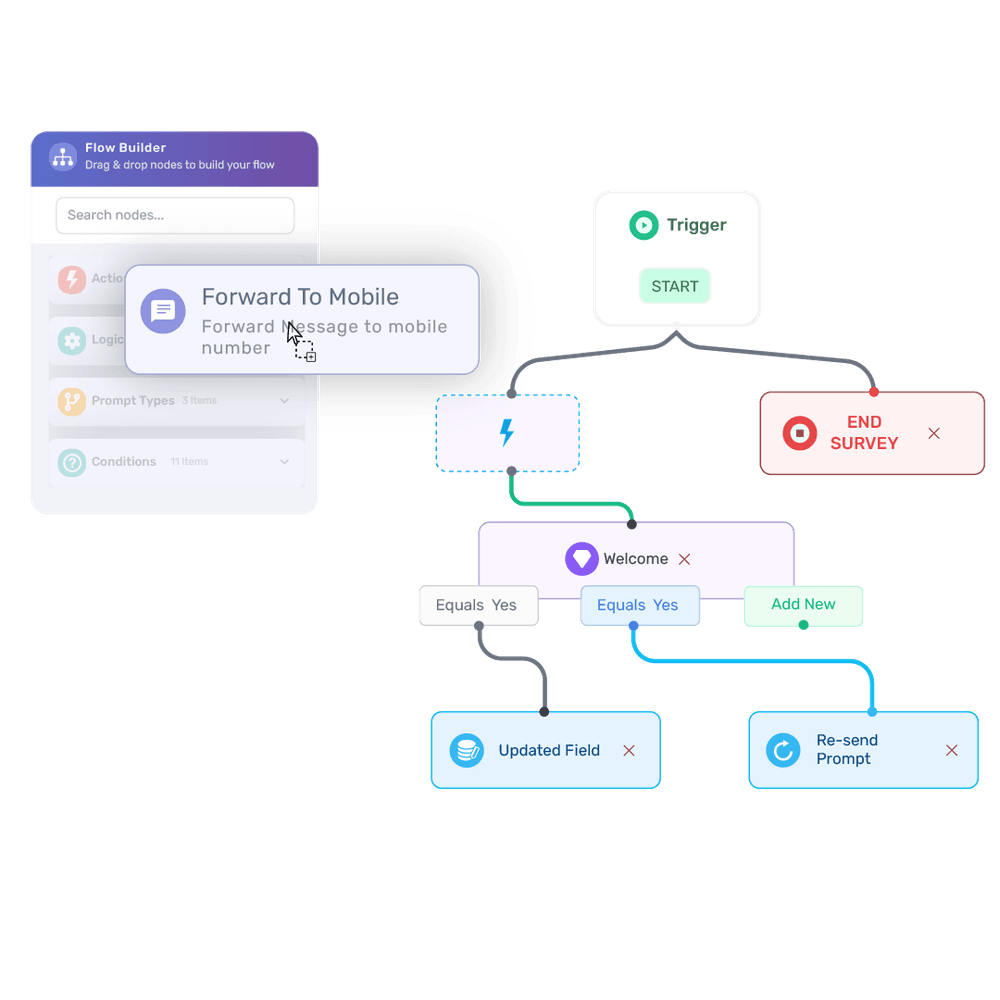
Start by creating a new workflow in TXTImpact using the intuitive drag-and-drop workflow builder with conditional logic.
Step 2: Select Your Messaging Channel
Choose your preferred messaging channel, such as RCS or RCS Agent, to run the survey campaign.
Step 3: Set a Trigger
Configure a keyword-based trigger that will initiate the workflow whenever a user sends the specified keyword.
Step 4: Send a Welcome Message
Once the trigger is activated, send a welcome message asking users if they would like to participate in the survey. Include simple interactive buttons like “Yes” and “No.”
Step 5: Continue the Survey for ‘Yes’ Responses
If the user selects “Yes,” the workflow automatically continues and sends a sequence of survey questions with multiple-choice options displayed as interactive buttons.
Step 6: End the Survey for ‘No’ Responses
If the user selects “No,” the workflow automatically ends the survey, and no additional questions are sent.
Step 7: Capture and Manage Responses
TXTImpact automatically collects user responses, allows you to add delays between questions, and lets you integrate the workflow with other applications.
Step 8: Sync Responses for Analysis
You can sync or forward survey responses to your email or other tools for deeper analysis and reporting.
Step 9: Test the Workflow
Run a test survey to check for any errors or gaps in the workflow before launching the campaign.
Step 10: Launch the Automated Survey
Once everything is verified, activate the workflow. TXTImpact will automatically manage the entire RCS survey process, ensuring the campaign runs smoothly and efficiently, and you can also get the report and analytics within the TXTImpact omnihub.
Step 11: Analyze Survey/Polling Report and Data
After running RCS polling and survey campaigns, you can easily analyze results and generate reports directly from the TXTImpact Omnihub dashboard using visual insights such as graphs and pie charts.
📝 Note: For RCS polling, the steps are similar; you are not required to add follow-up questions in the workflow, just one question with multiple answers as buttons, and that's it. |
Types of Surveys and Polls You Can Run Using RCS
Here are the key types of surveys you can run using RCS:
- Customer satisfaction (CSAT) surveys measure how satisfied customers are with their service, product, or interaction. RCS enhances CSAT surveys with quick reply buttons, contextual details, and automated follow-up questions.
- Post-purchase feedback surveys allow businesses to gather insights about checkout experience, product quality, delivery satisfaction, and customer support interactions. This works well for the retail and e-commerce industries.
- Net Promoter Score (NPS) surveys measure customer loyalty by asking questions like “How likely are you to recommend us to a friend or colleague?” With RCS, businesses can send a 1-10 rating scale, trigger a follow-up question, and offer incentives or referral links to promoters.
- Event feedback surveys enable businesses to collect real-time feedback after in-store events, virtual sessions, or webinars, and ask about their event rating, the most valuable session, and whether they would attend again.
- Product preference polls enable businesses to run quick, visual preference polls using image previews and swappable cards. Businesses can ask questions like, “Choose your favorite flavor,” “Which design do you prefer?” and “Select the next feature you’d like us to build,” which are perfect for product development and market research.
- Service experience surveys are ideal for service-based companies, enabling them to assess appointment experience, issue resolution effectiveness, support call satisfaction, and wait-time feedback.
- Employee engagement surveys help businesses gather employee feedback via pulse surveys, workplace satisfaction polls, training feedback surveys, and quick morale checks, encouraging higher participation than lengthy email forms.
Here are the key types of polls you can run using RCS:
- Product preference polls make it easier to ask customers to choose between product designs, features, flavors, or packaging options using image-based carousel cards.
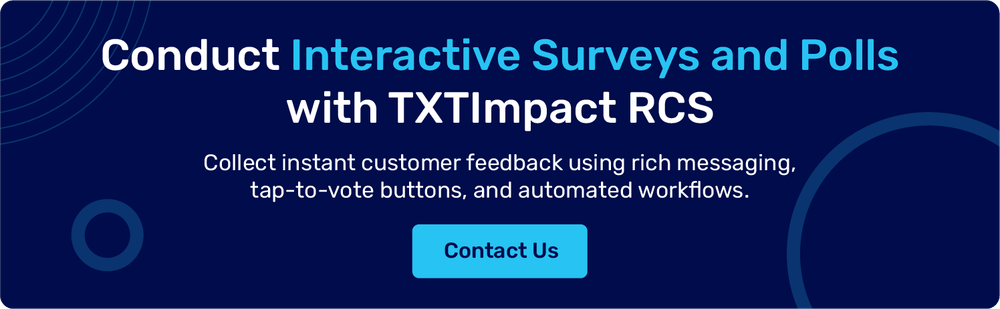
- Feature voting polls let customers choose and vote on upcoming features or product updates.
- Yes/No quick polls let businesses send a simple one-tap poll with questions like “Would you like a callback?” or “Are you attending tomorrow?”
- Appointment/delivery preference polls allow customers to instantly choose preferred service windows or time slots as needed. Internal team polls allow companies to collect quick employee input for feedback, scheduling, and decision-making.
RCS Survey and Poll Examples and Templates for Customer Feedback (by Use Case)
RCS surveys and polls allow businesses to collect real-time feedback using interactive messaging polls, rich media cards, and tap-to-vote buttons. Unlike traditional SMS surveys, RCS templates enable businesses to create conversational and visually engaging feedback experiences directly inside the user’s native messaging app.
Below are some practical RCS survey and poll templates businesses can use to gather customer insights.
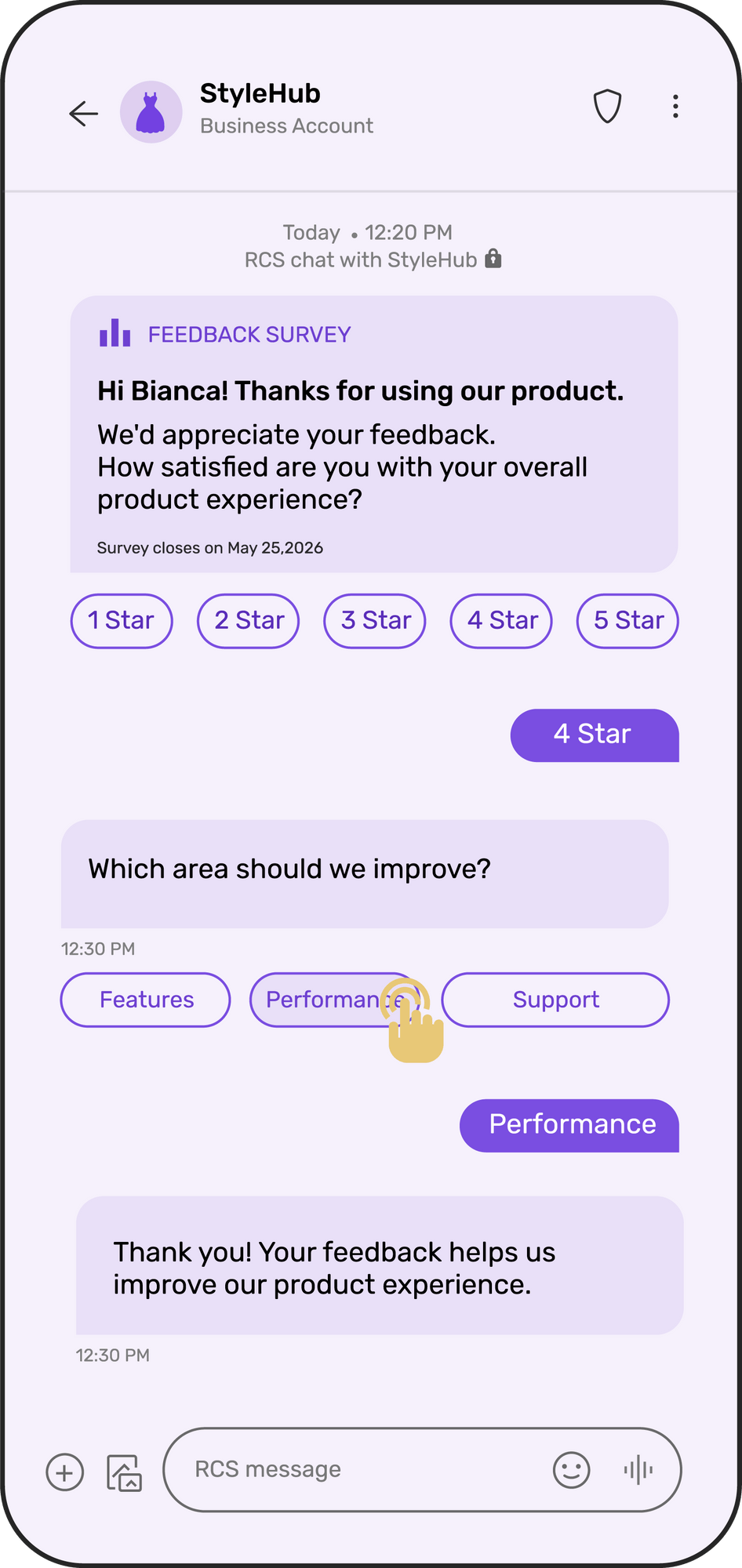
1. Product Feedback
RCS Poll Template:Message Question Buttons • Dark Mode Auto Reply |
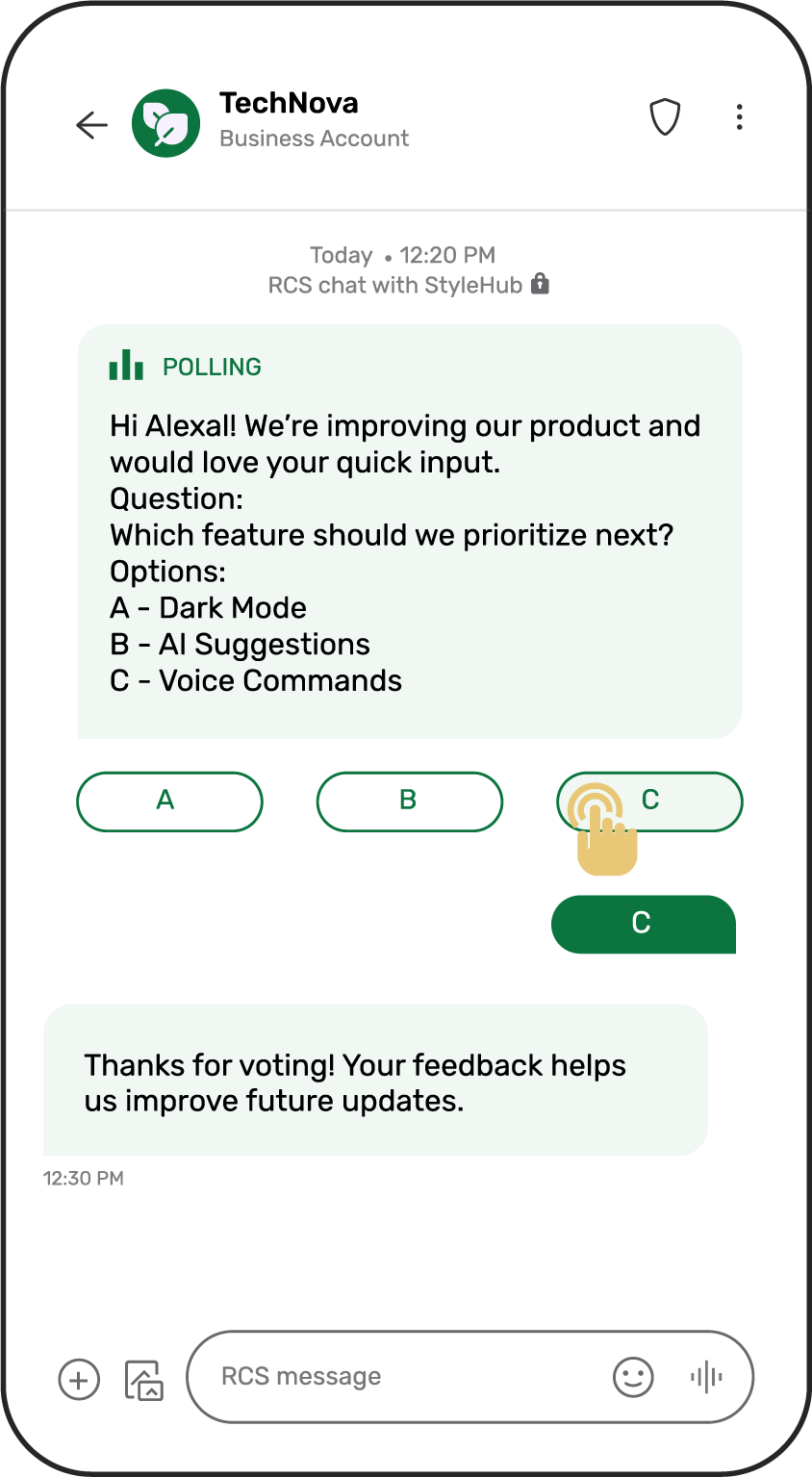
| RCS Survey Template:Message Question 1 Options: ⭐ 1 Star Buttons: 1, 2, 3, 4, 5 Question 2 Buttons: Features Performance Support Closing Message |
2. Customer Satisfaction (CSAT / NPS)
Poll Template:
Message
Hi Rahul! Quick question about your recent experience.
Question
How satisfied are you with our service?
Buttons:
Very satisfied
Satisfied
Neutral
Dissatisfied
Auto Reply
Thanks for sharing your feedback!
Survey Template:
Message
Hi Sarah! We'd love to understand your recent service experience.
Question 1
How likely are you to recommend us to a friend or colleague?
Options:
⭐ 1 Star
⭐⭐ 2 Stars
⭐⭐⭐ 3 Stars
⭐⭐⭐⭐ 4 Stars
⭐⭐⭐⭐⭐ 5 Stars
Buttons
1 2 3 4 5
Question 2
What was the main reason for your rating?
Buttons:
Product quality
Customer service
Pricing
Delivery experience
Closing Message
Thanks! Your feedback helps us improve our service.
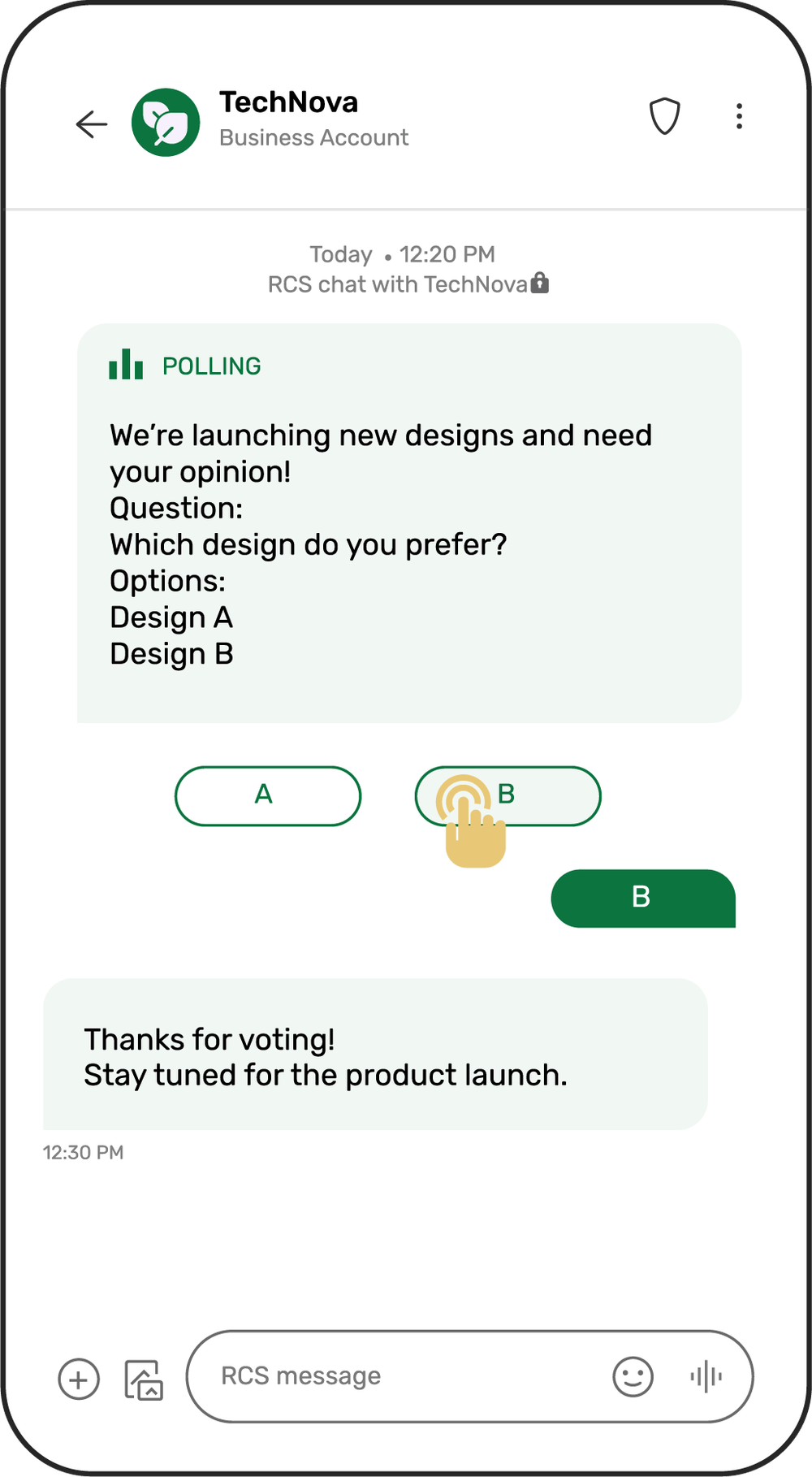
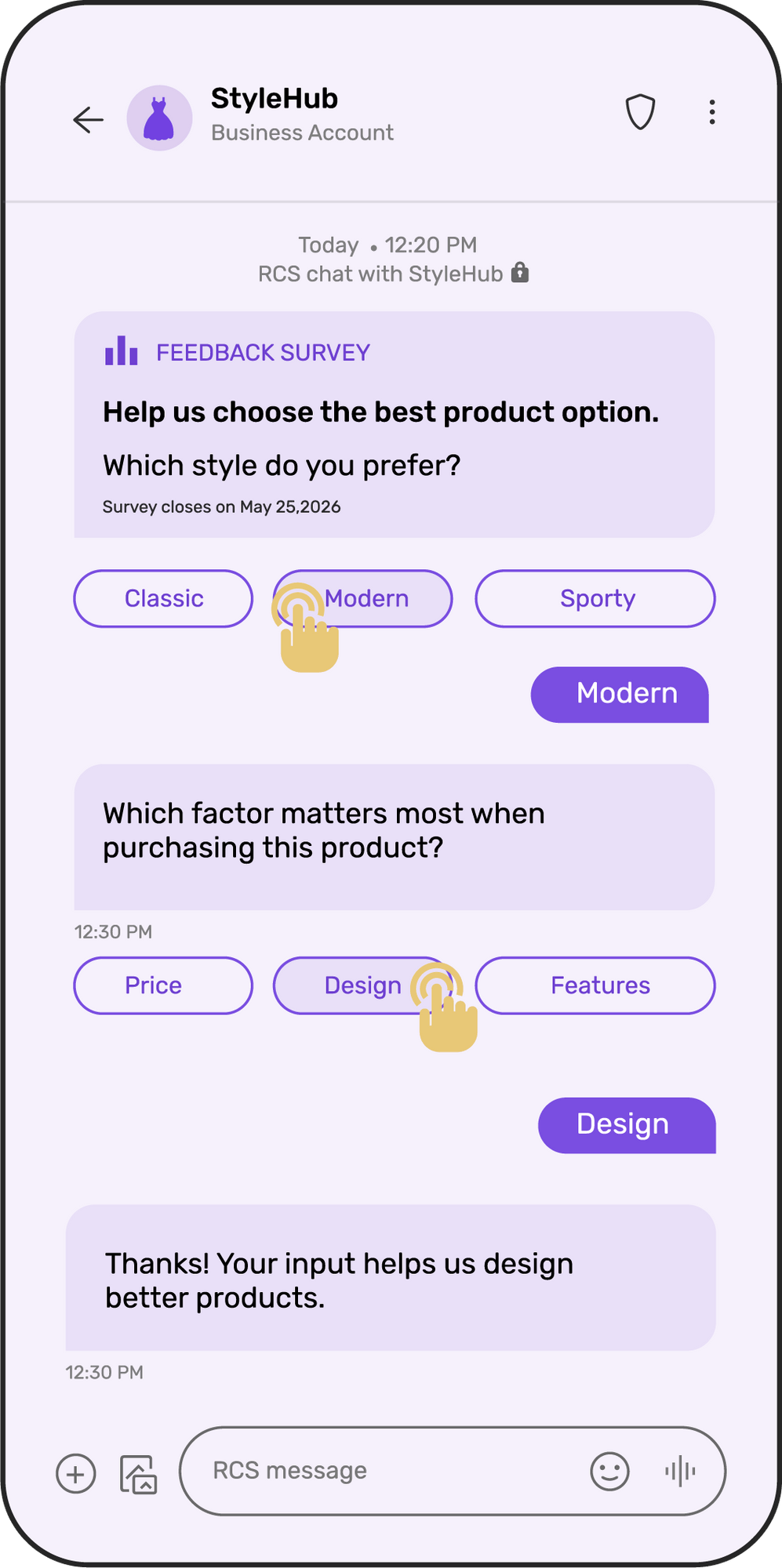
3. Product Preference / Market Research
RCS Poll Template:Message Question Button • Design A Auto Reply |
| RCS Survey Template:Message Question 1 Buttons Classic Question 2 Buttons: Price Closing Message Thanks! Your input helps us design better products. |
4. Event Participation
Poll Template:
Message
Hi Rahul! We're hosting an upcoming webinar.
Question
Would you like to attend?
Options:
A - Yes, register me
B - Send more details
C Not interested
Buttons:
A B C
Survey Template:
Message
Help us plan a better event experience.
Question 1
Which session topic interests you most?
Buttons:
AI trends
Marketing automation
Growth strategies
Question 2
What time works best for you?
Buttons:
Morning
Afternoon
Evening
Closing Message
Thanks! We'll notify you once the event schedule is finalized.
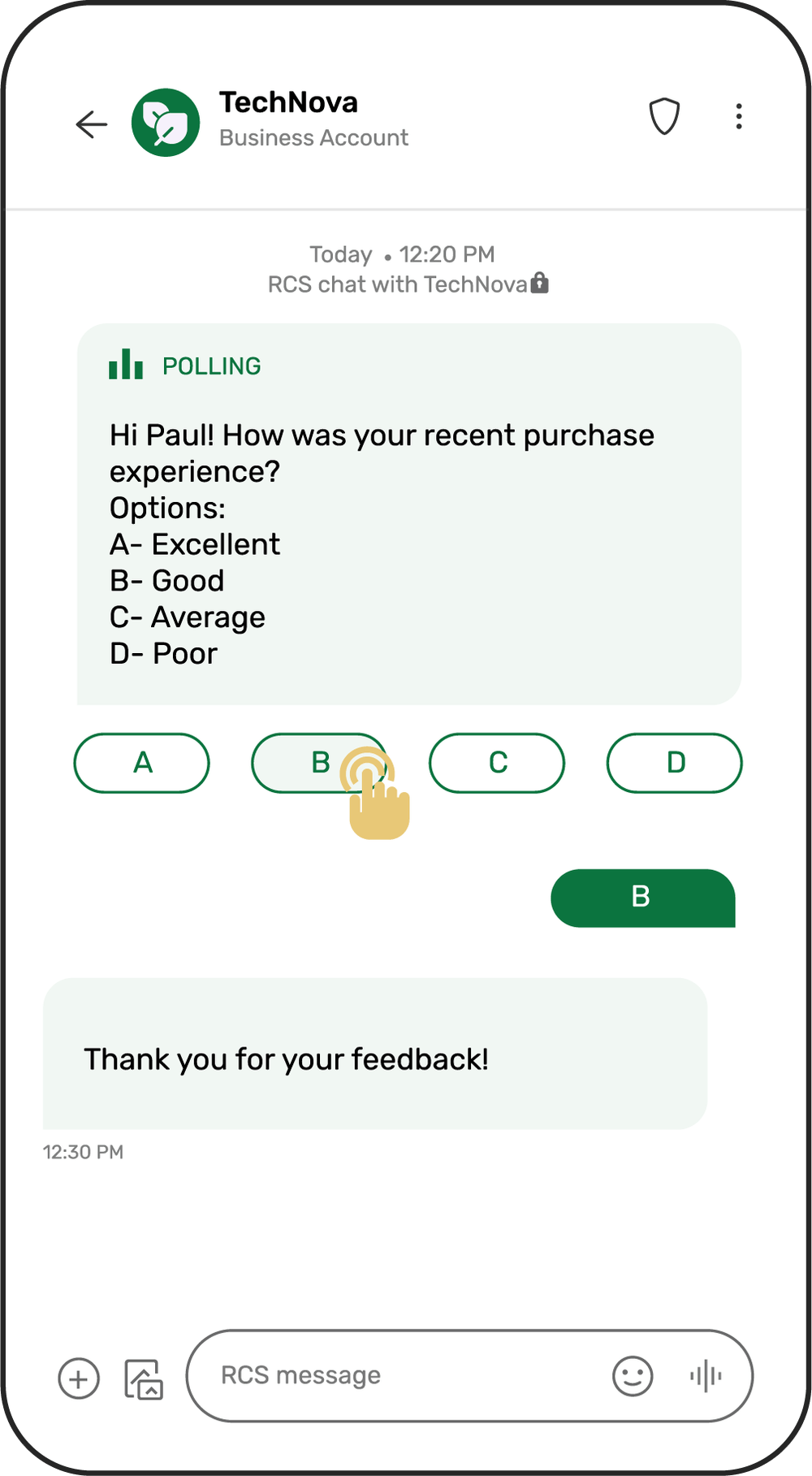
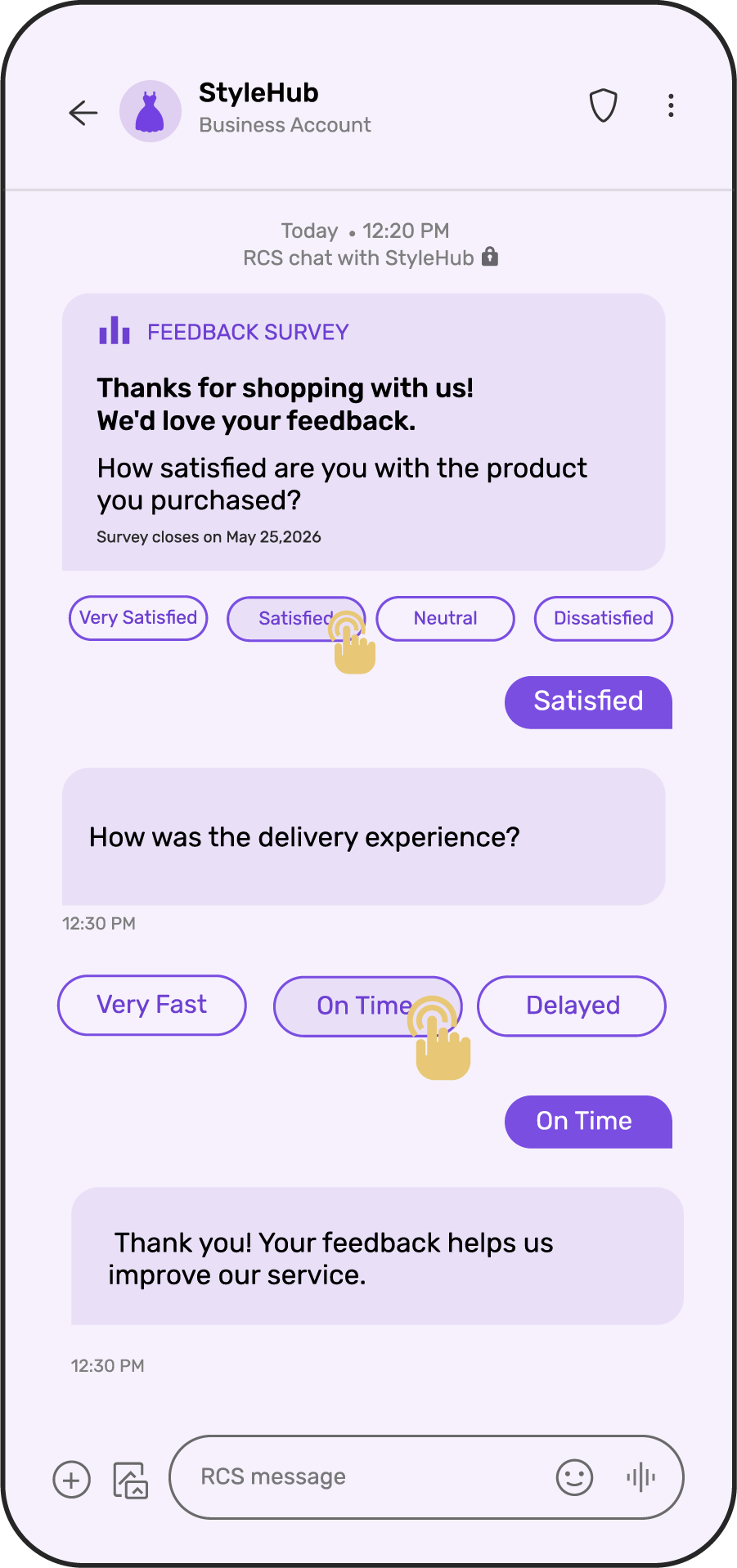
5. Post-Purchase Feedback
RCS Poll Template:Message Options: A- Excellent Buttons: A, B, C, D Auto Reply |
| RCS Survey Template:Message Question 1 Buttons: Very satisfied Question 2 Buttons: Very fast Closing Message |
RCS vs SMS For Surveys: What’s The Difference?
While SMS is simple and widely supported, it offers limited interactivity and rich media capabilities. RCS, on the contrary, transforms polls and surveys into rich, interactive, and conversational experiences with better RoI.
Here are the differences between SMS and RCS when it comes to running polls and surveys.
Features | RCS Surveys | SMS Surveys |
Message format | Rich media (images, videos, etc.) | Plain text only |
Branding | Verified brand profile with logo | Numeric sender ID |
Response method | One-tap suggested buttons | Users type replies |
Interactive elements | Buttons, carousels, rich cards | No interactive elements |
Read receipts | Available | Not available |
Typing indicators | Available | Not available |
Survey flow | Dynamic and conversational | Linear, static |
User experience | Native app-like experience | Text-based |
Analytics depth | Detailed engagement tracking | Basic delivery status |
Accuracy | High | Low |
RCS Survey and Polls Use Cases by Industry
RCS surveys and polls are adaptable across industries specific to customer journeys. Here are various industries that can leverage RCS to collect effective feedback.
1. Healthcare
RCS surveys help healthcare providers and hospitals to improve patient experience and boost operational efficiency. The healthcare industry can use RCS polls and surveys to send immediate post-appointment surveys, automate follow-up alerts, and enable simple tap-based responses to reduce patient effort and ensure a conversational flow and experience.
Use cases of RCS surveys for healthcare include:
- Appointment experience feedback
- Prescription reminder confirmations
- Facility cleanliness ratings
- Post-treatment follow-up surveys
- Telehealth consultation satisfaction
2. Retail and e-commerce
Customer experience is of the utmost importance in the retail and e-commerce industry as it directly impacts retention and repeat purchases. Retail brands and businesses can use RCS surveys to display product images in rich cards, offer discount codes as incentives within the chat, use carousel format to rate multiple items, and collect instant feedback after delivery.
Use cases of RCS polls and surveys for the retail and e-commerce industry include:
- Delivery experience feedback
- Cart abandonment polls
- Product rating and review collection
- Visual preference polls for new collections
- Post-purchase satisfaction surveys
3. Banking and financial industry
Service quality and customer trust are critical in the financial sector. RCS surveys help banking and financial institutions monitor customer satisfaction after interactions. A branded sender profile and verified communication increase engagement and credibility, essential in the BFSI sector.
Use cases of RCS surveys in the banking and financial sector include:
- Insurance claim process feedback
- Post-branch visit feedback
- Customer support satisfaction
- Fraud alert confirmation polls
- Loan application experience rating
4. Travel and hospitality
In the travel and hospitality industry, real-time feedback can help prevent negative reviews and improve guest experience during their stay. Proactively engaging using RCS surveys also helps reduce churn and improve brand reputation.
Use cases of RCS surveys in the travel and hospitality sector include:
- Room service satisfaction polls
- Check-in experience surveys
- Destination preference polls
- Mid-stay feedback
- Post-check experience surveys
5. Education
Educational institutions and EdTech platforms can use RCS surveys to gather student and parent feedback and improve student experience and satisfaction.
Use cases of RCS surveys in the educational sector include:
- Course feedback surveys
- Faculty evaluation surveys
- Webinar satisfaction polls
- Parent engagement feedback
- Program preference polls
Tips for Increasing RCS Survey Response Rates
Follow these best practices to run effective, successful RCS surveys and polling campaigns for your business.
- Keep the surveys short and conversational, limit them to 1-5 questions, and use a natural, chat-style language instead of formal questionnaires.
- Use visuals strategically by adding images, videos, and carousels only when they enhance clarity.
- Optimize the surveys for mobile UX by using clean layouts, well-structured rich cards, and concise text for better readability.
- Implement branching logic by triggering follow-up questions based on responses to keep the experience relevant and dynamic.
- Use one-tap reply buttons, quick action buttons, and suggested replies to reduce typing effort and increase completion rates.
- Personalize messages by adding the customer name, service context, or rafting messages based on the user’s recent purchases to make the surveys more relevant.
- Time the surveys right and send them immediately after key events and interactions, such as an appointment, purchase, or support call.
- Offer incentives, discounts, rewards, and loyalty points whenever relevant and required to encourage participation in surveys or polls.
- Track and continuously optimize the surveys by monitoring read rates, response rates, and drop-offs to refine future surveys.
- Ensure opt-in compliance by sending surveys only to those users who have consented to receive business messages.
Conclusion
Customers today no longer want to experience the traditional, slow-paced polls and surveys. They expect seamless, quick, hassle-free, and engaging experiences when it comes to sharing feedback. Emails, surveys, and traditional SMS no longer deliver the level of engagement businesses need to satisfy customers.
This is why businesses are switching to RCS, which transforms polls and surveys, offering rich, branded, and conversational customer experiences. Multimedia support, one-tap responses, real-time analytics, and dynamic workflows enhance survey experience for businesses and customers, allowing businesses to collect high-quality feedback faster and more efficiently.
Whether you’re running product polls, customer satisfaction surveys, or NPS campaigns, RCS helps turn simple questionnaires into meaningful and impactful customer experiences.
If you’re looking to implement RCS-based surveys and polling for your business, TXTImpact offers an RCS business messaging platform with secure infrastructure, seamless integrations, and tools designed to deliver interactive customer experiences.
Contact us or book a demo to get started.
FAQs
♦ What is the difference between SMS and RCS surveys?
While SMS surveys are text-based and require users to type responses or click on external links to navigate to external forms, RCS surveys offer rich media, interactive buttons, and one-tap responses directly within users’ native messaging apps.
♦ Can I personalize RCS surveys?
Yes, businesses can absolutely personalize RCS surveys based on customer data, purchase history, past interactions, and behavioral triggers.
♦ Are RCS surveys secure?
Yes, RCS surveys are highly secure as they support branded messaging and sender profiles, boosting brand trust and ensuring secure communication.
♦ What happens if a user’s device doesn’t support RCS?
TXTImpact automatically enables SMS fallback, ensuring your surveys reach all recipients even if certain users’ devices don’t support RCS.
♦ What industries benefit most from RCS surveys?
Healthcare, retail, BFSI, telecom, travel and hospitality, education, and service-based industries benefit the most from RCS surveys and polling campaigns.
About the Author:
 | Tejal Sushir (Content Writer) Tejal Sushir is a content writer with 4+ years of experience writing fresh and insightful content for B2B SaaS companies. She has delivered top-performing and top-ranking blogs in the SMS marketing, Digital Marketing, web hosting, AI & ML, cybersecurity, WordPress, HR Tech, and technical SEO domains. Her meticulous research when writing content ensures industry expertise and keeps up with emerging trends. |