9 Common Challenges in SMS Ticketing Software (And How TXTImpact Gets It Right)
TL;DR
|
Customers today expect fast, simple, and personal support. They don’t want to be left on hold, dig through cluttered inboxes, or repeat the same issue to five different agents. And yet, many businesses still rely on incompetent channels that frustrate customers and drain team productivity. That’s where SMS ticketing software makes a difference, only for the better.
Now let’s cut to the chase.
Say your bank, for example, Bank of America, sends you an SMS regarding a suspicious activity. You reply to the message, and a service “ticket” is instantly created without ever making a call or visiting a branch. It’s like raising an issue at the counter, but through text.
The same applies within a company. When the Wi-Fi goes down, you text the IT team, just like how you would report a stuck elevator. IT logs the issue using SMS‑based support software, keeping you updated on progress, and closes the loop once the issue is resolved.
This usability is what puts SMS ticketing for customer service in a league of its own. But here’s the catch: not all SMS ticketing systems are created equal. Many solutions fall short in automation, personalization, and usability. Let’s look at the common pitfalls in SMS-based support and how TXTImpact’s text message ticketing platform is built to solve them.
What’s an SMS Ticket?
An SMS ticket is a way to raise concerns and ask for help both internally and externally via text message. Each message turns into a support request (called a ticket) in the company’s system. This helps the team keep track of the issue, resolve it efficiently, and keep everyone in the loop through humble text messages.
Why SMS Ticketing Stands Out
Well, here are the Top 5 benefits of using SMS ticketing over other customer service and queue management methods:
1. Faster Response Times
SMS ticketing drastically reduces wait times by allowing customers to connect on the go without sitting on hold or navigating clunky email threads. This leads to faster resolutions and happier customers.
2. Real-Time Queue Updates
Customers receive SMS alerts for ticket updates about their position in the queue and estimated wait times.
3. Customizable Messaging
Businesses can tailor SMS content to match their tone, branding, and customer needs, creating more personal and engaging interactions.
4. Secure Communication
With TXTImpact’s encryption features, every SMS ticket is logged and secured digitally, minimizing the risk of lost information.
5. Accessible Across All Age Groups and Devices
SMS is universally understood and doesn’t require a smartphone or any dedicated mobile app, making it an inclusive solution that caters to tech-savvy users and older generations alike.
But Why do Most SMS Ticketing Systems Fail?
While the idea is promising and feasible, let's talk about what keeps it on its back foot. We have mapped out some of the real pain points that businesses face every day when implementing SMS help desk software and how TXTImpact solves them. Some problems here might even feel personal to you.
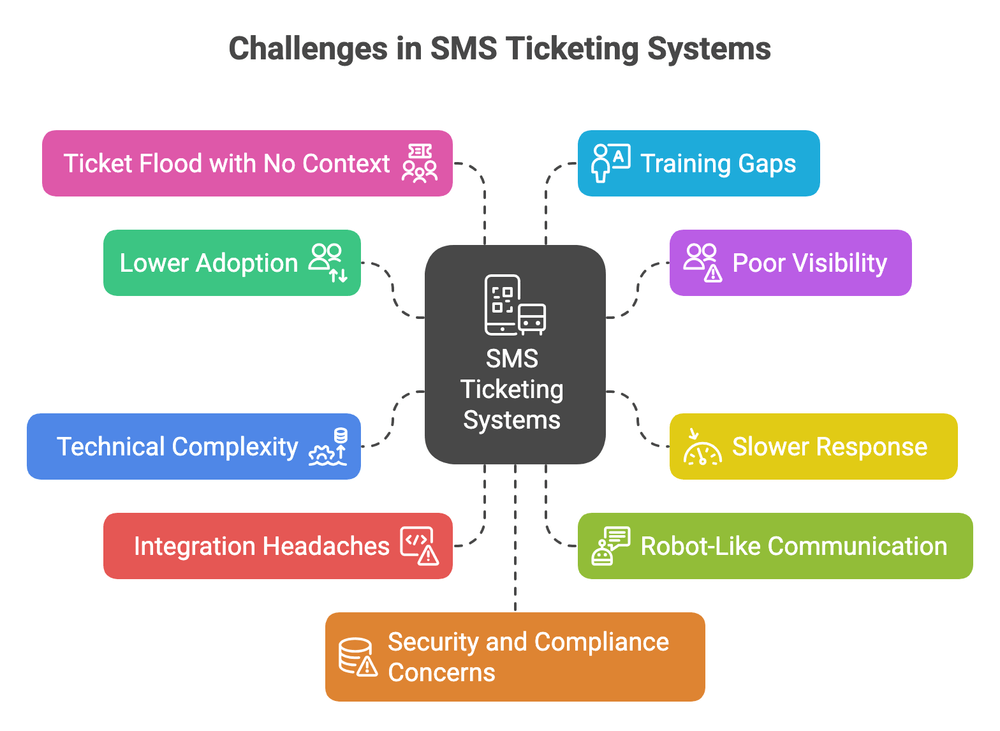
1. Lower Adoption
This might be one of the most frustrating problems. You invest in a mobile ticketing solution, set everything up, train your team, and then... crickets. One Reddit user shared their experience, stating:
"We paid for the system for 18 months, and never received one single ticket via text... sending an email was working fine, and they didn't see a reason to change." Reddit
What Causes This?
Customers forget the SMS number
Email feels more "official" for important issues
No clear incentive to change existing habits
Poor promotion of the SMS option
Confusing user experience
TXTImpact Solution:
Seamless integrations with CRMs like Zendesk, so agents don’t need new workflows
Proactive SMS notifications to promote text-based support
Frictionless user experience with no extra steps for either customer or agent
TXTImpact ensures seamless helpdesk SMS integration, allowing SMS tickets to appear in familiar email or helpdesk queues

2. Poor Visibility
You know that sinking feeling when you submit a support ticket and hear nothing back? SMS can make this bitter. At least with email, you get confirmation messages and can reference ticket numbers easily.
As one support manager put it: "Submitting a Ticket Feels Like a Black Hole... employees feel ignored."
What Causes This?
No read receipts or delivery confirmations
Lack of real-time status updates via SMS alerts for ticket updates
No clear escalation path
TXTImpact Solution:
- Status updates via automated SMS notifications
- A unified ticket history for both agents and users
- Real-time escalation workflows through helpdesk tools like Zendesk
- TXTImpact’s SMS workflow automation sends real-time message ticket alerts, while unified ticket histories ensure no one loses track of the conversation
3. Slower Response
Here's the irony – customers choose SMS expecting speed, but often get slower service than traditional channels. The common complaint across online forums, i.e., Reddit and Quora, is that: "Long response & resolution times due to manual triaging, slow workflows."
What Causes This?
Manual ticket routing and assignment
SMS integration doesn't trigger proper workflows
Support agents are not monitoring SMS channels actively
No SMS workflow automation in place
TXTImpact Solution:
Automated routing via Zendesk, Zapier, or API integrations
Real-time notifications for agents and customers
TXTImpact’s integrations streamline routing and notifications, ensuring SMS tickets get resolved as quickly as customers expect
4. Technical Complexity
Setting up two-way SMS support sounds simple in theory. In practice? It's often a technical nightmare that requires significant IT resources. Users frequently mention in the various popular forums "Complexity and learning curve" as major barriers to successful implementation.
What Causes This?
Complex API integrations
Multiple systems that don't play nicely together
Lack of clear documentation
Need for custom development work
TXTImpact Solution:
Text-2-Email simplifies the process with zero learning curve for agents, as SMS tickets are managed just like emails.
Prebuilt integrations (Zendesk, Zapier) for fast, no-code deployment
TXTImpact’s Text-2-Email and prebuilt integrations eliminate setup headaches. No dev team required—just plug and play
5. Integration Headaches
Your SMS customer support tool needs to work with your existing helpdesk, CRM, and other business systems. But most solutions create data silos instead of seamless workflows. "Not compatible with other systems" and "Integration difficulties" consistently rank among the top user complaints.
What Causes This?
Limited pre-built integrations
Poor API documentation
Data synchronization issues
Workflow conflicts between systems
TXTImpact Solution:
Native integrations (e.g., Zendesk) and automation tools like Zapier
Open SMS APIs for syncing ticket data and automating workflows
TXTImpact’s cloud-based SMS ticketing solution includes open APIs and native integrations, giving you a truly unified, end-to-end support process

6. Robot-Like Communication
SMS should feel personal and immediate, but most systems send generic, cold responses that make customers feel like they're texting a machine. "Impersonal & inefficient support" undermines the entire value proposition of SMS support
What Causes This?
Over-reliance on chatbot SMS responses
Lack of personalization options
No context from previous interactions
Generic templates for all scenarios
TXTImpact Solution:
Agents reply to SMS tickets with full history/context using Zendesk and Text-2-Email
Templates used only for status or routine info
TXTImpact personalizes every interaction, combining a chatbot with a human agent. Customers get fast, helpful, human responses
7. Ticket Flood with No Context
Because texting is so easy, customers often send vague messages like "It's not working" without any context. This creates more work for support teams, not less. Support teams report "Poor ticket qualification" and struggle with "High volume and backlog without proper prioritization."
What Causes This?
No guided intake process via SMS
Character limits prevent detailed descriptions
Lack of automated triage based on keywords
No priority classification system
TXTImpact Solution:
Smart triage using keywords or customer type
Guided SMS flows that prompt for key info upfront
TXTImpact’s intelligent SMS flows guide users to share the right info immediately, and automation sorts tickets by priority, keeping your team focused and efficient
8. Training Gaps
Even when you have a great SMS ticketing system, success depends on proper training for both customers and support staff. As per a Reddit user, "Lack of user training" consistently leads to low usage and poor-quality tickets. Reddit
What Causes This?
Inadequate onboarding processes
No clear guidelines on when to use SMS vs. other channels
Support staff are unprepared for SMS workflows
Customers are unaware of SMS capabilities
TXTImpact Solution:
Streamlined training via familiar platforms like Zendesk and Text-2-Email
Quick-start guides for customers and agents
TXTImpact simplifies onboarding by integrating into the tools your team already uses, so no steep learning curve is required
9. Security and Compliance Concerns
SMS adds another layer of potential data exposure, which could be a problem for companies handling sensitive information like defense.
What Causes This?
Unencrypted message transmission
Data storage across multiple systems
Unclear compliance with industry regulations
Inadequate access controls
TXTImpact Solution:
Centralized, secure storage in platforms like Zendesk
Full audit trails and role-based access controls
TXTImpact ensures SMS data stays compliant with standards like HIPAA, TCPA, and others. Every ticket is archived securely and tracked end-to-end

How TXTImpact Solves SMS Ticketing Pain Points
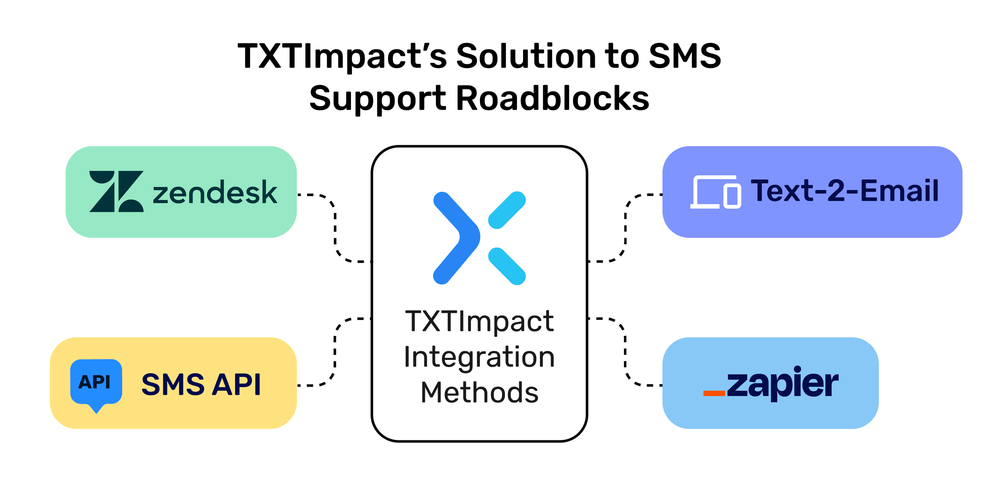
Now that we've covered what goes wrong, let's talk about what works. This section demonstrates how TXTImpact directly addresses the most pressing challenges of SMS ticketing through its integration methods: Zendesk, Text-2-Email, Zapier & SMS API.
1. Works Smoothly With Zendesk
Connect TXTImpact to Zendesk and manage SMS tickets directly from your helpdesk dashboard. Agents can respond via SMS without leaving the Zendesk interface and keep all messages and history in one place.
2. Turn Texts Into Emails
Most people prefer email for support, and thus TXTImpact’s Text-2-Email feature automatically turns customer texts into email tickets. Your team stays in their email inbox, while customers enjoy the convenience of texting.
3. Integrate With Any Tool Using Zapier
TXTImpact supports Zapier integration, so you can link SMS ticketing with over 3,000+ apps like Freshdesk, Google Sheets, Trello, or CRMs and automate workflows without writing code.
4. Customize With Our SMS API
For more advanced needs, TXTImpact’s SMS API gives developers full control. Integrate SMS ticketing into custom-built systems or enterprise software with ease and flexibility.
Why These Integrations Matter?
With its tiered approach, TXTImpact enables:
Minimal disruption to current systems
Rapid adoption by users and agents
Centralized command over ticket data
The flexibility to evolve as business needs grow
RCS is now available in TXTImpact, and you can further enhance your ticketing capabilities by simply upgrading to TXTImpact RCS. Wondering how RCS can be a better alternative to SMS ticketing software? Check this out: Best ways to use RCS for Customer Support and reduce call centre loads. |
TXTImpact Implementation Best Practices
1. Start with Clear Customer Communication
Before launching your mobile support messaging system, educate customers on when and how to use it effectively. Create simple guidelines that encourage detailed initial messages while setting proper expectations for response times.
2. Design for Context, Not Just Speed
The best SMS-based support software balances quick responses with meaningful context. Configure your system to capture relevant customer information automatically and provide agents with conversation history at a glance.
3. Plan Your Automation Strategy
Automated SMS notifications should enhance the experience, not replace human connection. Use automation for status updates, confirmations, and routine information while ensuring complex issues get human attention.
4. Monitor and Optimize Continuously
Track key metrics like adoption rates, resolution times, and customer satisfaction scores. The best SMS ticketing software for small businesses provides detailed analytics to help you identify and address issues before they become major problems.
Security and Compliance Considerations
When evaluating secure SMS ticketing for enterprise support, consider these critical factors:
End-to-end encryption for sensitive communications
Audit trails for all SMS interactions
Secure data storage and retention policies
Access controls and authentication requirements
💡 Also Read: SMS Compliance Guide |
Final Thoughts
Customer service via text isn’t the future; it’s already here. But success depends on choosing the right tool. Many businesses fail not because SMS doesn’t work, but because they pick a platform that doesn’t support their growth, their agents, or their customers.
TXTImpact isn’t just an SMS ticketing tool—it’s a complete mobile ticketing solution that delivers what modern businesses need: fast, flexible, and customer-first support. Avail your free trial today [Start Texting Free]
Frequently Asked Questions
♦ How to implement SMS ticketing in the helpdesk workflow?
You can implement TXTImpact’s SMS ticketing solution in your helpdesk workflow using one of the following methods: by integrating TXTImpact’s SMS API, connecting through platforms like Zendesk or Zapier, or by using TXTImpact’s Email-to-Text feature to convert support emails into SMS messages.
♦ What is SMS ticketing software, and how does it work?
TXTImpact, an SMS ticketing software, enables businesses to manage customer service via text. When a customer texts your support number, TXTImpact converts the message into a ticket within your SMS help desk. This mobile ticketing solution enables real-time tracking, quicker replies, and efficient support.
♦ Can customers reply to SMS tickets, or is it one-way only?
TXTImpact supports two-way SMS. Customers can reply to the same thread, and TXTImpact logs the full conversation history for agents to view and manage seamlessly.
♦ How do automated SMS notifications keep customers updated?
TXTImpact sends automated SMS notifications at every ticket stage (received, in-progress, resolved). These real-time alerts reduce the need for email or phone follow-ups and keep customers informed instantly.
♦ Will a customer's reply create a new ticket or continue the thread?
With TXTImpact, replies are linked to the original ticket automatically. This prevents duplicate cases, streamlines the resolution process, and maintains clarity across your help desk system.
♦ Do I need special equipment to use an SMS ticketing platform?
Not at all. TXTImpact is cloud-based and works with existing numbers like toll-free, 10DLC, or.
♦ Is SMS ticketing software secure and compliant with industry standards?
Yes, TXTImpact provides a secure, TCPA-compliant platform with opt-out options, encrypted data, and complete interaction logs, ensuring transparency, compliance, and data integrity for all.
♦ What’s the best SMS ticketing software for small businesses or startups?
TXTImpact is a top-rated SMS ticketing software for startups. It’s economic, easy to set up, and includes must-haves like two-way messaging, chatbot responses, and intuitive workflows.
♦ What is the best way to integrate sms notifications into a crm or ticketing system?
The best way is through an API or native connector that links your CRM or help desk with an SMS platform like TXTImpact. This ensures ticket updates, assignments, or status changes automatically trigger SMS alerts. TXTImpact makes it simple with APIs, pre-built connectors, webhooks, and automation tools. You can also enable two-way SMS so customer replies are logged directly in your CRM or ticket thread, keeping all communication in one place while staying compliant with opt-out rules and global messaging regulations.
About the Author:
 | Rahul Kumar (Marketing Specialist) Rahul Kumar is a Digital marketer with 7+ years of experience in SEO, AEO,SMS marketing, WhatsApp marketing, SaaS, and WordPress. He has led successful growth campaigns for startups and tech brands, combining data-driven strategies with compelling content. His work has been featured on top SaaS blogs, and he’s known for turning complex ideas into high-converting digital strategies. |