Celebrating TXTImpact's 20 Years of Business Texting Excellence. Be part of our journey. Start your free trial today!
Built on Meta's Official WhatsApp Cloud API
WhatsApp Business Messaging for Businesses in India 🇮🇳
Reach more customers with TXTImpact's secure WhatsApp Business Messaging platform. Manage customer conversations, notifications, broadcasts, workflow automation, and team messaging all from one platform.

Trusted by Businesses Since 2006
20+ Years Business Messaging Experience
30K+ Businesses Served
Official Meta API
🇮🇳 Built for Indian Businesses
Why Businesses Choose WhatsApp Business Messaging
Customer Support
Resolve customer queries faster with real-time two-way WhatsApp conversations.
OTP
Deliver secure one-time passwords instantly for login, verification, and authentication.
Order Updates
Keep customers informed with real-time order confirmations, shipping, and delivery updates.
Payment reminders
Send timely payment reminders to reduce missed or overdue payments.
Appointment reminders
Reduce no-shows with automated appointment confirmations and reminders.
Lead Follow-ups
Automatically follow up with new leads and inquiries.
Notifications
Instantly notify customers about important events, account activity, and service updates.
Internal Communication
Keep employees and field teams informed with instant business updates and operational alerts.
The Messaging Channel Your Customers Already Use Every Day
With billions of users worldwide and hundreds of millions in India, WhatsApp has become one of the most familiar and convenient channels for customer communication.
~98%
Message open rate
Industry-wide figure widely reported for WhatsApp Business messages.
2.9Bn+
Active users worldwide
WhatsApp remains the most-used messaging app globally, with 500M+ users in India alone.
45–60%
Typical CTR
Commonly cited range for WhatsApp campaign clicks vs. email's single digits.
24×7
Always-on channel
Customers can message, and get answered, any time — no app switching required.
Figures reflect commonly reported industry benchmarks for WhatsApp Business messaging and vary by industry and use case.
Why Growing Businesses Need the WhatsApp Business API
The free WhatsApp Business app works for a single person answering chats manually. The API is what lets a real Whatsapp Business Messaging at scale.
WhatsApp Business API vs. the WhatsApp Business app
| Capability | WhatsApp Business API (TXTImpact) | WhatsApp Business App |
|---|---|---|
| Broadcast limit | Unlimited contacts | Up to 256 contacts/day |
| Team access | Unlimited agents, one number | Up to 5 linked devices |
| Automated messaging & chatbots | ✓ | ✘ |
| Verified green tick eligibility | ✓ | ✘ |
| Clickable buttons & quick replies | ✓ | ✘ |
| Campaign & delivery analytics | ✓ | ✘ |
| CRM & helpdesk integration | ✓ | ✘ |
| Coding needed to go live | None — TXTImpact handles setup | Not applicable |
One Platform. Built for WhatsApp Business Communication.
TXTImpact India is built for indian businesses to combining customer communication, broadcast messaging, workflow automation, and exclusive two-way Email ↔ WhatsApp routing in one business messaging platform.
Business Messaging
Customer conversations, notifications, alerts, and broadcasts.
Official Business API
Built on Meta's official Cloud API for reliable delivery, advanced messaging features, and seamless scalability as your business grows.
Broadcast Messaging
Broadcast to opted-in contact lists with scheduling, personalization, and delivery reports.
Email Integration
Turn emails into WhatsApp conversations and route WhatsApp replies back to your inbox—without changing how your team works.
Workflow Automation
Reduce manual work by automating reminders, approvals, notifications, and customer follow-ups.
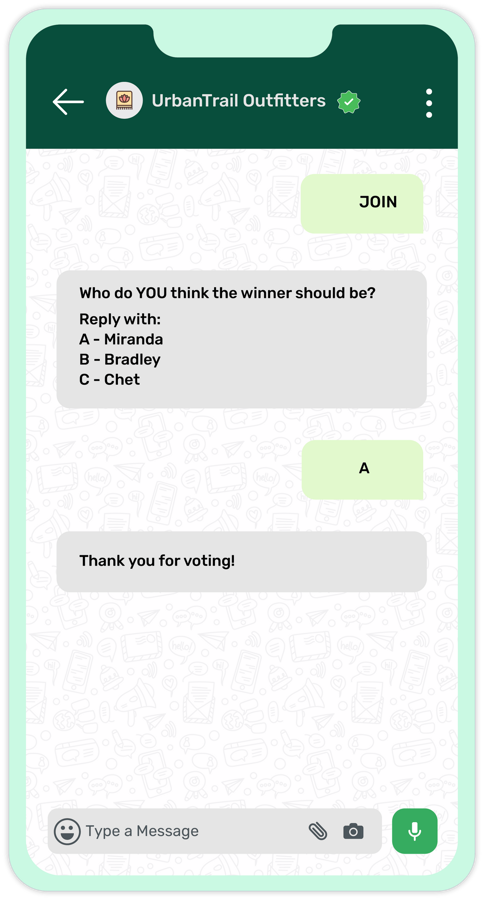
Whatsapp to Join
Encourage customers to join your opt-in WhatsApp list by enabling them to send a keyword via WhatsApp.
WhatsApp-to-Email & Email-to-WhatsApp
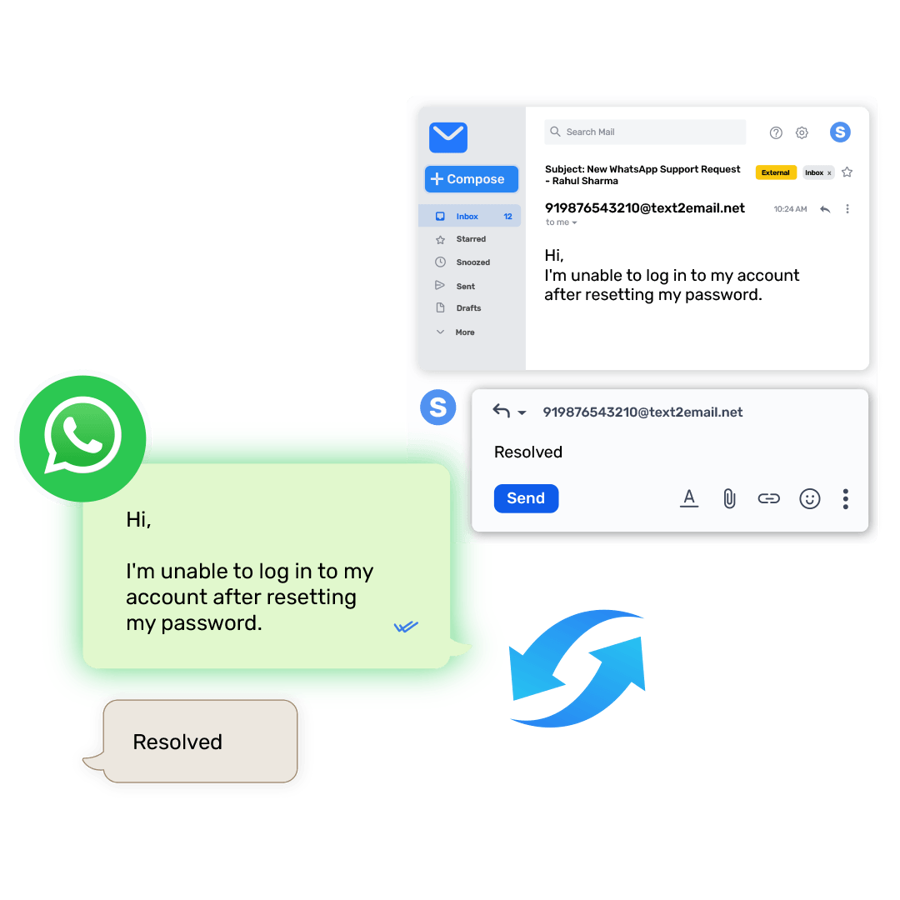
Two directions, two different jobs: WhatsApp-to-Email brings customer chats into a shared inbox your team already runs. Email-to-WhatsApp takes alerts your systems already generate and delivers them as WhatsApp messages instead.
WhatsApp-to-Email — for shared inboxes
Works like a text-to-email service, but for WhatsApp: customer messages land in a shared team inbox, so support and sales teams keep working from email instead of learning a new dashboard.
Customer messages you on WhatsApp
A query, order update request, or support ticket comes in on your verified WhatsApp Business number.
Your team sees it as an email & replies from there
No new login. No new tool. The reply is delivered back to the customer on WhatsApp, formatted and on time.

Ideal for:
Customer Support
Sales Teams
Property Management
Field Service
Healthcare
Help Desk
Email-to-WhatsApp — for alarm & monitoring notifications
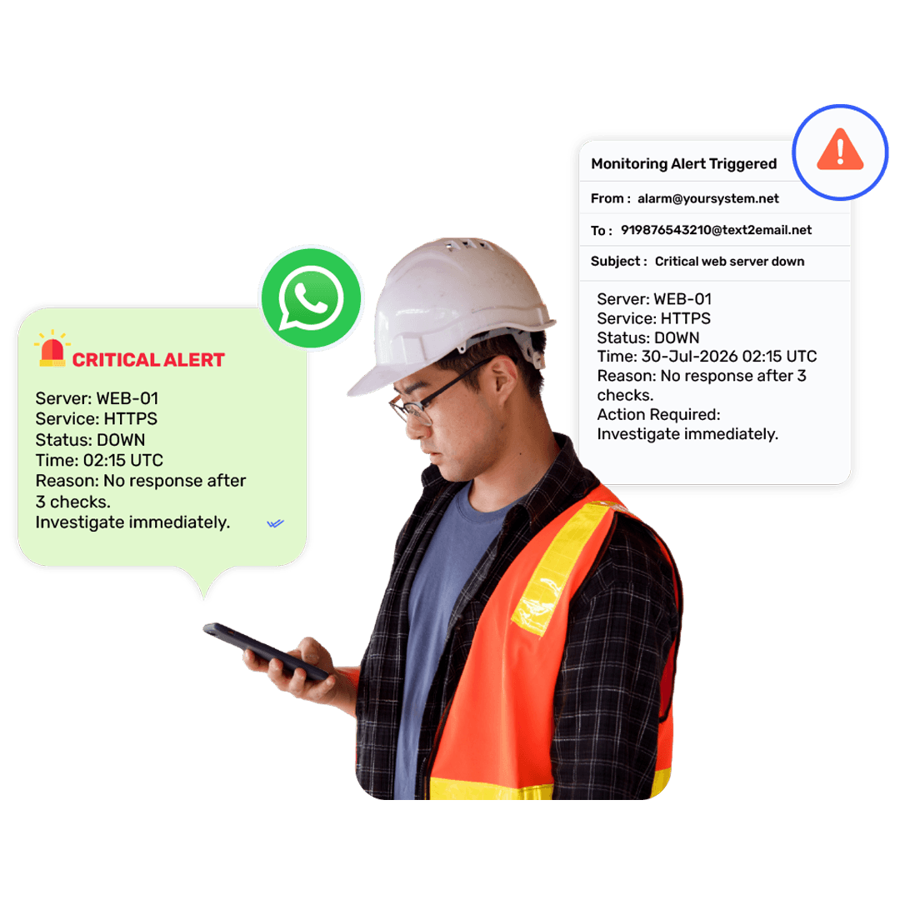
If a system can send an email alert, TXTImpact can turn that same alert into a WhatsApp message — no changes to the source system required. Useful anywhere alarm notifications are currently emailed and the on-call recipient needs it on WhatsApp instead:
Your system sends its usual email alert
BAS, SCADA, legacy systems, IoT devices, and industrial automation platforms all raise alarms by email today — that doesn't need to change.
The on-call recipient gets it on WhatsApp
The same alert reaches the right person as a WhatsApp message, so critical alarms aren't missed sitting in an inbox.

Ideal for:
Building Automation Systems (BAS)
Server & Network Monitoring
Manufacturing Alerts
Security Systems
Legacy Software
Cloud Monitoring
Broadcast Personalized WhatsApp Messages at Scale
Upload a contact list, pick an approved template, and send to thousands of opted-in customers in one broadcast — with each message still feeling personalized.
Segment your list
Upload contacts or sync from your CRM, then group by location, order status, or any custom tag.
Personalize at scale
Insert name, order ID, or city into every message in the broadcast — not just a generic blast.
Track delivery & replies
See sent, delivered, and read rates per campaign, and route replies straight to your team's inbox.
Automate Business Communication with Workflows
Automate customer notifications, Schedule, follow-ups, approvals, support conversations, and broadcast messaging—all from one place via Whatsapp Messaging Channel.
Trigger
on an event
Start a workflow the moment an order is placed, a form is submitted, or a keyword is received.
Branch Based on Customer Actions
Send reminders, wait for a reply, and continue the workflow based on predefined conditions and customer responses.
Automate the Next Step
Schedule follow-up messages, update customer records, notify your team, or trigger the next action automatically—without manual intervention.
Connect with Your Existing Systems
Trigger webhooks, update your CRM, or notify external applications automatically as part of your workflow.
Research & Feedback
Collect Structured Feedback, Polls, and Surveys on WhatsApp
Whether you're gathering feedback after a customer interaction or conducting large-scale surveys across cities, states, or countries, TXTImpact helps you collect structured responses on the app your audience already uses—without forms or app switching.
Send to any country
Run the same poll or survey template across international respondent lists in a single campaign.
Tap to answer
Respondents pick from quick-reply buttons or list options — no forms, no app switching, no typing required.
See results in real time
Responses roll up as they arrive, so you can track completion rates and export results as they come in.
Ideal For:
Post-delivery and post-appointment satisfaction surveys
Customer support and help desk feedback
Education admissions and student feedback
Employee engagement and HR pulse surveys
Market research and consumer studies
Event registrations and RSVP confirmations
Government, civic, and public opinion polling
Internal business surveys and operational feedback

Integrate WhatsApp API With Your Existing Infrastructure
Connect WhatsApp to your existing tools without friction. TXTImpact makes it easy to integrate via API with Salesforce, HubSpot, Zendesk, Zapier, Mailchimp, and many other platforms you already use.

HubSpot
Send personalized messages, lead follow-ups, appointment reminders, and promotional offers to customers on WhatsApp.

Zendesk
Manage 1:1 support conversations with your customers directly inside your helpdesk.

Mailchimp
Sync WhatsApp with your email marketing campaigns to deliver alerts, follow-ups, and promotions.

Salesforce & Zapier
Connect WhatsApp to your CRM and thousands of other apps via REST API and webhooks.
Where Indian Businesses Use It Most
D2C & E-commerce
Order updates, abandoned cart, COD confirmation on WhatsApp.
NBFC & Fintech
KYC reminders, EMI alerts, statement delivery.
Healthcare
Appointment reminders, patient updates, and report delivery.
Education
Admissions follow-up and fee reminders via WhatsApp.
Industrial & Facilities
Route BAS, SCADA, and IoT alarm emails to on-call staff as WhatsApp alerts.
Head to head
TXTImpact vs. The Top 5 India WhatsApp Messaging Platforms
| Capability | TXTImpact India | AiSensy | WATI | Interakt | Gallabox | Gupshup |
|---|---|---|---|---|---|---|
| Primary Use case | Business Communication | WhatsApp Marketing | WhatsApp Marketing | WhatsApp Marketing | WhatsApp Marketing | WhatsApp Marketing |
| Built-in bulk WhatsApp sender | ✔ | ✔ | ✔ | ✔ | ✔ | ✔ |
| WhatsApp-to-Email routing | ✔ | ✘ | ✘ | ✘ | ✘ | ✘ |
| Email-to-WhatsApp reply | ✔ | ✘ | ✘ | ✘ | ✘ | ✘ |
Competitor pricing and features reflect publicly published information as of mid-2026 and may change; verify current terms directly with each provider.
Onboarding
Seamless WhatsApp Business onboarding with TXTImpact
We guide you through every step of the onboarding process to help you get started with TXTImpact WhatsApp Business as quickly as possible.
Account verification support
TXTImpact helps you through Meta/WhatsApp Business verification for quicker account activation.
Business profile setup
Add your brand name, contact details, logo, and messaging information.
Number registration
Connect your official business phone number to WhatsApp, or migrate an existing number to the WhatsApp Business API.
Platform integration
Easily integrate existing workflows and apps, like HubSpot, Salesforce, Zendesk, Zapier, and more.
Template creation and approval
Craft and get WhatsApp-approved templates for alerts, notifications, and promotional messages.
Go live
Start sending messages quickly within hours or days, once everything is approved by Meta.
Ready for WhatsApp Usernames & BSUID
Meta is letting WhatsApp users hide their phone number behind a username — similar to Instagram or Telegram. When that happens, instead of a phone number, your business receives a different identifier called a BSUID (Business-Scoped User ID).
Customers can message you by username
A user who's adopted a WhatsApp username can still start a conversation with you — just without sharing their
phone number.
TXTImpact maps the BSUID for you
Your team keeps replying and running workflows normally — TXTImpact handles the BSUID behind the scenes so conversations, CRM sync, and Email routing keep working.
Common questions from Indian businesses
Frequently asked questions answered
Is this WhatsApp Business Messaging available only in India?
Yes— this plan and pricing page is built specifically for businesses operating in India.
Can I use this as a bulk WhatsApp message sender in India?
Yes — send bulk WhatsApp messages to opted-in contact lists with scheduling, personalization tokens, and delivery/read reports, all within Meta's WhatsApp Business API policies.
What is WhatsApp-to-Email and Email-to-WhatsApp?
WhatsApp-to-Email forwards incoming WhatsApp messages to your team's email inbox. Email-to-WhatsApp lets your team reply from that same inbox and have it delivered to the customer as a WhatsApp message. Also the incomine emails from any legacy system or application can be converted into whatsapp messages and delivered to recipients.
Is TXTImpact's WhatsApp API official?
Yes — TXTImpact's WhatsApp Business API for India is built on Meta's official WhatsApp Cloud API, so your messages run on WhatsApp's own infrastructure and follow its policies.
How long does WhatsApp Business API integration take in India?
Most businesses complete number registration, template approval, and CRM or webhook integration within 1–3 business days, depending on Meta's verification turnaround.
What do I need to apply for WhatsApp Business Messaging?
A registered business name, a business phone number not already on the regular WhatsApp app, and a Facebook Business Manager account. TXTImpact walks you through each of these during onboarding.
Can I migrate my existing WhatsApp number to the TXTImpact Whatsapp Business Messaging Platform?
Yes — an existing number from the WhatsApp Business app can be migrated to the WhatsApp Business Messaging platform without losing your chat history retention settings or contacts.
Can I use WhatsApp Business Messaging and the regular WhatsApp Business app on the same number?
No — once a number is migrated to the WhatsApp Business API, it can no longer be used in the standard WhatsApp Business app on a phone.
Can Email-to-WhatsApp be used for alarm or monitoring notifications?
Yes — if your BAS, SCADA, legacy system, IoT device, or industrial automation platform already sends email alerts, TXTImpact can deliver that same alert as a WhatsApp message to the on-call recipient, with no changes needed on the source system.
Can I run international polls or surveys on WhatsApp?
Yes — send the same poll or survey template to respondents in multiple countries in one campaign, with tap-to-answer buttons and results that roll up in real time.
What happens if a customer hides their number with a WhatsApp username?
Meta is rolling out WhatsApp usernames, letting users message businesses without sharing their phone number. When that happens, your business receives a Business-Scoped User ID (BSUID) instead — TXTImpact supports BSUID so conversations, CRM sync, and Email routing keep working without any changes on your end.
By using this website you agree to our privacy policies
We use cookies to improve user experience. Choose what cookie categories you allow us to use. You can read more about our Cookie Policy by clicking on Cookie Policy below.
These cookies enable strictly necessary cookies for security, language support and verification of identity. These cookies can’t be disabled.
These cookies collect data to remember choices users make to improve and give a better user experience. Disabling can cause some parts of the site to not work properly.
These cookies help us to understand how visitors interact with our website, help us measure and analyze traffic to improve our service.
These cookies help us to better deliver marketing content and customized ads.