What is SMS Signature, and How to Add a Signature to a Text Message?
Introduction
SMS has way higher open rates than email, but with a strict 160-character limit, making every word count is crucial. This is where text message signatures play a key role. More than just a name, they add trust, professionalism, and brand identity, helping your customers know who is reaching them.
All the fun part, but the problem is that adding an email signature is easy, but when it comes to adding one to an SMS, it becomes a lot trickier. Androids may require a specific tool, and iPhones may require some text replacement. However, TXTImpact makes it more seamless for you with a simple trick, keeping you up to date in the game.
We’ve compiled everything you need to know about adding a text message signature in one place. In this guide, you’ll learn what SMS signatures are and why they matter, how to add them on iPhone, Android, and TXTImpact, five ready-to-use signature templates, and the best practices to keep your texts more professional.
What Is an SMS Signature?
Cutting to the chase, an SMS signature is a small block of text appended at the end of your message, very much like an email signature, but more concise. Let’s see the anatomy of an SMS signature.
- A sender name or job role (ex, “– Jerry | Customer Support”)
- A brand identifier (ex, company name or website)
- An optional contact info (ex, phone number or email)
It’s a great way to establish your reputation and show recipients why they should trust your message.
Why Should Businesses Use Text Message Signatures?
Text message signatures do more than just sign off a conversation. They help you establish your brand and induce professionalism. Adding a signature is a small step towards a bigger impact, especially in customer outreach and support. Here are a few benefits of why businesses should consider adding text message signatures:
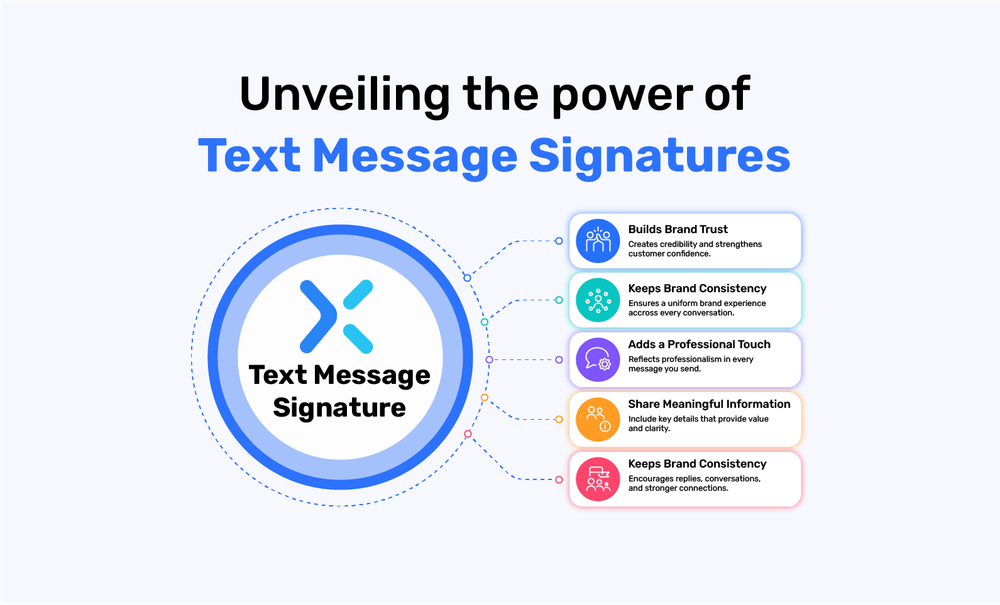
1. Builds Brand Trust
When the receivers see who the message is exactly from, they feel more confident to engage with it, and it's a very general human contention to do so. Moreover, a signature confirms identity, reduces guesswork, and helps avoid spam.
2. Keeps Brand Consistency
Using a branded signature across all the communication points helps you maintain consistency and a uniform tone and style. This creates a persona that your brand is grounded, consistent, and reliable.
3. Adds a Professional Touch
Even short text messages feel neat and polished with a signature. It shows your quest for attention to detail and leaves a positive and lasting impression on customers.
4. Share Meaningful Information
Your SMS signature may include your organisation’s name, your designation, or a simple website link. All this info saves customers time and makes their journey easier to contact you.
5. Increase Engagement
When people regularly see the familiar sign-off, they begin to recognize the name and trust the sender. This can lead to higher open rates and quicker responses.
How to Add a Signature to Your Business Text Messages? (Easily via TXTImpact)
TXTImpact offers a feature that lets you add a custom signature to your text messages. To set it up, simply go to:
Dashboard > Manage Account > Manage Users > Edit User.
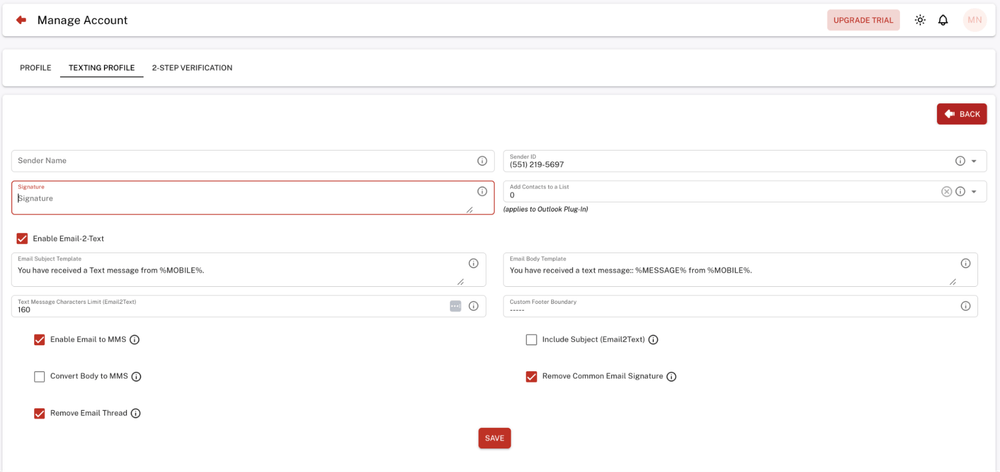
In the Signature field, you can create your custom text message signature. So whenever you run an SMS campaign, it will automatically attach to the text messages and be delivered to the recipients. And if you are looking for how to remove the text message signature suffix from messages, just leave the field blank.
However, if you are using TXTImpact’s Email to Text functionality to forward your emails to text messages or would like to send a Text message from Outlook, and want to remove the email signature and use the custom text message signature instead, simply follow the steps mentioned below.
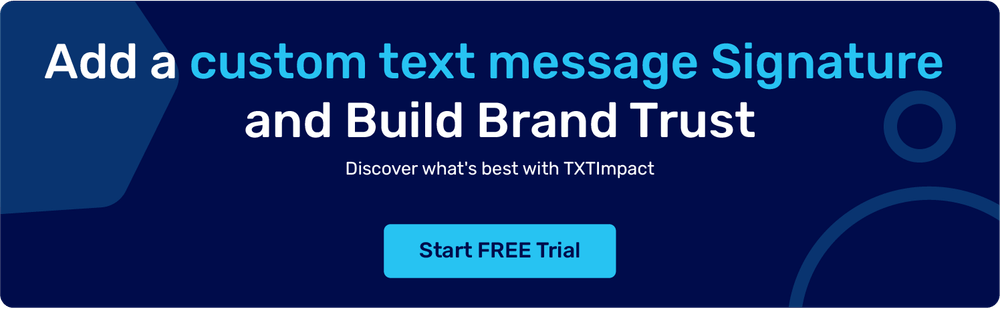
How to Remove Text Message Signature? (In Email to Text feature)
On the same Texting Profile, you will find an option to enable/disable the “Remove Common Email Signature” field. Just mark the check box to allow it to, and that’s it.
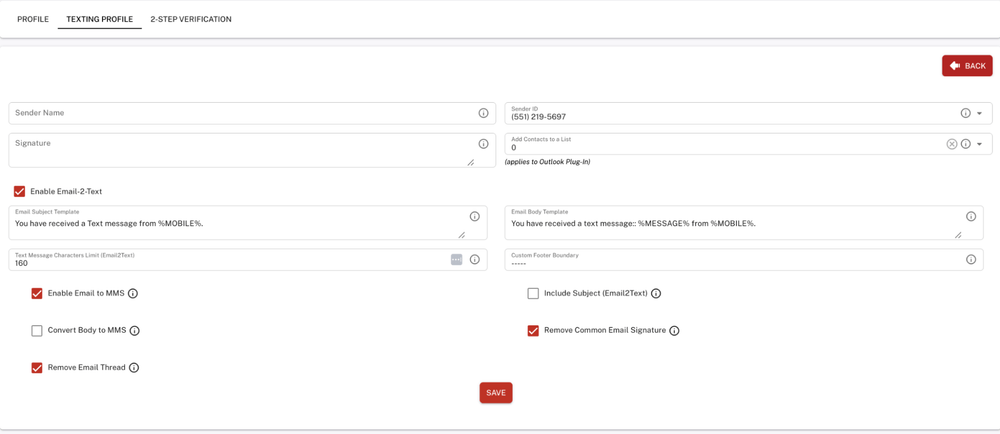
The TXTImpact email-to-SMS gateway will detect and remove common sign-offs such as:
“Thanks,” “Thank you,” “Best Regards,” “Warm Regards,” “Kind Regards,” “Sincerely,” “Yours Truly,” “Cheers,” “Thanks and Regards,” “With Gratitude,” “Respectfully,” “Faithfully” — preventing them from cluttering your text messages.
This ensures your SMS stays professional, concise, and free of unnecessary footers.
For example, here is a Typical email that looks like this with a cluttered signature :
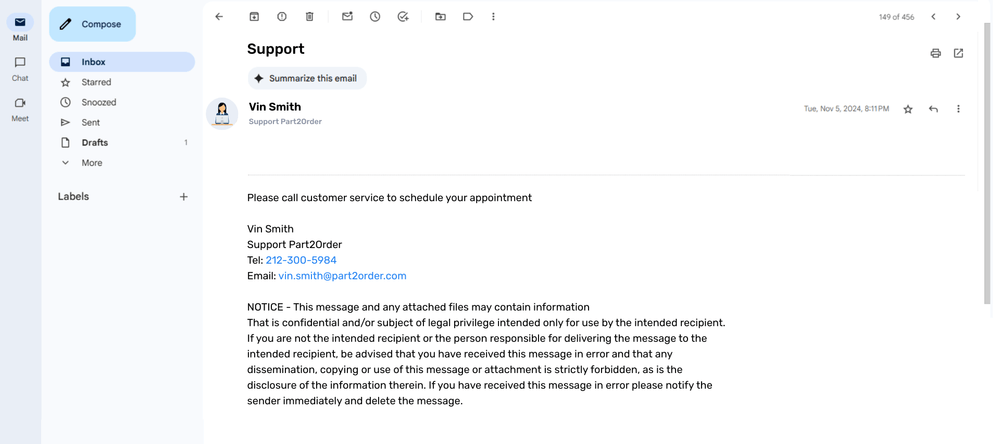
And if you want to forward this email to a phone number without the email signature, TXTImpact’s text-to-email gateway will remove the email signature and forward a clean and professional-looking message as shown below:
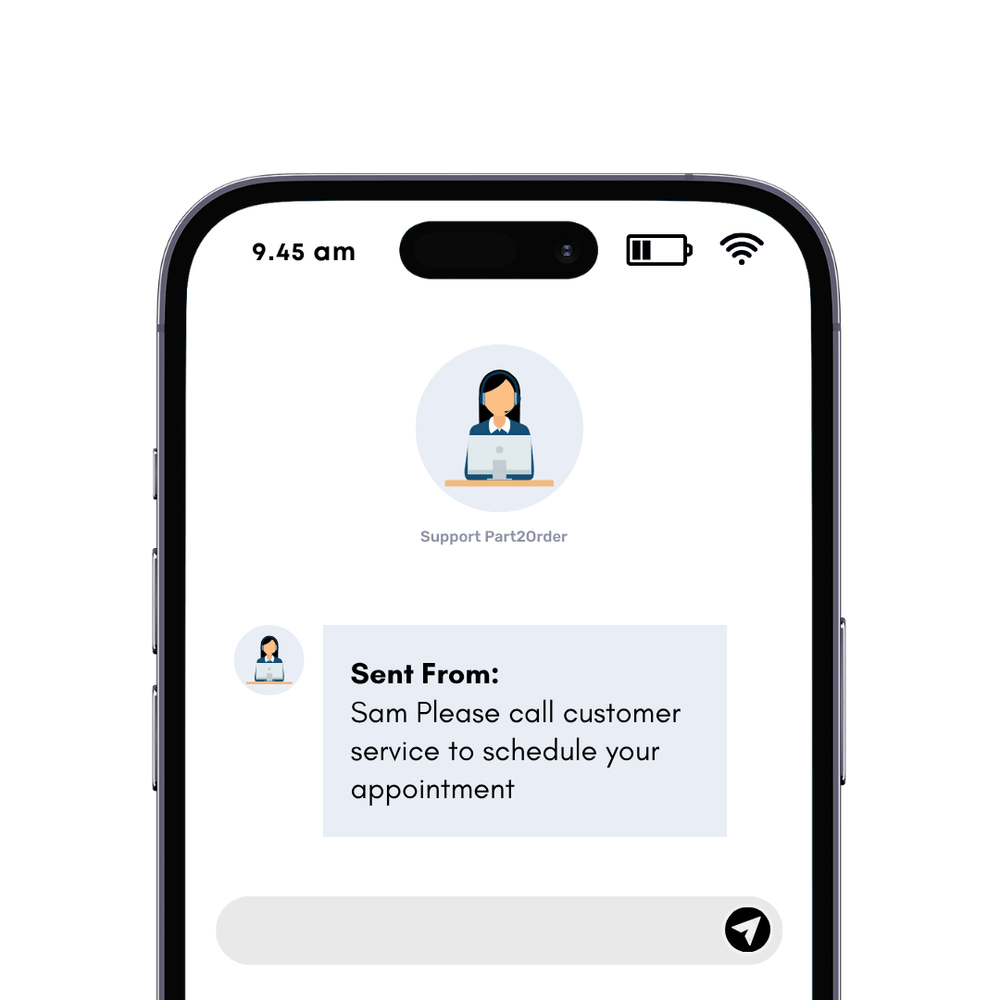
In short, no matter how you send your messages: mail, Outlook, or default messenger, the TXTImpact functionality gives you the flexibility to either use a custom text message signature for your sms campaigns or completely eradicate email signatures if you are forwarding emails to Text Messages automatically.
💡 Also Read: How to send texts from your email like a pro? (Ultimate Guide) |
How to create a professional text message signature? (Android and iOS devices)
1. On iPhone (via Text Replacement)
iPhones function differently from Androids; they don’t have a built-in SMS signature option like Androids do. However, you can set up a quick signature via Text Replacement:
Open Settings and navigate to General > Keyboard
Select Text Replacement and tap the + icon
In the Phrase box, enter your full signature (ex, “–Alex from TXTImpact”)
In the Shortcut box, type a quick trigger (like “/sig” or “@@”)
Finally, tap Save to store your signature shortcut
Now, whenever you type your shortcut in a message, it will automatically expand into your full signature.
In case you want to delete the signature, follow these steps:
Go to Settings > General > Keyboard > Text Replacement
Locate the shortcut you set up for your signature
Tap it, then choose Delete or edit the phrase to remove the signature (ex, “–Ryan | Apex Health”)
Tips for iPhone Signatures:
Keep your signature brief to fit within character limits
Include clear branding like your name, department, or organization
Skip emojis if you fall in regulated industries
Set up multiple shortcuts for faster replies in different scenarios
2. On Android (Built-in Option or Personal Dictionary)
A variety of Android phones allow you to add SMS signatures directly in the default messaging app. However, we will state methods to help you add an SMS signature even if the default mode exists or not.
A. If Your Device Has a Built-in Option
Launch the Messages app
Tap the three-dot menu and go to Settings
Choose Text message (SMS) settings or Advanced settings
Look for the option SMS Signature or Add Signature
Switch it on and enter your signature (ex, “–Maya | Horizon Care”)
This trick ensures that your signature appears at the end of every text.
B. Via Personal Dictionary Method
Open Settings > System > Languages & Input > Personal Dictionary
Pick your preferred language
Tap the + icon to add a new entry
Type your full signature in the Phrase field (ex, “–David | TechNova”)
Add a shortcut keyword (like “sig1”) to quickly insert it when typing
This method is applicable when your device does not support a built-in feature. Now, when applied, after typing the shortcut in an SMS, your signature will appear automatically.
In case you want to delete a text signature for any reason on an Android device, follow these steps:
Open the Messages app
Go to Settings > Advanced > SMS Signature
Turn off the signature option or clear the text (ex., “–Sophia | BrightLine Support”)
Types of SMS Signatures (With Examples)
1. Professional and Corporate
This style is ideal for businesses in finance, consulting, legal, healthcare, or any B2B arena.
Example:
Jamie Williams | Curie Financial
Dr. Niranjan Patel | Manhattan Clinic
Max Cooper |Senior Manager, Jury Legal
2. Friendly and Conversational
Such kinds of signatures are best for retail, hospitality, lifestyle, and D2C brands.
Example:
Joseph from Llama Threads
Your Friends at The Athena Café
Thanks! –Sara @EuropeVacay
3. Short and Efficient
These SMS signatures are a great solution for internal updates, supply chain, and even transactional alerts.
Example:
HR Manager | SiliconTech
Support Team | IT Helpdesk
Customer Support | FreshBasket
4. With Contact Information
This is best to help customers reach you directly and connect quickly via phone or email.
Example:
Tommy | Auto Care | 123-456-7890
Customer Care | Reply HELP anytime
Mamta | [email protected]
5. Personalized with Dynamic Fields
Use this type for CRM-driven or automated campaigns at scale.
Example:
{{staff_name}} | {{company_name}}
{{sales_manager}} | {{branch_city}}
{{user_first_name}}, we’re here if you need us – {{company_name}}
Some Common Text Message Signature Mistakes to Avoid
Exceeding the limitation of 160 characters can split your message into multiple texts.
Use of inconsistent branding across channels creates confusion and reduces customer trust.
Forgetting compliance like “Reply STOP to unsubscribe” risks fines and blockage from carriers.
Adding unnecessary information clutters the message and weakens the main point.
5 Text Message Signature Templates You Can Try
To make your job easier and without trespassing the character limits, here are five signature templates you can include in your text messages to customers:
1. SMS Signature Template for Sales Team
Sales reps should include their phone number and emails to make it easy for leads to reach out with questions.
Example: Jamie | Account Executive (Acme) | [email protected]
2. Message Signature Template for Customer Support
Customer support representatives should share their name, role, and available hours, as customers usually want to know who they’re communicating with and when to expect a response.
Example: Joseph | Support @ Acme Co. | M-F, Delaware, OH
3. Text Signature Template for Appointment
Customers may have questions about your services or pricing. While your signature can’t detail everything, you can include a link to your website for more information. This is especially useful when confirming bookings or sending reminders.
Example: Sarah | Country Wellness | Book here: [website link]
4. SMS Signature Template for Founders
Business owners can use a personal signature to boost brand visibility and showcase the company’s vision or tagline.
Example: Gregory | Founder, TXTImpact — Save time on tax day
5. SMS Signature Template for Field Technicians
Signatures are ideal for mobile teams, like plumbing or electrical services, who need to keep customers updated while on the go.
Example: Nate | Plumbing | On-site service | Call/text: 123-456-7890
Best Practices for Professional Text Message Signatures
A great SMS signature should add credibility, trust, and value for you and the customer. Here’s a snapshot of best practices as per SMS marketing experts at TXTImpact to create one that feels natural, professional, and consistent across all points of communication.
1. Keep it Short and Clear
Aim for 15-35 characters so your signature supports your message instead of crowding it. Make sure the style matches your intent, whether informative, nurturing, or action-oriented.
Example:
–Sarah | Bloom Care
–Sarah Johnson, Senior Customer Success Manager at Bloom Technologies
2. Match Your Brand Voice
Your tone should align with the rest of your brand communications, be it formal, approachable, playful, or whatever your brand guidelines suggest. It reinforces brand recognition and professionalism.
Example:
Formal: –Michael | Apex Legal
Friendly: –Jess from Urban Threads
Playful: –Your TravelEase Team
3. Add a Human Touch
Whenever possible, include a name or role. People trust messages that feel personal and come from a recognizable sender.
Example:
–Dani | Customer Support
–Team
4. Use Proper Formatting
Simple separators like dashes (-) or pipes (|) improve readability. Avoid overuse of symbols or cluttered designs.
Example:
–Dani | Support Team
***** Dani, CS Dept *****
5. Include Contact Details
If your goal is to prompt action like calling your number or replying, in that case, add a phone number, email, or short link.
Example:
–Mike | 123-456-7890
–Mira | [email protected]
6. Avoid All Caps and Symbol Overload
ALL CAPS looks spammy, and too many special characters feel unprofessional. Keep it clean and simple.
Example:
–Luca @ TravelEase
*–LUCA @ TravelEase *****
7. Personalize
Use dynamic fields to make automated messages feel personal. Pull in details like customer name, agent name, or store location.
Example:
Template: –{{agent_name}} | {{brand_name}}
Output: –Sophia | PetPlus
8. Test and Refine
A/B test signatures with different audiences. Measure open rates, replies, or conversions to see what works best. Once you have analytics, maintain consistency and reap the benefits of TXTImpact.
Final Takeaway
An SMS signature may be small, but it makes a big difference. It turns plain texts into professional, branded, and trustworthy messages that build trust, support compliance, and strengthen brand recognition.
Whether you’re an SMB, a big corporation, or an independent consultant, the right strategy starts with choosing a signature style that matches your brand voice, then testing and refining it with your audience.
Over time, data-driven optimization will help you get the best results. In today’s crowded inbox, your signature acts as the anchor that reassures customers they’re communicating with a real, reliable brand. To start your SMS Marketing campaign, Sign Up for a 15-day free trial.
FAQs About SMS Signatures
♦ How can TXTImpact help us add custom text message signatures to our outbound SMS?
TXTImpact allows businesses to add, remove, and customize text message signatures directly from their intuitive Dashboard.
♦ How do you turn on text signatures?
With TXTImpact, you don’t need to manually enable signatures on Android or iPhone. Once you set up your signature in the TXTImpact dashboard, it gets automatically appended to every message you send, whether through Email-to-Text, Outlook Add-In, or the web portal.
♦ What is a good signature text font?
SMS uses the default system font of the recipient’s phone, so you can’t set a custom font. Instead, focus on clear formatting with separators like “|” or “–” for readability.
♦ Can SMS signatures be personalized with sender names, job titles, or company info?
Yes, SMS signatures can be easily personalized with sender names, job titles, or company info, directly setting up the custom Signature Through the dashboard.
♦ Can a signature just be text?
Yes. An SMS signature is typically plain text—short, clear, and professional. It usually includes your name, brand, or a simple call to action. Emojis or decorative characters can be used, but sparingly.
♦ How should I format a mobile message signature?
Use the format Name | Brand/Role | Contact or CTA. Keep it short, within 160 characters, and avoid clutter. If you add links, use short branded links.
♦ What are the top tools for creating branded SMS signatures?
Popular tools include CRM platforms (HubSpot, Salesforce apps) and SMS APIs via TXTImpact. They help automate and keep signatures consistent.
♦ Does adding an SMS signature count toward the character limit of a message?
Yes, since an SMS signature is generally plain text, your signature also counts toward the 160-character default limit per segment. It’s highly advisable to keep it concise to avoid extra charges or broken messages.
♦ What is a text string signature?
A text string signature is simply a block of text that appears automatically at the end of every SMS, much like an email footer. It includes your name, business details, or even a short CTA.
♦ Is a text signature legal?
Yes, a text signature is completely legal and often recommended for businesses. Adding a signature helps identify the sender, supports compliance, and can even include opt-out instructions to meet carrier regulations.
About the Author:
 | Rahul Kumar (Marketing Specialist) Rahul Kumar is a Digital marketer with 7+ years of experience in SEO, AEO,SMS marketing, WhatsApp marketing, SaaS, and WordPress. He has led successful growth campaigns for startups and tech brands, combining data-driven strategies with compelling content. His work has been featured on top SaaS blogs, and he’s known for turning complex ideas into high-converting digital strategies. |