6 Best Free QR Code Generator 2026: Tools Compared (A Marketer's Honest Review)

QR Codes are no longer just black-and-white squares; they’re dynamic marketing tools, interactive menus, and bridges between offline and digital worlds. Today, businesses use QR codes to connect customers directly to landing pages, digital menus, payment systems, and even mass texting service opt-in forms that allow brands to instantly grow their SMS subscriber lists.
But with 110K average monthly Google search results for “free QR code generator,” finding the right one feels like searching for a needle in a digital haystack.

Source: Google Keyword Planner
Previously, I worked with plenty of eCommerce businesses and had to try and use a wide range of tools. Similarly, for this purpose, I used and tested 20+ QR code generator tools (paid + free) for various clients.
Based on that, here I’ve come up with a detailed list of the best or top 6 free QR code generators for businesses in 2026.
Here’s my brutally honest take on the 5 best free QR code generators in 2026, ranked by design, functionality, and real-world performance.
How I Tested These QR Code Generators
As a marketer, I work with multiple e-commerce businesses, and for that reason, I needed to generate QR codes with tracking capabilities.
It turned out to be a great opportunity for me to test various QR code generators available in the market. I ended up creating 100+ free printable QR codes for a sustainable skincare brand’s packaging and tracking purposes.
Evaluation Criteria:
- Scannability: Tested on 10+ devices, including in low-light conditions.
- Customization: Checked for brand alignment, logo integration, and color flexibility.
- User Experience: Looked at sign-up hassles, ads, and download format options.
- Hidden Limits: Examined for watermarks, expiration dates, and redirect limitations.
Factor | Weight |
Design Flexibility | 25% |
No Sign-Up Required | 20% |
Download Formats (PNG/SVG/EPS) | 15% |
Scannability | 20% |
Ads/Watermarks | 20% |
What Makes a Good Free QR Code Generator?
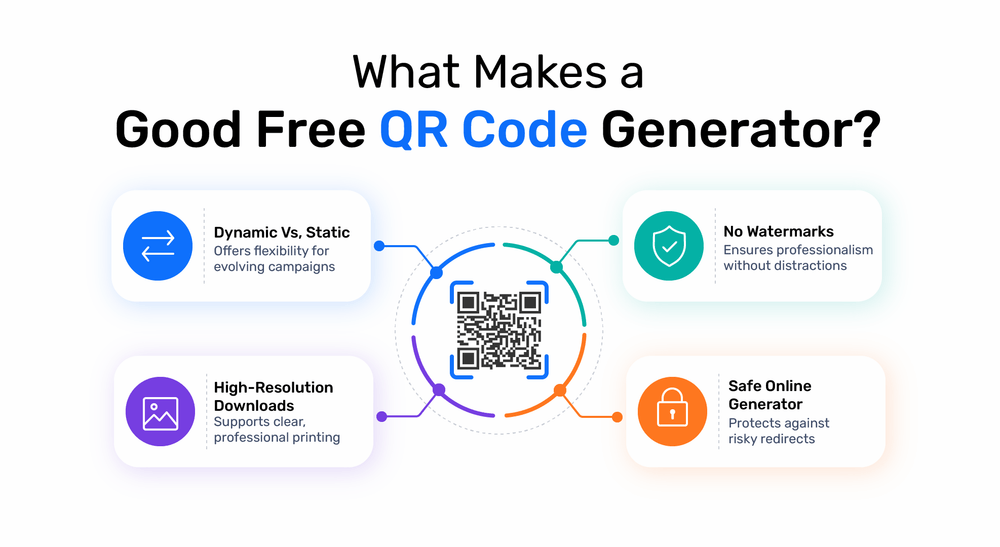
You need to consider some points when looking for the best free QR code generator. You should avoid settling for “just okay” features—instead, prioritize the following:
Dynamic vs. Static:
A dynamic QR code generator (free and editable post-creation) is rare but a game-changer for campaigns that evolve.
No Watermarks:
Some free tools sneak in logos—a deal-breaker for professional use. Look for free QR code generators with no watermark.
High-Resolution Downloads:
Blurry QR codes = failed scans. Make sure the tool supports vector formats like SVG or EPS for professional printing.
Safe QR Code Generator Online:
Ensure the tool uses HTTPS and doesn’t add risky redirects or link shorteners.
Here’s a comparison table for the top 6 free QR code generator platforms (no sign-up required), highlighting key features, limitations, and best use cases:
Tool | Customization | Tracking | Download Formats | Ads/ Watermarks | Best For |
TXTImpact | QR Colors, Background Color, Error correction, Margin | ✓ Available on TXTImpact Omnihub | PNG, SVG | ✗ No | Best fit for all purpose. |
qrcode-generator.com | Basic colors, size | ✗ No | PNG, SVG, EPS | ✗ No | Free QR codes for printing |
QrStuff.com (14-day free trial) | Colors, templates | ✓ Basic scan stats | PNG, SVG | ✗ No | Free QR code maker with Tracking |
qrcode-monkey.com | Logos, shapes, patterns | ✗ No | PNG, SVG, EPS, PDF | ✓ Banner ads | Custom QR code for business branding |
GoQR.me | Minimal (colors only) | ✗ No | PNG, SVG | ✗ No | Free QR code generator for small businesses |
Unitag.io | Gradients, templates | ✗ No | PNG, JPG | ✓ Watermark | Social media QR codes |
Key Points to Consider:
- Tracking: Only QrStuff offers basic scan stats for free (14-day trial for advanced analytics).
- Formats: QRCode Monkey supports EPS/PDF, ideal for professional printing.
- Ads: QRCode Monkey shows banner ads; Unitag adds a small watermark.
- Dynamic QR Codes: Most free tools only offer static QR codes (un-editable post-creation).
Top 6 Free QR Code Generators in 2026 (Detailed Review)
Listed below are the 5 best free QR code generator tools that work perfectly on both iPhone and Android devices. The best part is that they are completely free and require no signup, unlike Canva's or Adobe's QR code generators.
1. TXTImpact
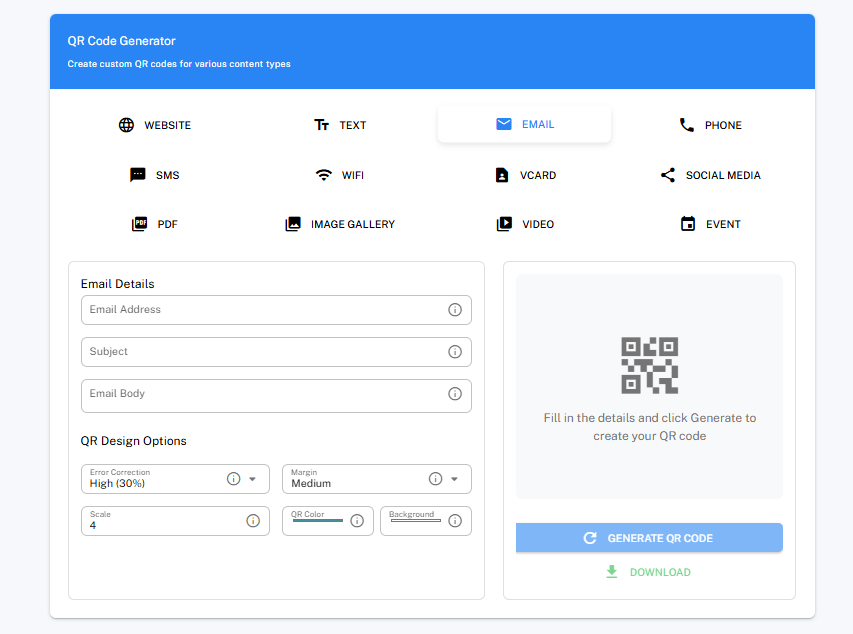
TXTImpact offers a range of free SMS marketing tools, including a free QR code generator.
The Free QR Code Generator is a simple browser-based tool for creating QR codes without requiring an account, payment, or software installation.
It supports several common business use cases, including website links, text, vCards, Wi-Fi access, SMS, phone, image gallery, and event information, with downloads available in PNG and SVG formats.
Unlike many free QR code generators that add watermarks or require users to create an account before downloading, TXTImpact keeps the tool completely free with no watermark on exported QR codes.
Key features:
- 100% Free: No trial period, subscription, or credit card required.
- No Watermark: Download clean QR codes without added branding.
- No Sign-Up: Generate QR codes without creating a TXTImpact account.
- Multiple QR Code Types: Create codes for websites, vCards, Wi-Fi, and events.
- Design options: Adjust QR error correction, margin, color, scale, and background with intuitive controls.
- Browser-Based: No software or installation required.
- PNG & SVG Downloads: Suitable for both digital use and high-quality print applications.
- Business-Friendly: Useful for websites, business cards, menus, packaging, events, and promotional materials.
- Unlimited Use: The free tool is not tied to a specific project, client, or campaign.
Testing notes: Used the tool for website URLs and digital contact information. It generated the QR code directly in the browser and let you download the output without requiring an account or adding a watermark.
Pros | Possible cause |
Completely free with no trial restrictions | Advanced QR campaign analytics are not the focus of the standalone free tool |
No watermark on downloads | Primarily designed for straightforward QR generation |
No account or email required | Fewer advanced design controls than some specialized QR platforms |
PNG and SVG downloads | |
Suitable for personal and business use |
Best for: Businesses, marketers, agencies, event organizers, and individuals who want a quick, free QR code generator without signup requirements or watermarks.
2. QRCode Monkey (qrcode-monkey.com)

Best For: Branded QR Codes (Logos + Custom Shapes)
This is ideal for marketers or small businesses wanting to know how to create branded QR codes that match their brand colors.
Key Features:
Free Logo Embedding: Upload your logo without a paid plan.
Shape Customization: Circles, rounded edges, and abstract patterns.
Transparent Backgrounds: Perfect for packaging and merch.
Testing Notes:
Created a floral QR code for organic face cream packaging. Scanned flawlessly on 8/10 devices (failed on scratched Android screens).
Pros | Cons |
✓ SMS/MMS fallback feature, ensuring guaranteed message delivery | ✗ Limited dynamic QR options |
✓ Seamless onboarding with 24/7 support and multichannel experience | ✗ Premium templates locked |
✓ 30+ template designs |
|
3. QR Stuff (qrstuff.com)

Best For: Analytics-Curious Users
One of the few free QR code makers with basic tracking, ideal for campaigns that need feedback on scan activity.
Key Features:
Free Tracking: Basic scan metrics (total scans, locations).
Wi-Fi QR Codes: Share network logins instantly.
Google Sheets Integration: Auto-update QR content.
Testing Notes:
Used for a pop-up store’s Wi-Fi access. Scans dropped by 40% after 3 days—paid upgrade needed for advanced analytics.
Pros | Cons |
✓ Real-time tracking (14-day free trial) | ✗ UI feels outdated |
✓ 20+ data types (vCards, Bitcoin) | ✗ High-res downloads require a sign-up |
✓ No watermark |
|
4. Unitag (unitag.io)

Best For: Social Media Campaigns
Perfect if you're looking to generate stylish and interactive QR codes for Instagram, TikTok, and Facebook campaigns.
Key Features:
- Gradient Colors: Match QR codes to Instagram themes.
- Animated QR Codes: Add motion for TikTok/Reels.
- Frame Library: 50+ borders for CTAs (“Scan Me!”).
Testing Notes:
Viral coffee brand campaign saw 2x engagement with animated QR codes vs. static.
Pros | Cons |
✓ Mobile-optimized interface | ✗ Animation limits (5 seconds) |
✓ Facebook/Twitter deep linking | ✗ Requires email for downloads |
✓ Free .SVG downloads |
|
5. GOQR.me

Best For: Quick, No-Fuss Codes
Great for those who want a free QR code generator with no watermark and instant download, especially for event tickets or pop-up flyers.
Key Features:
- Instant Generation: 3-second URL-to-QR conversion.
- Lightweight: Works on slow connections.
- API Access: Free for ≤100 codes/month.
Testing Notes:
Used for time-sensitive event tickets. Simple but reliable zero scan fails.
Pros | Cons |
✓ Zero ads | ✗ Minimal customization |
✓ No tracking cookies | ✗ Can’t edit post-download |
✓ Bulk generation (CSV upload) |
|
6. QR Code Generator (qrcode-generator.com)

Best For: Print Media
An excellent choice if you need high-resolution QR codes for printing on packaging or brochures.
Key Features:
- CMYK Support: Ideal for professional printing.
- Vector Downloads: EPS/AI files for large formats.
- Error Correction: Scannable even if 30% damaged.
Testing Notes:
Printed on recycled brochures readable after creases and coffee spills.
Pros | Cons |
✓ Print-ready presets | ✗ Clunky interface |
✓ GDPR-compliant | ✗ Watermark on free PDFs |
✓ Multi-language support |
|
How to Create a Free QR Code (Step-by-Step by TXTImpact)
Creating a QR code does not require design software or technical expertise. Most free QR code generators let you create a QR code with a few simple steps and download it for digital or print use.
Step 1: Choose a free QR code generator
Start with a QR code generator that matches your requirements. If you only need a QR code for a website, contact information, Wi-Fi credentials, or an event, a free static QR code generator is usually enough.
For example, TXTImpact’s Free QR Code Generator lets you create QR codes for websites, vCards, Wi-Fi, and events directly from your browser. You don't need to create an account, and the downloaded codes don't include a watermark.
Step 2: Select the QR code type
Select what you want the QR code to contain. Depending on the tool, you may be able to create QR codes for:
- Website
- Wi-Fi
- vCards
- Phone
- SMS
- Text
- Image gallery
- Social media
- Event
- Video
Step 3: Enter your information
Enter the URL, contact details, Wi-Fi information, or other content you want to encode.
Before generating the code, double-check the information. A static QR code cannot be edited after it's created, so correcting a typo may require generating and printing a new code.
Step 4: Customize the QR code
TXTImpact lets you customize the margin, color, error correction, scale, and background color.
Maintain sufficient contrast between the QR code and its background, and leave enough blank space around the code so smartphone cameras can detect it easily.
Step 5: Generate and download the QR code
Generate the code and download it in the format you need. PNG works well for websites, presentations, and everyday digital use, while SVG is better suited to print materials because it can be scaled without losing quality.
TXTImpact's free generator supports both PNG and SVG downloads.
Step 6: Test the QR code before publishing
Always scan the QR code with at least one or two smartphones before printing or distributing it.
Test it from the actual distance and surface where people will use it. A QR code that works perfectly on your computer screen may be harder to scan when printed too small, placed on a curved surface, or displayed with insufficient contrast.
Do Free QR Codes Expire? Static vs Dynamic Explained
Free QR codes don't necessarily expire. Whether a QR code remains active depends on whether it is static or dynamic, not simply whether the generator is free.
- Static QR codes: Store the information directly in the code and generally do not expire. They continue working as long as the encoded URL or information remains valid.
- Dynamic QR codes: Use a redirect managed by the QR provider, allowing you to change the destination and track scans. They may stop working if the provider discontinues its subscription or service.
If you need a QR code that keeps working without a subscription, a reputable static QR code is generally the safest option.
Thus, choose a static QR code for permanent, no-cost use, and choose a dynamic QR code when you need editable destinations, scan tracking, or campaign analytics.
Are Free QR Code Generators Safe to Use?
Generally, creating a QR code with a reputable generator is safe. The bigger security concern is where the QR code takes you after someone scans it.
A QR code is essentially a convenient way to encode information. It does not automatically make a website trustworthy. A malicious QR code can redirect users to a phishing page, a fake payment website, a malware download, or another unsafe destination.
Follow these precautions when using free QR generators:
- Use a reputable generator: Choose a well-established tool with clear information about how it works.
- Prefer HTTPS websites: The destination should use HTTPS, especially when users enter personal or payment information.
- Check the destination URL: Make sure the website address is correct before generating the code.
- Scan before publishing: Test the final QR code with multiple devices.
- Avoid suspicious redirects: Be cautious if the QR code sends users through unfamiliar or unrelated domains.
- Check the URL after scanning: Don't assume that a familiar-looking QR code leads to a legitimate website.
- Keep the landing page secure: A safe QR generator cannot compensate for an insecure destination website.
- Protect sensitive information: Don't encode confidential credentials or private data into a QR code unless you understand how that information will be stored and accessed.
For business use, also check whether the QR generator adds a redirect URL or requires an ongoing subscription to keep the code active. This is particularly important with dynamic QR codes.
Free vs Paid QR Code Generators: What's the Difference?
A free QR code generator is often enough when you need a basic static code. Paid QR platforms become more useful when QR codes are part of an ongoing marketing, customer engagement, or analytics strategy.
Free tools generally work best for straightforward use cases such as websites, business cards, printed flyers, menus, event information, and Wi-F- sharing.
Their biggest advantage is simplicity, and you can easily create a code without committing to a subscription.
Paid QR code platforms typically focus on features that businesses need after the QR code has been printed or distributed. These may include destination editing, scan analytics, dynamic QR codes, campaign management, advanced customization, and API integrations.
Their main benefit is flexibility. For example, if you print 10,000 brochures with a QR code, being able to change its destination without reprinting them can be far more valuable than the initial cost of generating the QR code.
What are the Safety Tips You Should Follow for Using Free QR Generators?
Everyone indeed loves free stuff, and because of this, some hackers or illegitimate individuals take advantage of the opportunity for their purposes. To avoid falling into their trap, here are a few tips you should consider when using a free QR code generator platform or tool:
- Choose a safe QR code generator online that uses HTTPS.
- Avoid services using link shorteners that can be flagged by browsers or carriers.
- Test using tools like Kaspersky QR Scanner to preview links and avoid malicious redirects.
How Are QR Codes Used in Marketing?
You can incorporate QR codes into your SMS marketing Strategy. QR codes simplify SMS opt-ins by letting customers scan to join SMS campaigns, making this one of the best use cases for QR codes in modern marketing.
👉 To learn more, check out our guide: QR code to Text: An Easy Way for Customers to Join your SMS Campaign |
TXTImpact’s SMS platform elevates this strategy with built-in QR code generation, ensuring compliance, real-time analytics, and seamless list growth.
Branded URLs for Better Link Tracking & Engagement
Unlike basic QR code tools, TXTImpact links each QR code to a branded short URL, enabling:
- Real-time scan analytics
- SMS opt-in compliance
- Campaign-specific link tracking
- Seamless integration into your text message marketing strategy
Link tracking and engagement features are available to TXTImpact paid users. These features are built directly into the TXTImpact OmniHub dashboard. To access link tracking and engagement data, you need to sign up for TXTImpact account.
💡 Pro Tip: Encode your mobile site, SMS keyword, or contact info into a QR code and add it to your website, email signature, product packaging, or business card for instant access. Whether you're sharing your business contact details or launching a QR-to-text campaign, TXTImpact’s branded QR codes turn casual scans into meaningful customer connections — all while tracking performance and ensuring compliance. |
Example Use Case:
Scan a QR code that opens a branded URL like txti.cc/JoinNow, prompting users to open a web form, company website, or any web-based application.
Then, deploy generated QR codes in storefronts, packaging, or events, and track performance via TXTImpact’s dashboard:
- Scan Analytics: Monitor real-time opt-ins, locations, and engagement.
- Compliance Guardrails: Pre-loaded TCPA/Carrier-compliant CTAs.
- Dynamic Updates: Edit campaign keywords post-launch without reprinting codes.
💡 Also Read: QR code to Text: An Easy Way for Customers to Join your SMS Campaign |

QR Code Generator Alternatives: NFC, Short Links & Other Options
QR codes aren't the only way to connect physical materials with digital content. Depending on your audience and use case, alternatives such as NFC and short links may provide a better experience.
- NFC: NFC allows compatible smartphones to interact with a nearby NFC tag without requiring users to open their camera and scan a code.
- Best for: Product displays, business cards, retail experiences, access points, and locations where users are likely to interact with the same physical object repeatedly.
- Short links: A short URL can be typed, clicked, or shared directly. It can also be easier to remember than a long website address.
- Best for: SMS campaigns, social media, printed materials, email, and situations where users may not be able to scan a QR code.
- SMS keywords: For businesses focused on text messaging, an SMS keyword can let customers text a specific word to a business number to join a campaign or request information.
Best for: Promotions, SMS marketing, offline campaigns, and customer opt-ins.
You don't necessarily have to choose one method. A business card, for example, could include a QR code for universal compatibility while also supporting NFC for compatible smartphones.
The right option depends on your audience, environment, and the action you want customers to take.
Does Google Have a Free QR Code Generator?
Yes, Google Chrome has a built-in QR code sharing feature that can generate a QR code but only for the page you're currently viewing; it isn't a replacement for a dedicated QR Code Generator that you can use for marketing purpose. if you need features such as advanced customization, campaign management, dynamic destinations, or scan analytics, go for Free QR Code Generator tools.
QR Codes for vCards, WiFi & Contact Info
QR codes aren't limited to website URLs. They can also make it easier for people to access contact information or connect to a Wi-Fi network without typing details manually.
1. QR Codes for vCards
A vCard can include details such as name, email, phone number, job title, company, and business address. This is particularly useful on business cards, event badges, sales materials, and networking collateral.
Instead of manually typing someone's phone number or email address, a prospect can scan the code and access the contact information digitally.
2. QR Codes for Wi-Fi
A Wi-Fi QR code can contain the network name, password, and security information required to connect to a wireless network. They’re useful for hotels, offices, restaurants, events, retail stores, guest networks, and rental properties.
Visitors can scan the code instead of manually entering a long Wi-Fi password.
3. QR Codes for Contact Information
You can also use QR codes to direct people to a contact page, online profile, business website, or digital directory.
For businesses, this creates a simple bridge between printed materials and digital information. A QR code on a brochure, poster, or product package can take customers directly to the information they need.
TXTImpact's free QR Code Generator specifically supports vCards and Wi-Fi QR codes, along with websites and events.
Final Verdict: Match the Tool to Your Need
There are plenty of options available on the web, many claiming to be the best, some even charging a hefty amount.
But I would ask: why go for a paid option when a free one gets the job done?
As a marketer, I’ve personally found these tools to be reliable and effective. I recommend them to all digital marketers and small business owners. They're worth trying.
However, if you're into SMS marketing and need advanced functionality like tracking links via QR codes for your products or analyzing user interactions — TXTImpact’s Mass Texting tool has you covered.
With built-in QR code features, analytics, and tracking, it’s an all-in-one solution designed to make your SMS campaigns smarter and more effective.
👉 Try TXTImpact’s Mass Texting Tool today, along with our QR Code Generator featuring built-in link tracking and analytics — perfect for marketers who want smarter, data-driven results without paying extra.
📞 For any queries, contact us or book a demo today!
Frequently Asked Questions
♦ What are the best free QR code generators available, and how do they compare in terms of features and ease of use?
TXTImpact, QRCode Monkey, QRStuff, and Unitag are popular options. TXTImpact stands out for simple, no-signup QR code creation, while QRCode Monkey and QRStuff offer more customization and advanced features.
♦ Do free QR codes have scan limits?
Static QR codes generally don't have a built-in scan limit because they don't depend on a QR provider's server. Dynamic QR codes may have scan or feature limits depending on the provider and plan.
♦ Are free QR code generators safe to use?
Yes, reputable free QR generators are generally safe, but always verify the destination URL before publishing or scanning a QR code. Avoid unfamiliar tools that use suspicious redirects or request unnecessary sensitive information.
♦ What are the top QR code generators available with free trial options?
Several QR platforms offer free plans or trials, including QRStuff, QR Code Generator, and Unitag. Check what each trial includes, particularly scan limits, dynamic QR features, and whether the code remains active after the trial ends.
♦ What are the best QR Code Generator alternatives to QRStuff and QR Code Monkey?
TXTImpact, Unitag, and Chrome's built-in QR feature are useful alternatives. TXTImpact is a good choice for free, no-signup QR codes, while Unitag suits users who want more design customization.
About the Author:
 | Rahul Kumar (Marketing Specialist) Rahul Kumar is a Digital marketer with 7+ years of experience in SEO, AEO,SMS marketing, WhatsApp marketing, SaaS, and WordPress. He has led successful growth campaigns for startups and tech brands, combining data-driven strategies with compelling content. His work has been featured on top SaaS blogs, and he’s known for turning complex ideas into high-converting digital strategies. |