MMS and E-mail

Send MMS Picture Messages From Your E-mail and Vise Versa

The Advantage:

With the TXTImpact MMS through e-mail service you can send MMS messages through any email client. That means outlook, lotus notes, Gmail, Yahoo, or even our company email!

You can communicate with clients using mobile messaging.

This includes photos and videos right from your computer while you're archiving the messages or searching the messages (along with your other communication with clients over email).

Who Can Use MMS To E-mail?

Insurance Agents

Mortgage Agents

Realtors

For Example:

An insurance claim adjuster can take pictures of a damaged property and send it as an MMS to the back office for processing.

If the insurance agent needs a client to take pictures of the property and send them back to the office, <a href="https://www.txtimpact.com/mms-messaging">MMS </a> through email is a great service to complete this task quicker.

All you need to do is set up a virtual phone number or short code where customers can send a text message with pictures from their mobile phone, and we’ll forward all attached pictures (and their text message) to your given e-mail address.

Email to MMS: How It Works

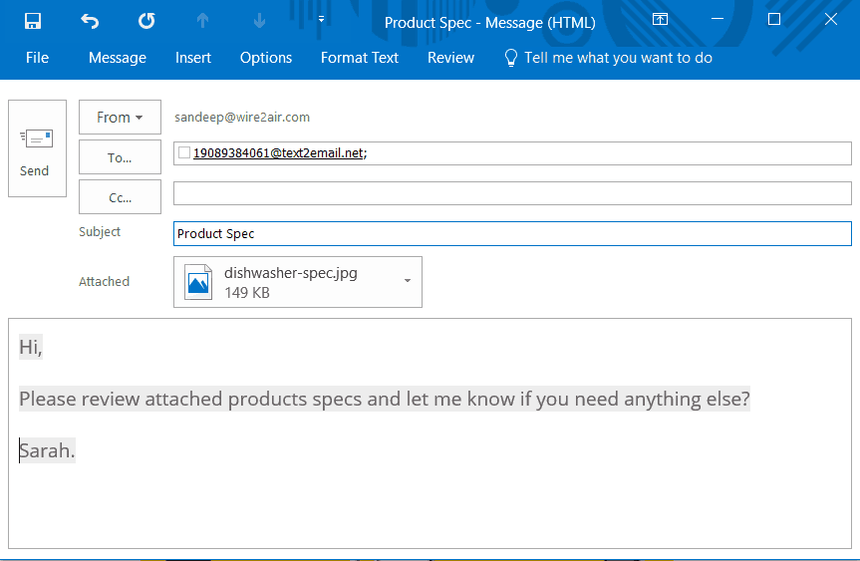
Compose an e-mail with the attachment.

Compose an e-mail using your primary e-mail client with an attachment and format recipient mobile number as “Mobilenumber[@]text2email.net"

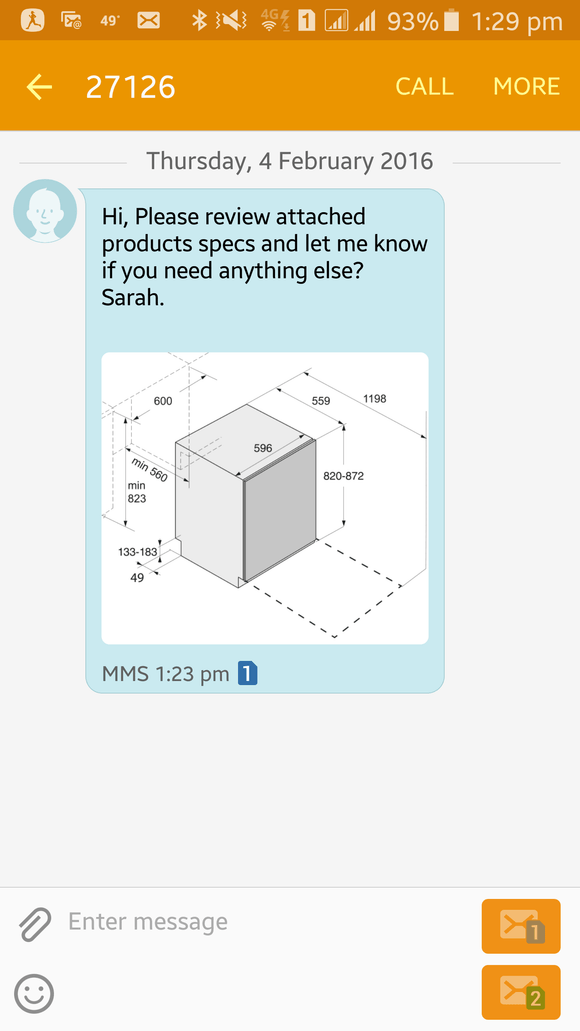
MMS received on phone.

Recipient would receive the e-mail as an MMS message on their phone. You can send Pictures, Videos, vCards, vCals or PDF files.

Send Picture Messages: Using Email For MMS

Sending picture messages from an email using TXTImpact’s Email to MMS service is simple, efficient, and reliable.

We simply convert your email messages with attachments into a picture message (MMS) and deliver it directly to the recipient’s mobile phone.

Not only that, but any reply to the MMS message is automatically forwarded to you as an email.

You can send picture messages from any email client such as Outlook, Lotus Notes, Gmail, Yahoo, or even from an application built using any programming language.

Sending a text message from an email also opens opportunities for developers to send MMS from applications that are not accessible from the web.

Most MMS APIs offered by service providers require images and videos to be hosted on a public web server. However, in many cases, it’s not feasible for developers to upload media to a web server and then call provider APIs with the media URL to deliver picture messages.
How to Setup The MMS to E-mail Service

video thumbnail

Ready to get started?

Contact us or sign up for a free trial now.

Cookie Settings

By using this website you agree to our privacy policies

Cookie Settings

We use cookies to improve user experience. Choose what cookie categories you allow us to use. You can read more about our Cookie Policy by clicking on Cookie Policy below.

These cookies enable strictly necessary cookies for security, language support and verification of identity. These cookies can’t be disabled.

These cookies collect data to remember choices users make to improve and give a better user experience. Disabling can cause some parts of the site to not work properly.

These cookies help us to understand how visitors interact with our website, help us measure and analyze traffic to improve our service.

These cookies help us to better deliver marketing content and customized ads.